

2016-2018 Cadillac CT6 CUE Screen: Fixing Ghost Touch & Programming a Replacement
Your definitive guide to diagnosing the infamous Cadillac CUE screen delamination, understanding HMI module programming, and choosing the right replacement part.
- The most common failure is the touchscreen itself due to a faulty gel bonding layer, causing 'ghost touch' and unresponsiveness. The best fix is a new, gel-free aftermarket screen.
- The display screen is separate from the HMI (Human Machine Interface) module. The HMI is the 'brain' and stores the vehicle's programming.
- Replacing the HMI module REQUIRES programming to the vehicle's VIN to avoid a 'Theft Locked' error. Replacing only the screen does not require programming.
- Do not buy a used OEM screen, as it will likely suffer from the same delamination flaw. A new gel-free aftermarket screen is a more affordable and permanent solution.
Symptoms of a Failing Infotainment Display

Failures in the CT6 infotainment system can be traced to two different components: the display screen itself or the Human Machine Interface (HMI) module located behind it. Identifying the right culprit is key to a successful repair.
Symptoms of a Bad Touchscreen (Digitizer)
These issues are almost always caused by a physical failure within the screen assembly, specifically the touch-sensitive layer called the digitizer. A well-known design flaw involving a heat-sensitive gel bonding layer is the root cause.
- Ghost Touches or Phantom Inputs: The most common symptom. The screen acts as if it's being touched, randomly changing radio stations, making calls, or navigating menus on its own. This is caused by the failing digitizer sending false signals.
- Unresponsive or Dead Spots: Certain areas of the screen stop responding to touch, making it impossible to press on-screen buttons.
- Cracked or Bubbled Appearance: A "spiderweb" pattern of cracks or bubbles appears under the top glass layer. This is the internal gel layer delaminating and breaking down.
- Slow or Laggy Response: The screen responds slowly to touch, or only after repeated presses.
Symptoms of a Bad HMI Module
If you experience these symptoms, the problem is more likely the HMI module, which is the computer that powers the screen.
- Completely Black or Blank Screen: The screen does not turn on at all, even though button backlights may be on. This often points to a total failure or communication loss with the HMI module.
- System Randomly Reboots: The Cadillac logo appears as the system constantly tries to restart itself.
- "Theft Locked" Message: This message appears if an HMI module from another vehicle has been installed without being reprogrammed.
- Major Feature Loss: Functions like the backup camera, navigation, or Bluetooth completely disappear or fail to launch.
Known Issues, Recalls, and Technical Service Bulletins (TSBs)

The most significant known issue for the 2016-2018 Cadillac CT6 CUE system is the failure of the touchscreen due to delamination. The original design used a gel to bond the screen layers, which breaks down from heat and UV exposure over time. This causes ghost touching, unresponsiveness, and the spiderweb-like cracks.
While this is a widespread and well-documented problem across many Cadillac models, there has been no official safety recall issued for the CUE screen itself on the 2016-2018 CT6. Repairs outside of the factory warranty period are typically the owner's responsibility.
General Motors has issued several Technical Service Bulletins (TSBs) related to the CUE system, such as the PIC6055 series, which instructs dealers on how to handle customer complaints about bubbled or delaminating screens by replacing the Integrated Center Stack (the screen assembly). Another TSB, #PIC6410A, addresses an issue where movies may not play after a software update.
Pro Tip: A simple hard reset can sometimes fix temporary software glitches. With the vehicle on, press and hold the power button below the screen for 10-15 seconds until the screen goes black and reboots. If this does not solve the problem, especially if you have ghost touch or visible screen damage, the issue is hardware-related.
Programming and Anti-Theft Requirements

This is the most critical information for anyone replacing infotainment components in a CT6.
- Replacing the Screen ONLY: If you are only swapping out a cracked or ghost-touching screen with a new one, programming is generally not required. The vehicle's programming is stored in the separate HMI module, which you will be reusing.
- Replacing the HMI Module: If you replace the HMI module, programming is ALWAYS required. The HMI module is tied to the vehicle's Vehicle Identification Number (VIN). Installing a used HMI module from another car without reprogramming it will cause a "Theft Locked" message to appear on the display, rendering it useless.
Programming must be done with GM's Service Programming System (SPS) software. This can be performed by a GM dealership or a qualified independent repair shop with the proper tools and subscription. Some online retailers also sell used or new HMI modules that are pre-programmed to your vehicle's VIN before they are shipped.
Warning: A GM dealer's programming tools are designed to restore a vehicle to its original factory configuration. They cannot easily program a used module from a different VIN. For a used HMI, you will likely need a specialist who can unlock and reprogram it.
Buying a Used 2016-2018 CT6 Infotainment Display
Purchasing a used infotainment component requires careful consideration to avoid common pitfalls.
If You Need to Replace the Touchscreen:
- Avoid Used OEM Screens: It is strongly recommended to avoid buying a used original (OEM) screen. Because the delamination issue is a design flaw, a used OEM screen is highly likely to fail in the same way as your original one.
- Choose a "Gel-Free" Aftermarket Screen: The best solution is a new aftermarket screen that uses an improved, gel-free bonding method. These are specifically designed to permanently fix the delamination and ghost touch problem and are often more durable than the original part.
- Inspect Connectors: Ensure all ribbon cables and connectors on the back of the screen are intact and free of damage.
If You Need to Replace the HMI Module:
- Verify Part Numbers: Match the part number exactly to ensure compatibility with your vehicle's options (e.g., with or without navigation).
- Prioritize Pre-Programmed Modules: The easiest path is to buy a new or refurbished HMI module from a vendor that will program it to your car's VIN before shipping. This makes the installation plug-and-play and avoids a trip to the dealer.
- Understand the Risks of Used Modules: If you buy a standard used HMI module, factor in the additional cost and hassle of finding a shop that can perform the VIN programming to unlock it.
Cost of Replacement (2026 Estimates)
| Part / Service | Estimated Cost | Notes |
|---|---|---|
| New OEM CUE Unit (at Dealer) | $1,200 - $2,000+ | Includes screen and HMI. This is the dealership solution, which replaces everything. |
| New Aftermarket Screen (Gel-Free) | $100 - $250 | Part only. The recommended fix for ghost touch or cracked screens. |
| Used OEM Screen | $150 - $400 | Not recommended due to high risk of repeat failure. |
| Remanufactured / Pre-Programmed HMI Module | $450 - $900 | The recommended fix for a dead HMI. Often sold pre-programmed to your VIN. |
| Shop Labor (Screen or HMI Swap) | $150 - $300 | Typically 1-2 hours of labor. Does not include programming. |
| HMI Module Programming (at Dealer/Shop) | $100 - $250 | Required if you install a non-programmed HMI module. |
Frequently Asked Questions (FAQ)
Do I need to program a replacement 2017 Cadillac CT6 screen?
If you are only replacing the touchscreen display to fix issues like ghost touch or cracks, you do not need to program it. The programming is stored in the separate HMI module, which you will reuse. However, if you replace the HMI module itself, it absolutely must be programmed to your vehicle's VIN.
What causes the "ghost touch" on my CT6's screen?
Ghost touch, where the screen acts on its own, is caused by the physical failure of the touchscreen's digitizer layer. An internal gel bonding agent breaks down over time from heat, causing the screen to send false touch signals to the system. It is a hardware failure, not a software glitch.
Can I just replace the cracked glass on my CUE screen?
Technically, the component that fails is the touch-sensitive digitizer, which is bonded to the glass. While some specialists can separate and replace just this layer, the most common and reliable DIY repair is to replace the entire front screen and digitizer assembly. Aftermarket gel-free screen assemblies are readily available and provide a permanent fix.
Why is my screen completely black but the radio still plays?
A black screen often points to a failure in the HMI module or a lost connection between the HMI and the display. The radio tuner is a separate module that can continue to function even if the HMI (which controls the display) has failed. Basic troubleshooting should include checking fuses and connections before condemning the HMI module.
Can an independent shop program a new HMI module, or do I have to go to the dealer?
Many well-equipped independent shops can program a new GM HMI module. They need a subscription to GM's Service Programming System (SPS) and a compatible J2534 pass-thru device. However, programming a *used* module is more complex and may require a specialist, as dealer tools are not set up for this.
Technical Specifications
OEM Part Numbers: 84025086 84062196 84213565
10.2-inch diagonal CUE Touchscreen Display
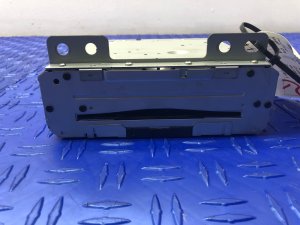
We Have This Part in Stock



The information in this article is provided for general reference and educational purposes only. Vehicle specifications, procedures, and part compatibility can vary by production date, trim level, and region. Always consult your vehicle's factory service manual and verify part numbers before purchasing or performing repairs. Safety-critical components such as airbags, seat belts, and braking systems should be installed by a qualified professional.
- Cadillac CT6:
- 🛍️ Shop This Part
- Symptoms of a Failing Infotainment Display
- Symptoms of a Bad Touchscreen (Digitizer)
- Symptoms of a Bad HMI Module
- Known Issues, Recalls, and Technical Service Bulletins (TSBs)
- Programming and Anti-Theft Requirements
- Buying a Used 2016-2018 CT6 Infotainment Display
- If You Need to Replace the Touchscreen:
- If You Need to Replace the HMI Module:
- Cost of Replacement (2026 Estimates)
- Frequently Asked Questions (FAQ)
- 🎟️ Get 5% Off