

2014-2024 Acura MDX Infotainment: Display Problems, Resets, and Replacement Guide
Your definitive guide to diagnosing and fixing the dual-screen (2014-2020) and widescreen (2022-2024) infotainment systems in the Acura MDX.
- The MDX has two distinct systems: a 2014-2020 dual-screen setup and a 2022-2024 widescreen with a touchpad. Parts are not interchangeable.
- Many common issues like black screens or freezing on newer models are software-related and can be fixed with a system reboot or a dealer-installed update.
- When buying a used display, you MUST match the part number exactly to your vehicle's year, trim, and options (Navigation, Rear Entertainment).
- Nearly all replacements will require a 5-digit anti-theft code to unlock the unit after installation. This code can be found in your vehicle's documentation or retrieved from Acura.
Generational Differences: Two Systems, Unique Problems

The 2014-2024 Acura MDX spans two distinct infotainment architectures. Understanding which system your vehicle has is the first step in diagnosis and repair.
2014-2020: The Dual-Screen System
This generation is known for its two-screen setup: an upper 8-inch non-touch display for navigation and key information, and a lower 7-inch touchscreen (On-Demand Multi-Use Display or ODMD) for audio, climate, and other inputs. Problems with this system are common and can involve one or both screens.
- Upper Display Failures: Often manifest as flickering, a completely black screen, or being stuck on the Acura logo. Sometimes the backlight fails, making the screen appear black even though the system is technically running.
- Lower Touchscreen Failures: This is a frequent point of failure. Symptoms include a completely unresponsive touch interface, phantom or ghost touches, or cracking of the digitizer (the touch-sensitive layer). In many cases, the screen may display information correctly but will not respond to any input.
2022-2024: The Widescreen True Touchpad System
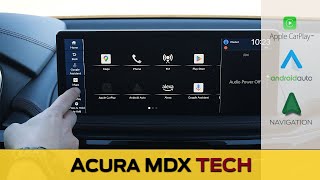
For its fourth generation (skipping the 2021 model year), the MDX adopted a single 12.3-inch widescreen controlled by a touchpad in the center console. This system is more integrated and relies heavily on software. The 2025 model year introduced a Google-based operating system. 🎬 Watch: A full walkthrough of the 2025 MDX infotainment features. Issues are typically software-related.
- Software Glitches: Problems often present as a black or blank screen upon startup, freezing, audio cutting out or switching to a single speaker, or issues with Apple CarPlay® and Android Auto™ connectivity. Many of these can be temporarily resolved by restarting the vehicle.
- FAKRA Connector Issues: A known issue across recent Acura models involves the FAKRA coaxial connectors that link the various infotainment components. A loose or faulty connector can cause intermittent black screens and audio loss. Acura has issued a warranty extension for this specific problem on some models.
Pro Tip: For many software-related glitches on both systems, a simple system reboot can provide a temporary fix. For 2022+ models, press and hold the power/volume knob for about 10-15 seconds until the system restarts. For older models, a battery disconnect for 10-15 minutes can reset the module, but this will erase presets.
🎬 See this guide on how to reboot or factory reset your system.Known Issues, Recalls, and Technical Service Bulletins (TSBs)

Recalls
Acura issued a recall for some 2025 MDX models due to a software defect in the center information display. The issue could cause the screen to go black when shifting out of reverse, preventing the rearview camera image from displaying and increasing the risk of a crash. The remedy involves dealers replacing the center information display unit.
Technical Service Bulletins (TSBs)
Acura has released numerous TSBs for infotainment issues. For example, TSB B23-033 for the 2022 MDX addresses complaints of popping/cracking from speakers, a blank display, or no audio. Another TSB for 2024 models mentions software updates to fix screen freezing, intermittent blanking of the display, and other performance enhancements. These bulletins instruct dealers on how to diagnose and apply software updates or specific repairs to resolve known bugs.
Buying a Used Acura MDX Infotainment Display

Buying a used OEM display is a cost-effective solution, but careful verification is essential. The MDX infotainment system is not one single part, but a collection of modules that must be compatible.
- Identify the Correct Component: Are you replacing the upper screen, the lower touchscreen unit (2014-2020), the main widescreen display (2022+), or a rear entertainment screen? Each is a separate part with a unique part number.
- Match Part Numbers Exactly: This is the most critical step. Part numbers vary based on year, trim level (Base, Technology, Advance), and whether the vehicle has factory navigation or a Rear Entertainment System (RES). Using a part with the wrong number can lead to incompatibility. The provided OEM part numbers in your vehicle's documentation are a starting point, but always verify with the seller.
- Inspect for Physical Damage: For screens, check for deep scratches, cracks, or delamination. For control units, ensure all connectors are intact and not corroded or bent.
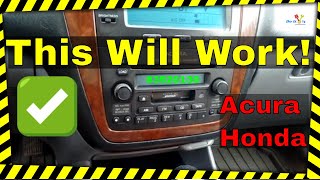
- Understand Anti-Theft and Programming: After installation, the unit will likely display the word "CODE" on the screen. This is an anti-theft measure. You will need a 5-digit code to unlock the unit. This code can often be found on a card in the owner's manual, on a sticker in the glove box, or by retrieving it from an official Acura website with the unit's serial number. 🎬 Watch: How to find and enter your radio security code. In some cases, especially with newer models, a trip to the dealer may be required for programming to ensure all features function correctly with your vehicle's specific VIN.
Cost Breakdown
Prices can vary significantly based on the specific component, its condition, and the vehicle generation.
| Part | New OEM | Used OEM | Remanufactured | Shop Labor |
|---|---|---|---|---|
| 2014-2020 Lower Touchscreen | $800 - $1,500 | $150 - $400 | $200 - $500 | $150 - $300 |
| 2014-2020 Upper 8" Display | $1,200 - $2,000 | $100 - $350 | $250 - $600 | $150 - $300 |
| 2022-2024 12.3" Widescreen Display | $1,050 - $1,600 | $165 - $500 | N/A | $200 - $400 |
| Rear Entertainment Screen | $1,500+ | $200 - $450 | N/A | $150 - $300 |
Frequently Asked Questions (FAQ)

Do I need an anti-theft code after replacing my MDX display?
Yes, in most cases. After a power loss or replacement, the audio/navigation unit will enter a theft-protection mode and require a five-digit code to reactivate. You can find this code in your owner's manual, on a sticker in the glove box, or retrieve it online from Acura's website using the unit's serial number.
Why is my screen black but the radio still plays?
This common issue, especially on 2014-2020 models, often points to a failure of the display screen itself, not the main audio unit. The backlight or the screen's internal electronics may have failed. On 2022+ models, this can be a software glitch or a faulty FAKRA connector. A system reboot or checking connections may resolve it.
Can I replace just the touchscreen part of my 2014-2020 lower display?
Yes. If the display shows an image but doesn't respond to touch, the problem is likely the touch-sensitive layer called the digitizer. Aftermarket digitizers are available and can be replaced by a skilled DIYer or an electronics repair shop, which is much cheaper than replacing the entire unit.
Can I upgrade my 2017 dual-screen system to the 2022 widescreen system?
No, this is not a feasible upgrade. The two systems are fundamentally different in their wiring, mounting, control inputs (touchscreen vs. touchpad), and software integration with the rest of the vehicle. You must replace components with parts designed for your vehicle's specific generation and trim.
Helpful Videos

Technical Specifications
OEM Part Numbers: 39110-TZ5-A01CN 39110-TZ5-A01CP 39110-TZ5-A01RM 39110TZ5A01 39460TZ6A11 39460TZ6A11ZA 39460TZ6A11ZB 39460TZ6A11ZC 39710-TYA-A01 39710-TYB-A11 39710TYAA01 39710TYBA11 39810-TZ5-307 39810-TZ5-A21 39810-TZ5-A21CN
System architecture varies by generation. 2014-2020 models use a dual-screen setup (8-inch upper, 7-inch lower). 2022-2024 models use a single 12.3-inch widescreen display. Rear Entertainment Systems (RES) can feature 9-inch or 16.2-inch screens depending on the package.
We Have This Part in Stock




The information in this article is provided for general reference and educational purposes only. Vehicle specifications, procedures, and part compatibility can vary by production date, trim level, and region. Always consult your vehicle's factory service manual and verify part numbers before purchasing or performing repairs. Safety-critical components such as airbags, seat belts, and braking systems should be installed by a qualified professional.
- Acura MDX:
- 🎬 Helpful Videos
- 🛍️ Shop This Part
- Generational Differences: Two Systems, Unique Problems
- 2014-2020: The Dual-Screen System
- 2022-2024: The Widescreen True Touchpad System
- Known Issues, Recalls, and Technical Service Bulletins (TSBs)
- Recalls
- Technical Service Bulletins (TSBs)
- Buying a Used Acura MDX Infotainment Display
- Cost Breakdown
- Frequently Asked Questions (FAQ)
- 🎟️ Get 5% Off