

1996-1998 Acura RL Navigation Screen: A Guide to Failures and Compatibility
This guide covers the common problems, critical part number and VIN matching, and replacement realities for the first-generation Acura RL navigation system.
- Compatibility is critical: For 1997 models, you must match the part to your vehicle's VIN (before or after VC009825). For all years, the OEM part number must be an exact match.
- This part is plug-and-play and does not require dealer programming, but you will need the anti-theft code for the navigation system after installation.
- A "check disk" error is caused by the trunk-mounted navigation unit, not the in-dash screen. Replacing the screen will not fix this problem.
- Common failures are a blank screen (bad backlight) or unresponsive controls. Used OEM parts are the only viable replacement option.
Symptoms of a Failing RL Navigation Screen

Failures in these early navigation systems can manifest in several ways, often making it difficult to distinguish between a problem with the screen itself, the trunk-mounted drive, or the map data disc. Here are the most common symptoms owners report:
- Blank or Black Screen: The screen fails to power on, remains completely black, or shows a very dim, barely visible image. This often points to a failure of the screen's internal backlight, a common issue with aging LCDs. Sometimes, a power cycle, like disconnecting the car battery, can temporarily restore function.
- "Please check your disk" Error: The screen powers on but displays an error message indicating it cannot read the map data. This almost always points to a problem with the separate navigation computer located in the trunk, not the in-dash screen unit. The issue could be a faulty drive mechanism or a corrupted or missing map data hard drive.
- Frozen or Unresponsive Screen: The display is stuck on a single screen (like the Acura logo) or the touchscreen/buttons do not respond to input. This can indicate a software glitch or a failure in the screen's control board.
- Flickering or Distorted Display: The image on the screen flickers, shows distorted colors, or has lines running through it, suggesting a failing screen component or a loose connection.
Known Issues, Recalls, and TSBs

While the navigation screen itself has not been the subject of a specific safety recall, owners should be aware of other recalls for the 1996-1998 Acura RL.
- NHTSA Campaign 99V227000: A recall was issued for a transmission case bolt that could loosen, potentially causing a loss of power to the wheels. This affects 1996-1998 RL models.
- NHTSA Airbag Recalls: Multiple recalls related to airbag inflators have been issued, affecting these model years. It is crucial to ensure these safety-related recalls have been addressed.
Acura has also issued Technical Service Bulletins (TSBs) related to the navigation system, though most apply to later models. TSB 05-018 is an informational bulletin about different navigation system types (DVD vs. Hard Drive) that covers the 1996-2004 RL. It notes that installing an incorrect map disc can cause malfunctions. Another TSB from 2004 mentions that replacing navigation system DVDs can cause a "disc error," highlighting the sensitive nature of the data media.
Warning: The navigation system in the 1996-1998 RL uses a trunk-mounted hard disk drive for its map data, not a DVD like later models. Do not attempt to use a map DVD from a newer Acura, as it is incompatible and may cause errors.
Buying a Used Acura RL Navigation Screen

Due to the age of these vehicles, a used OEM screen is the only practical replacement option. No modern aftermarket units exist that will integrate properly with the RL's factory systems. Here’s what to look for when buying a used unit:
- Verify the Part Number: The most critical step is to match the part number from your original unit exactly. There are numerous part numbers, and they are not interchangeable. The initial data provided lists several valid Acura and Alpine part numbers, such as 39540-SZ3-A820-M1.
- VIN Verification is Crucial for 1997 Models: As noted in the buyer warnings, there was a mid-year change during 1997. You must verify if your vehicle's VIN is before or after the VC009825 / VC009826 cutoff. Units from before this split are not compatible with units after it, likely due to different wiring or connectors. Always get the VIN from the donor vehicle if possible.
- Physical Inspection: Check the screen for deep scratches, cracks, or delamination (a bubbling or peeling look). Test the physical buttons to ensure they press and return correctly.
- Ask About Testing: Ask the seller if the unit was tested before removal. Specifically, ask if it powered on. Remember, a seller cannot easily test for a "check disk" error, as that relates to the trunk unit.
- Understand What You're Buying: You are buying only the in-dash screen unit. This will not fix problems related to the trunk-mounted navigation drive or the map data hard disk. If your primary issue is a "check disk" error, replacing the screen will not solve it.
Programming and Installation
Good news for DIY mechanics: the navigation screen itself does not require any special programming or flashing by a dealer to work with the vehicle. It is a plug-and-play component, provided you have the correct part number for your specific vehicle year and VIN range.
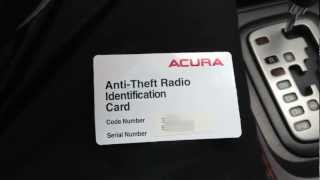
However, you will likely need an anti-theft code. After the unit is installed and power is reconnected, the screen will likely display the word "CODE" or ask for a navigation system code. This is a security feature.
- Finding the Code: The 4 or 5-digit code may be on a sticker in the glove box, in the owner's manual, or on a card that came with the vehicle.
- Retrieving the Code: If you cannot find the code, you can retrieve it from an Acura dealer or sometimes through Acura's official code retrieval website. You will need the vehicle's VIN and the serial number of the navigation unit to do this.
Pro Tip: Before removing the old unit, you can try to retrieve its serial number electronically. 🎬 Watch this quick guide to retrieve your radio serial number and reset code. With the unit powered off, press and hold the #1 and #6 radio preset buttons, then turn the radio on. The serial number may display on the screen, which you can then use to retrieve the necessary code for your replacement unit.
Cost to Replace a 1996-1998 Acura RL Navigation Screen
| Part Type | Estimated Cost | Notes |
|---|---|---|
| New OEM | $2,000+ | Likely discontinued and extremely difficult to find. Not a practical option. |
| New Aftermarket | Not Available | No aftermarket units exist that retain factory integration. |
| Used OEM | $100 - $350 | The most common and recommended option. Price varies by condition and seller. |
| Remanufactured | $400 - $800+ | Specialty electronics repair shops may offer this service, but it is not common. Alpine may be able to diagnose or repair the unit. |
| Shop Labor | $150 - $300 | Expect 1.5 to 2.5 hours of labor for a professional to remove the dash trim and replace the unit. |
Frequently Asked Questions (FAQ)
Do I need to have the dealer program this screen?
No, dealer programming is not required. The screen is plug-and-play. However, you will need the anti-theft code for the navigation system to unlock it after installation.
My screen says "Please check your disk." Will replacing the screen fix this?
No, it will not. This error message refers to the separate navigation computer and map data hard drive located in the trunk of the car. Replacing the in-dash screen will not resolve this issue. You need to diagnose the trunk-mounted unit.
Can I upgrade this old navigation system to a modern one with Apple CarPlay or Android Auto?
Not easily. The factory screen is deeply integrated with the vehicle's climate and audio controls. Replacing it with a standard aftermarket stereo would require extensive, custom wiring and fabrication work, and you would likely lose the integrated climate control display. For most owners, this is not a feasible project.
Why is it so important to match the part number and VIN for 1997 models?
Acura made a mid-year production change to the navigation system's hardware during the 1997 model year. Units made before the VIN cutoff (VC009825) have different connectors and/or wiring than units made after it. They are physically and electronically incompatible. You must match the part to the correct VIN range or it will not work.
Helpful Videos
Technical Specifications
OEM Part Numbers: 39540-SZ3-315 39540-SZ3-335 39540-SZ3-A820 39540-SZ3-A820-M1 39810-S0X-A023-M1 39810-SZ3-305ZA 39810-SZ3-A82ZA 39810-SZ3-A84ZA 39810-SZ3-A85ZA 39810SZ3305ZA 39810SZ3A82ZA
System manufactured by Alpine. Uses a trunk-mounted hard disk drive for map data (not DVD). Integrates display for climate control and audio systems.

The information in this article is provided for general reference and educational purposes only. Vehicle specifications, procedures, and part compatibility can vary by production date, trim level, and region. Always consult your vehicle's factory service manual and verify part numbers before purchasing or performing repairs. Safety-critical components such as airbags, seat belts, and braking systems should be installed by a qualified professional.
- Acura RL: