

2018-2020 Jaguar F-PACE HUD Module: Failures, Costs, and Critical Programming Info
Your definitive guide to diagnosing a faulty Head-Up Display, understanding the essential programming requirements, and replacing the control module.
- This module is NOT plug-and-play. It requires mandatory programming with Jaguar's Pathfinder software by a dealer or specialist.
- The most common failure symptom is a completely blank HUD, though flickering or frozen data can also occur.
- Before buying a used module, get a quote for programming, as this is a significant and unavoidable part of the total repair cost.
- A faulty HUD module does not affect the vehicle's safety or drivability; the primary instrument cluster remains fully functional.
Symptoms of a Failing HUD Control Module
When the HUD control module in a 2018-2020 Jaguar F-PACE begins to fail, the symptoms are usually straightforward and directly impact the display itself. Unlike some other electronic modules, a faulty HUD module typically does not affect the vehicle's drivability.
- Blank Display: The most common symptom is the HUD failing to appear on the windshield at all. The projector may not rise from the dashboard, or it may rise but project no information.
- Flickering or Intermittent Display: The display might flicker, cut out randomly while driving, or only work sporadically. This can be a sign of a failing module or a loose connection.
- Incorrect or Frozen Information: The module may fail to update information, causing the speed to be stuck at a certain number or navigation prompts to be frozen, even as conditions change.
- Inability to Configure HUD Settings: You may find that you are unable to change the HUD's brightness, position, or content through the vehicle's menu settings in the instrument cluster.
- Diagnostic Trouble Codes (DTCs): A professional scan may reveal communication error codes, typically U-codes like U0001-81 (High speed CAN communication bus), indicating the HUD module is not communicating correctly with other vehicle systems.
The Critical Step: Module Programming and Configuration
Warning: This module is NOT a plug-and-play part. A new or used HUD control module must be professionally programmed to your vehicle to function.
For security and system integration, Jaguar requires that most electronic control modules be configured to the specific vehicle they are installed in. The HUD module is no exception.
- Software Required: This programming requires Jaguar Land Rover's proprietary diagnostic software, known as Pathfinder for vehicles from 2017 and newer. This software communicates with the vehicle's systems to write the vehicle's specific Car Configuration File (CCF) to the new module, essentially telling it what features the car has and pairing it to the VIN.
- Who Can Program It: This procedure must be performed by a Jaguar dealership or a highly specialized independent shop that has an active subscription to JLR's diagnostic systems and the proper JLR-approved DoIP VCI (Diagnostics over Internet Protocol Vehicle Communication Interface). The average mechanic or local garage will not have this capability.
- Why It's Necessary: Programming ensures that the module works correctly with the other systems in your car, such as the instrument cluster, infotainment system, and various driver aids. It prevents conflicts and ensures all features, like navigation turn-by-turn and traffic sign display, are available.
Buying a Used 2018-2020 F-PACE HUD Module
A used OEM module can be a cost-effective solution, but you must be aware of the total cost of the repair, which includes programming.
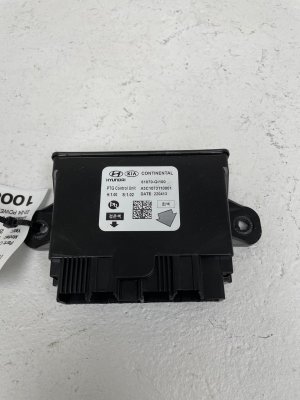
- Verify the Part Number: Before purchasing, match the OEM part number from your original module to the used part. Known part numbers include HX63-19H524-AB, T2H19271, and T2H6812. While different numbers may exist, an exact match is the safest bet.
- Inspect the Part: When the part arrives, check the electrical connector pins for any signs of corrosion, bending, or water damage. Ensure the plastic casing is not cracked or showing signs of heat damage.
- Factor in Programming Costs: A used module is non-functional until it is programmed. Before you buy the part, call your local Jaguar dealer or a qualified specialist and get a quote for programming a customer-supplied used module. This cost is a mandatory part of the repair and can be significant.
- Why Used OEM is a Smart Choice: For this part, there are no new aftermarket alternatives. A used OEM module, once correctly programmed, is identical in function to a brand-new one from the dealer. It provides the same performance and reliability without the high cost of a new part.
Known Issues, TSBs, and Recalls
As of now, there are no specific recalls from the National Highway Traffic Safety Administration (NHTSA) for the HUD control module on the 2018-2020 Jaguar F-PACE. However, Jaguar has issued numerous Technical Service Bulletins (TSBs) related to the vehicle's electrical systems and software. Some issues, like a blank infotainment screen or other module communication faults, can sometimes be caused by low battery voltage, a common sensitivity in Jaguar vehicles. It's also worth noting that Jaguar frequently releases over-the-air (OTA) software updates that can improve the stability and performance of various electronic modules, including those related to the displays.
Cost Breakdown
The total cost of replacement involves the part itself and the essential programming labor. Prices can vary by location and supplier.
| Part or Service | Estimated Cost |
|---|---|
| New OEM Module (Part Only) | $700 - $950 |
| Used OEM Module (Part Only) | $150 - $400 |
| Shop Labor (Physical Installation) | $100 - $200 (approx. 1 hour) |
| Dealer/Specialist Programming | $200 - $400 (approx. 1-2 hours) |
| Total Estimated Cost (Used Part) | $450 - $1000 |
| Total Estimated Cost (New Part) | $1000 - $1550 |
Pro Tip: To save money, you can perform the physical installation of the module yourself and then drive the vehicle to the dealer or specialist for the final programming. The vehicle will operate normally without the HUD working.
Frequently Asked Questions (FAQ)
Can I install a HUD module myself?
Yes, the physical installation is often straightforward for a DIY mechanic, as it usually involves removing a few dash panels to access the module. However, the vehicle is not drivable without the main instrument cluster, and the HUD module itself will not function at all until it is programmed by a professional with Jaguar-specific software.
Does a used HUD module need to be programmed?
Yes, absolutely. All replacement HUD modules, whether new or used, must be programmed. The module is coded to the VIN of the original vehicle and needs to be re-coded to your F-PACE's VIN and specific configuration using JLR Pathfinder software to work correctly.
My HUD is just turned off. How do I turn it back on?
Before assuming the module has failed, make sure the display hasn't been accidentally turned off. Use the menu button on the steering wheel to navigate to the instrument panel display settings. Find the 'Head-Up Display' or 'HUD' menu and ensure the box to enable it is checked. 🎬 Watch: How to adjust and use your HUD settings Also, check that the brightness is not turned all the way down.
What is the difference between the HUD Control Module and the HUD Projector?
The HUD Control Module is the computer or 'brain' that processes the data. The HUD Projector is the physical unit, often with a small motor and lens, that sits in the dashboard and projects the light onto the windshield. While the module is a common failure point, issues with the projector (like a failed motor or lens issue) can also cause problems. A diagnostic scan can usually determine which component is at fault.
Helpful Videos
Technical Specifications
OEM Part Numbers: HX63-19H524-AB T2H19271 T2H6812
Requires programming and configuration via JLR Pathfinder software using a DoIP VCI interface.
We Have This Part in Stock



The information in this article is provided for general reference and educational purposes only. Vehicle specifications, procedures, and part compatibility can vary by production date, trim level, and region. Always consult your vehicle's factory service manual and verify part numbers before purchasing or performing repairs. Safety-critical components such as airbags, seat belts, and braking systems should be installed by a qualified professional.
- Jaguar F-PACE: