

2022-2023 Kia Stinger Heads-Up Display: Failure Symptoms and Replacement Guide
An in-depth look at common issues, compatibility checks, and replacement costs for the Stinger's HUD assembly.
- This part is for replacement only and cannot be used to add a HUD to a non-equipped Stinger.
- Many 'failure' symptoms are actually due to user settings, polarized sunglasses, or an incorrect non-HUD windshield.
- A blurry or doubled image is almost always caused by an aftermarket windshield not designed for HUDs.
- The OEM part number is 94310-J5410, and a new unit is very expensive, making a verified used part a smart alternative.
Common Symptoms of a Failing HUD Assembly
Before assuming the HUD unit itself has failed, it's important to rule out simple issues. Many reported problems are not due to a faulty projector. First, check the vehicle's settings in the infotainment screen to ensure the HUD is enabled and the brightness is turned up. Also, be aware that certain types of polarized sunglasses can make the display invisible. If you wear them, try taking them off to see if the display reappears.
1. Dim or Invisible Display
One of the most common complaints is a display that is too dim to see, especially in bright daylight. While you can adjust the brightness in the settings, a display that is barely visible at maximum brightness could indicate a failing projector lamp or a problem with the power supply to the unit. In some cases, this has been linked to the use of a non-OEM or incorrect type of windshield that lacks the necessary reflective film for HUDs.
2. No Display or Intermittent Failure
If the HUD does not turn on at all, the first step is to check the vehicle's settings and the related fuse. If those are fine, the issue could be a complete failure of the HUD projector, a loose connection, or a fault in the vehicle's body control module. Some owners report the display works sometimes and not others, which can be difficult to diagnose and may point to a wiring or internal electronic fault.
3. Distorted, Blurry, or Doubled Image
A clear, sharp image depends on two things: a healthy projector and the correct windshield. If the image appears blurry, doubled (a 'ghosting' effect), or distorted, it is a strong indicator that the wrong type of windshield has been installed. A standard windshield does not have the specific layering and coating required to properly reflect the HUD's projection. If the windshield is original and the image suddenly becomes distorted, it could point to a problem with the projector's lens or internal mirrors.
4. Dead Spots or Artifacts in the Display
A user on a Stinger forum reported a persistent, perfectly round dark spot appearing in their HUD projection. This type of issue, where a piece of the display is missing or shows artifacts, almost certainly points to a failure within the projector unit itself, such as a dead pixel on the LCD screen or debris on the internal lens.
Known Issues, Recalls, and Service Bulletins
As of mid-2024, there are no specific recalls or Technical Service Bulletins (TSBs) from Kia or the NHTSA that directly address the Heads-Up Display assembly for the 2022-2023 Stinger. Most issues reported by owners are isolated incidents or related to external factors like windshield replacement or user settings.
Pro Tip: Some 2023 Kia models (not specifically the Stinger) were part of a recall for instrument cluster software that could cause the screen to go blank. While this doesn't affect the HUD directly, it shows that display-related software issues can occur. Always ensure your vehicle's infotainment and cluster software is up to date.
Buying a Used 2022-2023 Stinger HUD: What to Check
Given the high cost of a new OEM unit, a recycled part is a practical option. However, this is a sensitive electronic component, and careful inspection is critical.
Verify Compatibility First
Warning: This part is for replacement only. It CANNOT be used to add a Heads-Up Display to a Stinger that was not originally equipped with one from the factory. The vehicle must have the correct HUD-compatible dashboard, wiring harness, and, most importantly, the specialized windshield.
Before purchasing, confirm the part number. The primary OEM part number for the 2022-2023 Kia Stinger HUD assembly is 94310-J5410.
Physical Inspection Checklist
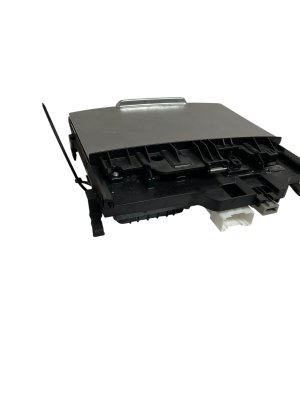
- Projector Lens: Inspect the glass lens on top of the unit for any deep scratches, chips, or cloudiness. Minor dust is acceptable, but physical damage to the lens will ruin the projected image.
- Electrical Connectors: Check that all connector pins are straight, clean, and free of corrosion. Bent or broken pins are a major red flag.
- Housing: Look for cracks or signs of impact on the plastic housing. This could indicate the unit was damaged during removal or in an accident, potentially harming the delicate internal mirrors and electronics.
- Cover/Lid: The unit has a movable dust cover. Ensure it is present and moves freely.
Why a Used OEM Unit is the Only Choice
For this specific part, there are no new aftermarket options available. Your choices are a very expensive new OEM part or a used OEM part. A used unit provides the exact same factory performance and compatibility as a new one, often at a fraction of the price. As long as it is inspected carefully, it is the most cost-effective solution.
Cost Comparison: Stinger HUD Replacement
The cost to replace the HUD assembly is significant, primarily due to the high price of the part itself.
| Part Type | Estimated Cost |
|---|---|
| New OEM (Part #94310-J5410) | $1,750 - $2,700 |
| New Aftermarket | Not Available |
| Used OEM | $400 - $800 (Varies by supplier and condition) |
| Shop Labor | $200 - $400 (Estimated 1.5-3 hours) |
Installation Guide & Calibration
Replacing the HUD assembly is a moderately difficult job that involves removing significant portions of the dashboard.
- Difficulty Rating: 3.5 out of 5
- Estimated Time: 2-3 hours
- DIY Feasible: Yes, for experienced DIY mechanics comfortable with interior trim removal.
Step-by-Step Overview
- Disconnect the vehicle's battery.
- Carefully pry off and remove the upper dashboard trim pieces, including the speaker grille near the windshield.
- Unbolt the old HUD assembly from its mounting points within the dashboard.
- Disconnect the electrical connector.
- Install the new unit, reconnect the electrical connector, and re-secure the bolts.
- Reassemble the dashboard trim.
- Reconnect the battery.
Post-Installation Calibration
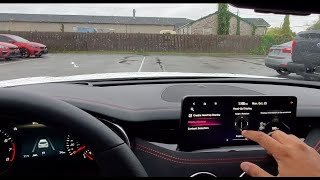
After installation, the new HUD must be calibrated for the driver's viewing position. This is not a complex procedure requiring special tools. The calibration for height, rotation, and brightness can be done through the vehicle's infotainment screen under the 'Vehicle' and 'Head-Up Display' settings menu. 🎬 Watch: How to adjust and customize your Stinger's HUD settings The system will save these settings to the driver's profile.
Frequently Asked Questions (FAQ)
Can I add a HUD to my Stinger if it didn't come with one?
No. This is not a feasible retrofit. It would require replacing the dashboard, the windshield, and adding a complex wiring harness and programming, making it prohibitively expensive and complex.
Why is my HUD display blurry or showing a double image?
This is almost always caused by an incorrect windshield. If your windshield was recently replaced, it's likely an aftermarket glass was used that is not compatible with a HUD. You must use a specific OEM or equivalent windshield designed for HUD reflection.
Why can't I see my HUD when wearing sunglasses?
The light from the HUD is polarized. Many sunglasses use polarized lenses to reduce glare, but they can also block the light from the HUD, making it invisible. This is normal operation. Try a pair of non-polarized sunglasses if you wish to see the HUD while wearing them.
My speed limit display on the HUD is wrong or disappears. Is the unit broken?
No, this is likely not a fault with the HUD unit. The speed limit information is pulled from the car's built-in navigation system map data, not from reading road signs with a camera. If the map data is outdated or doesn't have a speed limit for a particular road, it will not be displayed or may be incorrect.
Helpful Videos
Technical Specifications
OEM Part Numbers: 94310-J5410 94310J5410
Projects information onto a HUD-specific windshield. Display content includes speedometer, navigation, and driver-assist warnings. Settings for brightness, rotation, and height are controlled via the infotainment system.
We Have This Part in Stock



The information in this article is provided for general reference and educational purposes only. Vehicle specifications, procedures, and part compatibility can vary by production date, trim level, and region. Always consult your vehicle's factory service manual and verify part numbers before purchasing or performing repairs. Safety-critical components such as airbags, seat belts, and braking systems should be installed by a qualified professional.
- Kia Stinger:
- 🎬 Helpful Videos
- 🛍️ Shop This Part
- Common Symptoms of a Failing HUD Assembly
- 1. Dim or Invisible Display
- 2. No Display or Intermittent Failure
- 3. Distorted, Blurry, or Doubled Image
- 4. Dead Spots or Artifacts in the Display
- Known Issues, Recalls, and Service Bulletins
- Buying a Used 2022-2023 Stinger HUD: What to Check
- Verify Compatibility First
- Physical Inspection Checklist
- Why a Used OEM Unit is the Only Choice
- Cost Comparison: Stinger HUD Replacement
- Installation Guide & Calibration
- Step-by-Step Overview
- Post-Installation Calibration
- Frequently Asked Questions (FAQ)
- 🎟️ Get 5% Off