

2021-2024 Genesis GV80 Heads Up Display: Diagnosing a Dim, Flickering, or Dead Projector
This guide covers the common failure symptoms, replacement costs, and what to inspect when buying a used Heads Up Display (HUD) for the Genesis GV80.
- The most common failure symptoms are a dim display, intermittent operation, or complete failure.
- Replacement is a very difficult (5/5) job requiring extensive dashboard disassembly and is not recommended for DIY.
- Before replacing the unit, check for the relevant software recall (NHTSA 26V019000) as a flickering or blank screen could be a software issue.
- When buying used, carefully inspect the projector lens for scratches and verify the part number (94310-T6040 or 94310-T6540).
Symptoms of a Failing Genesis GV80 Heads Up Display
A failing Heads Up Display in the GV80 typically manifests in several distinct ways. Understanding these symptoms can help you determine if the HUD unit itself is the problem or if another system is at fault.
1. Dim or Invisible Display in Daylight
One of the most common complaints is a display that is too dim to be seen during the day, even with the brightness setting turned all the way up in the vehicle settings. While the display's visibility can be affected by polarized sunglasses or direct sunlight, a properly functioning HUD should be clearly visible in most daytime conditions. If the display is only legible at night or in very low light, it often points to a weakening projector lamp within the HUD assembly.
2. Intermittent Operation or Disappearing Display
The HUD may work perfectly on one trip and then fail to appear on the next. Owners have reported the display not turning on at startup, only to randomly appear later while driving or idling. In some cases, when the HUD stops working, the corresponding "Head-Up Display" settings menu may also disappear from the vehicle's infotainment screen, indicating the system is not detecting the module.
3. Flickering or Rebooting Display
A flickering or blinking display is another potential symptom. This can sometimes be related to a broader vehicle electronics issue rather than a fault in the HUD projector itself. Notably, Genesis issued a recall for a software glitch related to the HD Radio that could cause both the main instrument cluster and the center infotainment screen to reboot while driving. While this recall does not specifically name the HUD, a system-wide electrical or software issue could certainly cause the HUD to flicker in unison with the other screens.
4. Complete Failure / No Display at All
The most severe symptom is a display that never turns on. This can be caused by a few issues. The easiest to check is the fuse for the HUD module, which is located in the smart junction box. If the fuse is intact, the problem could be a disconnected or damaged wiring connector, or a complete internal failure of the HUD unit. In diagnostic terms, this often presents as a "no communication" error when a technician scans the vehicle, meaning the car's main computer cannot establish a connection with the HUD module.
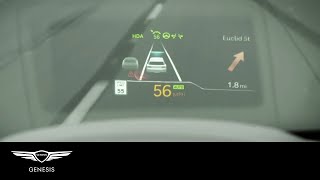
Pro Tip: Before assuming the HUD has failed, check the vehicle settings. The HUD can be disabled entirely via the infotainment screen. Navigate to Setup > Vehicle > Head-Up Display 🎬 Watch Genesis' official video guide on setting up your HUD and ensure the "Enable Head-Up Display" box is checked.
Known Issues, Recalls, and Technical Service Bulletins (TSBs)
As of mid-2026, there are no specific NHTSA recalls for the Heads Up Display assembly on the 2021-2024 Genesis GV80.
However, there is a highly relevant recall that owners should be aware of:
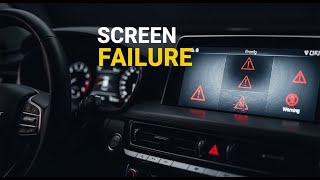
- Instrument Panel Display Failure (NHTSA Campaign Number: 26V019000 / 25V105000): This recall addresses a software error that can cause the main digital instrument cluster and center infotainment screen to go blank or reboot while driving. The issue was traced to a software logic problem with the HD radio's memory storage. While the HUD is not the primary component, its data comes from the same systems. A driver experiencing this issue might see all displays, including the HUD, go dark simultaneously. The official remedy is a software update performed by a dealer, but a temporary fix is to disable the HD radio feature in the settings. 🎬 See this video breakdown of the Genesis screen failure recall
Buying a Used Genesis GV80 Heads Up Display Assembly
Given the high cost of a new OEM unit, a used HUD assembly is a cost-effective option. However, because it is a sensitive electronic component, careful inspection is crucial.
1. Verify the Part Number
Genesis used at least two part numbers for this period: 94310-T6040 and 94310-T6540. Always match the part number from your original unit to the replacement. Using an incorrect part number may result in compatibility issues or features not working correctly.
2. Inspect the Projector Lens
The most important part to inspect is the glass projector lens on the top of the unit. Look for deep scratches, chips, or any signs of delamination or hazing. A damaged lens will result in a distorted or blurry image projected on the windshield.
3. Check the Housing and Mounting Points
The entire assembly is made of plastic. Inspect the housing for any cracks, especially around the mounting tabs. This part is secured deep in the dash, and broken mounting points can lead to vibrations, rattles, and a misaligned projection.
4. Examine the Electrical Connector
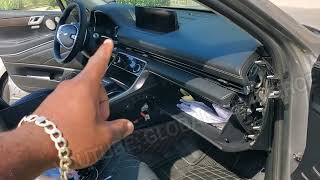
The unit has a single multi-pin electrical connector. Check the connector for any signs of corrosion (green or white powder), bent pins, or damage to the plastic housing. A technician's diagnostic video showed that a poor connection can cause a total failure of the unit. Ensure the locking tab on the connector is intact.
5. Ask About the Donor Vehicle
If possible, get the mileage of the vehicle the part came from. Since the projector lamp can dim over time, a lower-mileage part is always preferable. Also, ask if the donor vehicle had any front-end or water damage. Avoid parts from flood-damaged vehicles, as moisture can cause delayed electronic failure.
Warning: This part is only for GV80 models originally equipped with the Head-Up Display from the factory. It is not a simple plug-and-play upgrade for vehicles that did not come with this option, as it requires a specific type of windshield glass and complex wiring integration.
Replacement Information
Replacing the Heads Up Display assembly is a complex and time-consuming task.
- Difficulty Rating: 5 out of 5 (Expert)
- DIY Feasible: Not recommended for beginners or intermediate DIY mechanics.
- Estimated Time: 4-6 hours
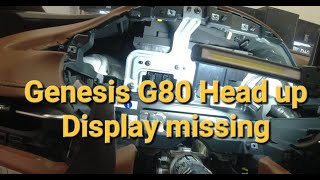
The procedure requires extensive disassembly of the dashboard, including the removal of A-pillar trims, the speaker grille, the main instrument cluster, and various other trim panels to gain access to the HUD unit's mounting bolts and electrical connector. Due to the complexity and risk of damaging expensive dashboard components, this job is best left to a professional technician experienced with Genesis vehicles.
Calibration Requirements
After physical installation, the new HUD may require position and rotation calibration through the vehicle's service menu using a dealership-level diagnostic tool to ensure the projection is correctly aligned for the driver.
Cost Comparison
The cost for a replacement Heads Up Display assembly can vary significantly based on the source.
| Part Source | Estimated Cost |
|---|---|
| New OEM (Dealer) | $1,900 - $2,800 |
| Used OEM (Recycled) | $250 - $600 |
| New Aftermarket | Not Available |
| Shop Labor | $500 - $1,000+ |
Labor costs are estimated based on a 4-6 hour job at a typical shop rate of $125-$175/hour.
Frequently Asked Questions (FAQ)
Can I upgrade my GV80 to have a HUD if it didn't come with one?
This is not a practical upgrade. Vehicles with a factory HUD use a special windshield with a reflective coating in the projection area. Without this specific windshield, the display will appear as a blurry double image. The wiring and module programming are also missing, making it a prohibitively complex and expensive conversion.
Why is my HUD display blurry or showing a double image?
If you recently had your windshield replaced, this is the most likely cause. You must use an OEM or aftermarket windshield that is specifically designed for HUD compatibility. If you have the original windshield, a double image could indicate a problem with the projector unit itself, causing a misalignment of the light.
Does a replacement HUD need to be programmed?
While the unit itself is largely plug-and-play, it may require calibration using a diagnostic tool to properly align the height and rotation of the display on the windshield. In most cases, basic functionality should be restored immediately upon installation, but fine-tuning may be needed.
My HUD is flickering. Is it definitely broken?
Not necessarily. First, check if your vehicle is affected by the instrument panel software recall (NHTSA 26V019000). A flickering display could be a symptom of that software glitch. Try disabling the HD Radio in your infotainment settings as a temporary test. If the flickering stops, the issue is software-related, not a failed HUD unit.
Helpful Videos
Technical Specifications
OEM Part Numbers: 94310-T6040 94310-T6540
Full-color projection display unit. Integrated with vehicle CAN bus for data (Speed, Navigation, Safety Systems). Requires HUD-specific windshield for proper viewing.
We Have This Part in Stock



The information in this article is provided for general reference and educational purposes only. Vehicle specifications, procedures, and part compatibility can vary by production date, trim level, and region. Always consult your vehicle's factory service manual and verify part numbers before purchasing or performing repairs. Safety-critical components such as airbags, seat belts, and braking systems should be installed by a qualified professional.
- Genesis GV80:
- 🎬 Helpful Videos
- 🛍️ Shop This Part
- Symptoms of a Failing Genesis GV80 Heads Up Display
- 1. Dim or Invisible Display in Daylight
- 2. Intermittent Operation or Disappearing Display
- 3. Flickering or Rebooting Display
- 4. Complete Failure / No Display at All
- Known Issues, Recalls, and Technical Service Bulletins (TSBs)
- Buying a Used Genesis GV80 Heads Up Display Assembly
- 1. Verify the Part Number
- 2. Inspect the Projector Lens
- 3. Check the Housing and Mounting Points
- 4. Examine the Electrical Connector
- 5. Ask About the Donor Vehicle
- Replacement Information
- Calibration Requirements
- Cost Comparison
- Frequently Asked Questions (FAQ)
- 🎟️ Get 5% Off