

2017-2019 Cadillac XT5 Grille Emblem Camera: Failure Symptoms and Calibration Guide
This guide explains how to diagnose a failing front grille camera, what to know before buying a used one, and why professional calibration is often required after replacement.
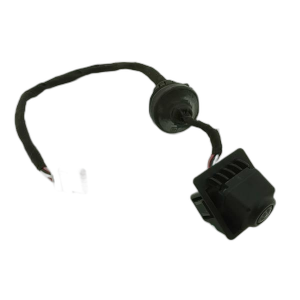
- This grille emblem is actually a camera (part #84012687) and is only used on XT5 models with the Surround View option (RPO code UVH).
- Failure typically results in a black/blue screen or a 'Camera Unavailable' message on the infotainment display.
- After replacement, the new camera MUST be calibrated by a dealer or qualified shop using a GM-specific scan tool to initiate a driving learn procedure.
- Wiring and connector issues are a known problem in similar GM camera systems, so inspect the coaxial cable for damage during diagnosis.
Symptoms of a Failing Grille Emblem Camera
When the front camera in the grille emblem begins to fail, the symptoms are almost always displayed on the vehicle's central infotainment screen. You will not typically notice a physical problem with the emblem itself.
- Black or Blue Screen: The most common symptom is the screen turning black or blue when you try to activate the front or 360-degree camera view.
- "Camera Unavailable" Message: The infotainment system may display an error message, sometimes with a red camera icon that has a line through it, indicating the system cannot get a signal from the camera.
- Flickering or Distorted Video: Before complete failure, the camera's video feed may flicker, show static, or appear distorted. This can be intermittent, often happening more frequently in very hot or cold weather.
- "Service Front Camera" or "Service Driver Assist" Message: A warning message may appear in the driver information center, pointing directly to a system fault.
Known Issues, TSBs, and Recalls
While there are no direct recalls for the front grille camera on the 2017-2019 XT5, there are several highly relevant service bulletins and a recall for similar models that shed light on common problems.
Technical Service Bulletins (TSBs)
General Motors has issued bulletins that are relevant to front camera issues. A notable one addresses a "Service Front Camera" or "Service Driver Assist" message on 2017-2021 XT5 models, indicating that this is a recognized issue. Another TSB, while for different GM trucks, highlights that front camera calibration can fail (setting a DTC B1008) if the camera is not mounted perfectly or if an aftermarket windshield alters its viewing angle. This underscores the sensitivity of the system.
Related Camera System Recall
GM issued a recall (NHTSA Campaign Number: 22V709000) for 2020-2021 Cadillac XT5, XT6, and GMC Acadia models for rearview camera failure. The cause was identified as improperly crimped coaxial cable connectors. The symptoms described in the recall—a black screen with a red triangle and a camera icon with a line through it—are identical to the symptoms of a failing front camera. While this recall does not apply to the 2017-2019 front camera, it suggests that the wiring and connectors for the camera systems are a known weak point and should be inspected during diagnosis.
Important: The grille emblem camera is only present on models with the Surround View option, RPO code UVH. You can find your vehicle's RPO codes on a sticker in the glove box or spare tire well. Do not purchase this part if your vehicle does not have this option.
Buying a Used 2017-2019 XT5 Grille Camera
A used OEM camera can be a cost-effective solution, as reliable aftermarket camera modules are not widely available. However, it's crucial to inspect the part carefully before purchasing.
- Verify the Part Number: The most current OEM part number for this camera is 84012687. This number supersedes older versions like 23184103. Ensure the part you are buying matches.
- Inspect the Lens: Check the camera lens for any deep scratches, cloudiness (hazing), or signs of delamination. Minor surface scuffs may be acceptable, but anything that could obstruct the view will make the part unusable.
- Check the Connector: Carefully examine the electrical connector and its pins. Look for any signs of corrosion (green or white powder), bent pins, or damage to the plastic housing. A damaged connector is a major red flag.
- Ask About the Donor Vehicle: If possible, get the VIN of the vehicle the part came from. This can help verify that the donor car was equipped with the Surround View (UVH) package. Ask the seller to confirm the camera was working before it was removed.
Cost Comparison
| Part Type | Estimated Cost |
|---|---|
| New OEM (Dealer) | $190 - $340 |
| New OEM (Online) | $140 - $200 |
| Used OEM | $75 - $150 |
| Shop Labor for Installation & Calibration | $150 - $300 |
Replacement and Calibration Procedure
Physically replacing the grille emblem camera is moderately difficult, but the required post-installation calibration is what makes this a job that many DIY mechanics will need to send to a shop.
Installation Difficulty: 3/5
The installation itself involves removing the upper radiator sight shield and potentially other grille trim pieces to access the back of the emblem. The camera is typically held in with a few small fasteners. The main challenge is carefully releasing plastic clips without breaking them.
Warning: Calibration Is Required. This part requires a specific programming and setup procedure after installation. GM service information states that the front view camera must be calibrated any time it is replaced. This is not an optional step.
Calibration Process
The calibration is a "Front View Camera Module Learn Procedure" that must be initiated using GM's GDS2 diagnostic software or a compatible high-end scan tool. Once initiated, the procedure often requires driving the vehicle under specific conditions. For some Cadillacs, this means driving on a straight road with clear lane markings at a speed above 38 mph for several minutes until the scan tool indicates the process is complete.
Because of the requirement for specialized software to start the process, this is not considered a DIY-feasible repair for most home mechanics. You should expect to take the vehicle to a dealership or a well-equipped independent shop to have the calibration performed after you install the part.
Frequently Asked Questions (FAQ)
Why is my screen black or blue when I select the front camera?
This is the most common sign of a failed front camera or a problem with its wiring. The system is not receiving a video signal, so it displays a blank screen, often with an error icon. The issue could be the camera module itself, a damaged coaxial cable, or a corroded connector.
Do I have to get the new camera calibrated at the dealer?
Yes, calibration is mandatory for the camera to function correctly with the Surround Vision system. While you might be able to physically install the part yourself, the final calibration step requires a specific GM diagnostic tool (GDS2) to initiate a learn procedure. A dealership or a specialized auto electronics shop will be needed to complete the job.
Can I just replace the plastic emblem without the camera?
No, for vehicles with Surround View (UVH), the camera and emblem are an integrated unit. You cannot separate them. If your vehicle does not have the camera system, you would have a different, non-camera emblem part number.
My front camera stopped working after I had my windshield replaced. What happened?
This is a known issue. Some aftermarket windshields can slightly change the mounting position or angle of the separate windshield-mounted camera (used for lane-keeping), which can cause system-wide ADAS faults. While the grille camera is different, any work on the front of the vehicle or related ADAS systems can sometimes cause conflicts. The first step is to have a technician scan the vehicle for diagnostic trouble codes (DTCs) to pinpoint the source of the error.
Technical Specifications
OEM Part Numbers: 84012687 23184103 23165927
Requires Surround View Option Code UVH. Integrated front-facing camera module with coaxial cable connector.
We Have This Part in Stock


The information in this article is provided for general reference and educational purposes only. Vehicle specifications, procedures, and part compatibility can vary by production date, trim level, and region. Always consult your vehicle's factory service manual and verify part numbers before purchasing or performing repairs. Safety-critical components such as airbags, seat belts, and braking systems should be installed by a qualified professional.
- Cadillac XT5:
- 🛍️ Shop This Part
- Symptoms of a Failing Grille Emblem Camera
- Known Issues, TSBs, and Recalls
- Technical Service Bulletins (TSBs)
- Related Camera System Recall
- Buying a Used 2017-2019 XT5 Grille Camera
- Cost Comparison
- Replacement and Calibration Procedure
- Calibration Process
- Frequently Asked Questions (FAQ)
- 🎟️ Get 5% Off