

2019-2020 Genesis G80 Navigation Head Unit: Rebooting, Black Screens, and Replacement Guide
This guide covers the common failures of the 2019-2020 Genesis G80 navigation head unit and explains the critical programming required after replacement.
- A replacement head unit is NOT plug-and-play. It is VIN-locked and requires mandatory programming ('variant coding') by a Genesis dealer to function.
- Common failure symptoms are purely electronic, including constant rebooting, black screens, and unresponsiveness. Diagnosis is based on symptoms, not OBD-II codes.
- Before replacing the unit, perform a hard reset by holding the MAP and SETUP buttons or by disconnecting the battery for 30+ minutes.
- When buying a used unit, you must match the OEM part number exactly and budget for the additional cost of dealer programming.
Symptoms of a Failing G80 Navigation Head Unit
When the navigation head unit in a 2019-2020 Genesis G80 begins to fail, the symptoms are typically electronic and can range from minor annoyances to a complete loss of function. Diagnosis is based on these symptoms, as specific OBD-II codes for head unit failure are not common.
1. Constant Rebooting or Boot Loop
The most widely reported issue is the unit getting stuck in a reboot loop. The screen will display the Genesis logo as if it's starting up, go black, and then repeat the cycle every 30-60 seconds. This prevents the system from ever reaching the main menu, making all of its functions unusable. This can be caused by a corrupted software file from a failed update or an internal hardware fault.
2. Black or Blank Screen
The screen may go completely black and become unresponsive. In some cases, the screen may be black but the audio will still play. A blank screen can also be a symptom that appears after a replacement unit is installed without proper programming. Sometimes, a hard reset can temporarily fix a black screen caused by a software glitch.
3. Unresponsive Touch Screen or Controls
The display may be on, but it fails to respond to touch inputs. Likewise, the physical buttons and knobs on the center console may stop working, leaving you unable to control audio, navigation, or other settings. This is often due to software freezes or internal memory overload.
4. Navigation and Connectivity Errors
You might see specific error messages like "Please check SD card," especially after a failed map or software update. Other symptoms include faulty GPS positioning, an inability to calculate routes, or persistent problems pairing phones via Bluetooth or connecting to Apple CarPlay/Android Auto.
Pro Tip: Before assuming the head unit is bad, perform a hard reset. Press and hold the MAP and SETUP buttons at the same time for about 10 seconds until the system reboots. If that doesn't work, disconnect the negative terminal of the 12V battery for at least 30 minutes to clear any corrupted temporary memory from all vehicle modules. Also, inspect the USB port for bent or shorted pins, as this is a known cause of rebooting issues.
Known Issues, TSBs, and Recalls
While there are no major recalls specifically for the 2019-2020 G80 head unit, related technical service bulletins (TSBs) and recalls for other model years highlight important patterns and procedures.
- TSB 17-BE-002-G & 17-BE-004-G: These crucial bulletins, issued for the 2017-2018 G80, state that after replacing the navigation head unit, a procedure called "variant coding" must be performed. If it is not done, the rearview camera will display a black, blank, or distorted black-and-white image. This confirms that a replacement is not a simple plug-and-play job.
- Recall for Newer Models (2025-2026): A recall was issued for newer Genesis models due to a software bug in the HD radio memory that caused the infotainment and instrument cluster screens to reboot intermittently. While not for the 2019-2020 models, it shows a history of software-related screen failures.
- Safety Recall 21V-160 (ABS Module): Unrelated to the radio, but important for owners to know, is a recall for 2017-2020 G80 models concerning the ABS module. It can malfunction and cause an electrical short, increasing the risk of an engine compartment fire while parked or driving. Owners should ensure this recall has been addressed.
Buying a Used G80 Navigation Head Unit
Given that a new OEM head unit can cost thousands of dollars from a dealer, a used unit is a very attractive option. However, there are critical factors to consider to avoid buying a part that won't work.
Warning: This part is NOT plug-and-play. A used head unit is electronically locked to the original vehicle's VIN. This is a theft-prevention feature often called "Component Protection." Installing a used unit in your car will trigger this lock, resulting in limited functionality (like no audio or a black screen) until it is programmed to your car by a Genesis dealer.
1. Match the Part Number Exactly
The most important step is to verify your vehicle's original part number and buy a used unit with the exact same number. The known OEM part number is 96560B1EV14X, but other compatible numbers may exist. Using a unit with a different part number, even from another G80, can cause compatibility issues with vehicle options.
2. Budget for Dealer Programming
You MUST take the vehicle to a Genesis dealership after installing the used unit to have it programmed. They will use their diagnostic tool (GDS-M) to perform the "variant coding" and unlock the component protection, linking the used radio to your car's VIN. This service can cost between $150 and $400, depending on the dealer's labor rates. Factor this mandatory cost into your budget.
3. Inspect the Unit
When buying used, inspect photos for any physical damage. Check that all connectors are intact and not bent or corroded. Ensure the screen is free from deep scratches or delamination. Buy from a reputable seller with a good return policy.
4. Why Used OEM is the Best Choice
For a complex, integrated module like this, a used OEM part is almost always superior to a new aftermarket one. Aftermarket units often have trouble integrating with factory systems like steering wheel controls, backup cameras, and premium sound systems (Lexicon). A used OEM unit, once programmed, is designed to work perfectly with all vehicle features.
Cost Comparison
Replacing the navigation head unit can be expensive, which is why understanding your options is key.
| Part Source | Estimated Cost | Notes |
|---|---|---|
| New OEM | $2,700 - $5,000+ | Extremely expensive. A dealer quote for a similar model was $5,000, and online dealer parts stores list similar units for around $2,700-$4,000. |
| Used OEM | $450 - $700 | The most cost-effective option. Based on online marketplace sales for the correct or similar part numbers. |
| New Aftermarket | Not Recommended | Due to deep integration with vehicle systems, generic aftermarket units are not a viable replacement for the factory navigation head. |
| Shop Labor | $150 - $350 | Estimated 1.5-2.5 hours of labor for removal and installation. |
| Dealer Programming | $150 - $400 | This is a required cost when installing a used unit. |
Frequently Asked Questions (FAQ)
Does a replacement G80 navigation head unit need to be programmed?
Yes, absolutely. A replacement unit, whether new or used, must be programmed to the vehicle. This process, called "variant coding," is required for all features, especially the backup camera, to work correctly. Used units also have component protection that must be unlocked by a dealer.
Can I install a used navigation head unit myself?
Yes, the physical installation is feasible for a DIY mechanic with experience in removing interior trim panels. However, the vehicle will need to be taken to a Genesis dealer immediately after installation for the mandatory programming to make the unit fully functional.
Can an independent shop or locksmith program the replacement unit?
It is unlikely. This programming requires a connection to Genesis's servers through the official dealer diagnostic tool (GDS-M). Most independent shops do not have this capability. You should plan on a dealer visit.
Can I upgrade a non-navigation G80 with this navigation unit?
This is not recommended. The wiring harnesses, antenna connections, and vehicle software are different between navigation and non-navigation models. Attempting this kind of retrofit would be extremely complex and costly, with no guarantee of success.
Technical Specifications
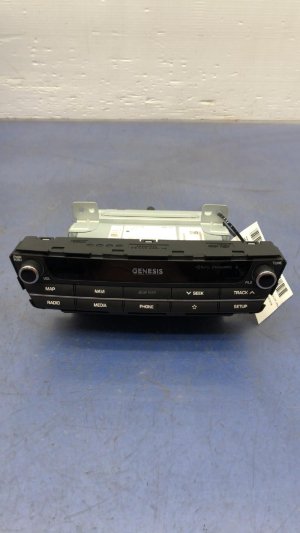
OEM Part Numbers: 96560B1EV14X 96560-B1EV14X 96560-B1EA04X 96560-B1EB14X
Integrated Audio Video Navigation (AVN) head unit with AM/FM, Satellite Radio, Navigation, Bluetooth, Apple CarPlay, and Android Auto support.
We Have This Part in Stock

The information in this article is provided for general reference and educational purposes only. Vehicle specifications, procedures, and part compatibility can vary by production date, trim level, and region. Always consult your vehicle's factory service manual and verify part numbers before purchasing or performing repairs. Safety-critical components such as airbags, seat belts, and braking systems should be installed by a qualified professional.
- Genesis G80:
- 🛍️ Shop This Part
- Symptoms of a Failing G80 Navigation Head Unit
- 1. Constant Rebooting or Boot Loop
- 2. Black or Blank Screen
- 3. Unresponsive Touch Screen or Controls
- 4. Navigation and Connectivity Errors
- Known Issues, TSBs, and Recalls
- Buying a Used G80 Navigation Head Unit
- 1. Match the Part Number Exactly
- 2. Budget for Dealer Programming
- 3. Inspect the Unit
- 4. Why Used OEM is the Best Choice
- Cost Comparison
- Frequently Asked Questions (FAQ)
- 🎟️ Get 5% Off