

2006-2012 Bentley Continental & Flying Spur Navigation DVD Drive Failure: Diagnosis and Replacement
Troubleshoot common "Navigation Not Available" errors and learn how to replace the glovebox-mounted DVD navigation unit in your Bentley Continental or Flying Spur.
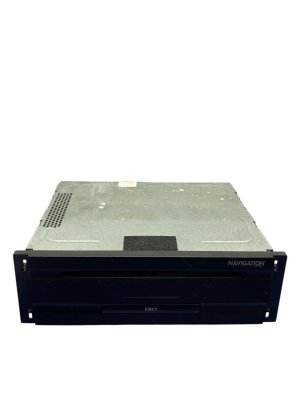
- This part is the DVD drive in the glovebox, not the main screen. Failure is common and usually presents as a "Navigation not available" error.
- A replacement unit with a matching part number does NOT require dealer programming. It is a plug-and-play swap.
- Symptoms can include the infotainment system being stuck on the Bentley logo, rebooting, or causing a parasitic battery drain.
- A used OEM unit is a cost-effective solution, but having your original unit repaired is also a great option that avoids any security code issues.
Key Vehicle-Specific Information
This guide covers the DVD-based navigation drive, identified by part numbers like 3W0919887F, found in the 2006-2012 Bentley Continental (GT, GTC) and 2006-2012 Bentley Flying Spur. These vehicles share the same infotainment architecture. It's important to distinguish this DVD-based system from the earlier CD-based systems (found in ~2003-2007 models) and the later Hard-Drive (HDD) based systems (found in ~2012 and newer models). This article specifically addresses the DVD drive located in the glove compartment.
Common Symptoms of a Failing Navigation DVD Drive
When the navigation drive begins to fail, you will notice issues specifically related to map and navigation functions. The radio, climate controls, and other infotainment features may still work correctly. Here are the most common signs of failure:
- "Navigation not available" or "Insert Navigation DVD" Error: The most frequent symptom is an error message on the main screen indicating that the system cannot read the map disc, even when one is inserted.
- System Stuck on Bentley Logo: The entire infotainment screen may get stuck on the Bentley splash screen or continuously reboot. This happens when the main system fails to initialize the faulty navigation module.
- Constant Disc Spinning Noise: You may hear the drive in the glovebox constantly spinning, clicking, or attempting to read the DVD without success.
- Parasitic Battery Drain: A faulty navigation drive can fail to shut down properly when the car is turned off, leading to a dead battery after the vehicle sits for a day or two.
- System Stuck in German: In some failure modes, the infotainment system may revert to German and lose the ability to change languages.
- Diagnostic Fault Codes: A professional scan tool may report a fault code for the navigation control unit, indicating it is faulty or not communicating.
Diagnosing the Problem
Before buying a replacement part, follow these steps to confirm the navigation drive is the culprit:
- Inspect the DVD: Eject the navigation DVD from the drive in the glovebox. Check it for deep scratches, cracks, or smudges. Clean it with a soft, lint-free cloth and re-insert it. Forum users note these drives can be very sensitive to disc condition.
- Try a System Reset: For some software-related glitches, a reset can restore functionality. On later models (around 2012), you can perform a three-button reset by pressing and holding the three buttons at the top of the infotainment screen simultaneously until the screen goes blank and reboots. An alternative is a "fuse pull" reset by temporarily removing the fuses for the infotainment system.
- Test with a Different Disc: If possible, test your system with a known-good, compatible Bentley navigation DVD. If another disc works, your original DVD is the problem. If the other disc also fails to load, the drive itself is almost certainly faulty.
Warning: Do not confuse a faulty drive with outdated maps. Buying a new map update DVD will not fix a drive that cannot read discs. If the system displays errors like "DVD read error" or "Insert DVD," the hardware has failed.
Programming and Anti-Theft Requirements
This is a critical topic for anyone replacing this module. Fortunately, the process is straightforward.
- No Dealer Programming Required: A replacement DVD navigation drive with a matching part number does not need to be programmed or coded by a Bentley dealer. It is a plug-and-play component. Repair shops confirm that claims of needing dealer coding are generally false for a like-for-like swap.
- 4-Digit Security PIN: Some units are linked to the car with a 4-digit security PIN. When installing a used unit, it may ask for this code. If you can get the code from the donor vehicle's paperwork, it simplifies the process. However, even if you don't have the code, many independent radio repair shops can retrieve or reset it. This is an anti-theft measure, not a complex immobilizer function.
Buying a Used GPS Navigation System
Given the extremely high cost of a new OEM unit from Bentley, a used OEM part is the most practical solution for most owners. Here’s what to look for:
- Verify the Part Number: The most important step is to match the part number. Remove your original unit from the glovebox and find the sticker on the casing. Match the part number (e.g., 3W0919887F or 3W0919887GX) with the used part you intend to buy.
- Check Compatibility: Ensure the donor vehicle falls within the correct generation. A drive from a CD-based system (pre-2007) or an HDD-based system (post-2012) will not work in your DVD-based vehicle.
- Physical Inspection: When you receive the used part, inspect the case for any signs of physical damage or water intrusion. Ensure the connectors are clean and free of corrosion.
- Ask for the Security Code: If possible, ask the seller if they can provide the 4-digit security PIN from the donor vehicle. While not always essential, having it can make installation smoother.
- Why Used OEM is a Good Choice: For this part, a used OEM unit is a reliable and cost-effective option. Aftermarket solutions typically involve replacing the entire infotainment system at a very high cost and complexity, often with a less-than-factory finish. A used OEM drive maintains the original functionality and appearance of your vehicle's interior.
Replacement Procedure Overview
Replacing the navigation drive is a simple DIY task that can be completed in under 30 minutes.
- Location: The unit is located inside the glovebox, typically on the upper shelf.
- Removal: It is held in place by a few screws. Once the screws are removed, the unit can be slid forward.
- Disconnection: Carefully disconnect the electrical connectors from the back of the unit.
- Installation: Connect the new unit, slide it back into place, and secure it with the screws. Power on the car to test functionality. You may be prompted to enter the security code if it's from a different vehicle.
Pro Tip: Before purchasing a replacement, consider sending your original unit to a specialized electronics repair service. They can often repair the internal laser mechanism or software for less than the cost of a used unit, and it guarantees you won't have any security code issues.
Cost Comparison
| Part Source | Estimated Cost | Notes |
|---|---|---|
| New OEM (Dealer) | $3,500 - $6,000+ | Extremely expensive and often unnecessary. |
| Used OEM (Recycled) | $150 - $600 | The most common and cost-effective solution. Prices vary by condition and seller. |
| Remanufactured / Repair Service | $300 - $800 | A great option. Your original unit is repaired, avoiding any potential compatibility or coding issues. |
| Shop Labor for Installation | $100 - $200 | Typically less than one hour of labor, as access is simple. |
Frequently Asked Questions (FAQ)
Does a replacement navigation drive need to be programmed by the dealer?
No. A like-for-like replacement with a matching part number is plug-and-play and does not require dealer programming. It may ask for a 4-digit security PIN, which is different from programming.
Is this part the same as the main infotainment screen?
No. This part is the DVD drive located in the glovebox. It reads the map data. The screen is a separate component in the dashboard.
My infotainment system is stuck rebooting. Can this part be the cause?
Yes, this is a very common symptom. A failure in the navigation drive can prevent the entire infotainment system from starting up correctly, causing it to get stuck on the Bentley logo or reboot in a loop.
Can I upgrade my system to have Apple CarPlay or Android Auto by replacing this part?
No. This part only handles the factory navigation. To add modern features like Apple CarPlay, you would need to purchase a specialized aftermarket kit that replaces the entire head unit and integrates with the vehicle's electronics, which is a much more complex and expensive project.
Will a new map update DVD fix my "Navigation not available" error?
No. If the drive's laser or mechanism has failed, it will not be able to read any disc, new or old. An error message indicates a hardware problem with the drive, not an issue with the map data on the disc.
Technical Specifications
OEM Part Numbers: 3W0919887F 3W0919887GX 3W0919887A
DVD-ROM based navigation computer. Located in glovebox.
We Have This Part in Stock

The information in this article is provided for general reference and educational purposes only. Vehicle specifications, procedures, and part compatibility can vary by production date, trim level, and region. Always consult your vehicle's factory service manual and verify part numbers before purchasing or performing repairs. Safety-critical components such as airbags, seat belts, and braking systems should be installed by a qualified professional.
- Bentley Continental:
- Bentley Flying Spur: