

2021 Toyota Highlander Navigation Module: Solving Blank Screens & Reboots
This guide explains common failures with the 2021 Highlander's navigation module, why part numbers are critical, and what to expect for replacement and programming.
- The part number on the replacement module MUST EXACTLY match the original part (e.g., 86840-0E082) to ensure compatibility.
- Common failure symptoms include a blank screen, constant rebooting, or a frozen display, often triggered by a battery disconnect.
- A replacement module, whether new or used, requires programming by a Toyota dealer or qualified shop with Techstream software.
- A used OEM module is a cost-effective alternative to a new dealer part, which can cost over $2,000.
Symptoms of a Failing 2021 Highlander Navigation Module
A problem with the GPS Navigation Control Module often looks like a problem with the main screen, but the module itself is the source. The most common symptoms are related to software and processing failures rather than just incorrect GPS data.
- Intermittent Blank or Black Screen: The most widely reported issue is the screen going black, often while driving. The audio may continue playing, but the display is unresponsive.
- Constant Rebooting: The system may get stuck in a loop where the Toyota logo appears, the system tries to load, then goes black and starts over.
- Frozen or Unresponsive Touch Screen: The display may be visible but will not respond to any touch inputs.
- Issues After Battery Disconnect or Replacement: Many owners first experience these symptoms after the vehicle's 12-volt battery has been disconnected or replaced. This suggests a software glitch that is triggered by a power cycle.
- GPS Inaccuracy or No Signal: While less common than screen issues, the module can fail to acquire a GPS lock, leading to an inaccurate vehicle position on the map or a "GPS Signal Lost" message.
Known Issues, TSBs, and Recalls
While there are no specific recalls for the navigation module itself, Toyota has issued a Technical Service Bulletin (TSB) that addresses the common symptoms.
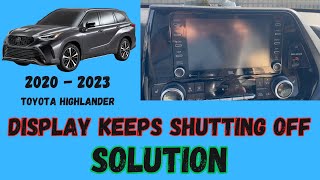
TSB T-SB-0055-22 (rev1): Released in June 2022, this TSB addresses "Abnormal 12.3-in. Radio Screen Operation" for 2020-2022 Highlander models. Symptoms covered include an intermittent blank screen, rebooting, and a frozen touch screen. 🎬 Watch this guide to fix a Highlander screen that won't stay on The bulletin notes that an updated "integration control module" is available to fix these conditions. This indicates Toyota is aware of the issue and has a hardware solution. The repair is covered under the standard 36-month/36,000-mile warranty.
There are several safety recalls for the 2021 Highlander, but none are directly related to the navigation module. Recalls cover issues such as the front bumper cover detaching, incorrect tire load ratings, airbag sensor faults, and seat back failures.
Pro Tip: Before assuming the module is bad, try a simple reset. Many owners report that software glitches causing a black screen can be temporarily fixed. One method is to press and hold the radio's power/volume knob for about 10-12 seconds until the system reboots. 🎬 See how to quickly troubleshoot an Apple CarPlay black screen Another unusual but reported fix involves turning the vehicle's power on (without starting the engine), putting the car in reverse with the parking brake on, and waiting for five minutes before restarting the car.
Replacement: Programming and Installation
Replacing the navigation module is not a simple plug-and-play operation. Due to the module's integration with the vehicle's systems, programming is required.
Programming Requirements
When a new or used navigation module is installed, it must be initialized to the vehicle. This process, sometimes called an "ECU Security Key Write," creates a digital handshake between the module and the vehicle's other computers. This procedure requires Toyota's proprietary diagnostic software, Techstream or GTS+. While a DIY mechanic can purchase the software and a compatible J2534 interface cable, the process involves a subscription to Toyota's Technical Information System (TIS) and can be complex. For most owners, a visit to a Toyota dealership or a qualified independent shop with the proper equipment is necessary.
Warning: Failure to properly program the module after installation can result in it not functioning at all. The vehicle may drive, but the entire infotainment system will be inoperative.
Buying a Used GPS Navigation Control Module: A Crucial Guide
Purchasing a used navigation module is an excellent way to save money, as new units are extremely expensive. However, you must be extremely careful to buy the correct part.
1. Match the Part Number EXACTLY: This is the most critical rule. The 2021 Highlander was built with different modules that are not interchangeable. The primary part numbers are 86840-0E081 and its superseding number, 86840-0E082. Using a module with a different part number, even if it looks identical, will likely result in incompatibility issues or a complete failure to operate. Always verify the part number on your original module before ordering a replacement.
2. Why Part Numbers Matter: These modules are tied to specific vehicle options, such as the size of the display (8-inch vs. 12.3-inch), the type of audio system (JBL vs. standard), and other trim-level features. The internal hardware and software are different. A module from a vehicle with a different configuration will not work correctly in yours.
3. Physical Inspection: When buying a used module, inspect the casing for any signs of damage, especially water intrusion. Check that all connector pins are straight and free of corrosion. Since this is a purely electronic part, there are no moving components to wear out, so a unit from a low-mileage vehicle is not necessarily better than a high-mileage one, as long as it is the correct, functioning part.
4. Source and Value: A used OEM module is almost always a better choice than a new aftermarket unit. Genuine Toyota parts are designed to integrate seamlessly with the vehicle's complex electronics. Aftermarket systems often lack full integration and can cause new, unforeseen issues.
Cost of Replacement
The cost of replacing the navigation module can vary significantly based on the source of the part.
| Part Source | Estimated Cost |
|---|---|
| New OEM (Dealer) | $2,100 - $3,300 |
| Used OEM (Recycled) | $350 - $600 |
| Remanufactured OEM | $245+ (for older, similar part numbers) |
| Shop Labor (Installation & Programming) | $150 - $300 |
Frequently Asked Questions (FAQ)
Does a replacement navigation module need to be programmed?
Yes. A new or used module must be programmed or initialized to the vehicle using Toyota's Techstream or GTS+ software. This requires a trip to a dealer or a properly equipped independent shop.
What is the difference between part numbers 86840-0E081 and 86840-0E082?
Part number 86840-0E082 is a newer version that replaces 86840-0E081. While a newer part sometimes works in place of an older one, it is always safest to match the part number from your vehicle's original module exactly to ensure compatibility.
Can I upgrade my Highlander from a non-navigation model using this part?
No, this is not a simple upgrade. A vehicle originally equipped with navigation has different wiring harnesses and potentially a different display screen and amplifier. Attempting to add factory navigation is complex and extremely expensive. It is far more practical to use Apple CarPlay or Android Auto for navigation.
My screen is blank. Is it the screen or the navigation module?
It is most likely the navigation module (or a related control module). TSB T-SB-0055-22 specifically identifies the module as the cause for blank screens, rebooting, and freezing. Even if the backup camera works, the main module that controls the infotainment can still be faulty.
Helpful Videos

Technical Specifications
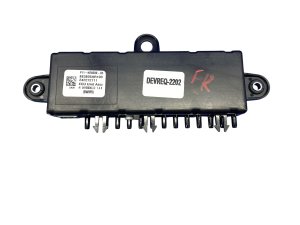
OEM Part Numbers: 86840-0E081 86840-0E082 868400E082
Also known as: Computer Assembly NAVIG, Radio Control Unit, Tuner. This module is separate from the display screen and main radio unit.
We Have This Part in Stock



The information in this article is provided for general reference and educational purposes only. Vehicle specifications, procedures, and part compatibility can vary by production date, trim level, and region. Always consult your vehicle's factory service manual and verify part numbers before purchasing or performing repairs. Safety-critical components such as airbags, seat belts, and braking systems should be installed by a qualified professional.
- Toyota Highlander:
- 🎬 Helpful Videos
- 🛍️ Shop This Part
- Symptoms of a Failing 2021 Highlander Navigation Module
- Known Issues, TSBs, and Recalls
- Replacement: Programming and Installation
- Programming Requirements
- Buying a Used GPS Navigation Control Module: A Crucial Guide
- Cost of Replacement
- Frequently Asked Questions (FAQ)
- 🎟️ Get 5% Off