

2001-2004 Saab 9-5 & 9-3 OnStar GPS Module: Why a Dead Part Still Causes Problems
This guide explains why the obsolete OnStar module in your Saab 9-5 or 9-3 can still cause battery drain and navigation system failures, and what you can do about it.
- This module's primary OnStar function is obsolete due to cellular network shutdowns; do not replace it expecting OnStar service to work.
- Replacement is necessary to fix parasitic battery drain or restore the GPS signal to the factory navigation system.
- A replacement module MUST be programmed to the car with a Saab Tech 2 scanner to function.
- For 2003 Saab 9-3s, this part ONLY fits the Convertible and Hatchback, NOT the Sedan.
The Obsolete OnStar Service: A Critical Starting Point
Before diagnosing any issues, it's essential to understand that the core services this module was built for are no longer active. The analog cellular network it relied on was shut down by the FCC in 2008, and the later 2G networks have also been decommissioned. This means that even with a perfectly functioning module, you cannot make OnStar emergency calls, use remote services, or subscribe to the service. Replacing a faulty module will not bring these features back. The reasons to replace this module today are solely to fix collateral issues caused by its failure.
Symptoms of a Failing OnStar Module
When this module fails, it doesn't just die quietly. Its failure can create frustrating electrical problems in your Saab 9-5 or 9-3. Here are the most common symptoms:
- Parasitic Battery Drain: This is the most frequent complaint. A faulty OnStar module can fail to enter its low-power "sleep" mode when the car is off. It remains active, continuously drawing power and draining the battery, often over a period of two to four days. This issue can occur even if you've never had an OnStar subscription.
- Factory Navigation Malfunctions: If your Saab is equipped with the factory navigation system, a failed OnStar module can cause the map to show an incorrect vehicle position or no position at all. This happens because the GPS antenna signal is routed through the OnStar module before it reaches the navigation head unit. You may also experience the clock displaying the wrong time, as it relies on the GPS signal for synchronization.
- "OnStar Malfunction" Message: A persistent error message may appear on the Saab Information Display (SID), which can be an annoyance during every drive.
- Loss of Audio or Infotainment Functions (2003 9-3): On the 2003 Saab 9-3 Convertible and Hatchback, the audio and infotainment components are connected in a fiber-optic loop. If the OnStar module fails, it can break this communication "ring," causing other components like the amplifier or CD changer to stop working.
Compatibility Warning for 2003 Saab 9-3 Owners: The 2003 model year was a transition period. This specific OnStar module fits ONLY the 2003 Saab 9-3 Convertible and 5-door Hatchback models. It does NOT fit the 2003 Saab 9-3 Sport Sedan, which is a different generation built on a new platform.
Diagnosing the Module
If you suspect a parasitic battery drain, you can perform a draw test. This involves disconnecting the negative battery terminal and connecting a multimeter in series to measure the amperage draw after the vehicle has been off for at least 30 minutes, allowing all modules to go to sleep. A normal draw should be very low (typically under 50 milliamps). If the draw is high, you can start pulling fuses one by one. The OnStar module fuse is a common culprit. If pulling its fuse causes the draw to drop significantly, you've likely found the problem. For definitive diagnosis of communication or GPS signal issues, a Saab-specific Tech 2 diagnostic scanner is required to communicate with the module and read any specific trouble codes.
Buying a Used GPS Navigation Control Module
Since new OEM parts are no longer available, a quality used module is the only option. Here’s what to look for:
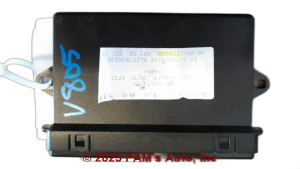
- Match the Part Number: This is the most critical step. There are several compatible part numbers, but you must match one from your original module to the replacement. Check the label on your existing unit and compare it to the seller's listing.
- Inspect the Connectors: Ask the seller for clear photos of the connector pins. Look for any signs of corrosion (green or white crust), which can indicate water damage and lead to a short lifespan.
- Vehicle Fitment: Double-check that the module is from a compatible vehicle: a 2001-2004 Saab 9-5 or a 2001-2003 Saab 9-3 (Convertible/Hatchback only).
- Why Used OEM is Best: There are no new aftermarket versions of this specific, complex module. A recycled OEM part is the only reliable and available solution. It was designed by Saab to integrate perfectly with the vehicle's systems, provided it is programmed correctly.
Replacement, Programming, and Alternatives
Module Location
- 2001-2004 Saab 9-5: The module is typically located under the luggage compartment floor in wagon (5-door) models or behind the glove box in sedan models.
- 2001-2003 Saab 9-3: The module is located in the trunk, often mounted on a bracket behind the side trim panel.
Programming is Required
Warning: This is not a plug-and-play part. After installation, a replacement module must be programmed, or "married," to your vehicle's VIN using a Saab Tech 2 scanner. Without this step, the module will not be recognized by the car's other computers, and your issues will likely persist. This programming can be done by a Saab dealership or a qualified independent Saab specialist who owns a Tech 2.
The DIY Alternative: Bypassing the Module
If you do not use the factory navigation and simply want to eliminate the error messages or battery drain, you can bypass the module entirely. For the 2003 9-3 models that use a fiber optic loop, you can purchase a simple fiber optic bypass adapter. This adapter connects the incoming and outgoing fiber optic cables together, completing the circuit and allowing the rest of your audio system to function. For other models, simply unplugging the module may solve a battery drain, but it will set permanent trouble codes. The correct way to remove it from the system is to have a technician with a Tech 2 reprogram the vehicle to know the module is no longer present.
Pro Tip: If your only issue is a parasitic battery drain and you don't want to spend money on a replacement module and programming, simply pulling the fuse for the OnStar module is a simple, free, and reversible way to stop the drain. However, this will also disable the GPS signal to your navigation unit.
Cost of Replacing the OnStar Module
| Part or Service | Estimated Cost |
|---|---|
| New OEM Module | Not Available |
| New Aftermarket Module | Not Available |
| Used OEM Module | $40 - $120 |
| Shop Labor (Installation & Programming) | $150 - $300 |
Frequently Asked Questions
Does this module need to be programmed after installation?
Yes, absolutely. A replacement module must be "married" to your car using a Saab Tech 2 diagnostic tool. Without this programming step, it will not function correctly.
If I replace the module, will my OnStar service work again?
No. The analog and 2G cellular networks required for the service have been permanently shut down. The only reasons to replace the module are to fix battery drain or restore the GPS signal to your factory navigation system.
Why did my factory navigation stop working?
The GPS antenna signal passes through the OnStar module to get to the navigation screen. When the OnStar module fails, it can block this signal, causing your navigation to lose its location data.
Can I just unplug the module to fix my battery drain?
You can, and it will stop the battery drain. However, it will also disable your factory navigation's GPS signal and may cause persistent error codes. On 2003 9-3 models with a fiber optic loop, unplugging it will disable other parts of your audio system unless you install a bypass loop.
Technical Specifications
OEM Part Numbers: 0013207573 0013209153 05375027 12207509 12207549 13209153 5370556 5372115 9389729
Primary Function: OnStar Telematics Communication. Secondary Function: GPS Signal Processing. Cellular Technology: Analog AMPS / 2G CDMA (Obsolete).
We Have This Part in Stock




The information in this article is provided for general reference and educational purposes only. Vehicle specifications, procedures, and part compatibility can vary by production date, trim level, and region. Always consult your vehicle's factory service manual and verify part numbers before purchasing or performing repairs. Safety-critical components such as airbags, seat belts, and braking systems should be installed by a qualified professional.
- Saab 9-5:
- Saab 9-3:
- 🛍️ Shop This Part
- The Obsolete OnStar Service: A Critical Starting Point
- Symptoms of a Failing OnStar Module
- Diagnosing the Module
- Buying a Used GPS Navigation Control Module
- Replacement, Programming, and Alternatives
- Module Location
- Programming is Required
- The DIY Alternative: Bypassing the Module
- Cost of Replacing the OnStar Module
- Frequently Asked Questions
- 🎟️ Get 5% Off