

Bentley Continental & Flying Spur Navigation Module Failure: Reboot Loops, Blank Screens & Fixes (2004-2012)
Diagnose and fix the common infotainment system failures in your 2004-2011 Bentley Continental or 2006-2012 Bentley Flying Spur, and understand the critical repair, programming, and compatibility requirements.
- The most common failure is a constant reboot loop, which is typically repairable.
- Repairing your original unit is highly recommended to avoid costly and complex VIN programming required for a replacement module.
- These modules are region-locked; a used part from Europe or Japan will not work correctly in a North American car without being recoded.
- A faulty module can cause a parasitic battery drain, so it should be investigated if you experience a dead battery.
Symptoms of a Failing Navigation Module
A failing navigation module in a 2004-2011 Bentley Continental (GT, GTC) or 2006-2012 Bentley Flying Spur typically presents obvious and disruptive symptoms. Because this single unit controls so many functions, failure is hard to ignore. Owners most commonly report issues that begin intermittently and worsen over time.
- Constant Rebooting: The most widely reported symptom is the system getting stuck in a reboot loop. The screen will display the Bentley logo, then go blank and restart the process repeatedly, never fully loading the main menu.
- Blank or Frozen Screen: The unit may fail to power on entirely, resulting in a black or blank screen. Alternatively, the screen might power on but display a white screen or freeze on the Bentley boot animation.
- Unresponsive Touchscreen: The display may light up, but it will not respond to touch commands, making it impossible to control any of the infotainment or climate functions.
- No GPS Signal: The navigation system may fail to locate the vehicle, constantly showing a "Searching for satellites" message or displaying an incorrect location. This can be a fault in the head unit's internal GPS tuner or the external GPS antenna.
- Popping Sounds from Speakers: Some failures are accompanied by a distinct popping or crackling sound from the vehicle's speakers, especially during the boot-up sequence.
- System Stuck in German: A specific software glitch can cause the unit to get stuck in the German language, with no ability to change it back.
- Parasitic Battery Drain: A faulty module can fail to shut down correctly when the vehicle is turned off, causing a significant drain on the main vehicle battery. If your battery repeatedly dies, this unit could be the culprit.
Known Issues, TSBs, and Recalls
While there are no specific NHTSA recalls for the navigation module itself in these vehicles, Bentley has issued Technical Service Bulletins (TSBs) to its dealers regarding the diagnosis of these units. TSBs like 2030765/8 instruct technicians to perform a system reset before replacing the unit.
Pro Tip: Before assuming the unit is dead, try a system reset. There are two methods: a "button press reset" or a "fuse pull reset." A simple reboot can sometimes resolve temporary software glitches without requiring removal or repair of the unit.
The primary cause of failure is the degradation of internal electronic components over time due to heat and age. Key components like capacitors, flash memory chips, and internal power regulators are known to fail, leading to the common symptoms listed above. In some cases, software corruption on the internal hard drive can also cause the constant rebooting issue.
Buying a Used GPS Navigation Module: A Buyer's Guide
Given the high cost of a new OEM unit, many owners consider a used or repaired module. This is a viable option, but there are critical factors to consider to avoid purchasing an incompatible or faulty part.
1. Repair Your Original Unit If Possible
The best option is often to have your vehicle's original unit repaired by a specialist. The mainboard is coded to your vehicle's VIN. Repairing the original unit means you can typically reinstall it without needing any expensive dealer programming or coding. Many services can perform component-level repairs on the mainboard, replace the hard drive, and update the software, which resolves the most common issues.
2. Verify Part Numbers and Regional Compatibility
If you must buy a used replacement, part number matching is essential. These units are specific to a geographic region (e.g., North America, Europe, Japan) for map data and radio frequencies. A unit from a different region will not function correctly without being professionally recoded.
- Known Part Numbers: 3W0919887A, 3W0919887AX, 3W0919887J, 3W0919887Q, 3W0919887QX, 3W0035017C, 3W0035017L, 3W0035017G.
- Inspect Carefully: When buying used, look for signs of tampering or previous failed repair attempts. Ask the seller if the unit has been tested and is confirmed to be fully functional.
Warning: A used module from another vehicle will likely require programming by a Bentley dealer or a specialist with the correct tools to pair it to your car's VIN and unlock it with a 4-digit security PIN. Factoring in this potential cost is crucial.
3. Aftermarket Alternatives
Several companies offer kits to replace the factory unit with a modern, double-DIN head unit from brands like Kenwood or Pioneer. These kits include a new fascia and an interface to retain factory functions like climate control. While this provides modern features like Apple CarPlay and Android Auto, the total cost of the kit and installation can be very high.
Cost of Replacement
The cost to fix a failed Bentley navigation module varies dramatically depending on the solution you choose.
| Solution | Estimated Cost |
|---|---|
| New OEM Unit (Dealer) | $5,000 - $7,000+ |
| Used OEM Unit | $500 - $900 (plus potential programming costs) |
| Repair Service (Original Unit) | $900 - $1,500 |
| Shop Labor for Removal/Installation | $200 - $400 |
Replacement Overview
Removing the head unit is a moderately difficult job that a skilled DIYer can perform. The process involves carefully prying trim panels and removing a few screws.
- Move the gear shifter to provide clearance.
- Carefully pry up and remove the trim panel surrounding the gear shifter and clock. Use plastic trim tools to avoid scratching the wood veneer.
- Disconnect the electrical connectors for the clock and other components on the trim panel.
- This will expose four Torx screws (typically T20 or T25) that secure the head unit to the dashboard.
- Slide the head unit out and disconnect the large main connector and various antenna cables from the back. These connectors have locking tabs that must be released carefully.
Installation is the reverse of removal. If you had your original unit repaired, it should be plug-and-play.
Frequently Asked Questions (FAQ)
Does a replacement navigation module need to be programmed by a dealer?
If you are installing a used or new replacement unit, then yes, it will almost certainly require programming to your car's VIN. However, if you have your car's original module repaired and re-install it, no programming is typically needed.
Can I upgrade my 2006 Continental GT to have Apple CarPlay?
Yes, but not with an OEM part for this generation. You would need to use an aftermarket radio replacement kit from a company like NAV-TV, which allows you to install a modern double-DIN radio that has CarPlay. This can be a costly and complex installation.
My navigation screen is stuck on the Bentley logo. Is it broken?
This is the most common symptom of a failure, usually related to software corruption or a failing internal component like the hard drive or mainboard. While it indicates a definite fault, it is often repairable by a specialist service without needing a full replacement.
Why is my car's battery dying? Could the navigation unit be the cause?
Yes. A known failure mode for this module is failing to enter its low-power sleep mode when the car is off, which creates a parasitic draw that can drain the battery. If you are experiencing battery drain issues, this unit is a likely suspect.
Technical Specifications
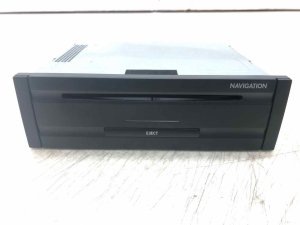
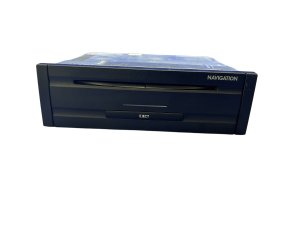
OEM Part Numbers: 3W0919887A 3W0919887AX 3W0919887J 3W0919887Q 3W0919887QX 3W0035017C 3W0035017F 3W0035017G 3W0035017L 3W0035017T 3W0035008
Integrates navigation, radio, media (CD), and climate control functions. Communicates with vehicle via CAN bus. Contains internal hard drive for map data. Requires a 4-digit security PIN for activation in a new vehicle.
We Have This Part in Stock

The information in this article is provided for general reference and educational purposes only. Vehicle specifications, procedures, and part compatibility can vary by production date, trim level, and region. Always consult your vehicle's factory service manual and verify part numbers before purchasing or performing repairs. Safety-critical components such as airbags, seat belts, and braking systems should be installed by a qualified professional.
- Bentley Continental:
- Bentley Flying Spur:
- 🛍️ Shop This Part
- Symptoms of a Failing Navigation Module
- Known Issues, TSBs, and Recalls
- Buying a Used GPS Navigation Module: A Buyer's Guide
- 1. Repair Your Original Unit If Possible
- 2. Verify Part Numbers and Regional Compatibility
- 3. Aftermarket Alternatives
- Cost of Replacement
- Replacement Overview
- Frequently Asked Questions (FAQ)
- 🎟️ Get 5% Off