

2007-2015 Nissan Titan Fusible Link Holder: Solving Total Power Loss & No-Start Issues
This guide explains how to diagnose, replace, and buy the correct engine bay main fuse holder, a common cause of a completely dead 2007-2015 Nissan Titan.
- The most common symptom of failure is a completely dead truck with no electrical power, which a jump-start will not fix.
- This part is the Fusible Link Holder on the battery terminal, NOT the more complex IPDM (Intelligent Power Distribution Module).
- Replacement requires NO programming or special tools, making it a very simple DIY repair.
- Corrosion is the primary cause of failure; always clean all metal contact points thoroughly during replacement and apply a corrosion protectant.
Is It Your Fusible Link Holder or the IPDM?

When a 2007-2015 Nissan Titan has electrical problems, especially a no-start condition, confusion often arises between two different parts in the engine bay: the Fusible Link Holder and the Intelligent Power Distribution Module (IPDM). It is critical to know the difference, as they have very different symptoms and costs.
Important: The part this guide covers is the Fusible Link Holder, which attaches directly to your positive battery terminal. It is NOT the IPDM, which is a larger, black or white plastic box nearby that contains many smaller fuses and relays.
| Feature | Fusible Link Holder (This Guide) | IPDM (Intelligent Power Distribution Module) |
|---|---|---|
| Location | Bolted directly to the positive battery terminal. | A separate box near the battery, containing many fuses and relays. |
| Primary Symptom of Failure | Complete loss of all electrical power. No lights, no crank, no accessories. The truck is totally dead. | Engine cranks but won't start. Engine stalls while driving. Specific systems (like headlights or fuel pump) don't work. |
| Function | A simple, non-electronic block of high-amperage fuses. | A computerized module with internal relays that controls power to the ECM, fuel pump, fans, etc. |
| Programming Required? | No. It is a plug-and-play part. | No. For this generation of Titan, the IPDM is also typically plug-and-play. |
Symptoms of a Failing Fusible Link Holder

Failure of the fusible link holder is usually dramatic and easy to spot. Look for these key signs:
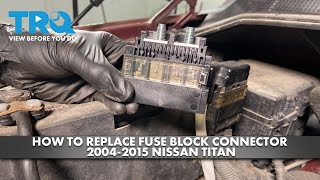
- Total Electrical Blackout: This is the most common symptom. You get in the truck and nothing works—no dome lights, no dashboard, no radio, and no sound when you turn the key. Trying to jump-start the vehicle will have no effect. 🎬 Watch this video to diagnose a total loss of electrical power.
- Intermittent Power Loss: Before a complete failure, you might experience flickering lights or a total loss of power that is temporarily fixed by wiggling the positive battery terminal. This points to severe corrosion inside the holder.
- Visible Damage: The fusible links are visible through small, clear plastic windows on the unit. A blown link will show a clear break in the metal strip inside. You may also see melted plastic or signs of extreme heat.
- Heavy Corrosion: A buildup of white or greenish powder on the battery terminal and the fusible link holder is a major red flag. This corrosion creates high resistance, which generates heat and can lead to intermittent connections or complete failure.
Step-by-Step Replacement Guide

Replacing the fusible link holder is a straightforward job that most DIY mechanics can complete in under 30 minutes with basic hand tools.
Pro Tip: Before you begin, take a picture of the wiring connections on the old unit to ensure you put them back in the correct order.
- Safety First: Disconnect the Battery. Always disconnect the negative battery terminal first using a 10mm wrench. Tuck the cable aside to prevent it from accidentally touching the battery post.
- Remove the Cover: Unclip and remove the red plastic cover from the fusible link holder.
- Disconnect the Main Wires: Using a 10mm or 12mm socket, remove the nuts holding the main vehicle power wires to the front of the fusible link holder. Lift the wires off the studs.
- Remove the Holder: Loosen and remove the 12mm nut that clamps the holder to the positive battery post. Wiggle the entire assembly and lift it off.
- Disconnect Wiring Harnesses: There are typically two small electrical connectors on the sides or bottom of the holder. Press the release tabs and carefully unplug them.
- Clean All Connections: Before installing the new part, it is essential to clean all contact points. Use a wire brush to clean the battery post and the ring terminals on the main power wires until they are shiny.
- Install the New Fusible Link Holder: Connect the small wiring harnesses to the new unit. Place it onto the positive battery post and tighten the 12mm clamping nut. Re-attach the main power wires and tighten their nuts securely.
- Apply Protectant: To prevent future issues, apply a thin layer of dielectric grease to the small harness connectors and a coating of anti-corrosion spray or grease over the entire terminal area.
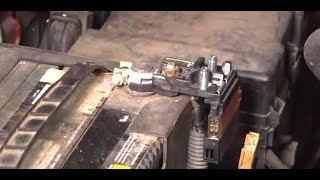
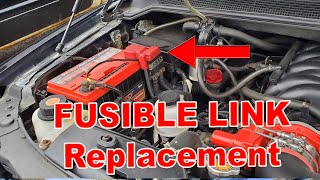
- Reconnect Battery: Reconnect the negative battery terminal and tighten it. Start the vehicle to confirm the repair. 🎬 See this step-by-step fusible link replacement walkthrough.
Buying a Used Fusible Link Holder: What to Look For
Because this part is not an electronic module, a used OEM unit is an excellent, cost-effective option. When buying a recycled fusible link holder, here’s what to inspect:
- Check the Windows: Look through the clear windows on top of the unit. Ensure all the metal links are intact with no visible breaks or burn marks.
- Inspect for Melting: Check the plastic housing, especially around the wire connection studs, for any signs of melting, warping, or discoloration from heat.
- Examine the Terminals: Look for clean, corrosion-free terminal studs and battery clamp. Minor surface dullness is okay, but avoid any parts with heavy green or white corrosion buildup.
- Verify Part Numbers: While many of these units look similar, there can be slight differences in amperage ratings. Match the part number from your original unit to the replacement whenever possible to ensure 100% compatibility.
Cost of Replacement
Replacing the fusible link holder is an affordable repair, especially if you do it yourself.
| Part Source | Estimated Cost |
|---|---|
| New OEM | $40 - $75 |
| New Aftermarket | $30 - $60 |
| Used OEM | $25 - $50 |
| Shop Labor | $60 - $90 |
Known Issues, Recalls, and TSBs
There are no specific recalls or Technical Service Bulletins (TSBs) from Nissan for the fusible link holder on the 2007-2015 Titan. However, a number of electrical issues have been reported for this vehicle generation.
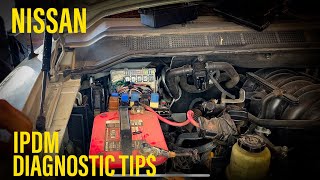
- IPDM Failures: As mentioned, the IPDM is a known failure point that can cause stalling and crank-no-start issues. A recall was issued for an ECM relay within the IPDM on some earlier Nissan models, which can cause similar problems. 🎬 Watch: Nissan IPDM and relay diagnostic tips.
- Fuel Gauge Inaccuracy: A recall was issued for the fuel sending unit, which could cause the fuel gauge to read inaccurately, typically showing more fuel than is actually in the tank.
- Wiring Harness Chafing: Some owners have reported issues with wiring harnesses chafing, particularly in the steering column, which can cause intermittent electrical failures for components like the manual shift mode button.
Does a replacement fusible link holder need to be programmed?
No. The fusible link holder is a non-electronic part and does not require any programming, flashing, or calibration. It is a simple plug-and-play replacement.
Can I replace just one blown link inside the assembly?
No, the fusible links are integrated into the housing and are not designed to be serviced individually. The entire fusible link holder assembly must be replaced as a single unit.
My truck is completely dead. Is the fusible link the problem?
If your truck has absolutely no electrical power (no lights, no crank, no accessories) and a jump-start doesn't work, a blown main fusible link is the most likely cause. The second most likely cause is a completely failed battery or a loose/corroded main battery connection.
Why did my fusible link blow?
The most common reason for failure is long-term corrosion creating high resistance and heat. Other causes include a severe electrical short in a major component, or connecting jumper cables incorrectly (reversed polarity). If a new fusible link blows immediately upon installation, you have an underlying severe short circuit that must be diagnosed and repaired.
Helpful Videos
Technical Specifications
OEM Part Numbers: 24382-7S100 24382-7S110 24382-9FM0B 24382-9FM0C 24382-ZE00A 24382-ZV01A 24380-79915 24380-79912
Connects directly to the positive battery terminal. Contains multiple non-serviceable fusible links of various amperages (e.g., 40A, 80A, 120A).
We Have This Part in Stock



The information in this article is provided for general reference and educational purposes only. Vehicle specifications, procedures, and part compatibility can vary by production date, trim level, and region. Always consult your vehicle's factory service manual and verify part numbers before purchasing or performing repairs. Safety-critical components such as airbags, seat belts, and braking systems should be installed by a qualified professional.
- Nissan Titan: