

2013-2018 Nissan Altima IPDM (Fuse Box): A Guide to Stalling, No-Start & Electrical Issues
This guide covers common failure symptoms, part number matching, and replacement for the Intelligent Power Distribution Module (IPDM) in 2013-2018 Altimas.
- The main fuse box is a computer called the IPDM (Intelligent Power Distribution Module); its failure is a common cause of stalling and no-start issues.
- A replacement IPDM for a 2013-2018 Altima does NOT need to be programmed; it is a plug-and-play part.
- You MUST match the OEM part number from your old module exactly, as compatibility is complex and depends on engine, trim, and options.
- A built-in "Auto Active Test" can help diagnose if the IPDM is functioning correctly by cycling the lights, wipers, and fans.
What is the IPDM E/R in a Nissan Altima?

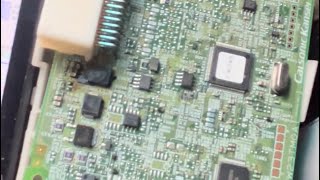
In the 2013-2018 Nissan Altima, the component most people call the "engine fuse box" is technically the Intelligent Power Distribution Module Engine Room, or IPDM E/R. Unlike a simple fuse panel, the IPDM is a smart device with its own internal processor that communicates with other computers in the car, like the Body Control Module (BCM). It takes commands from the BCM and uses a series of internal, solid-state relays to switch power ON and OFF for many of the car's most important functions. Because it's a complex electronic part, it can fail in ways a simple fuse block cannot.
Symptoms of a Failing 2013-2018 Altima IPDM

A faulty IPDM can cause a variety of strange and often intermittent electrical issues. The most common symptoms point to the module failing to provide consistent power to critical components.
- Engine cranks but won't start: This is the most reported symptom. The starter will turn the engine over, but the engine never fires up because the IPDM is not activating the fuel pump or ignition system relays.
- Sudden engine stalling: The engine may shut off unexpectedly while driving, often at lower speeds. 🎬 See how a stalling Altima is diagnosed and fixed. This is a significant safety hazard and can happen without warning.
- Intermittent electrical failures: You might notice headlights flickering, wipers behaving erratically, or the air conditioning compressor failing to engage.
- Cooling fans run constantly or not at all: The IPDM controls the cooling fan relays. If it fails, the fans might run continuously, draining the battery, or not turn on at all, leading to engine overheating.
- Parasitic battery drain: A fault inside the IPDM can cause a circuit to remain active even when the car is turned off, leading to a dead battery overnight.
- Multiple, unrelated warning lights: Communication errors caused by a faulty IPDM can sometimes trigger various warning lights on the dashboard.
OBD-II Codes Associated with IPDM Failure
A failing IPDM often does not store a trouble code that points directly to itself. Instead, it may cause other modules to log communication errors (U-codes) or codes related to the systems it controls. For example, you might see codes for the Mass Airflow (MAF) sensor or fuel pump circuit if the IPDM is cutting power to them. It's important to note that many other issues, like a bad crankshaft sensor or fuel pump, can cause similar symptoms, so proper diagnosis is key.
Known Issues, Recalls, and Technical Service Bulletins (TSBs)
While there are no specific recalls for the IPDM module itself on the 2013-2018 Altima, several related service campaigns and bulletins are relevant.
- No Recall for IPDM: As of early 2026, there has not been a recall issued by Nissan or the NHTSA for the IPDM on these vehicles.
- Hood Latch Recall: A major safety recall (NHTSA #20V315000) was issued for all 2013-2018 Altimas concerning the secondary hood latch. Corrosion can cause the latch to fail, potentially allowing the hood to open while driving. This is important to check on any used Altima.
- TSB for CAN Communication: Nissan issued a bulletin (NTB15-083b) providing diagnostic tips for technicians dealing with CAN communication codes (U-codes). Since a failing IPDM can cause these codes, this bulletin is a useful resource for professional diagnosis.
- TSB for Headlight Dimming: Bulletin NTB22-002A addresses an issue where headlamps can become dim due to delamination. Nissan extended the warranty to cover this specific problem. While not an IPDM failure, it relates to a system controlled by the IPDM.
How to Diagnose a Faulty Altima IPDM

If you suspect the IPDM is the source of your electrical problems, there are two key diagnostic steps you can take before replacing it.
1. Perform the IPDM "Auto Active Test"
Nissan built a self-test function into the IPDM that allows you to check its output to major systems. This test will cycle the wipers, various lights, the A/C compressor clutch, and the cooling fans. If these components activate during the test, it confirms the IPDM's internal relays and the wiring to those components are likely working.
- Get in the car and close all doors. Lift the wiper blades off the windshield to prevent scratching.
- Turn the ignition ON (push the start button twice without your foot on the brake). Do not start the engine.
- Within 20 seconds, press the driver's door jamb switch (the small black plunger that detects if the door is open) 10 times.
- Turn the ignition OFF.
- Turn the ignition back ON. The horn should honk once, signaling the start of the test.
- The car will now cycle through its systems: wipers will run, lights will flash, and you should hear the A/C compressor clutch click. 🎬 Watch: Diagnosing A/C issues using the IPDM self-test. This cycle will repeat three times.
- To end the test, turn the ignition off.
Pro Tip: If a component like the cooling fan doesn't work during the self-test, the problem is likely the fan itself, the wiring, or the IPDM. If all components work during the test but fail during normal operation, the problem may lie with the input signal to the IPDM (from the BCM or another sensor).
2. Check for Water Intrusion
A common cause of electronic module failure is water damage. Disconnect the negative battery terminal, then unplug the large electrical connectors from the IPDM. Carefully inspect the pins on both the module and in the connectors for any signs of white or green corrosion, which indicates water has gotten inside.
Buying a Used Fuse Box: What to Look For

Given the high cost of a new IPDM, a used OEM unit is a very popular and cost-effective solution. Here’s what to know before you buy.
Crucial: Match the Part Number EXACTLY
The single most important step is to match the OEM part number from your original IPDM to the one you are buying. Nissan used many different IPDMs for this Altima generation depending on the engine, trim level, and options. The compatibility warnings are not suggestions—they are requirements.
Warning: The initial data for this guide highlighted numerous compatibility issues. For example, some IPDMs fit only 2.5L Base/S trims, while others are specific to 3.5L SV/SL trims. Do not rely on visual appearance. You must remove your old unit and read the part number printed on the label.
Known OEM part numbers include: 240123NT1A, 240123TA0A, 240123TA1A, 240129HP2C, 240129HP2D, 240129HS0A, 240129HS0D, 240129HS1D, 240129HS4D, 240129HT2A.
Physical Inspection
When buying a used IPDM, inspect it carefully:
- Check for Corrosion: Look at all connector pins for any hint of green or white powder. Do not buy a unit with any signs of corrosion.
- Inspect the Case: Check for melted plastic around the fuse sockets or cracks in the housing, which could indicate a past short circuit or heat damage.
- Verify All Fuses are Present: Ensure the fuse layout looks complete and hasn't been scavenged for parts.
Why Used OEM is a Smart Choice
For a complex electronic module like the IPDM, a used OEM part is often a better choice than a new aftermarket one. A genuine Nissan part that has been tested and verified from a reputable recycler ensures perfect fitment, original software logic, and factory-grade durability, often at a fraction of the cost of a new part from the dealer.
Programming and Installation Guide
Does the 2013-2018 Altima IPDM Need to be Programmed?
No. A replacement IPDM for this generation of Nissan Altima does not need to be programmed or flashed. It is a plug-and-play installation. You do not need to visit a dealer for programming as long as you have installed a compatible IPDM with the correct part number.
Step-by-Step Replacement
- Disconnect the Battery: Always disconnect the negative battery terminal and wait a few minutes before working on any vehicle electronics.
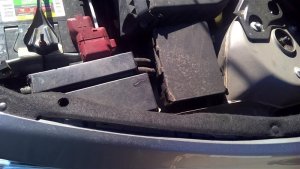
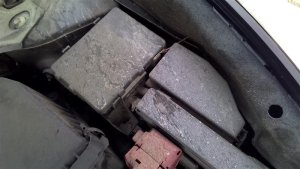
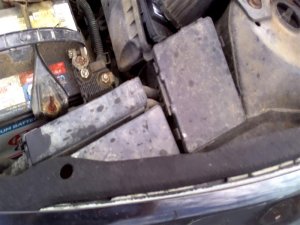
- Locate the IPDM: The IPDM is located in the engine compartment, typically on the passenger side near the battery. It is a black box with fuses and several large electrical connectors.
- Remove the Cover: Release the clips on the IPDM cover to expose the module.
- Disconnect Electrical Connectors: Carefully press the release tabs on each large wiring harness connector and pull them straight out from the IPDM. Do not force them.
- Remove the IPDM: The module is held in place by retaining clips. Gently release these clips and lift the IPDM out of its housing.
- Install the New IPDM: Seat the replacement module firmly in place, ensuring it clicks into its retaining clips.
- Reconnect Everything: Plug all electrical connectors back in until they click securely. Reinstall the cover and reconnect the negative battery terminal.
Cost of a 2013-2018 Nissan Altima IPDM
The cost to replace an IPDM can vary significantly depending on the source of the part.
| Part Source | Estimated Cost |
|---|---|
| New OEM (Dealer) | $300 - $700+ |
| New Aftermarket | Not widely available |
| Used OEM (Recycled) | $60 - $150 |
| Shop Labor | $100 - $200 |
Frequently Asked Questions (FAQ)
Can I just replace a single bad relay inside the IPDM?
Nissan officially advises against this. The relays are integrated into the module's circuit board and are not designed to be serviced individually. Attempting to remove one can damage the board or create loose connections, leading to even more frustrating intermittent problems. The entire module should be replaced.
Will a bad IPDM definitely cause a "crank, no start"?
It is a very common cause, but not the only one. A crank-no-start condition can also be caused by a failed crankshaft position sensor, a dead fuel pump, or an issue with the immobilizer system. The IPDM's "Auto Active Test" is a good way to help determine if the IPDM is part of the problem.
Do I need to disconnect the battery before replacing the IPDM?
Yes, absolutely. Failing to disconnect the negative battery terminal before unplugging or installing electronic modules can cause voltage spikes that may damage the replacement IPDM or other computers in the vehicle.
My car stalls, but the IPDM passed the self-test. What else could it be?
If the IPDM self-test works correctly, the module itself is likely functioning. Stalling issues could then point to other common Altima problems, such as a faulty mass airflow (MAF) sensor, dirty throttle body, or failing camshaft/crankshaft position sensors.
Helpful Videos

Technical Specifications
OEM Part Numbers: 240123NT1A 240123TA0A 240123TA1A 240129HP2C 240129HP2D 240129HS0A 240129HS0D 240129HS1D 240129HS4D 240129HT2A 284B7-3TA0B 284B7-3TS9E
The IPDM E/R (Intelligent Power Distribution Module Engine Room) is a solid-state control module that integrates the engine compartment fuse block and non-serviceable relays. It communicates with the BCM via CAN bus to control power distribution.
We Have This Part in Stock




The information in this article is provided for general reference and educational purposes only. Vehicle specifications, procedures, and part compatibility can vary by production date, trim level, and region. Always consult your vehicle's factory service manual and verify part numbers before purchasing or performing repairs. Safety-critical components such as airbags, seat belts, and braking systems should be installed by a qualified professional.
- Nissan Altima:
- 🎬 Helpful Videos
- 🛍️ Shop This Part
- What is the IPDM E/R in a Nissan Altima?
- Symptoms of a Failing 2013-2018 Altima IPDM
- OBD-II Codes Associated with IPDM Failure
- Known Issues, Recalls, and Technical Service Bulletins (TSBs)
- How to Diagnose a Faulty Altima IPDM
- 1. Perform the IPDM "Auto Active Test"
- 2. Check for Water Intrusion
- Buying a Used Fuse Box: What to Look For
- Crucial: Match the Part Number EXACTLY
- Physical Inspection
- Why Used OEM is a Smart Choice
- Programming and Installation Guide
- Does the 2013-2018 Altima IPDM Need to be Programmed?
- Step-by-Step Replacement
- Cost of a 2013-2018 Nissan Altima IPDM
- Frequently Asked Questions (FAQ)
- 🎟️ Get 5% Off