

2015-2018 Ford Edge Front Camera: Solving Blue Screens & Failure Messages
A complete guide to diagnosing, replacing, and sourcing a front grille camera for your 2015-2018 Ford Edge, focusing on common failures and cost-saving tips.
- The most common failure symptom is a blue or black screen, which almost always means the camera unit itself has failed internally.
- Replacement does NOT require dealer calibration for the 2015-2018 model years; it is a plug-and-play installation.
- Verify the part number before buying. The most common replacement is F2GZ-19G490-D, which replaces earlier versions.
- A used OEM camera is a cost-effective and reliable alternative to expensive new dealer parts and often higher quality than cheap aftermarket units.
Symptoms of a Failing 2015-2018 Ford Edge Front Camera
When the front camera begins to fail, the symptoms are usually obvious on the center display screen. You may also see a warning message on the instrument cluster.
- Blue or Black Screen: The most common symptom. When you activate the front camera, the display shows a solid blue or black screen instead of the camera feed. This often points to an internal failure of the camera unit itself or a connection issue.
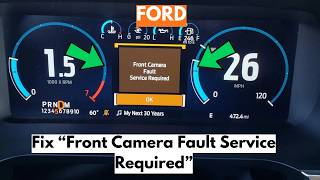
- "Front Camera Malfunction, Service Required" Message: The instrument cluster may display this warning, indicating the system has detected a fault. 🎬 Watch this guide on fixing the front camera fault warning This can be caused by a failed camera, a wiring problem, or a software glitch.
- Distorted or Flickering Image: The camera feed may appear distorted, grainy, flickering, or have lines running through it. This can be a sign of the camera's internal electronics failing or water intrusion.
- Split-View Failure: Some owners report that the normal wide-angle view works, but the split-view function for a 180-degree look fails, or vice-versa. This points to a specific failure within the camera's processing capabilities.
Known Issues, Recalls, and Technical Service Bulletins (TSBs)
While many Ford camera issues reported online relate to newer (2021+) models and are often software-based, the 2015-2018 generation is known for hardware failures. There are no major recalls specifically for the front camera on the 2015-2018 Edge, but the widespread nature of camera failures across the Ford lineup is well-documented.
- Internal Component Failure: The most frequent cause of failure is the camera unit itself. The internal electronics are sensitive and can fail over time due to heat, vibration, and exposure to the elements, leading to the common blue or black screen symptom.
- Wiring and Connectors: The wiring harness leading to the camera can become damaged or corroded. The connector pins are a weak point; moisture can lead to corrosion and a loss of signal. Checking this connection and applying dielectric grease is a good first diagnostic step.
Pro Tip: Before assuming the camera is bad, check the fuse for the camera system. Also, inspect the wiring harness plug at the back of the camera for any visible corrosion or damage. Cleaning the contacts can sometimes restore function.
Buying a Used Front Grille Camera: What to Check
Purchasing a used OEM camera is a smart way to save significant money over a new dealer part. Because these cameras are electronic, there are a few key things to inspect to ensure you get a good part.
- Verify the Part Number: This is the most critical step. Ford used several part numbers for this camera, and they must match for the camera to work correctly. The most common replacement part number is F2GZ-19G490-D, which supersedes F2GZ-19G490-B. Always match the part number from your original camera or verify compatibility with the seller using your vehicle's VIN.
- Inspect the Lens: Look for a clear, unscratched lens. A hazy, yellowed, or cloudy lens will produce a poor-quality image. Avoid any cameras with deep scratches or signs of delamination (the lens appearing to peel).
- Check the Connector Pins: Examine the electrical connector. The pins should be straight, clean, and free of any green or white corrosion. A corroded connector suggests water intrusion, and the camera is likely bad.
- Ask About the Source Vehicle: If possible, find out the mileage of the vehicle the part came from. While not a guarantee, a camera from a lower-mileage vehicle is generally preferable.
- Why Used OEM is a Good Choice: Used original equipment (OEM) cameras are often more reliable than cheap aftermarket alternatives. An OEM camera ensures correct plug-and-play fitment, proper image quality, and integration with the vehicle's software without the compatibility headaches common with aftermarket electronics.
Replacement Cost Comparison
The cost of replacing the front camera can vary significantly depending on the source of the part and who performs the labor.
| Part Source | Estimated Price Range |
|---|---|
| New OEM (Dealer) | $370 - $565 |
| New Aftermarket | $80 - $150 |
| Used OEM (Recycled) | $100 - $250 |
| Shop Labor Cost | $85 - $125 |
Installation Overview & Calibration
Replacing the front camera on a 2015-2018 Ford Edge is a relatively straightforward task for a DIYer with basic tools.
Difficulty: 2 out of 5
Estimated Time: 0.5 - 1 hour
The general process involves removing the upper radiator cover (the plastic shield held in by push-pins) to gain access to the top of the grille. From there, you can typically reach down to unclip the camera from its mounting bracket and disconnect the electrical harness. The grille does not usually need to be fully removed.
Important Note on Calibration: For the front grille parking camera on the 2015-2018 Ford Edge, specific calibration with a scan tool is generally not required. This is different from the forward-facing camera mounted to the windshield, which is used for lane-keeping and pre-collision assist and requires extensive calibration if replaced. After installing the new grille camera, the system should recognize it and function correctly upon startup.
Frequently Asked Questions (FAQ)
Why is my Ford Edge camera screen blue?
A blue screen is the most common sign of a failed front camera. It means the infotainment system is trying to display the camera feed but is receiving no video signal. This is almost always due to an internal failure in the camera itself or a complete break in the wiring connection.
Do I have to get the new front camera calibrated at the dealer?
No. The front grille camera for parking assist on the 2015-2018 Edge does not require a special calibration procedure after replacement. It is a plug-and-play part. You should not be confused with the windshield-mounted camera for the Lane-Keeping System, which does require calibration.
Can I just replace the lens or do I need the whole camera?
The camera is a sealed unit. The lens is not available as a separate service part. If your lens is damaged or cloudy, you will need to replace the entire camera assembly.
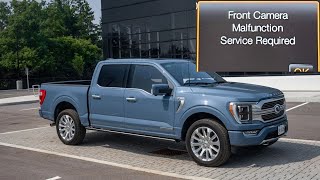
My screen says "Front Camera Malfunction." Is it definitely the camera?
While the camera is the most likely culprit, this message can also be triggered by a bad wiring connection or, in rare cases, a software issue within the Image Processing Module (IPM) or APIM. It's always wise to check the electrical connector at the camera for corrosion or damage before ordering a new part.
🎬 See how to troubleshoot the front camera malfunction messageHelpful Videos

Technical Specifications
OEM Part Numbers: F2GT-19H222-AB F2GT-19H222-AD F2GT-19H222-CA F2GZ-19G490-B F2GZ-19G490-D
Wide-angle lens, integrated into front grille or emblem housing. Connects to the vehicle's APIM/IPM modules.
We Have This Part in Stock


The information in this article is provided for general reference and educational purposes only. Vehicle specifications, procedures, and part compatibility can vary by production date, trim level, and region. Always consult your vehicle's factory service manual and verify part numbers before purchasing or performing repairs. Safety-critical components such as airbags, seat belts, and braking systems should be installed by a qualified professional.
- Ford Edge:
- 🎬 Helpful Videos
- 🛍️ Shop This Part
- Symptoms of a Failing 2015-2018 Ford Edge Front Camera
- Known Issues, Recalls, and Technical Service Bulletins (TSBs)
- Buying a Used Front Grille Camera: What to Check
- Replacement Cost Comparison
- Installation Overview & Calibration
- Frequently Asked Questions (FAQ)
- 🎟️ Get 5% Off