

2008-2010 Scion tC ECM: Programming, Part Numbers & Immobilizer Secrets
Your guide to replacing the engine computer in an automatic Scion tC, including the critical immobilizer reset procedure.
- A replacement ECM MUST be programmed to your car's VIN and synchronized with the immobilizer system; it is not plug-and-play.
- These ECMs only fit 2008-2010 Scion tC models with an AUTOMATIC transmission.
- Part number 89661-21521 is the newer version that replaces 89661-21520. Always try to match your original part number first.
- Buying a 'VIN-programmed' unit from a reputable remanufacturer is often the easiest and most cost-effective solution for replacement.
Symptoms of a Failing 2008-2010 Scion tC ECM


An ECM failure can be difficult to diagnose because its symptoms often mimic other problems. However, if you've ruled out sensors, wiring, and other components, the ECM itself might be the culprit. Look for these signs:
- Check Engine Light: This is the most common symptom. If the light is on, scan for codes. Codes specifically pointing to the computer's internal health (P0600-P0607 series) are a strong indicator of ECM failure.
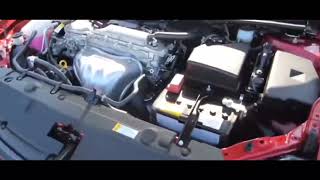
- Engine Will Not Start: The engine may crank but fail to start because the ECM isn't commanding the fuel injectors or ignition coils to fire. 🎬 Watch: Troubleshooting a Scion tC that cranks but won't start.
- Stalling or Misfiring: The engine may stall for no reason, run roughly, or misfire intermittently as the ECM fails to properly manage the engine.
- Poor Performance and Fuel Economy: A failing ECM can result in incorrect air-fuel mixtures and timing, leading to a noticeable drop in power and more frequent trips to the gas station.
- Automatic Transmission Problems: Since the ECM controls shifting in the automatic transmission, a faulty module can cause harsh shifts, failure to shift, or getting stuck in one gear.
Warning: A replacement Engine Control Module for the 2008-2010 Scion tC is NOT plug-and-play. It requires programming to function.
The #1 Hurdle: Programming and Immobilizer Synchronization

You cannot simply swap a new or used ECM into your Scion tC and expect it to work. These vehicles have a factory anti-theft system called an immobilizer, where the keys, immobilizer module, and ECM must all recognize each other. When you install a different ECM, this electronic "handshake" is broken, and the car will not start as a security measure.
To install a replacement ECM, it must be:
- Programmed (or Flashed) with your vehicle's unique 17-digit Vehicle Identification Number (VIN).
- Synchronized with your vehicle's immobilizer system and keys.
You have three main options to accomplish this:
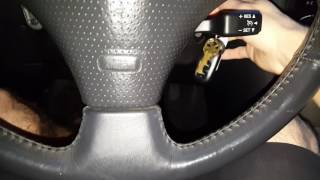
- Buy a Pre-Programmed Unit: Many online retailers sell remanufactured ECMs that they will program with your VIN before shipping. Some may even provide a special OBD-II tool to help you perform the final immobilizer key re-learn procedure at home. 🎬 See how to perform a transponder ECU reset and sync. This is often the easiest and most cost-effective option for DIYers.
- Dealership Visit: A Scion or Toyota dealership can install and program a new or used ECM using their proprietary Techstream software. This is the most surefire method but also typically the most expensive.
- Locksmith or Independent Shop: Some professional locksmiths and well-equipped independent repair shops have the tools and software (like Techstream) to program the ECM and re-learn the keys.
Buying a Used 2008-2010 Scion tC ECM: What You Must Know
If you are buying a used or remanufactured ECM, compatibility is everything. Follow these rules to avoid buying a paperweight.
1. Match the Part Number
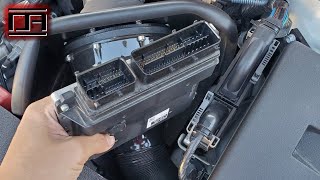
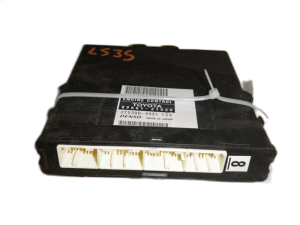
First, locate the ECM behind the glove box and find the part number on the label. You must match this number. The two primary part numbers for this vehicle are:
- 89661-21520
- 89661-21521
Part number 89661-21521 is the newer version and officially supersedes (replaces) 89661-21520. While the newer part should be backward compatible once programmed, the safest bet is to match your original part number exactly. The initial warning to match 89661-21520 for 2008 models underscores the importance of getting the correct hardware version for your specific year.
2. Automatic Transmission ONLY
The part numbers listed here are ONLY for 2008-2010 Scion tC models equipped with an Automatic Transmission. They will not work in a vehicle with a manual transmission.
3. Physical Inspection
When buying a used unit, inspect it carefully. Look for signs of corrosion on the case and connector pins, which indicates water damage. Avoid any units that look like they have been opened or tampered with.
Known Issues, TSBs, and Recalls
There are no major recalls for ECM failure on the 2008-2010 Scion tC. However, Toyota has issued several Technical Service Bulletins (TSBs) related to ECU flash reprogramming (S-SB-0003-10 and S-SB-0015-14). These bulletins indicate that software updates have been released to fix potential issues. When purchasing a remanufactured ECM, it's beneficial to get one that has been updated with the latest software.
Pro Tip: The 2.4L (2AZ-FE) engine in these cars is known for a potential oil consumption issue. TSB S-SB-0024-11 REV addresses this. While not an ECM problem, it's a critical piece of information for any owner of this vehicle.
Cost Comparison (2008-2010 Scion tC ECM)
| Part Type | Estimated Cost |
|---|---|
| New OEM | $550 - $790 |
| Remanufactured (Pre-Programmed) | $220 - $400 |
| Used OEM (from a salvage yard) | $75 - $200 (will still require programming) |
| Shop Labor (Swap & Program) | $150 - $300+ |
Frequently Asked Questions (FAQ)
Do I have to program a replacement ECM for my Scion tC?
Yes, absolutely. A replacement ECM must be programmed with your car's VIN and synchronized with the immobilizer anti-theft system. The car will not start without this step.
Where is the ECM located on a 2008-2010 Scion tC?
The ECM is located behind the glove box on the passenger side of the dashboard. You will need to open or remove the glove box assembly to access it.
🎬 Watch this guide on how to reset or reprogram your computer.Can I install a used ECM from a junkyard?
Yes, but it is not a simple swap. The used ECM will still need to be professionally programmed to your vehicle's VIN and have the immobilizer system reset by a dealer or a shop with the correct tools, like Toyota's Techstream software.
Why does this part only fit automatic transmission models?
The ECM also controls the automatic transmission's shifting behavior. The software and hardware are different from the ECM used in a manual transmission car, which does not have these functions. Using the wrong one will result in transmission-related error codes and improper operation.
Helpful Videos
Technical Specifications
OEM Part Numbers: 89661-21520 89661-21521
Fits 2008-2010 Scion tC with 2.4L 2AZ-FE engine and Automatic Transmission ONLY. Located behind the glove compartment.
We Have This Part in Stock


The information in this article is provided for general reference and educational purposes only. Vehicle specifications, procedures, and part compatibility can vary by production date, trim level, and region. Always consult your vehicle's factory service manual and verify part numbers before purchasing or performing repairs. Safety-critical components such as airbags, seat belts, and braking systems should be installed by a qualified professional.
- Scion tC:
- 🎬 Helpful Videos
- 🛍️ Shop This Part
- Symptoms of a Failing 2008-2010 Scion tC ECM
- The #1 Hurdle: Programming and Immobilizer Synchronization
- Buying a Used 2008-2010 Scion tC ECM: What You Must Know
- 1. Match the Part Number
- 2. Automatic Transmission ONLY
- 3. Physical Inspection
- Known Issues, TSBs, and Recalls
- Cost Comparison (2008-2010 Scion tC ECM)
- Frequently Asked Questions (FAQ)
- 🎟️ Get 5% Off