

2013-2016 Dodge Dart Center Console DVD Player: Diagnosis and Replacement Guide
This guide covers the separate, console-mounted DVD player for the 2013-2016 Dodge Dart, including common problems, replacement tips, and programming requirements.
- This is the remote DVD player that mounts inside the center console/behind the glovebox, not the main radio unit.
- The unit is generally plug-and-play and does not require an anti-theft code.
- If the odometer flashes after installation, a 'Proxy Alignment' procedure is required to sync the new module with the vehicle.
- Always match the part number. The final, most current part number is 05091057AD.
Symptoms of a Failing DVD Player
When the center console DVD player in a 2013-2016 Dodge Dart begins to fail, it can cause a range of issues with media playback. Here are the most common symptoms:
- Disc Read Errors: The Uconnect screen may display a "Disc Read Error" or "Check Disc" message, even with known good discs.
- Failure to Load or Eject: The player may refuse to accept a disc, or it may fail to eject a disc that is already inside. You might hear the mechanism trying to work without success.
- Skipping or Freezing: During playback of a CD or DVD, the audio or video may skip, pause, or freeze completely.
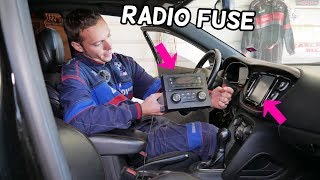
- No Power: The unit may seem completely dead, with no response when a disc is inserted and no option to select it as a source on the Uconnect screen. This can sometimes be caused by a blown fuse. 🎬 Watch: How to find and replace the radio fuse
- Uconnect System Glitches: While less common, a failing DVD player module can sometimes cause broader issues with the Uconnect system, such as freezing or unresponsiveness, as it is a connected module on the vehicle's network.
Known Issues, TSBs, and Recalls
While there are no specific recalls or a high volume of Technical Service Bulletins (TSBs) for the DVD player unit itself, the Dodge Dart has had numerous TSBs related to the Uconnect system and other electronic modules. Some Uconnect software glitches can mimic a faulty DVD player. Before replacing the hardware, it's wise to ensure your vehicle's Uconnect software is up to date. A simple system reset can also sometimes resolve communication issues.
Pro Tip: To perform a soft reset of the Uconnect system, press and hold the volume and tuner knobs simultaneously for about 15-30 seconds until the screen goes black and reboots. This can sometimes restore communication with the DVD player module without any data loss.
🎬 See this quick video on resetting your Uconnect systemThere have been several major recalls for the 2013-2016 Dodge Dart, most notably for a shifter cable bushing that can fail and lead to a rollaway risk (NHTSA Recall 25V-674 / A0C). However, none of the vehicle recalls directly pertain to the DVD player's function.
Programming and Installation Requirements
This is a critical topic for any electronic module replacement in a modern vehicle.
Does the DVD player need to be programmed?
No, a replacement DVD player typically does not require a specific programming or flashing procedure to function. It is generally considered a plug-and-play part. However, if the vehicle's systems do not recognize the new module correctly, it may trigger a flashing odometer.
The Flashing Odometer and Proxy Alignment
A flashing odometer on a Dodge Dart indicates a configuration mismatch between the electronic modules on the vehicle's network (CAN bus). This happens when a module is replaced, added, or removed. To fix this, a procedure called a "Proxy Alignment" (or Proxi Alignment) must be performed.
- What it is: A Proxy Alignment is a diagnostic routine that scans the network and allows the Body Control Module (BCM) to recognize all connected modules, creating a correct configuration list.
- When it's needed: You will need to perform a Proxy Alignment if your odometer starts flashing after you install the replacement DVD player.
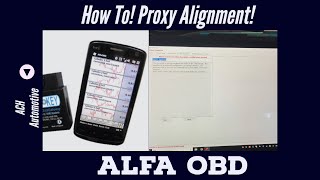
- How it's done: This procedure requires a compatible OBD-II scan tool and software, such as AlfaOBD or some professional-grade scanners from brands like Snap-on. It is a relatively simple process for a technician with the right equipment and can also be performed by advanced DIY mechanics. 🎬 Watch: How to perform a Proxi Alignment using AlfaOBD A dealership can always perform this service, but independent shops with the proper tools can do it as well.
Warning: While many sellers state the unit is plug-and-play and requires no code, be prepared for the possibility of needing a Proxy Alignment. A flashing odometer is the key indicator that this procedure is necessary.
Buying a Used DVD Player: What to Look For
Purchasing a used OEM DVD player is often the most cost-effective way to restore functionality. Aftermarket equivalents for this specific integrated part are not available. Here’s what to check:
- Match the Part Number: This is the most important step. The original part numbers for this unit include 5091057AA, 5091057AB, and 5091057AC, which have all been superseded by the latest part number, 05091057AD (or P05091057AD). Ensure the replacement unit you buy has one of these exact part numbers. Units from other Chrysler/Dodge vehicles will not work.
- Physical Inspection: Check the front slot for any signs of damage, foreign objects, or bent pins. Since it's located in the center console, look for any signs of liquid spills on the casing.
- Verify Compatibility: This DVD player is designed for 2013-2016 Dodge Darts equipped with the compatible Uconnect 8.4-inch touchscreen radio. It will not work with base model radios or add video functionality to a car not originally equipped for it.
- Source and Warranty: Purchase from a reputable seller that offers a warranty and a return policy. This protects you in case the unit is dead on arrival or fails shortly after installation.
Replacement Overview
Replacing the DVD player is a straightforward job for a DIYer with basic tools. The player is located behind the glove box.
- Disconnect the negative battery terminal.
- Open and remove the glove box assembly to gain access to the area behind it.
- The DVD player is the module located in this cavity. It is typically held in place by four screws with 7mm heads.
- Remove the screws, carefully lower the unit, and disconnect the electrical connectors.
- Installation is the reverse of removal. Connect the new unit, secure it with the screws, and reinstall the glove box.
- Reconnect the battery and test the system. Check for a flashing odometer.
Cost Comparison
Prices can vary, but here is a general cost breakdown:
| Part Type | Estimated Cost |
|---|---|
| New OEM | $450 - $600+ (Part #05091057AD) |
| New Aftermarket | Not Available |
| Used OEM / Refurbished | $50 - $150 |
| Shop Labor Cost | $100 - $200 (for installation) |
| Proxy Alignment Service | $50 - $150 (if needed) |
Frequently Asked Questions (FAQ)
Does this DVD player need to be unlocked by a dealer?
No, this specific remote DVD player is not tied to an anti-theft code like a main radio head unit. It does not require a dealer unlock code.
Will my odometer flash if I replace the DVD player?
It might. A flashing odometer indicates a mismatch in the vehicle's electronic module configuration. If this happens after installation, a Proxy Alignment procedure is needed to sync the new player with the car's Body Control Module.
Can I add this DVD player to my Dart if it didn't have one from the factory?
This is a complex retrofit. In addition to installing the physical unit, you would need to ensure you have the correct Uconnect 8.4 head unit and wiring. You would then need to use a tool like AlfaOBD to change the vehicle's configuration in the Body Control Module to enable the DVD player option, followed by a Proxy Alignment. It is not a simple plug-and-play addition.
Why does the DVD video only play when the car is parked?
This is a standard safety feature in all vehicles with front-facing video screens. It is designed to prevent driver distraction. Video playback is disabled as soon as the vehicle is shifted out of Park.
Helpful Videos
Technical Specifications
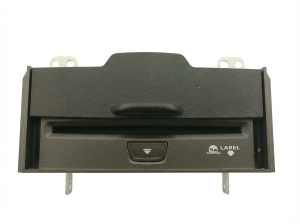
OEM Part Numbers: 05091057AD 5091057AD P05091057AD 5091057AC 5091057AB 5091057AA
Single-disc CD/DVD player, integrates with Uconnect 8.4 system, mounts in center console/behind glove box.
We Have This Part in Stock





The information in this article is provided for general reference and educational purposes only. Vehicle specifications, procedures, and part compatibility can vary by production date, trim level, and region. Always consult your vehicle's factory service manual and verify part numbers before purchasing or performing repairs. Safety-critical components such as airbags, seat belts, and braking systems should be installed by a qualified professional.
- Dodge Dart:
- 🎬 Helpful Videos
- 🛍️ Shop This Part
- Symptoms of a Failing DVD Player
- Known Issues, TSBs, and Recalls
- Programming and Installation Requirements
- Does the DVD player need to be programmed?
- The Flashing Odometer and Proxy Alignment
- Buying a Used DVD Player: What to Look For
- Replacement Overview
- Cost Comparison
- Frequently Asked Questions (FAQ)
- 🎟️ Get 5% Off