

2021-2025 G80 & Electrified G80 Center Console Switches: Sticky Buttons & Replacement Guide
This guide covers common issues, part number confusion, and replacement for the center console switch panel in the 2021-2024 Genesis G80 and 2023-2025 Genesis Electrified G80.
- The most common cause of failure is spilled liquids, leading to sticky or non-functional buttons.
- Part numbers are confusing; many catalogs list dash-mounted switches instead of the console panel. Always buy based on a visual match.
- Replacement is simple for a DIYer and usually only requires prying up the console trim, not removing the entire console assembly.
- There are no major recalls for this specific part, but there are recalls for the digital screens, which is a separate software issue.
Symptoms of a Failing Control Console Switch Panel
While widespread electronic failure of this panel is not common on the 2021-2025 Genesis G80 and Electrified G80, issues can still occur, most often due to spills or wear. A Reddit user, for example, reported buttons becoming sticky and gummy after spilling a soda on the console. Here are the most likely symptoms:
- Sticky or Gummy Buttons: Spilled drinks with sugar are the number one enemy of these panels. The liquid gets into the switch mechanism, causing buttons like the Drive Mode selector or Auto Hold to feel sticky, slow to return, or difficult to press.
- Unresponsive Buttons: A specific button (e.g., camera view) may stop working entirely. Pressing it does nothing, and the function does not activate. This can be caused by internal contamination from a spill or, less commonly, an electronic failure within the switch.
- Intermittent Function: A button may work some of the time but not always. This often points to a failing internal contact or a loose connection and is a sign of impending failure.
- Functions Activate on Their Own: In rare cases of liquid damage or electronic shorts, a function might activate without the button being pressed.
Known Issues, TSBs, and Recalls
As of mid-2026, there are no specific recalls or widespread Technical Service Bulletins (TSBs) for the electronic failure of the center console switch panel on these vehicles.
- Related TSB: There is a TSB (23-BD-013G) for 2021-2023 G80 models where the center console armrest storage bin is difficult to open. This is a mechanical issue with a foam pad interfering with the latch and is not related to the electronic switches.
- Unrelated Recalls: Several recalls exist for these models concerning the main digital instrument cluster going blank. This is a software issue with the screen you see through the steering wheel and does not involve the physical buttons on the center console.
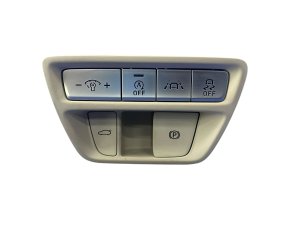
Part Number Warning: Be extremely careful when ordering this part. Many online parts catalogs list part numbers like 93700-T1000-VNB (Beige) or 93700-T1000-NNB (Black) for the G80. However, these are often described as a "Switch Assembly Side Crash Pad" and typically refer to the switch bank on the dashboard to the left of the steering wheel (containing controls for traction control, trunk release, etc.). The center console switch panel is a different part. There is no single, universally-listed part number for the center console assembly, so you must buy based on a visual match and the seller's vehicle compatibility information.
Buying a Used Control Console Switch Panel: What to Check
Since the most common reason for replacement is liquid damage, inspecting a used part carefully is critical. Buying a used OEM panel is often a smart choice over a non-existent or low-quality aftermarket alternative, as it preserves the original factory look, feel, and backlighting.
- Physical Inspection: Look closely at the gaps around each button. Check for any shiny, sticky residue that could indicate a past spill.
- Button Actuation: Press every single button on the panel. They should all have a consistent, crisp click and return to their original position immediately. Avoid any panel where buttons feel "mushy," slow, or stuck.
- Check Graphics: Ensure the graphics on the buttons (e.g., the camera icon, "P," "AUTO HOLD") are not worn off. While these cars are relatively new, high-mileage vehicles or those cleaned with harsh chemicals could show wear.
- Connector Pins: Inspect the electrical connector on the back. The pins should be straight, clean, and free of any green or white corrosion, which would be a major red flag for liquid damage.
- Match Your Interior: These panels come in different finishes to match the vehicle's interior trim (e.g., black, beige, brown with wood grain). Make sure the color and finish are an exact match for your car.
Cost Comparison: New vs. Used
Pricing can be difficult due to the part number confusion. The costs below are estimates based on available data for similar switch assemblies.
| Part Type | Estimated Cost |
|---|---|
| New OEM | $150 - $250 (Must be sourced from a dealer with VIN) |
| New Aftermarket | Not Generally Available |
| Used OEM | $40 - $75 |
| Shop Labor | $75 - $150 |
Installation Guide
Replacing the center console switch panel is a relatively straightforward job that most DIYers can handle. Based on videos for the G80 and related models, the entire center console does not need to be removed.
Difficulty: 2 out of 5
Estimated Time: 30 minutes
- Protect Surfaces: Place microfiber towels around the console trim to prevent scratching the surrounding leather and plastic.
- Pry Up Trim: Using a plastic trim removal tool, carefully pry up the edge of the trim piece that surrounds the shifter and switch panel. Start from an edge and work your way around, releasing the clips.
- Disconnect Connectors: Once the trim is loose, lift it carefully. You will see one or more electrical connectors attached to the bottom of the switch panel. Press the release tab on each connector and pull it straight out.
- Remove Old Panel: The switch panel is typically held to the trim piece with a few small Phillips head screws. Unscrew them and remove the old panel.
- Install New Panel: Place the new switch panel into the trim piece and secure it with the screws.
- Reconnect and Test: Reconnect the electrical connectors to the new panel. Before snapping the trim back into place, turn the vehicle's accessory power on and test every button to ensure it works correctly.
- Reinstall Trim: Align the trim piece with the console opening and press down firmly around the edges to snap all the retaining clips back into place.
Pro Tip: If a button is just sticky from a spill, you can try cleaning it before replacing the whole panel. After removing the panel, use electronics contact cleaner or isopropyl alcohol on a cotton swab to carefully clean around the affected button mechanism. Let it dry completely before reinstalling.
Frequently Asked Questions (FAQ)
Can I drive with a broken control console switch?
Yes. Failure of these switches typically does not affect the vehicle's ability to drive safely. However, you will lose access to convenience features like Auto Hold or the ability to change drive modes, which can be an annoyance.
Do I need to program a new switch panel?
No. The center console switch panel is a simple input device and does not require any special programming or calibration after installation. It is a plug-and-play part.
Why do my instrument cluster screens go blank? Is that related to this switch?
No, that is a separate issue. There are active recalls for the main digital instrument cluster and infotainment screen suffering from software glitches that cause them to go blank. This is unrelated to the physical buttons on the center console and is fixed with a software update from a Genesis dealer.
Will a switch panel from a gas G80 fit an Electrified G80?
Maybe. While the consoles are very similar, the button layout may differ slightly. For example, the gas model has a Drive Mode button, while the EV might have different functions. Always verify that the button layout, icons, and finish are identical to your original part before purchasing.
Technical Specifications
OEM Part Numbers: 93700-T1000-VNB (Beige, likely dash switch) 93700-T1000-NNB (Black, likely dash switch) 93700-T1200-DUE (Likely dash switch) 93700-T1000-OWN (Brown, likely dash switch)
Varies by trim and interior color. Must be matched visually.
We Have This Part in Stock


The information in this article is provided for general reference and educational purposes only. Vehicle specifications, procedures, and part compatibility can vary by production date, trim level, and region. Always consult your vehicle's factory service manual and verify part numbers before purchasing or performing repairs. Safety-critical components such as airbags, seat belts, and braking systems should be installed by a qualified professional.
- Genesis Electrified G80:
- Genesis G80: