

2009-2014 Cadillac CTS Control Panel: Fixing Peeling Buttons & Compatibility Guide
Your definitive guide to diagnosing and replacing the central control panel, with critical details on compatibility for navigation, heated seats, and specific model year variations.
- Compatibility is critical. You must match the part to your car's options, especially Heated Seats (RPO code KA1) and Navigation.
- This part is plug-and-play and does NOT require dealer programming after installation.
- The most common problem is peeling buttons, which can be fixed cheaply with a decal kit if you don't want to replace the whole unit.
- Be aware of model year traps: 2011 has two screen types, and this part does NOT fit the redesigned 2014 CTS Sedan.
Symptoms of a Failing 2009-2014 CTS Control Panel
Failures with this panel are common and typically fall into two categories: cosmetic wear and electronic malfunction.
Cosmetic Failure: Peeling & Worn Buttons
By far the most common issue is the deterioration of the soft-touch coating on the buttons. Over time, contact with fingers, oils, and cleaning products causes the black or silver finish to flake away, exposing the white plastic underneath. This makes the panel look worn and can make the button graphics unreadable. While it doesn't affect the button's function, it is a significant cosmetic issue for many owners.
Electronic Failure Symptoms
- Unresponsive Buttons: One or more buttons for climate or audio functions stop working entirely. You might press the fan speed button, for example, with no change.
- Flickering or Dead Backlighting: The lights behind the buttons may flicker, dim, or go out completely, making the panel difficult to use at night.
- Intermittent Operation: Controls may work one moment and not the next, often without a clear pattern.
- Complete Panel Failure: In rare cases, the entire panel may become unresponsive, leaving you unable to control climate or audio functions. This can sometimes be related to a failure in the main CUE or navigation module, which the panel communicates with.
Pro Tip: If you have issues with the main touch screen (delamination, ghost touches, or being completely black), that is typically a failure of the CUE screen or HMI module itself, not this lower control panel. However, a CUE system failure can sometimes cause the lower controls to become unresponsive.
Is Programming Required After Installation?
No. The Control Console Switch Panel does not need to be programmed, flashed, or coded to the vehicle after installation. It is a plug-and-play module. As long as you have purchased the correct part number for your vehicle's specific options, it will function correctly immediately after being connected.
Buying a Used 2009-2014 CTS Control Panel: A Buyer's Guide
Buying a used panel is an excellent way to save money, but getting the wrong one is a common and frustrating mistake. Use this checklist to guarantee you get a compatible part.
1. Match Your Options (The #1 Mistake)
The panel's button configuration is determined by the options your car was built with. You must match these exactly.
- Heated Seats (RPO Code KA1): This is the most important option to verify. If your CTS has heated front seats, you need a panel with the heated seat buttons. If it does not, you need a panel without them. The RPO (Regular Production Option) code "KA1" on your vehicle's service parts identification sticker confirms you have heated seats.
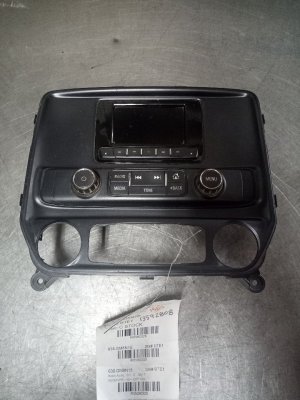
- Navigation System: Vehicles with the factory pop-up navigation screen have a different control panel than those without. The navigation-equipped panel includes a "NAV" button and a button to raise and lower the screen. Non-nav panels have a different layout.
- 2009 Heated Windshield Washer: For 2009 models, some vehicles were equipped with a button for heated windshield washer fluid. Verify if your original panel has this specific button.
2. Verify The Model Year Splits (2011 & 2014)
Cadillac made key changes in these years that create compatibility traps.
- 2011 Models: This year offered two different screen setups: a pop-up navigation display or a stationary screen integrated into the panel. You must visually compare your original part to ensure the replacement has the same configuration.
- 2014 Models: This is a critical split. This part ONLY FITS the 2014 CTS Coupe, Station Wagon, and V-Series models, which carried over the older body style. It does NOT FIT the redesigned 2014 CTS Sedan (often identified by the 4th digit of the VIN being 'A'), which uses a completely different CUE system and interior.
3. Choose the Correct Color
These panels were produced in several interior colors, most commonly Ebony (black), Titanium (grey), and Cashmere (beige). Check photos carefully and match the color to your vehicle's interior trim to avoid a mismatched look.
4. Inspect for Physical Wear
When buying a used part, carefully examine the photos for the exact issue you're trying to solve. Look for peeling or worn button surfaces. Since this is the most common failure, try to find a unit in the best possible cosmetic condition to ensure it lasts.
Repair vs. Replace: Fixing Peeling Buttons
If your panel works perfectly but the buttons are peeling, you have a much cheaper option than full replacement. Several companies sell adhesive decal kits designed to cover the worn buttons.
These kits cost around $15-$30 and can restore the look of your panel. The process involves cleaning the old button surface and carefully applying the sticker over it. While it's a cost-effective solution, the quality can vary, and it may not look as clean as a full replacement panel. For a perfect finish, replacing the entire unit with a good-condition used part is the best option.
Cost of Replacement
The cost to replace the control panel can vary significantly based on the path you choose.
| Part Type | Estimated Cost | Notes |
|---|---|---|
| New OEM | $350 - $500 | Purchased from a GM dealer. Guarantees a perfect, new part, but at a high cost. |
| Used OEM | $75 - $200 | Sourced from a recycled vehicle. Offers the best value, but condition must be verified. |
| New Aftermarket | Not Available | Complete aftermarket panels are not commonly manufactured for this part. |
| Button Repair Kit | $15 - $30 | A cheap and effective fix for cosmetic peeling only. |
| Shop Labor | $100 - $225 | Most shops will charge for 1-1.5 hours of labor to remove the trim and swap the panel. |
Frequently Asked Questions (FAQ)
Can I just replace the individual peeling buttons?
No, the individual buttons are not sold separately by GM. Your options are to cover the existing buttons with an aftermarket decal kit, attempt to repaint them (which is very difficult), or replace the entire control panel assembly.
What is an RPO code and why does it matter?
RPO stands for Regular Production Option. It's a three-character code GM uses to identify specific features on a vehicle. For this part, the most important RPO is KA1, which signifies heated seats. You can find your car's RPO codes on a sticker, usually located in the glove box or trunk.
Will this part fix my unresponsive CUE touch screen?
No, probably not. An unresponsive, cracked, or delaminating touch screen is a failure of the screen assembly itself, which is a separate component located above this control panel. This panel only contains the physical buttons below the screen.
Is the replacement difficult to do yourself?
For a DIYer with basic tools, the replacement is very feasible. It involves carefully prying off several pieces of trim around the center console and shifter, then removing a few 7mm screws that hold the unit in place. The difficulty is about a 2 out of 5, and it should take around one hour.
Recalls and Technical Service Bulletins (TSBs)
While there are no major recalls directly for the failure of this control panel, there are a few related items of note:
- NHTSA Recall 14V338: This safety recall was for a faulty transmission shift cable on 2013-2014 ATS and 2014 CTS models. The fix required technicians to remove the center console trim to access and secure the cable, but it was not a defect of the control panel itself.
- GM TSB #PI1102A: This service bulletin addresses concerns of the CUE screen (on 2014+ models) appearing bubbled, cracked, or delaminating, recommending replacement of the center stack unit.
Technical Specifications
OEM Part Numbers: 20819982 22748624 22748653 22748654 23103198 23103225 23103226 23103235 25947713 25947721 25947722 25977720
Available in Ebony, Titanium, and Cashmere colors. Configurations vary based on presence of Heated Seats (RPO KA1) and Navigation system.
We Have This Part in Stock




The information in this article is provided for general reference and educational purposes only. Vehicle specifications, procedures, and part compatibility can vary by production date, trim level, and region. Always consult your vehicle's factory service manual and verify part numbers before purchasing or performing repairs. Safety-critical components such as airbags, seat belts, and braking systems should be installed by a qualified professional.
- Cadillac CTS:
- 🛍️ Shop This Part
- Symptoms of a Failing 2009-2014 CTS Control Panel
- Cosmetic Failure: Peeling & Worn Buttons
- Electronic Failure Symptoms
- Is Programming Required After Installation?
- Buying a Used 2009-2014 CTS Control Panel: A Buyer's Guide
- 1. Match Your Options (The #1 Mistake)
- 2. Verify The Model Year Splits (2011 & 2014)
- 3. Choose the Correct Color
- 4. Inspect for Physical Wear
- Repair vs. Replace: Fixing Peeling Buttons
- Cost of Replacement
- Frequently Asked Questions (FAQ)
- Recalls and Technical Service Bulletins (TSBs)
- 🎟️ Get 5% Off