

Audi A8 & S8 MMI Control Panel Guide (2011-2018): Sticky Buttons, No Response, and Replacement
This guide covers the common failures of the MMI control switch panel in the 2011-2018 Audi A8 and 2013-2018 Audi S8, from sticky buttons caused by spills to complete failure and programming requirements.
- The most common cause of failure is liquid spills from the cupholders, leading to sticky or non-functional buttons.
- A replacement panel (new or used) WILL require programming by a dealer or specialist to remove 'Component Protection' and restore full functionality, especially audio.
- Cleaning the unit can sometimes fix sticky buttons, but will not repair electronic damage from a short circuit.
- The newest part number is 4H1919600M, which supersedes and is interchangeable with older versions ending in C, D, F, and H.
Symptoms of a Failing Control Console Switch Panel
Failure of the MMI control panel in the Audi A8 and S8 can manifest in several ways, ranging from a minor annoyance to a complete loss of infotainment control.
1. Sticky or Slow-to-Return Buttons
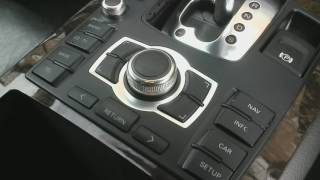
This is the most common symptom. Due to the panel's location next to the cupholders, spilled drinks like soda or coffee are a frequent problem. The sugar and residue cause the buttons to become sticky, hard to press, or slow to pop back up. In some cases, a button may get stuck in the down position, causing the MMI system to behave erratically or become unresponsive.
2. Unresponsive Buttons or Touchpad
Buttons may intermittently or completely stop working. You might press a button like 'NAV' or 'RADIO' and get no response from the MMI system. This can be caused by dried liquid residue on the internal circuit board or a complete electronic failure of the switch itself. A severe liquid spill can short out the circuit board, leading to a total loss of function.
3. Erratic MMI System Behavior
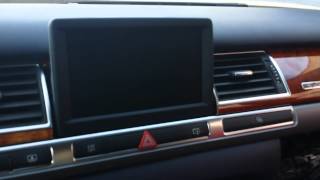
If a button is stuck or the internal electronics are shorting, the MMI system can act unpredictably. This might include the screen cycling on and off, menus changing on their own, or the system freezing entirely. However, it's important to note that a black screen or a system that is completely dead might also be caused by a failure in another part of the MMI's fiber optic loop, such as the main head unit in the dash or the amplifier in the trunk.
Troubleshooting and Diagnosis
Before replacing the panel, try these simple steps which may resolve the issue.
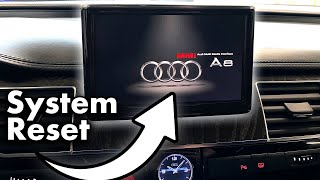
- MMI System Reset: For software glitches or a frozen system, a reset can often help. Press and hold the following three buttons simultaneously until the MMI screen goes dark and reboots: the main control knob, the upper-right function button, and the 'TONE' button. 🎬 Watch: How to force reboot your MMI system
- Fuse Check: Some owners have reported fixing a completely dead MMI system by locating the MMI-related fuses in the trunk, pulling them out, inspecting them, and re-inserting them.
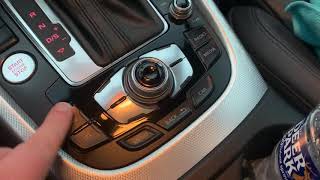
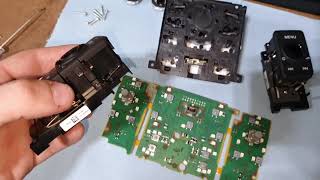
- Cleaning Sticky Buttons: For stickiness caused by spills, you can try cleaning the unit. A quick method is to spray electronics contact cleaner into the gaps around the affected buttons while pressing them repeatedly to work the cleaner in. For a more thorough job, the panel must be removed from the vehicle and disassembled for detailed cleaning of the button mechanisms and the circuit board with isopropyl alcohol. 🎬 See this guide on fixing sticky MMI buttons
Warning: While cleaning may fix sticky buttons, if a liquid spill has caused an electronic short, cleaning will not repair the damage. In these cases, the entire unit must be replaced.
Component Protection and Programming Requirements
This is the most critical factor to consider when replacing the MMI control panel.
Audi vehicles use a security system called Component Protection (CP) to link electronic modules to the vehicle's VIN. If you install a new or used control panel, it is highly likely that it will trigger Component Protection. When CP is active, the part may seem to work, but certain functions will be disabled. For the MMI system, this often results in a complete loss of audio.
Removing Component Protection is not a DIY job. It requires a special online connection to Audi's factory servers using a tool called ODIS. This means a trip to an Audi dealer or a qualified independent shop that subscribes to this service is necessary after installation. Standard diagnostic tools like VCDS cannot remove Component Protection.
Pro Tip: Before buying a used panel, call your local Audi dealer or a trusted European auto shop. Confirm they are willing and able to perform Component Protection removal on a customer-supplied used part and ask for a quote. Some shops may be hesitant to program parts they did not source themselves.
Buying a Used Control Console Switch Panel
A used OEM panel is a cost-effective alternative to a brand-new unit, but careful selection is key.
- Part Number Compatibility: The part numbers for this panel have been updated over the years. The latest part number is 4H1919600M. This part number replaces, and is interchangeable with, older versions like 4H1919600C, 4H1919600D, 4H1919600F, and 4H1919600H. When buying used, look for any of these part numbers, but prefer the newest revision (later letter in the alphabet) if possible.
- Physical Inspection: When you receive the part, inspect it closely for any signs of liquid damage. Look for sticky residue on the buttons or any corrosion on the electrical connector pins.
- Verify Vehicle Options: The initial data for this part specifies it is for vehicles with the North American market Radio/Navigation system (Audi option code 8DY). Ensure the part you are buying comes from a vehicle with a matching configuration.
Replacement Procedure Overview
Replacing the MMI control panel is a feasible DIY project for those comfortable with interior trim removal. The difficulty is moderate.
- Put the vehicle's ignition on (engine off) and place the gear selector into Neutral to provide clearance.
- Using plastic trim removal tools, carefully pry up the trim surrounding the gear selector and MMI panel.
- Remove the Torx screws holding the panel assembly in place.
- Lift the assembly and carefully disconnect the various electrical connectors on the underside. Pay attention to the different clip styles on each connector.
- Once the entire console trim piece is out, the MMI control panel can be unbolted from it.
- Installation is the reverse of removal. Remember to have the Component Protection addressed by a professional afterward.
Cost Comparison
| Part Source | Estimated Cost |
|---|---|
| New OEM | $1,400 - $1,800 |
| Used OEM | $75 - $250 |
| Shop Labor (Replacement) | $150 - $250 |
| Shop Labor (Component Protection Programming) | $150 - $300 |
Frequently Asked Questions (FAQ)
Does a replacement MMI control panel have to be programmed?
Yes, it is almost certain that a replacement unit (either new or used) will need to be programmed to your vehicle by an Audi dealer or a specialist shop to remove Component Protection. Failure to do so will likely result in a loss of audio and other functions.
Can I just clean my sticky MMI buttons instead of replacing the panel?
Sometimes, yes. If the only issue is sticky buttons from a spill, a thorough cleaning can restore function. You can try spraying electronics cleaner into the button gaps or, for a better result, remove and disassemble the unit for a deep clean. However, if the liquid caused an electronic short, cleaning will not fix it and replacement is necessary.
My whole MMI screen is black. Is it the control panel?
Not necessarily. While a faulty control panel can cause the system to freeze, a completely black or dead screen is often a symptom of a failure elsewhere in the MMI's fiber optic system. This could be the main head unit (J794 module) or another component. A diagnostic scan with a tool like VCDS is needed to identify the source of the communication break.
🎬 Watch: How to troubleshoot a dead MMI systemWhat is the difference between part numbers like 4H1919600F and 4H1919600M?
The letter at the end of the part number typically indicates a revision. Part number 4H1919600M is the latest version and supersedes the older versions ending in C, D, F, and H. They are all interchangeable, but it's generally best to get the newest revision available.
Helpful Videos
Technical Specifications
OEM Part Numbers: 4H1919600C 4H1919600D 4H1919600F 4H1919600H 4H1919600M
For North American market vehicles with MMI Radio/Navigation system (option code 8DY).
We Have This Part in Stock



The information in this article is provided for general reference and educational purposes only. Vehicle specifications, procedures, and part compatibility can vary by production date, trim level, and region. Always consult your vehicle's factory service manual and verify part numbers before purchasing or performing repairs. Safety-critical components such as airbags, seat belts, and braking systems should be installed by a qualified professional.
- Audi A8:
- Audi S8:
- 🎬 Helpful Videos
- 🛍️ Shop This Part
- Symptoms of a Failing Control Console Switch Panel
- 1. Sticky or Slow-to-Return Buttons
- 2. Unresponsive Buttons or Touchpad
- 3. Erratic MMI System Behavior
- Troubleshooting and Diagnosis
- Component Protection and Programming Requirements
- Buying a Used Control Console Switch Panel
- Replacement Procedure Overview
- Cost Comparison
- Frequently Asked Questions (FAQ)
- 🎟️ Get 5% Off