

2019-2020 Lincoln Nautilus Control Panel: Programming, Compatibility, and Screen Issues Explained
This guide covers the common failures, critical programming requirements, and important compatibility warnings for the 2019-2020 Lincoln Nautilus radio and climate control panel.
- This part is NOT plug-and-play and requires professional programming to your vehicle's VIN after installation.
- Compatibility is critical. You must match the part to your vehicle's options, specifically whether you have heated-only seats or heated AND cooled seats.
- Many common screen issues (frozen, blank, blue screen) are NOT caused by this button panel, but by software problems in the separate APIM (SYNC module), which may be fixed with a dealer software update per TSB 20-2363.
- Always match the OEM part number from your original unit to ensure you are buying the correct replacement.
Symptoms of a Failing Control Panel or Related Modules
Diagnosing issues in the center stack of a 2019-2020 Lincoln Nautilus can be tricky, as a single symptom can point to different modules. A blank screen, for example, is rarely caused by the button control panel. Below are common symptoms and their likely causes.
| Symptom | Likely Cause & Explanation |
|---|---|
| Unresponsive or Frozen Touchscreen | This is almost always a software issue with the Accessory Protocol Interface Module (APIM), not the physical control panel. Ford issued Technical Service Bulletin (TSB) 20-2363 for this exact problem, which can often be fixed with a software update by a dealer. |
| Blank or Blue Screen | Like a frozen screen, this is typically an APIM software problem covered by TSB 20-2363 or TSB 19-2282. In some cases, a blank screen can also be related to the rearview camera software (Recall 25S72) or the Instrument Panel Cluster behind the steering wheel (Recall 19V076). It is not a symptom of a bad button control panel. |
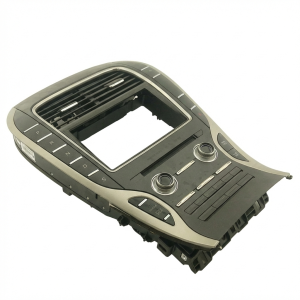
| Physical Buttons or Knobs Not Working | If the touchscreen works but the physical buttons (volume, temperature, fan speed) do not respond, the Control Console Panel (FCIM) itself has likely failed. |
| Climate Control Behaves Erratically | If the fan speed changes on its own, or you cannot adjust the temperature using the buttons, this points to a faulty FCIM. |
| Apple CarPlay or Other Apps Won't Launch | This is another software-related symptom pointing to the APIM module, as detailed in TSB 20-2363. A software update is the first step in diagnosis. |
Known Issues, Recalls, and Technical Service Bulletins (TSBs)
Several official communications from Ford/Lincoln address common issues with the infotainment and control systems in the 2019-2020 Nautilus.
- TSB 20-2363: SYNC 3 Performance Concerns. This is the most significant TSB for these vehicles. It covers a wide range of problems including frozen or blank touchscreens, Wi-Fi messages, rearview camera glitches, and non-functional apps like Apple CarPlay. The bulletin states that the cause is often outdated software in the APIM (SYNC module) and that updating the software corrects the condition without needing to replace any hardware.
- Recall 19V076 / 26V372000: Blank Instrument Panel Cluster. This safety recall addresses an issue where the gauge cluster screen (behind the steering wheel) can go blank on startup, hiding critical information like the speedometer. This is caused by a software glitch in the Instrument Panel Cluster (IPC) and is fixed by a dealer reprogram. It does not affect the center console screen.
- Recall 25S72: Rearview Camera Malfunction. A software error can cause the rearview camera image to be blank or remain on the screen after shifting out of reverse. Dealers will update the software free of charge to resolve this.
- Recall 20S37: Seat Wiring Harness Damage. On models with 16-way power seats, the seat frame can rub against and damage a wiring harness. This can affect airbag operation and is a separate electrical issue to be aware of.
CRITICAL: Module Programming and Installation
Warning: This is NOT a plug-and-play part. A replacement Control Console Panel (FCIM) must be programmed to your vehicle's specific Vehicle Identification Number (VIN) to function correctly.
When a new or used control module is installed in a modern Ford or Lincoln vehicle, it must be configured to match the specific options of that car. This process ensures that features like heated seats, parking aids, and specific camera systems are recognized and work correctly.
- Programming Methods: Technicians use one of two methods. The preferred way is Programmable Module Installation (PMI), where the configuration data from your old module is copied to the replacement. If the old module is dead, the technician will download your vehicle's original "As-Built" data from Ford's servers using your VIN and write it to the new part.
- Who Can Program It? This procedure requires a Ford/Lincoln dealership or an independent repair shop that has a high-level diagnostic scan tool and a subscription to the Ford service portal (www.motorcraftservice.com). A standard OBD-II code reader cannot perform this function.
- Anti-Theft System: The FCIM is not directly tied to the vehicle's immobilizer (Passive Anti-Theft System or PATS). You will not need to have keys reprogrammed for an FCIM replacement.
Buying a Used Control Console Panel
Purchasing a used OEM control panel is an excellent way to save money, but careful verification is essential to avoid buying an expensive paperweight. The single most important factor is ensuring compatibility.
1. Verify Your Seat Options
The primary difference between control panels is the button configuration for the seats. Your vehicle is equipped with one of two setups:
- Heated Seats ONLY: The panel will only have buttons for heated seats.
- Heated AND Cooled (Ventilated) Seats: The panel will have buttons for both heating and cooling functions.
You must purchase a panel that matches your vehicle's factory options. A panel for cooled seats will not work correctly in a vehicle that only has heated seats, and vice-versa.
Pro Tip: The part number KA1Z-18842-HC, one of the most common, is specifically for models WITH heated seats but WITHOUT cooled seats and WITHOUT the parking aid feature. This highlights how specific the parts are to vehicle options.
2. Match Part Numbers Exactly
The surest way to guarantee compatibility is to remove your original panel and match the OEM part number on the sticker to the replacement part. Part numbers like KA1T-18E245-HC, KA1T-18E245-HD, etc., define the exact hardware and button layout.
3. Budget for Programming
Remember to factor in the cost of professional programming. The price of the used part is not your final cost. Call local dealerships or qualified independent shops beforehand to get a quote for programming a customer-supplied module.
Cost Comparison
Prices for the Control Console Panel can vary significantly. The following are estimates to help you understand the value of a used OEM part.
| Part Type | Estimated Cost |
|---|---|
| New OEM | $900 - $1,400 |
| Used OEM | $110 - $400 |
| New Aftermarket | Not commonly available |
| Shop Labor (Installation) | $75 - $150 |
| Shop Labor (Programming) | $125 - $250 |
Frequently Asked Questions (FAQ)
Does a replacement 2019-2020 Nautilus control panel need to be programmed?
Yes, absolutely. The module must be programmed to your vehicle's VIN to ensure all features work correctly. It is not a plug-and-play part.
My touchscreen is frozen or blank. Will replacing this control panel fix it?
No, almost certainly not. A frozen, blank, or blue screen is a classic symptom of a software issue in the APIM (SYNC module), which is a separate part located behind the touchscreen. Check with a dealer about performing the software update outlined in TSB 20-2363 before replacing any hardware.
Can I install this part myself to save money?
You can physically install the part yourself, as it is generally held in by a few screws and clips. However, the vehicle's features will not work correctly until the module is professionally programmed. You will still need to take the vehicle to a dealer or qualified shop to complete the job.
How do I know which control panel to buy for my Nautilus?
First, confirm if your vehicle has heated seats only, or both heated and cooled seats. Then, the best method is to remove your original panel and find the OEM part number on the sticker. Matching this number exactly is the only way to guarantee you are buying the correct part for your vehicle's specific options.
Technical Specifications
OEM Part Numbers: KA1Z18842HC KA1T18E245HC KA1T18E245HD KA1T18E245HE KA1Z18842HG LA1T18D699HD KA1T18E245BC KA1T18E245BE KA1Z18842BC
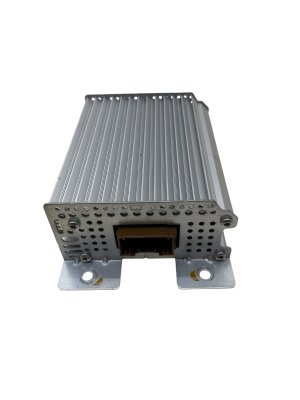
This module is technically known as the Front Controls Interface Module (FCIM). It communicates with the APIM (SYNC Module) and ACM (Audio Control Module) over the vehicle's CAN bus network.
We Have This Part in Stock



The information in this article is provided for general reference and educational purposes only. Vehicle specifications, procedures, and part compatibility can vary by production date, trim level, and region. Always consult your vehicle's factory service manual and verify part numbers before purchasing or performing repairs. Safety-critical components such as airbags, seat belts, and braking systems should be installed by a qualified professional.
- Lincoln Nautilus:
- 🛍️ Shop This Part
- Symptoms of a Failing Control Panel or Related Modules
- Known Issues, Recalls, and Technical Service Bulletins (TSBs)
- CRITICAL: Module Programming and Installation
- Buying a Used Control Console Panel
- 1. Verify Your Seat Options
- 2. Match Part Numbers Exactly
- 3. Budget for Programming
- Cost Comparison
- Frequently Asked Questions (FAQ)
- 🎟️ Get 5% Off