

2012-2015 Jaguar XF Control Console Panel: Solving Sticky Buttons and Matching Part Numbers
Your definitive guide to diagnosing a faulty Jaguar XF switch panel, fixing the common sticky button issue, and finding the correct used replacement.
- The most common failure is 'sticky buttons' caused by a degrading factory coating; this can be fixed by carefully cleaning the coating off with makeup wipes or alcohol.
- This control panel is PLUG-AND-PLAY and does NOT require any dealer programming or calibration after installation.
- You MUST buy a replacement panel that has the exact same buttons as your original, matching options like the heated windshield.
- No direct aftermarket replacements exist; buying a quality used OEM panel is the best value for replacement.
Symptoms of Failure
Failures of the Jaguar XF control panel are typically easy to spot and usually fall into two categories: physical deterioration of the buttons or an electrical malfunction.
1. Sticky or Gummy Buttons
By far the most common issue with these panels is the buttons becoming sticky, tacky, or even appearing to melt. This is not caused by dirt or a spill, but by the degradation of the soft-touch rubberized coating applied at the factory. This coating breaks down over time, especially with exposure to heat and humidity. Dust and lint will stick to the surface, making it look dirty and feel unpleasant to touch. In some cases, the button graphics can be rubbed off during cleaning attempts.
Pro Tip: This issue was so common that Jaguar issued Technical Service Bulletin (TSB) JTB00447, instructing dealers to replace affected switches on warrantied vehicles. If your vehicle is out of warranty, the most common solution is to remove the sticky coating yourself. Owners report great success using makeup remover wipes (Neutrogena brand is frequently mentioned) or a cloth with a small amount of isopropyl alcohol to carefully rub the degraded layer off, revealing the clean, hard plastic button underneath. This takes patience but restores the look and feel of the panel without needing to replace it.
2. Unresponsive or Malfunctioning Buttons
Less common than the sticky button issue, an electrical failure can cause one or more buttons to stop working entirely. You might press the heated seat button, for example, and nothing happens—no light and no function. This can be caused by a failure within the panel's circuit board, a loose connector, or a blown fuse. In rare cases, a liquid spill can seep into the unit and damage the electronics. If multiple buttons in the same area stop working at once, it's worth checking the fuses and the main electrical connector at the back of the panel before replacing the unit.
Buying a Used Control Console Panel
For many owners, replacing the entire panel is a faster solution than cleaning each button individually. Buying a good, used OEM panel is the most cost-effective approach, as quality aftermarket units are not available. Here’s what you need to know.
1. Match Your Vehicle's Options EXACTLY
This is the most critical step. Jaguar produced several versions of this panel based on the car's factory-installed options. You cannot add a feature simply by installing a panel that has the button for it. Your replacement panel must have the exact same buttons as your original.
- Heated Seats: All panels in this guide are for vehicles with heated seats.
- Heated Windshield: For 2013-2015 models, this panel also controls the heated windshield. If your car has this feature, your panel will have a specific button for it. A panel without this button will not work for your car.
- Other Features: Check for buttons like Dynamic Mode (checkered flag icon), Automatic Speed Limiter (ASL), and the Eco button. Your new panel must match your old one perfectly.
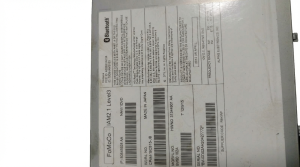
Warning: The safest way to ensure compatibility is to match the OEM part number from your original unit. The part number is printed on a sticker on the back or side of the panel. Part number C2Z31213 is a common replacement for C2Z12997.
2. Physical Inspection
When buying used, ask the seller for clear, well-lit photos. Look closely at the button surfaces. Even if it's a used part, you want one that isn't already sticky. Check for wear on the button graphics and ensure there are no cracks or significant scratches on the faceplate.
3. Why Used OEM is the Best Choice
New OEM panels are extremely expensive. There are no direct aftermarket copies of the entire panel; available "aftermarket" options are typically just cheap sticker overlays for the buttons, which often look bad and don't solve the underlying sticky feel. A recycled OEM panel from a reputable seller provides the original factory fit, finish, and function at a fraction of the price of a new one.
Programming and Installation
Does this part need to be programmed?
No. The Control Console Panel is a plug-and-play part. It does not need to be programmed, flashed, or coded to the vehicle's VIN. This makes replacement straightforward for a DIYer or any repair shop. You simply install the new panel, and it will work correctly, provided you have matched the part number to your vehicle's options.
Replacement Overview
Replacing the panel is a manageable DIY job requiring basic tools. The process generally involves:
- Disconnecting the vehicle's battery as a safety precaution.
- Carefully prying off the side trim panels of the center console using plastic trim removal tools. These are held by clips.
- Removing the screws (typically Torx head) that secure the control panel assembly.
- Lifting the panel and disconnecting the one or two electrical connectors on the back.
- Installation is the reverse of removal.
Cost Comparison
| Part Type | Estimated Cost |
|---|---|
| New OEM | $900 - $1000 |
| New Aftermarket | Not Available |
| Used OEM | $75 - $250 |
| Shop Labor | $120 - $200 |
Frequently Asked Questions (FAQ)
Can I add heated seats or a heated windshield by installing a panel with those buttons?
No. The buttons on the panel are only switches. The actual heating elements, wiring harnesses, and control modules must be present in the vehicle from the factory. Installing a panel with extra buttons will not activate those features.
Is it better to clean my sticky buttons or replace the whole panel?
This depends on your preference. Cleaning the buttons is very cost-effective (nearly free) but can be tedious and time-consuming. Replacing the panel with a clean, used unit is much faster and ensures a perfect finish, but it costs more.
My buttons are sticky. Will Jaguar fix this for free?
Only if your vehicle is still under the original new car warranty or a Certified Pre-Owned (CPO) warranty that covers cosmetic items. Jaguar issued TSB JTB00447 to address this, but it was a warranty repair, not a recall. For most 2012-2015 vehicles, this warranty has expired.
What causes the buttons to stop working?
If buttons are unresponsive, the most likely causes are a loose electrical connector behind the panel, a blown fuse, or an internal failure in the panel's circuit board. Spilled liquids are a common cause of electronic failure in this area.
Technical Specifications
OEM Part Numbers: C2Z31213 C2Z12997
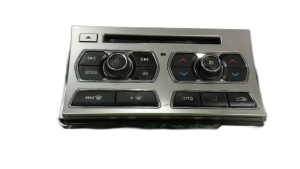
Houses buttons for climate control, heated/cooled seats, heated windshield, Dynamic Mode, Eco Mode, and Automatic Speed Limiter (ASL), depending on vehicle configuration.
We Have This Part in Stock




The information in this article is provided for general reference and educational purposes only. Vehicle specifications, procedures, and part compatibility can vary by production date, trim level, and region. Always consult your vehicle's factory service manual and verify part numbers before purchasing or performing repairs. Safety-critical components such as airbags, seat belts, and braking systems should be installed by a qualified professional.
- Jaguar XF:
- 🛍️ Shop This Part
- Symptoms of Failure
- 1. Sticky or Gummy Buttons
- 2. Unresponsive or Malfunctioning Buttons
- Buying a Used Control Console Panel
- 1. Match Your Vehicle's Options EXACTLY
- 2. Physical Inspection
- 3. Why Used OEM is the Best Choice
- Programming and Installation
- Does this part need to be programmed?
- Replacement Overview
- Cost Comparison
- Frequently Asked Questions (FAQ)
- 🎟️ Get 5% Off