

2022-2024 Expedition & Navigator Rear Console Panel: Control Failures and Peeling Trim
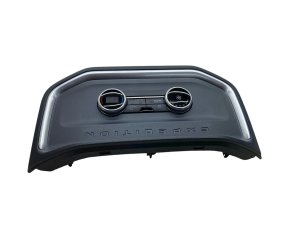
This guide covers the common failures, recalls, and many variations of the rear console control panel for the 2022-2024 Ford Expedition and Lincoln Navigator.
- You MUST match all buttons, ports, and screen types exactly when buying a replacement, as many variations exist.
- A recall (26S38) exists for 2018-2024 Expeditions for peeling chrome trim that creates sharp edges; check with a dealer.
- If rear controls are dead but front SYNC control works, the rear panel itself has failed and needs replacement.
- Replacement is very easy for DIYers, typically requiring only a trim tool and a screwdriver, and takes less than 30 minutes.
Part Variants: More Than Just a Trim Piece
When replacing the rear console panel on a 2022-2024 Ford Expedition or Lincoln Navigator, it is absolutely critical to understand that many different versions exist. Ordering the wrong one will result in mismatched features or connectors. These panels are specific to models equipped with second-row captain's chairs.
The main variations depend on the vehicle's options:
- Control Type: Panels can have basic knobs and buttons, or they can feature a full digital LCD touchscreen for climate, seat, and media controls (primarily on Lincoln Navigator models).
- Seat Options: The presence of buttons for heated and/or ventilated (cooled) rear seats is a major variation.
- Ports and Outlets: Configurations vary widely, with different combinations of USB-A, USB-C, and 12V or 110V power outlets. Some basic trim panels may have no ports at all.
- Finish and Color: The trim finish can range from standard black plastic to satin silver, brushed metal, or wood grain accents to match the vehicle's interior trim package.
Warning: The term "Console Trim Panel" can refer to a simple plastic bezel or a complete electronic control unit. Part number NL1Z-19980-C is the actual electronic HVAC control module, while numbers like ML1Z-78045E24-AC refer to the surrounding trim pieces. Always verify which component you need.
Known Issues, TSBs, and Recalls
While these are relatively new vehicles, a few key issues have emerged related to the rear console area.
Recall for Peeling Chrome Trim
Ford issued recall 26S38 (NHTSA ID: 26V368000) for a wide range of 2018-2024 Ford Expedition models due to chrome trim on the center console that can bubble, peel, and separate. This creates dangerously sharp edges that can cause cuts. While the recall addresses the main console area, this type of peeling chrome is a widespread issue on Ford interior parts from this era. Owners of affected vehicles are eligible for an inspection and replacement of the defective trim piece by a dealer.
Electronic Control Failures
A common complaint found in owner forums is the complete failure of the rear control panel. Symptoms include:
- Buttons and knobs do not respond.
- The panel is dark and appears to have no power.
- The rear climate lockout button on the front dashboard is not engaged.
Often, the rear climate can still be adjusted using the main SYNC screen on the dashboard, which points directly to a failure within the rear control unit itself. This is not typically a fuse issue, but rather an internal fault in the panel's electronics.
Related Issues (Mistaken Identity)
- Rear Screen Battery Drain (SSM 51116): Some 2022 Navigator and Expedition models experienced a battery drain caused by the rear entertainment screens failing to shut off. This is a software issue, not a fault of the lower control panel.
- Clicking Blend Door Actuator: A rhythmic clicking or ticking sound from the rear passenger side of the vehicle is a classic symptom of a failed rear HVAC blend door actuator, not the control panel. This separate part controls the direction of airflow and fails when its internal plastic gears strip.
Symptoms of a Failing Rear Console Panel
- Unresponsive Controls: The most common symptom is when the buttons, knobs, or touchscreen stop responding to input. The rear climate will be stuck in its last setting.
- Dead USB or Power Ports: One or more of the integrated charging ports may stop providing power.
- Blank or Frozen Screen: On models with a digital display, the screen may go blank, freeze, or display garbled information.
- Physical Damage: Bubbling or peeling chrome trim is a known issue that can create sharp edges. Scratches and cracked plastic from use are also common.
Pro Tip: If your rear controls are dead, first check the front SYNC screen. If you can still adjust the rear climate from the dashboard, it confirms the problem is isolated to the rear panel itself and not the main HVAC system.
Buying a Used Console Trim Panel
A used OEM panel is an excellent, cost-effective solution, but careful inspection is key. Given the high number of variations, this is the most important step.
- Verify Every Button and Port: This is non-negotiable. Place your old panel next to a picture of the used one. Count the buttons and ports. Do the icons match exactly? Does it have heated seats, ventilated seats, both, or neither? Does it have USB-A, USB-C, or a 110V outlet? The configuration must be identical for it to be plug-and-play.
- Check the Part Number: The most reliable method is to match the OEM part number, which is typically found on a sticker on the back of the unit. You will likely need to remove your old panel to see this number.
- Inspect for Physical Damage: Look closely at photos for signs of the peeling chrome issue. Check for deep scratches, cracks, or broken mounting clips, which are often damaged during improper removal.
- Question the Seller: Ask if the unit was tested before being removed from the vehicle. Reputable sellers of recycled parts will often test the electronics to ensure functionality.
Cost Comparison
Prices for these panels vary dramatically based on the features they include.
| Part Type | Estimated Cost |
|---|---|
| New OEM | $35 - $900+ (Simple trim is cheap; panels with touchscreens are very expensive) |
| New Aftermarket | Generally not available for these specific, complex panels. |
| Used OEM | $80 - $250 (Depending on features and condition) |
| Shop Labor | $75 - $150 |
Replacement Guide (DIY Difficulty: 1/5)
Replacing the rear console panel is a straightforward job that most DIYers can complete in under 30 minutes. The process generally involves carefully prying trim pieces and removing a few screws.
- Pry Up the Cupholder Assembly: The cupholder trim piece located just in front of the rear control panel is held in by clips. Use a plastic trim removal tool to gently pry it upwards and release the clips.
- Remove Mounting Screws: With the cupholders removed, you will expose two screws holding the top of the control panel assembly in place. Remove these screws (typically 7mm or Torx).
- Pull the Panel Out: The panel assembly can now be pulled backward and out of the console. It is held by clips at the bottom, so a firm, steady pull may be needed.
- Disconnect Electrical Connectors: Carefully unplug the one or two electrical harnesses attached to the back of the panel. Press the release tab on each connector before pulling.
- Installation: Installation is the reverse of removal. Connect the electrical harnesses to the new panel, slide it into place ensuring the bottom clips engage, and reinstall the mounting screws and cupholder trim.
Frequently Asked Questions
Why do my rear controls not work, but I can still change the settings from the front screen?
This indicates that the main HVAC system is working correctly, but the rear control panel itself has failed. The panel is essentially a remote switch for the system, and when it fails, the primary control (the front SYNC screen) still functions. Replacing the rear panel should solve the issue.
Is the peeling chrome trim on my console covered by a recall?
Yes, for the 2018-2024 Ford Expedition, Ford issued recall 26S38 to address bubbling and peeling chrome trim that can create sharp edges. Contact a Ford dealer with your vehicle's VIN to see if it is included in the campaign. They will inspect and replace the part free of charge if it is defective.
Can I upgrade my basic panel to one with a touchscreen or heated seat buttons?
This is generally not possible without significant, complex, and expensive modifications. The vehicle's wiring harness and computer programming are specific to the options it was built with. You must replace your panel with one that has the exact same features.
What is the clicking noise I hear from the back of my Expedition/Navigator?
A rhythmic clicking or tapping noise from the rear passenger-side cargo area is almost always a failed rear HVAC blend door actuator, not the control panel. This separate component needs to be replaced to fix the noise and restore proper air temperature blending.
Technical Specifications
OEM Part Numbers: ML1Z-78045E24-AC ML1Z-78045E24-BC NL1Z-19980-C NL7Z-10D885-B JL1Z-78045E24-EB
Varies by trim. Includes options for heated/ventilated seat controls, USB-A/USB-C ports, 12V/110V power outlets, and digital touchscreen displays.
We Have This Part in Stock



The information in this article is provided for general reference and educational purposes only. Vehicle specifications, procedures, and part compatibility can vary by production date, trim level, and region. Always consult your vehicle's factory service manual and verify part numbers before purchasing or performing repairs. Safety-critical components such as airbags, seat belts, and braking systems should be installed by a qualified professional.
- LINCOLN NAVIGATOR:
- FORD EXPEDITION:
- 🛍️ Shop This Part
- Part Variants: More Than Just a Trim Piece
- Known Issues, TSBs, and Recalls
- Recall for Peeling Chrome Trim
- Electronic Control Failures
- Related Issues (Mistaken Identity)
- Symptoms of a Failing Rear Console Panel
- Buying a Used Console Trim Panel
- Cost Comparison
- Replacement Guide (DIY Difficulty: 1/5)
- Frequently Asked Questions
- 🎟️ Get 5% Off