

2022-2024 Hyundai Ioniq 5 Sliding Console Cap: Fixing USB Port Disconnects and Charging Issues
This guide addresses the common failures, part numbers, and replacement tips for the console trim panel cap and its integrated electronics in Ioniq 5 models with the sliding 'Universal Island' console.
- This part is ONLY for Ioniq 5 models with the sliding center console (typically the Limited trim).
- The most common failure is the integrated USB-A port, which causes constant CarPlay/Android Auto disconnects. This is a hardware flaw.
- The permanent fix for disconnects is to replace the small, separate USB port assembly (Part No. 96125-GI000), which is an easy, 10-minute DIY job.
- When buying a used panel, always inspect the mounting clips on the underside and assume the included USB port will need to be replaced separately.
Symptoms of Failure
Failures related to this console panel almost always involve the electronic components it houses, not the plastic trim itself. The most common complaints are electronic, followed by cosmetic wear.
1. Intermittent Apple CarPlay / Android Auto Disconnections
This is the most widely reported issue. The connection to your phone will randomly drop, often triggered by hitting a bump or jostling the cable. The infotainment screen may show a "Phone Not Responding" or "Reading USB" error before disconnecting. This is not a software bug or a problem with your phone's cable; it is a known physical hardware defect in the original USB port assembly due to loose manufacturing tolerances that prevent it from securely gripping the USB cable.
2. Wireless Charger Malfunction or Poor Performance
Many owners report that the built-in Qi wireless charging pad is ineffective. Symptoms include very slow charging, the phone overheating and stopping the charge, or the pad failing to charge the phone at all. The phone must be perfectly aligned on the pad to work, and even then, it may lose charge if you are running navigation apps. In some cases, the charger may stop working entirely, which could be due to a blown fuse or an internal failure. Before assuming a hardware fault, check the vehicle's settings, as the wireless charging system can be turned off via the infotainment screen.
3. Dead or Non-Functional USB Port
In some cases, the USB port may fail completely, providing neither data nor power. This is less common than intermittent disconnects but points to a definitive failure of the USB port assembly.
4. Cosmetic Damage
As a high-touch area, the console trim panel is susceptible to scratches, scuffs, and wear from normal use. While this doesn't affect function, it can be an eyesore. There are no widespread reports of the panel itself cracking or breaking under normal conditions.
Vehicle-Specific Known Issue: The intermittent disconnection of the main USB-A port is a well-documented design flaw in early models. The only permanent fix is to replace the USB port assembly with an updated part.
Buying a Used Console Trim Panel Cap: A Buyer's Checklist
Purchasing a used OEM trim panel can be a great way to save money, especially if your original is just cosmetically damaged. However, there are critical details to check to ensure you get a good part.
Step 1: Confirm Compatibility
This is the most important step. This trim panel is only for 2022-2024 Hyundai Ioniq 5 models equipped with the sliding center console. In the US market, this feature is typically found on the Limited trim. It will not fit SE or SEL models with the fixed, non-sliding console.
Step 2: Understand the Part Numbers
The main trim panel and the electronics are separate parts. Be clear about what you are buying.
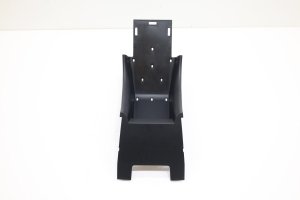
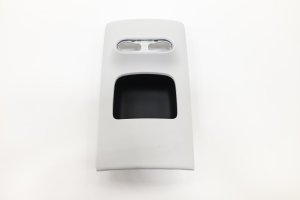
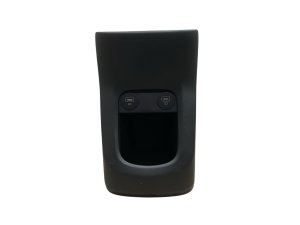
- Main Trim Panel: Look for part numbers like 84640-GI100-NNB (Black) or 84640-GI100-YGU (Beige/Grey).
- USB Port Assembly: The data port is a separate module, part number 96125-GI000.
Pro Tip: If you are buying a used panel to fix the USB disconnection issue, you should plan to buy a new USB port assembly (96125-GI000) separately. The used panel will likely come with the same faulty original port.
Step 3: Physical Inspection Checklist
When inspecting a used panel in person or looking at photos online, check the following:
- Surface Condition: Look for deep scratches, gouges, or signs of chemical damage to the finish. Minor scuffs may be acceptable.
- Mounting Tabs: This is critical. Flip the panel over and inspect all plastic clips and mounting tabs. If any are broken or cracked, the panel will not sit securely and may rattle.
- Included Electronics: Verify if the panel includes the wireless charger and USB port. Assume the included USB port is the faulty original version and may need replacement.
Replacement Guide
Replacing the electronic components within the trim panel is a common and straightforward DIY repair.
How to Replace the USB Port Assembly (Fixing Disconnects)
This procedure is simple and requires only a plastic trim removal tool to avoid scratching the console.
- Purchase the Part: Order a new USB Port Assembly, part number 96125-GI000.
- Pry Out the Old Module: Using a plastic trim tool, gently pry around the edges of the square USB port module. It is held in by plastic clips.
- Disconnect the Harness: Pull the module out just enough to access the wiring connector on the back. Press the small release tab on the connector and unplug it.
- Install the New Module: Plug the wiring harness into your new USB port assembly. Align the new module with the opening in the console trim and press it firmly into place until it snaps securely.
Replacing the entire console cap is also a clip-based process, but more care is needed to release the clips without breaking them.
Cost Comparison
Prices can vary based on supplier and availability. This table provides an estimated cost breakdown.
| Part | Cost Range |
|---|---|
| New OEM Console Trim Panel (84640-GI100...) | $200 - $330 |
| New OEM USB Port Assembly (96125-GI000) | $40 - $60 |
| Used OEM Console Trim Panel (with electronics) | $100 - $175 |
| Shop Labor to Replace USB Port | $50 - $100 (0.5 hours) |
Recalls and Technical Service Bulletins (TSBs)
There are no recalls or TSBs specifically for the console trim panel or its integrated USB port. However, there is a major safety recall for the vehicle's charging system that owners should be aware of.
- NHTSA Recall 24V-204 (Hyundai Recall 257): This recall addresses a faulty Integrated Charging Control Unit (ICCU) that can fail and stop charging the 12V battery, potentially leading to a loss of drive power. This is unrelated to the console USB ports or wireless charger but is a critical safety issue for all 2022-2024 Ioniq 5 owners. Dealers will update software and replace the ICCU if necessary, free of charge.
Frequently Asked Questions (FAQ)
Will this sliding console trim panel fit my Ioniq 5 SE or SEL?
No. This part is specifically for models with the sliding center console, which is a feature on the Limited trim in the United States. SE and SEL models have a different, fixed console, and this part is not compatible.
Why does my Apple CarPlay / Android Auto keep disconnecting?
This is a very common problem caused by a physical defect in the original USB-A port assembly (part 96125-GI000). The port's internal contacts are too loose to maintain a stable data connection when the car moves. The only permanent solution is to replace the USB port assembly with a new one.
My wireless charger isn't working. What should I check first?
First, check the infotainment settings. Go to Setup > Vehicle > Convenience and ensure the 'Wireless charging system' is enabled. Also, try removing your phone case, as thick cases can block the connection. If it still doesn't work, it could be a failed charger or a blown fuse, which may require a trip to the dealer.
Is it difficult to replace the USB port myself?
No, it is a very easy DIY job. The USB port module is held in by clips and can be pried out with a plastic trim tool. The entire process takes less than 10 minutes and requires no special skills.
Technical Specifications
OEM Part Numbers: 84640-GI100-NNB (Trim Panel, Black) 84640-GI100-YGU (Trim Panel, Beige/Grey) 96125-GI000 (USB Port Assembly)
Designed for 2022-2024 Hyundai Ioniq 5 with sliding center console. Houses one USB-A data port and one Qi wireless charging pad.
We Have This Part in Stock

The information in this article is provided for general reference and educational purposes only. Vehicle specifications, procedures, and part compatibility can vary by production date, trim level, and region. Always consult your vehicle's factory service manual and verify part numbers before purchasing or performing repairs. Safety-critical components such as airbags, seat belts, and braking systems should be installed by a qualified professional.
- Hyundai Ioniq 5:
- 🛍️ Shop This Part
- Symptoms of Failure
- 1. Intermittent Apple CarPlay / Android Auto Disconnections
- 2. Wireless Charger Malfunction or Poor Performance
- 3. Dead or Non-Functional USB Port
- 4. Cosmetic Damage
- Buying a Used Console Trim Panel Cap: A Buyer's Checklist
- Step 1: Confirm Compatibility
- Step 2: Understand the Part Numbers
- Step 3: Physical Inspection Checklist
- Replacement Guide
- How to Replace the USB Port Assembly (Fixing Disconnects)
- Cost Comparison
- Recalls and Technical Service Bulletins (TSBs)
- Frequently Asked Questions (FAQ)
- 🎟️ Get 5% Off