

Tesla Model 3 & Y Center Console Guide (2017-2026): Gen 1, Gen 2, Highland & Juniper Differences
From scratched piano black finishes to failing wireless chargers, this guide covers the common issues and critical compatibility differences for your Model 3 or Model Y center console.
- There are four main, non-interchangeable console generations; you must verify your vehicle's specific style (Gen 1, Gen 2, Highland, or Juniper) before buying a replacement.
- When swapping a console (e.g., for an upgrade), you MUST transfer the security controller from your original console to the new one to avoid disabling the vehicle.
- Common failures are physical, like broken latches, stuck sliding doors on 2021+ models, and cosmetic scratches on the 2017-2020 'piano black' version.
- Failure of the integrated wireless charger on 2021+ models is a frequent complaint, often solvable by removing the phone case or checking for a loose internal connection.
Variant Warning: Console Generations Are Not Interchangeable

Critical Compatibility Warning: Tesla has produced at least four distinct and non-interchangeable center console designs for the Model 3 and Model Y. Before purchasing a replacement, you must identify which version your vehicle has. Installing a console from a different generation is not a direct swap and can lead to inoperative features or even prevent the car from starting without complex modifications.
Identifying Your Tesla's Console Version

The most important step for any repair or replacement is to correctly identify your console. The versions are tied to specific model year ranges and vehicle updates.
Gen 1: The 'Piano Black' Console (2017-2020 Model 3)
The original console found in early Model 3s is famous for its high-gloss, "piano black" finish. It features a flip-up lid for the main storage and a separate flip-up phone dock. This design was often criticized for being a magnet for fingerprints and fine scratches. Many owners apply vinyl wraps to protect the surface or change its appearance.
Gen 2: The 'Refreshed' Matte Console (2021-2023 Model 3 & 2021-2024 Model Y)
In late 2020 for the 2021 model year, Tesla introduced a redesigned center console for the Model 3, which was also used for the Model Y. This "refreshed" console has a matte gray finish, a smooth sliding door, and integrated dual wireless phone charging. This version is generally considered more durable and practical than the first generation.
Gen 3: The 'Highland' Redesign (2024+ Model 3)
The updated Tesla Model 3, codenamed 'Highland', introduced another complete interior redesign, including the center console. This version features different contours, trim, and often includes a rear-facing 8.0-inch screen for passengers on the back of the console. The overall aesthetic is sleeker to match the rest of the updated interior.
Gen 4: The 'Juniper' Redesign (2025/2026+ Model Y)
To align with the Model 3 'Highland' update, the Model Y is expected to receive its own interior refresh, codenamed 'Juniper', starting with the 2025 or 2026 model year. This console is expected to mirror the design of the 'Highland' Model 3, including updated storage, materials, and the potential for a rear passenger screen on premium models.
Model Y 'Standard' Trim Open Console (2026+)
Some newer base or 'Standard' trim Model Y vehicles may come with a more open-concept lower console area instead of the fully enclosed storage compartment found in premium trims. This design leaves a large open bin, and owners looking for enclosed storage may need to seek aftermarket solutions or attempt a complex OEM console swap.
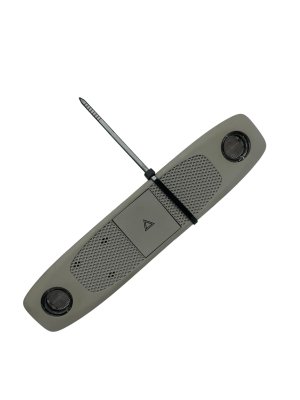
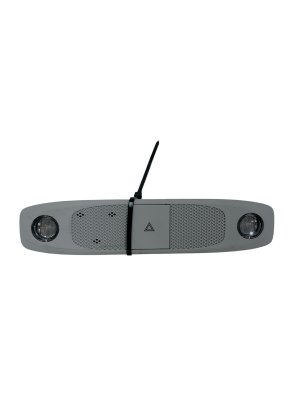
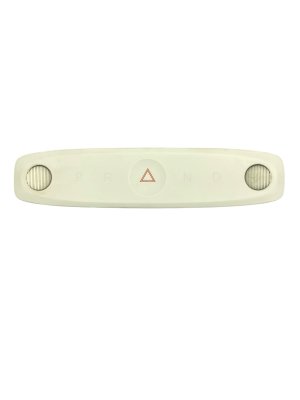
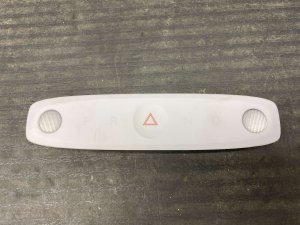
Pro Tip: The part number 1092573-00-L and similar variants are often misidentified in online listings. This part number is for the overhead console, which contains the dome light and hazard switch, not the center console between the seats. Always verify compatibility by photos and vehicle generation, not just this part number.
Common Symptoms of Console Panel Failure

Failure of the center console is typically cosmetic or mechanical, but can also include electronic issues in newer models.
- Scratches and Fingerprints (Gen 1): The glossy 'piano black' finish is notoriously easy to scratch and smudge, which is the most common complaint.
- Stuck or Noisy Sliding Door (Gen 2): The sliding door on refreshed consoles can become difficult to move, get stuck, or make scraping noises. This can be caused by debris in the tracks or a misaligned mechanism. 🎬 Watch: How to fix a scratching sliding drawer
- Broken Latch or Lid Won't Close: The latch for the main storage compartment can break, preventing the lid or armrest from staying closed. This can be due to a worn spring, physical damage, or misalignment. 🎬 See this guide to fix a stuck armrest latch
- Wireless Charger Not Working (Gen 2+): The integrated wireless charger may fail to charge a phone. This can be caused by a thick phone case, poor phone alignment, a loose internal connection, or a faulty charging module itself. In some cases, the phone may get very warm. 🎬 Watch: How to troubleshoot a faulty wireless charger
- Inoperative USB Ports: The USB ports located within the console can fail, preventing charging or data connections for features like Sentry Mode. This may require replacing the USB hub.
Known Issues, TSBs, and Recalls
As of mid-2026, there are no widespread official recalls or Technical Service Bulletins (TSBs) from the NHTSA specifically for the center console assembly in the Tesla Model 3 or Model Y. Most issues are considered cosmetic or are addressed by service centers on a case-by-case basis. The most well-documented "known issue" is the susceptibility of the Gen 1 console to cosmetic damage.
Buying a Used Console Panel: What to Inspect

Purchasing a used OEM console is a great way to save money, especially for an upgrade or repair. However, careful inspection is critical.
- Verify the Generation: This is the most important step. A Gen 2 console will not easily fit in a Gen 1 car. Match the finish (glossy vs. matte), lid type (flip vs. slide), and overall shape to your original console. Ask the seller for the year and model of the vehicle it was removed from.
- Inspect All Mounting Tabs: Carefully check all plastic mounting tabs and clips on the bottom and sides of the unit. These are easily broken during removal and are essential for a secure, rattle-free installation.
- Test Mechanical Parts: If possible, operate the lid or sliding door multiple times. It should move smoothly without binding, sticking, or making loud noises. Check that the latch engages and holds the lid securely closed.
- Check the Wiring and Connectors: Ensure the wiring harnesses and connector plugs are intact with no cut wires or damaged pins. A console with a damaged harness will be very difficult to install.
- Ask About the Security Controller: The NFC key card reader and vehicle security controller are located under the cupholder area. When swapping consoles, you MUST transfer the security controller from your original console to the replacement. Failure to do so can brick the vehicle, making it think it's being stolen. Confirm with the seller if the used console includes this module; if it does, you will need to swap it with your own.
Cost to Replace a Tesla Console Panel
Costs can vary significantly based on the console generation and whether you are buying new or used.
| Part Source | Estimated Cost |
|---|---|
| New OEM (from Tesla) | $800 - $1,200 |
| New Aftermarket (Upgrades/Wraps) | $50 (Wraps) - $700+ (Full Replacements) |
| Used OEM (Recycled) | $250 - $600 |
| Shop Labor Cost | $150 - $300 |
Replacement Guide Overview
Replacing the center console is a moderately difficult job that a patient DIYer can accomplish. The process generally involves disconnecting the 12V battery, removing side trim panels, and accessing several bolts.
- Disconnect Power: Power off the vehicle via the touchscreen and disconnect the low-voltage (12V) battery.
- Remove Side Panels: Carefully pry off the carpeted side panels of the center console to expose the mounting bolts.
- Remove Mounting Bolts: Remove the 10mm bolts securing the console to the vehicle floor at the front and rear.
- Disconnect Electrical Connectors: Tilt the console back to access and disconnect the main electrical harnesses for the USB ports, wireless charger, and NFC reader.
- Remove Console: With an assistant, carefully lift the console out of the vehicle, usually through the passenger door.
- Swap Security Controller: If installing a different console assembly, you must now disassemble both the old and new units to transfer your original security controller module to the new console.
- Installation: Installation is the reverse of removal. Connect all electrical harnesses before bolting the console back in place.
Frequently Asked Questions (FAQ)
Can I upgrade my 2018-2020 Model 3 console to the newer 2021+ sliding door version?
Yes, it is physically possible, but it is a complex project. You must swap the security controller module from your original console into the new one to prevent the car from being disabled. The wiring connectors may also be different, potentially requiring a custom adapter. It is not a simple plug-and-play swap.
My wireless charger isn't working. What should I check first?
First, remove your phone case, as thick cases can block the connection. Also, try repositioning the phone, as alignment is key. If it still doesn't work, the issue could be a software glitch (try rebooting the car's screen) or a loose internal connection. If none of these work, the charging module may have failed.
The sliding door on my 2022 Model Y is getting stuck. How can I fix it?
A stuck sliding door is often caused by small debris like coins or crumbs falling into the tracks. You can try using compressed air to clean the tracks. If that doesn't work, you may need to partially disassemble the console top to access and clean the sliding mechanism.
How do I clean the 'piano black' console without scratching it?
Use a high-quality, soft microfiber towel and a gentle cleaner designed for interior plastics. Avoid paper towels or rough cloths. To prevent future scratches, many owners install a vinyl wrap, which is available in many finishes like matte black, carbon fiber, or wood grain.
Helpful Videos


Technical Specifications
OEM Part Numbers: 1092573-00 1092573-00-L 1092573-00-M 1614943-00 1714377-20-K 1714382-20-F 1739293-00-E 1739293-00-G 1739293-99-E 173929300E 173929300G 173929699E 1755546 1755546-02-A 1982882-20-E 1755503-00-A
Designs vary by generation: Gen 1 (Glossy black, flip lid), Gen 2 (Matte gray, sliding door, wireless charging), Gen 3/Highland (Redesigned, optional rear screen), Gen 4/Juniper (Similar to Highland for Model Y).
We Have This Part in Stock

The information in this article is provided for general reference and educational purposes only. Vehicle specifications, procedures, and part compatibility can vary by production date, trim level, and region. Always consult your vehicle's factory service manual and verify part numbers before purchasing or performing repairs. Safety-critical components such as airbags, seat belts, and braking systems should be installed by a qualified professional.
- Tesla 3:
- TESLA Y:
- 🎬 Helpful Videos
- 🛍️ Shop This Part
- Variant Warning: Console Generations Are Not Interchangeable
- Identifying Your Tesla's Console Version
- Gen 1: The 'Piano Black' Console (2017-2020 Model 3)
- Gen 2: The 'Refreshed' Matte Console (2021-2023 Model 3 & 2021-2024 Model Y)
- Gen 3: The 'Highland' Redesign (2024+ Model 3)
- Gen 4: The 'Juniper' Redesign (2025/2026+ Model Y)
- Model Y 'Standard' Trim Open Console (2026+)
- Common Symptoms of Console Panel Failure
- Known Issues, TSBs, and Recalls
- Buying a Used Console Panel: What to Inspect
- Cost to Replace a Tesla Console Panel
- Replacement Guide Overview
- Frequently Asked Questions (FAQ)
- 🎟️ Get 5% Off