

2011-2024 Ford Edge Console Guide: Fixing Latches, USB Ports, and Trim Variations
Your definitive guide to diagnosing and replacing the center console in your 2011-2024 Ford Edge, with a focus on navigating the critical generation and trim-level differences.
- The console parts are NOT interchangeable between the two generations: 2011-2014 and 2015-2024. You must buy for your specific generation.
- Compatibility is extremely complex. Before buying a used part, you must verify your vehicle's trim (SE, SEL, Titanium) and options (SYNC, Ambient Lighting, Wireless Charging).
- The most common failures are physical: broken armrest latches, torn upholstery, and peeling trim. These are considered wear-and-tear items.
- Dead USB ports are a frequent electrical issue, but the problem is usually the small, inexpensive USB hub or a fuse, not the entire console assembly.
Understanding the Two Generations of Ford Edge Consoles

The 2011-2024 Ford Edge spans two distinct vehicle generations, and their console panels are completely different. Parts are not interchangeable between these generations. Identifying your vehicle's generation is the first and most important step in any repair or replacement.
First Generation (2011-2014)
The console in the first-generation facelift models features a more traditional design with a physical gear shift lever. These consoles are known for specific wear patterns and part variations.
- Common Issues: The most frequent problems are a broken armrest latch that prevents the lid from staying closed, and torn or cracked vinyl/leather on the armrest itself. The silver-painted trim pieces around the shifter and cupholders can also scratch or peel over time.
- Electrical Problems: Failures of the 12V power outlets or the USB/AUX hub inside the armrest storage are common. This is often due to a blown fuse or a faulty hub, not the entire console. Some models with ambient lighting may experience a software glitch where the lights get stuck on a single color, which may require a dealer visit to update the system per TSB 14-0175.
- Compatibility: Replacement consoles must be matched based on options like the SYNC system (with or without) and the presence of ambient lighting, which adds wiring and light pipes to the assembly.
Second Generation (2015-2024)
The second-generation Edge introduced a completely redesigned interior with a more integrated console, which transitioned from a traditional shifter to a rotary dial in 2019. These modern consoles have their own unique set of problems.
- Common Issues: Like the earlier models, the armrest latch mechanism is a frequent point of failure. Owners also report creaking noises from the armrest hinge under pressure. A widespread cosmetic issue is the peeling or bubbling of the chrome-like film around the cupholders and rotary shifter.
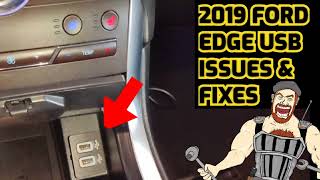
- Electrical Problems: Dead or intermittent USB ports are the most common electrical complaint for this generation. The ports, located in the cubby under the center stack, can become loose or fail due to corrosion from spills or a faulty USB module. This can prevent phone charging and disrupt Apple CarPlay or Android Auto connections. In most cases, the small, replaceable USB hub is the culprit, not the entire console assembly.
- Compatibility: Variants are numerous. You must match trim levels (SE, SEL, Titanium, ST) and options like wireless charging pads, ambient lighting, and the presence of a panoramic sunroof (which affects the overhead console).
Symptoms of a Failing Console Panel

- Broken Armrest Latch: The lid will not stay shut and may pop open while driving over bumps.
- Worn or Torn Upholstery: The armrest surface is cracked, peeling, or has a visible tear from elbow pressure and sun exposure.
- Dead USB or Power Ports: Phones won't charge or connect to the SYNC system. This is often isolated to the USB hub or a fuse.
- Peeling Trim Finish: The silver or chrome finish around cupholders and the shifter bubbles, flakes, or peels off, leaving sharp edges.
- Loose or Wobbly Armrest: The entire lid feels unstable due to a broken hinge.
- Creaking Noises: The console or armrest makes plastic-on-plastic creaking sounds when leaned on.
Warning: No recalls have been issued for console panel failures. These issues are considered normal wear and tear. You will not be able to get this fixed for free outside of the vehicle's original bumper-to-bumper warranty period.
Buying a Used Console Panel: A Step-by-Step Guide

Due to the high cost of new OEM console parts, a used part is often the best value. However, the extreme number of variations makes careful selection essential. Follow this checklist to get the right part the first time.
- Confirm Your Generation: Is your Edge a 2011-2014 or a 2015-2024 model? This is the first and most important filter.
- Document Your Features: Before you shop, check your exact vehicle configuration. Do you have:
- SYNC (voice recognition)?
- Ambient Interior Lighting?
- Heated Seats (controls may be on the panel)?
- A traditional shifter or a rotary dial (2019+)?
- A wireless charging pad (2019+)?
- Match Part Numbers: If possible, remove a piece of your existing console trim to find the original OEM part number molded into the plastic. Matching this number is the surest way to guarantee compatibility.
- Physical Inspection Checklist: When inspecting a used console panel, check for:
- Intact Mounting Tabs: Flip the part over. All plastic tabs and screw holes must be intact. Broken tabs are a major red flag and will lead to a loose, rattling fit.
- Functional Latch: Test the armrest latch multiple times. It should click securely and release smoothly.
- Smooth Hinge: Open and close the armrest. It should move freely without binding or excessive wobble.
- Connector Integrity: Look at all electrical connectors. Ensure there are no bent pins, cut wires, or signs of corrosion (green or white crust), especially around the USB hub area.
- Cosmetic Condition: Check for deep scratches, sun fading, and peeling trim that you aren't willing to live with.
Pro Tip: For a part this complex and dependent on options, a used OEM part is almost always a better choice than a new aftermarket one. Aftermarket companies rarely produce full console assemblies, and when they do, fitment and color matching can be poor. A used OEM part guarantees the correct fit, color, and feature compatibility if you match it correctly.
Replacement Difficulty & Labor Costs
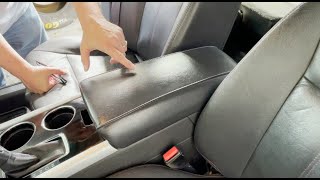
- Armrest Lid Only: This is a very easy DIY job. It typically involves removing a plastic cover on the underside of the lid and undoing four T20 Torx screws. Difficulty: 1/5. Time: 0.25 hours. 🎬 Watch: Step-by-step armrest removal for 2011-2014 models.
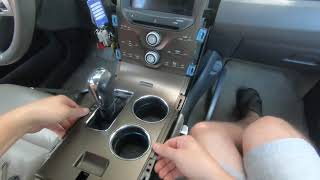
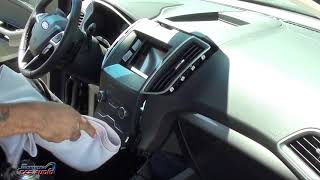
- Full Center Console Assembly: This is more involved and requires patience. The process involves prying off side trim panels, removing the trim around the shifter, undoing several screws (often 7mm), and carefully disconnecting multiple electrical connectors. Difficulty: 3/5. Time: 1.5-2.5 hours. 🎬 Watch this walkthrough for replacing a 2015-2018 storage console.
Cost Comparison
| Part Type | Estimated Cost | Notes |
|---|---|---|
| New OEM | $350 - $800+ | Price varies dramatically by specific panel and options. An overhead console can exceed $600. |
| New Aftermarket | $25 - $60 | Generally limited to armrest upholstery covers or drop-in organizer trays. Full console panels are not widely available. |
| Used OEM | $100 - $350 | Offers the best value. Price depends on condition, included components, and rarity. |
| Shop Labor Cost | $150 - $350 | For replacement of the main center console assembly. Armrest lid replacement would be much less, typically under $100. |
Frequently Asked Questions (FAQ)
Can I just replace the broken armrest latch?
Usually, no. For most Ford Edge models, the latch mechanism is integrated into the armrest lid and is not sold by Ford as a separate component. If the latch breaks, you typically need to replace the entire armrest lid assembly.
My USB ports stopped working. Do I need a whole new console?
Almost certainly not. The most common cause is a faulty USB hub module, which is a small, separate part that can be replaced. Before replacing anything, check the fuse for the power outlet first. If the fuse is good, inspect the USB port for debris or corrosion, and then consider replacing the USB hub itself.
🎬 See how to replace a faulty USB hub module.Can I upgrade my base model console to a higher trim version with ambient lighting?
This is not a simple plug-and-play swap. Adding features like ambient lighting requires the correct console panel, the corresponding wiring harness, and potentially programming changes to the vehicle's body control module to activate the feature. It is a complex and expensive project.
How can I fix the peeling chrome trim around my cupholders?
The trim piece is not sold separately from the larger console panel. Your options are to replace the entire panel, or attempt a DIY repair. Many owners carefully remove the peeling film, sand the area smooth, and then cover it with a vinyl wrap for a custom look. Others have had success repainting the trim after proper preparation.
Helpful Videos
Technical Specifications
OEM Part Numbers: BT4Z-78045A36-BA BT4Z78045A76CB BT4Z78045E24AA BT4Z78045E24BA BT4Z7806024AD DT4Z-78045A36-BA DT4Z78045A76KA DT4Z78045A76LA FT4Z-58519A70-FA FT4Z58044D90CA FT4Z580456024AC FT4Z58045A90AA FT4Z58045A90AB FT4Z58045E24AB FT4Z58045E24BB
Varies significantly based on vehicle options such as SYNC version, ambient lighting, and trim-specific finishes (e.g., Charcoal, Marble, various leather/stitching colors).
We Have This Part in Stock



The information in this article is provided for general reference and educational purposes only. Vehicle specifications, procedures, and part compatibility can vary by production date, trim level, and region. Always consult your vehicle's factory service manual and verify part numbers before purchasing or performing repairs. Safety-critical components such as airbags, seat belts, and braking systems should be installed by a qualified professional.
- Ford Edge:
- 🎬 Helpful Videos
- 🛍️ Shop This Part
- Understanding the Two Generations of Ford Edge Consoles
- First Generation (2011-2014)
- Second Generation (2015-2024)
- Symptoms of a Failing Console Panel
- Buying a Used Console Panel: A Step-by-Step Guide
- Replacement Difficulty & Labor Costs
- Cost Comparison
- Frequently Asked Questions (FAQ)
- 🎟️ Get 5% Off