

Excursion, Navigator & Blackwood Column Switch: Fixing Failing Turn Signals & Wipers (1999-2005)
A complete guide to diagnosing, replacing, and buying a used multifunction column switch for the 2000-2005 Ford Excursion, 1999-2002 Lincoln Navigator, and 2002-2003 Lincoln Blackwood.
- A recall (11V-352) was issued for faulty multifunction switches on 2002-2005 Excursions, highlighting this as a common and dangerous failure.
- The most critical compatibility check is for rear wiper control: Excursions and Navigators need it, the Blackwood does not.
- Symptoms like failing turn signals, erratic wipers, and high beam issues all point to this single switch as the likely cause.
- Replacement is DIY-friendly and does not require removing the steering wheel, making it a simple and accessible repair.
Symptoms of a Failing Column Switch

A bad multifunction switch rarely fails all at once. It usually starts with intermittent problems that get worse over time. If you notice any of the following, your column switch is the most likely culprit.
- Turn Signal Problems: This is the most common symptom. Your turn signals may not activate at all, work only sometimes, or fail to cancel after a turn. In some cases, only one side will work.
- Windshield Wiper Issues: Wipers may not turn on, may stop in the middle of the windshield, or won't return to the 'parked' position at the bottom of the glass.
- Headlight Control Failure: You may lose the ability to switch between high and low beams, or the high beams may not stay on.
- Hazard Lights Work but Turn Signals Don't: The hazard light system often uses a separate circuit path within the switch. If your hazards function correctly but the individual turn signals do not, it's a strong indicator that the turn signal contacts inside the multifunction switch have failed.
- Multiple Failures at Once: If your turn signals and wipers start acting up at the same time, the multifunction switch is almost certainly the cause, as it's the single point of failure for both systems.
Safety Recall Notice: Ford issued a recall for the multifunction switch on 2002-2005 Ford Excursions (NHTSA Campaign ID: 11V352000, Ford Recall #: 11C18). An internal fault in the switch could cause the turn signals, tail lights, hazard lights, and even brake lights to stop working, significantly increasing the risk of a crash. While the recall is old, it highlights the known high failure rate of this part. Check with a Ford dealer or using your VIN on the NHTSA website to see if your vehicle was affected or if the repair was ever performed.
Buying a Used Column Switch: What to Look For

A used OEM multifunction switch is often a reliable and cost-effective alternative to expensive new parts or lower-quality aftermarket versions. Here’s how to choose a good one.
1. The SINGLE Most Important Check: Rear Wiper Control
This is the number one mistake buyers make. You must match the switch to your vehicle's body style:
- Ford Excursion & Lincoln Navigator: These are SUVs with a rear window wiper. Your replacement switch MUST have the rotating control on the end of the stalk for the rear wiper.
- Lincoln Blackwood: This is a pickup truck and has no rear wiper. Your replacement switch MUST NOT have the rear wiper control.
Installing the wrong switch will result in either a missing function you need or a dead control on the stalk. Always verify this feature before purchasing.
2. Physical Inspection
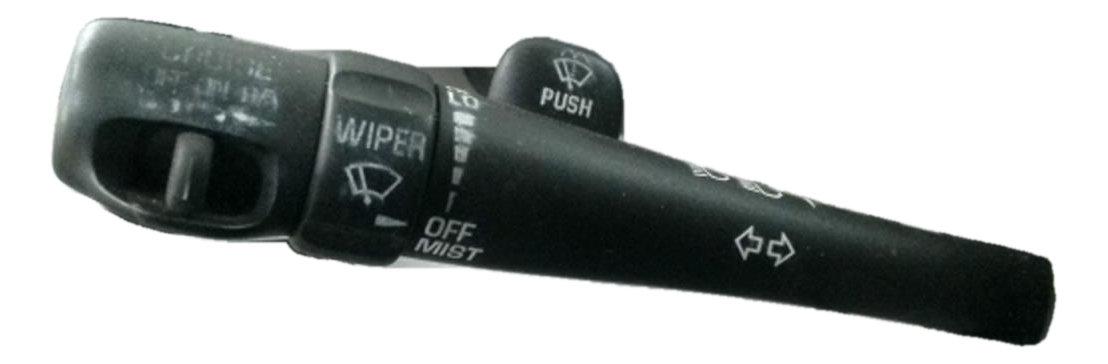
- Check the Stalk: Move the stalk up and down (for turn signals) and twist it (for wipers). The action should feel crisp and defined, not loose or mushy. A sloppy feel indicates internal wear.
- Examine the Markings: The white graphics for wiper speeds and turn signals should be clear and not worn away. This is a good indicator of how much use the switch has seen.
- Inspect the Electrical Connector: Look at the pins in the connector port. They should be straight, clean, and free of any green or white corrosion. Bent or corroded pins can cause intermittent issues even with a mechanically sound switch.
- Look for Cracks: Check the plastic housing for any cracks, especially around the mounting points where it screws to the steering column.
3. Why Choose Used OEM?
For a part like this, a good-condition used Original Equipment (OEM) switch is often superior to a new, cheap aftermarket part. The OEM part was designed to meet Ford's original specifications for materials and durability. Many low-cost aftermarket switches use inferior plastics and internal contacts that can fail prematurely, sometimes within months, putting you right back where you started.
Replacement Overview & Difficulty

Replacing the multifunction switch on these vehicles is a common DIY job.
- Difficulty Rating: 2 out of 5
- Estimated Time: 0.5 - 1.5 hours
- DIY Feasible: Yes
The process generally involves removing the plastic shrouds around the steering column to gain access to the switch. Good news: on these models, you typically do not need to remove the steering wheel or airbag.
Basic Steps:
- Disconnect the battery. This is a critical safety step to prevent electrical shorts and protect the airbag system.
- Remove the lower dash panel and steering column shrouds (usually held by Phillips or 7mm/8mm screws).
- Locate the multifunction switch on the left side of the column.
- Unplug the large electrical connector from the back of the switch.
- Unscrew the two Torx screws holding the switch to the column.
- Install the new switch, reconnect the electrical plug, and reassemble the trim panels.
- Reconnect the battery and test all functions (turn signals, high/low beams, all wiper speeds, washers).
Pro Tip: While you have the steering column covers off, check for a sloppy gear shifter. The shift tube bushings in these columns are another common failure point and are easy to replace at the same time. A loose shifter can cause inaccurate gear selection or prevent the vehicle from starting.
Cost Comparison
Prices can vary, but this gives a general idea of what to expect.
| Part Type | Estimated Cost | Notes |
|---|---|---|
| Used OEM | $40 - $90 | Best value. Ensure compatibility (rear wiper). |
| New Aftermarket | $35 - $120 | Quality varies widely. Stick to reputable brands. |
| New OEM (Motorcraft) | $120 - $200+ | Highest cost, but guaranteed fit and quality. |
| Shop Labor | $100 - $200 | Typically 1-1.5 hours of labor at an independent shop. |
Frequently Asked Questions
Do I have to remove the steering wheel to replace the switch?
No. On the Excursion, Navigator, and Blackwood, you can access and replace the multifunction switch by simply removing the plastic covers around the steering column. The steering wheel and airbag can remain in place.
My turn signals stopped working, but the fuse is good. What's next?
If the fuse is good, the multifunction switch is the next most likely culprit, especially if you have other symptoms like wiper issues. On some Super Duty-based trucks, a separate flasher relay located behind the radio can also fail, but the switch itself is a more common point of failure.
Can I just buy the cheaper switch without the rear wiper control for my Excursion?
No. If your vehicle came with a rear wiper, you must use a switch that has the controls for it. The electrical connector is wired for that function, and using a switch without it means you will lose control of your rear wiper and washer.
Why do my lights flicker or signals work only when I wiggle the stalk?
This is a classic sign of worn internal electrical contacts inside the switch. Wiggling the lever temporarily forces the contacts to touch, but the connection is weak and will eventually fail completely. This confirms the switch needs to be replaced.
Technical Specifications
OEM Part Numbers: 4C7Z13K359AAA XL1Z-13K359-AAA 4G7Z-13K359-AA SW6201
Column-mounted switch controlling turn signals, high/low beams, front wipers/washers, and optional rear wiper/washer. Connects via a single multi-pin electrical connector.
We Have This Part in Stock



The information in this article is provided for general reference and educational purposes only. Vehicle specifications, procedures, and part compatibility can vary by production date, trim level, and region. Always consult your vehicle's factory service manual and verify part numbers before purchasing or performing repairs. Safety-critical components such as airbags, seat belts, and braking systems should be installed by a qualified professional.
- Ford Excursion:
- Lincoln Navigator:
- Lincoln Blackwood: