

2018-2025 Wrangler & Gladiator Center Switch Cluster: Fixing Dead Buttons and Electrical Gremlins
Your complete guide to diagnosing, replacing, and finding the correct used center console switch cluster for your Jeep Wrangler JL or Gladiator JT.
- Compatibility is critical: You must match the part number and button layout of your original switch cluster exactly due to numerous variations for different trims and options.
- Failure is often caused by liquid spills from the cupholders; inspect used parts carefully for any signs of sticky residue or corrosion.
- Replacement is a DIY-friendly job that requires basic trim removal tools and can be done in about an hour.
- Widespread electrical issues like flickering lights or battery drain can be caused by the switch cluster, but you should also check the vehicle's dual-battery system first, as a weak battery can cause similar symptoms.
What the Center Console Switch Cluster Does
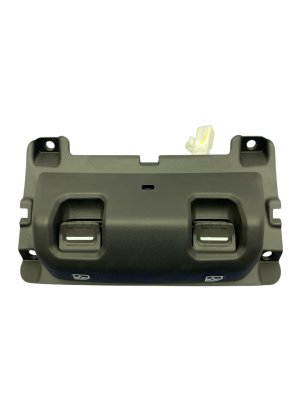
The Center Console Switch Cluster is the main hub for controlling comfort, convenience, and off-road features in the Jeep Wrangler (JL) and Gladiator (JT). More than just a set of buttons, this module is an electronic component that communicates with the vehicle's computer systems. When you press a button to lower a window or turn on the heated seats, the switch cluster sends a command to the Body Control Module (BCM), which then executes the action. This design reduces complex wiring compared to older vehicles. Because these Jeeps are offered in many trims with different options, there are numerous versions of this switch cluster, with layouts for basic functions, heated controls, or advanced off-road and auxiliary switches.
Common Symptoms of a Failing Switch Cluster
Failures in the switch cluster can range from a minor annoyance to a significant electrical issue. Because of its location near the cupholders, liquid spills are a frequent cause of damage.
Individual Buttons Stop Working
The most common failure is when a single button, like a power window switch or heated seat button, becomes unresponsive. You might hear a faint click when pressing the button, or there might be no response at all. Sometimes the soft rubber coating on the buttons can tear or peel, making them difficult to press or leading to eventual failure. In most cases, a single failed button requires the replacement of the entire switch cluster assembly.
Intermittent Operation or Flickering Lights
You might experience buttons that only work some of the time. This can manifest as the entire panel of switches becoming unresponsive and then suddenly working again. In some cases, owners report the backlighting on the switches flickering, or the entire center stack of controls blinking on and off, often accompanied by other random electrical issues or warning messages on the dash. These "electrical gremlins" can sometimes be traced back to a failing switch cluster, a bad ground, or issues with the vehicle's dual-battery system.
Delayed Response
Some owners report a significant delay between pressing a button and the function activating. For example, it might take 20-45 seconds for the climate controls or heated seats to respond after the vehicle has started. While sometimes resolved by resetting a fuse, this can also be an early sign of the switch module beginning to fail.
Parasitic Battery Drain
In severe cases, a short circuit within the switch cluster can cause it to draw power even when the vehicle is turned off. One owner reported a faulty console completely draining both the main and auxiliary batteries while parked. If you are experiencing unexplained battery death, the switch cluster could be a potential culprit.
Known Issues, TSBs, and Recalls
While there are no widespread recalls specifically for the main center switch cluster itself, several related electrical issues are important for owners to be aware of.
- Technical Service Bulletin (TSB) 08-001-24: This TSB addresses an inoperative center console USB port, which can affect Apple CarPlay or Android Auto connectivity. The repair involves replacing a USB cable, which requires the removal of the floor console and surrounding trim—a procedure very similar to replacing the switch cluster.
- Instrument Panel Cluster Recall (NHTSA 24V652000): A recall was issued for some 2018-2024 Wranglers and 2020-2024 Gladiators because the instrument panel cluster (the gauges behind the steering wheel) could short circuit and go blank. This prevents the driver from seeing critical information like the speedometer. While a separate part, it highlights the potential for electrical issues within the dash assembly.
- Other Electrical Recalls: These vehicles have been subject to several major fire-risk recalls related to the power steering pump and plug-in hybrid battery packs. These recalls underscore the complexity of the vehicle's electrical system and the importance of addressing any unusual electrical behavior promptly.
Warning: The factory Mopar Auxiliary Switch Bank, which is part of this cluster on some models, requires a dealer software flash to be activated if installed as an upgrade. If you are replacing a cluster that already has auxiliary switches, no flash is needed, but if you are attempting an upgrade, be aware of this extra step and cost.
Buying a Used Center Console Switch Cluster: What to Check
Purchasing a used OEM switch cluster is a great way to save money, but careful inspection is critical to ensure you get a working part that is compatible with your vehicle.
1. Match Part Numbers and Features EXACTLY
This is the most important rule. Due to the wide variety of trims and options (Sport, Sahara, Rubicon, etc.), there are many different switch configurations. A cluster from a base model will not work correctly in a Rubicon with heated seats and axle lock buttons. The best way to ensure compatibility is to remove your old switch cluster and match the OEM part number on the back. If you can't get the part number, you must visually verify that the replacement has the exact same buttons in the exact same locations as your original part.
2. Physical Inspection Checklist
Before buying, inspect the used part closely:
- Button Feel: Press every button. They should have a solid, tactile click and return to their original position smoothly. Avoid any that feel mushy, sticky, or stuck.
- Check for Liquid Damage: Look for any sticky residue, discoloration, or corrosion on the housing and especially around the seams of the buttons. Spilled drinks are a primary cause of failure.
- Inspect Connectors: Check the electrical connector ports on the back of the unit. Ensure there are no bent, broken, or corroded pins.
- Examine the Button Surfaces: Look for excessive wear or torn rubber on the button faces. While cosmetic, this can indicate heavy use and potential future failure.
3. Why a Used OEM Part is Often a Smart Choice
For a component like this, a used OEM (Original Equipment Manufacturer) part is often a better choice than a cheap, new aftermarket part. The OEM unit is designed to meet the vehicle's specific communication protocols and has a fit and finish (color, texture, and backlighting) that will match your interior perfectly. Aftermarket units, especially for complex electronics, can sometimes have issues with communication, button feel, or long-term reliability.
Cost to Replace the Center Console Switch Cluster
The cost can vary significantly based on the part's features and whether you do the work yourself.
| Item | Estimated Cost |
|---|---|
| New OEM Part | $150 - $400+ (Varies widely by features like AUX switches) |
| New Aftermarket Part | $75 - $250 (Primarily for adding auxiliary switches, not direct OEM replacement) |
| Used OEM Part | $50 - $200 (Dependent on condition and features) |
| Shop Labor Cost | $100 - $250 (Typically 1-1.5 hours of labor) |
Installation Guide: Wrangler (JL) and Gladiator (JT)
Replacing the center console switch cluster is a straightforward job that most DIYers can complete in about an hour with basic tools. The process is nearly identical for the Wrangler and Gladiator.
Difficulty: 2 out of 5
Tools Needed:
- Plastic trim removal tools
- 10mm socket wrench
- Torx drivers (T20, T25)
- Phillips screwdriver
Step-by-Step Replacement
- Disconnect the Battery: As a safety precaution, disconnect the negative terminal from your main vehicle battery.
- Remove Lower Dash Panel: Use a trim removal tool to gently pry off the panel below the steering column. It is held in by clips.
- Remove Shifter Trim: For automatic transmissions, pull up on the 4WD shifter boot to unclip it. For both shifters, you may need to remove a T25 set screw to pull the knobs off. The plastic trim piece around the shifters can then be carefully pried up and removed.
- Remove Center Stack Trim: The main trim piece that surrounds the infotainment screen and the switch cluster must be removed. Start by prying from the bottom and work your way up. It is held in by clips.
- Disconnect and Remove the Switch Cluster: With the main trim removed, you will see the switch cluster. Disconnect the electrical connectors from the back. The cluster is typically held into the trim piece with a few small Phillips or Torx screws. Remove these screws to separate the old cluster from the trim.
- Install the New Cluster: Secure the new (or used) switch cluster into the trim piece with the screws you just removed. Reconnect the electrical harnesses to the back of the new cluster.
- Reassemble the Dash: Re-install all trim pieces in the reverse order of removal. Ensure all clips snap securely into place. Re-install any screws you removed.
- Reconnect Battery and Test: Reconnect the negative battery terminal. Start the vehicle and test every button on the new switch cluster to ensure all functions are working correctly.
Pro Tip: When prying off plastic trim panels, use a plastic tool instead of a screwdriver to avoid scratching or damaging your dashboard. Take photos of the electrical connectors before you unplug them to avoid confusion during reassembly.
Frequently Asked Questions (FAQ)
Can I upgrade my switch cluster to add heated seats or auxiliary switches?
It is physically possible, but not a simple plug-and-play process. Adding features like heated seats requires installing the heating elements in the seats and additional wiring. Adding the factory auxiliary switches requires a new wiring harness and a software flash from a Jeep dealer to make them work, which can be costly. Aftermarket auxiliary switch kits are often an easier and more cost-effective solution.
My window switch stopped working. Is it the switch or the motor?
First, check the window lock button to make sure it isn't engaged. If other windows work from the main switch panel, the problem is likely isolated to that one button or its wiring. If you press the switch and hear a click from the door, the switch is likely sending a signal, and the problem may be the window motor or regulator. If you hear no sound, the switch itself is the most probable cause.
Do I really need to disconnect the battery to replace the switch cluster?
Yes, it is highly recommended. You are working with the vehicle's electrical system, and disconnecting the battery prevents the risk of short circuits, which could damage the new switch cluster or other sensitive electronics like the Body Control Module. It is a simple but critical safety step.
Why are my switch panel lights blinking and nothing works?
This is a common symptom of a broader electrical issue in JL/JT models, often called "electrical gremlins." Before replacing the switch panel, check the health of both your main and auxiliary batteries, as a failing battery can cause these exact symptoms. Also, check for loose ground connections. If the batteries are healthy, the switch cluster itself may have an internal short and require replacement.
Technical Specifications
OEM Part Numbers: 6BV75TRMAA
Varies by vehicle options. Configurations exist for standard controls, heated seats/steering wheel, and auxiliary switches (AUX 1-4) for Rubicon and other equipped models.
We Have This Part in Stock

The information in this article is provided for general reference and educational purposes only. Vehicle specifications, procedures, and part compatibility can vary by production date, trim level, and region. Always consult your vehicle's factory service manual and verify part numbers before purchasing or performing repairs. Safety-critical components such as airbags, seat belts, and braking systems should be installed by a qualified professional.
- Jeep Wrangler:
- Jeep Gladiator:
- 🛍️ Shop This Part
- What the Center Console Switch Cluster Does
- Common Symptoms of a Failing Switch Cluster
- Individual Buttons Stop Working
- Intermittent Operation or Flickering Lights
- Delayed Response
- Parasitic Battery Drain
- Known Issues, TSBs, and Recalls
- Buying a Used Center Console Switch Cluster: What to Check
- 1. Match Part Numbers and Features EXACTLY
- 2. Physical Inspection Checklist
- 3. Why a Used OEM Part is Often a Smart Choice
- Cost to Replace the Center Console Switch Cluster
- Installation Guide: Wrangler (JL) and Gladiator (JT)
- Step-by-Step Replacement
- Frequently Asked Questions (FAQ)
- 🎟️ Get 5% Off