

2019-2023 McLaren 720S Center Console: Infotainment Glitches and Control Failures
This guide covers the common electronic failures of the McLaren 720S center console, focusing on the IRIS infotainment system and what to check when buying a used replacement.
- The most common failure is the IRIS infotainment system, which can often be temporarily fixed with a hard reset (holding the power button for 10 seconds).
- Persistent electronic glitches may be solved with a software update (TSB 14 M 002) from a dealer or specialist.
- A used OEM console is a fraction of the price of a new one, but video proof of its electronic functionality is essential before buying.
- Replacement is a complex job with a high risk of damaging expensive interior trim, making it a task best left to professionals.
Symptoms of Failure
The McLaren 720S center console is a complex electronic assembly, and its failures are almost always related to the integrated systems rather than the physical structure. The most common issues stem from the IRIS infotainment system.
Infotainment and Screen Malfunctions
The most widely reported problem is the unreliability of the IRIS infotainment system. Owners and technicians frequently report a range of electronic glitches. These symptoms can be intermittent and may sometimes be temporarily resolved by restarting the vehicle.
- Screen Freezing or Becoming Unresponsive: The touchscreen may stop responding to touch inputs, or the entire system may freeze on a single screen.
- Blank or Black Screen: The display may fail to turn on, remaining black even when the car is running. In some cases, this can affect the entire instrument cluster as well.
- Phantom Touches: The screen may act as if it's being touched, randomly selecting menus or entering information without user input.
- Lagging and Slow Response: The system may lag significantly when switching between menus, especially after longer drives.
- Connectivity Issues: Bluetooth and Apple CarPlay may frequently disconnect or fail to connect at all.
- Backup Camera Failure: The reverse camera may not display when the car is put into reverse.
Pro Tip: Before assuming a hardware failure, perform a hard reset of the infotainment system by pressing and holding the power button for 10 seconds. Many software-related glitches can be resolved with this simple step or by ensuring the vehicle's software is up to date.
Unresponsive Buttons or Controls
While less common than screen issues, the physical buttons on the console can also fail. This can include the transmission selector buttons (Drive, Neutral, Reverse) or the Active Dynamics Panel controls. Often, if the Active Dynamics panel is unavailable, it may be linked to a fault in another system, such as a suspension error, which then disables the console controls.
Buying a Used Center Console
Due to the extremely high cost of new OEM components, a used center console is a practical option for replacement. However, careful inspection is critical to avoid buying a part with the same issues you're trying to fix.
What to Inspect
- Video Verification: This is the most important step. Insist the seller provides a clear video of the unit powered up in a vehicle. The video should show the screen booting up, responding to touch inputs across all areas of the screen, and cycling through different menus without lag.
- Button Functionality: If possible, the video should also show the illumination of the buttons and confirmation that they work.
- Check Part Numbers: The 720S was available with numerous interior trim options. The center console comes in various finishes, including full leather, Alcantara, and different types of carbon fiber (gloss, satin). Verify the part number to ensure the material matches your vehicle's interior specification.
- Cosmetic Condition: Closely inspect high-resolution photos for scratches on the screen, wear on the button icons, and damage to the leather, Alcantara, or carbon fiber. Pay special attention to the edges and corners, which are prone to wear.
- Connectors and Wiring: Check for any damage to the electrical connectors and wiring pigtails on the back of the unit. Bent pins or cut wires are major red flags.
Known Issues, Recalls, and Technical Service Bulletins (TSBs)
While no recalls exist for the center console itself, several TSBs and important vehicle-wide recalls are relevant to owners.
TSB for Infotainment (Advanced Driver Interface)
McLaren issued Service Campaign Bulletin 14 M 002 to release a software update (Platform 4.8). This update specifically addresses functional improvements and bug fixes for the Advanced Driver Interface (ADI), which is the infotainment system. It was designed to fix issues like GPS faults and audio muting problems. If you are experiencing persistent software glitches, checking if this update has been applied is a crucial diagnostic step.
Vehicle-Wide Recalls
Warning: These recalls do not directly involve the center console but are critical safety issues for 720S owners.
- NHTSA Recall 20V231000: Fuel Tank Corrosion: A foam pad located under the fuel tank can absorb and hold moisture, which may cause the fuel tank to corrode and leak. A fuel leak increases the risk of a fire. This recall affects 2016-2020 720S models.
- Brake Line Routing Recall: A small number of 2020-2025 models were recalled because brake lines may have been routed incorrectly to the ABS/ESP module. This could cause the wrong wheel to brake, potentially leading to a lock-up and loss of control.
Replacement Overview
Replacing the center console on a McLaren 720S is a complex and delicate procedure that should not be attempted by a novice. The process involves removing multiple interlocking trim pieces, disconnecting sensitive electronics, and carefully prying away panels held by strong clips. Damage to the expensive carbon fiber or leather trim is a significant risk.
- Difficulty: 5 out of 5 (Professional Recommended)
- Process: Involves removing side trim panels, the infotainment screen bezel, and the main console structure, which is secured by a combination of bolts and hidden clips. The entire assembly must be carefully lifted out to avoid scratching surrounding surfaces.
| Part/Service | Estimated Cost |
|---|---|
| New OEM Center Console (Full Assembly) | $4,500 - $5,500+ |
| New Aftermarket Carbon Fiber Trim | $800 - $1,000 |
| Used OEM Center Console (Complete) | $450 - $600 |
| Shop Labor for Replacement | $600 - $1,200 |
Frequently Asked Questions
My 720S screen is frozen. How can I fix it?
First, try a hard reset by pressing and holding the power/volume knob for about 10 seconds until the unit restarts. This resolves many temporary software glitches. If the problem persists, the vehicle may need a software update from a dealer or specialist, or it could indicate a hardware failure.
Why are the 'Active' panel controls not working?
If the 'Active' button is unresponsive and you cannot change Handling or Powertrain modes, the car may have detected a fault in a related system. For example, a 'Suspension Failure' warning will often disable the Active Dynamics panel. The root cause is likely not the button itself but another issue that needs to be diagnosed with a McLaren-specific scan tool.
Will a used center console from any 720S fit my car?
Physically, it should fit, but the trim materials may not match. The 720S was offered with many interior specifications, including different grades of carbon fiber, Alcantara, and leather. It is essential to match the part number or get clear photos to confirm the materials are identical to your original trim to maintain the factory appearance.
What does the 'ADI' software update fix?
The Advanced Driver Interface (ADI) is McLaren's term for the main infotainment and driver display system. Software updates, like Platform 4.8 mentioned in TSB 14 M 002, were released to fix specific bugs such as GPS antenna faults, navigation announcements interrupting phone calls, and other general stability issues.
Technical Specifications
Relevant Technical Service Bulletin: 14 M 002 (Service Campaign for vehicle software update to Platform 4.8 for the Advanced Driver Interface).
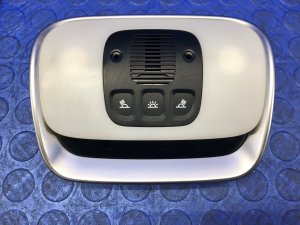
We Have This Part in Stock


The information in this article is provided for general reference and educational purposes only. Vehicle specifications, procedures, and part compatibility can vary by production date, trim level, and region. Always consult your vehicle's factory service manual and verify part numbers before purchasing or performing repairs. Safety-critical components such as airbags, seat belts, and braking systems should be installed by a qualified professional.
- McLaren 720S:
- 🛍️ Shop This Part
- Symptoms of Failure
- Infotainment and Screen Malfunctions
- Unresponsive Buttons or Controls
- Buying a Used Center Console
- What to Inspect
- Known Issues, Recalls, and Technical Service Bulletins (TSBs)
- TSB for Infotainment (Advanced Driver Interface)
- Vehicle-Wide Recalls
- Replacement Overview
- Frequently Asked Questions
- 🎟️ Get 5% Off