

2013-14 Cadillac ATS & 2014 XTS CD Player: VIN Lock, Programming, and Replacement Guide
This glovebox-mounted CD player is VIN-locked for theft prevention and requires mandatory dealer programming to function after replacement.
- This CD player is VIN-locked and requires professional programming by a GM dealer or specialist after installation. It is not plug-and-play.
- A used unit is a good value, but you must factor in the $150-$275 programming fee.
- Ensure the part number matches and your vehicle has the RPO code TG5.
- Problems controlling the CD player are often caused by a failed CUE touchscreen, which is a separate, common issue on these vehicles.
Symptoms of a Failing CD Player


Failure of the glovebox-mounted CD player in the Cadillac ATS and XTS can manifest in several ways. While the player itself can fail, its operation is also dependent on the main CUE infotainment screen, which has its own well-documented issues.
- CDs Will Not Load or Eject: The player may refuse to accept a disc or may fail to eject one that is already inside. This can be due to a mechanical jam, a failed loading mechanism, or an internal sensor issue.
- Grinding or Clicking Noises: Audible grinding, whirring, or clicking sounds from the glovebox during loading, ejecting, or playback attempts often point to stripped or broken internal gears or a failing drive motor.
- "CD Error" or "Cannot Read Disc" Messages: The CUE screen may display an error message indicating it cannot read the disc. This can happen with multiple known-good CDs, suggesting a dirty or failed laser lens inside the player.
- Player Not Recognized by CUE System: The CD player option may be grayed out or missing entirely from the CUE audio source menu. This can indicate a communication failure between the CD player module and the main HMI (Human-Machine Interface) module or a complete internal failure of the player.
- Unresponsive CUE Touchscreen: While not a failure of the CD player itself, the most common issue with the CUE system is the touchscreen delaminating, bubbling, or becoming unresponsive. This prevents you from controlling the CD player, making it unusable even if the player mechanism is perfectly fine. This widespread issue led to a class-action lawsuit against GM.
Known Issues, TSBs, and Recalls

There are no specific recalls or Technical Service Bulletins (TSBs) for the CD player module itself. However, the broader CUE system has several known issues that are important for owners to be aware of.
- CUE Screen Delamination (TSB PIT5304): This is the most prevalent problem. The touchscreen can appear bubbled, cracked, or delaminated, leading to phantom touches or complete unresponsiveness. This makes controlling all infotainment functions, including the CD player, impossible. The repair often involves replacing the entire CUE screen or the Integrated Center Stack.
- CUE System Software Updates (TSB 12293): GM released software updates for early CUE systems to improve performance, Bluetooth pairing, and media player functionality. If your vehicle has never had these updates, it may resolve some glitchy behavior, though it will not fix a physical hardware failure like a broken CD mechanism or a delaminated screen.
Critical Warning: VIN Locking and Programming
This CD player is a theft-deterrent module linked to the original vehicle's Vehicle Identification Number (VIN). A used CD player from another vehicle will not work when installed in your car. The CUE system will show it as locked. It is not a plug-and-play part. After installation, the module MUST be reprogrammed to your vehicle's VIN by a GM dealership or an independent auto repair shop that has a subscription to GM's Techline Connect (SPS) software and a J2534 pass-thru programming tool. Expect to pay between $150 and $275 for this programming service alone.
Buying a Used CD Player
Buying a used CD player is a cost-effective option, but you must account for the mandatory programming cost. A used unit that has been programmed to your vehicle will function identically to a brand-new one.
- Match the Part Number: It is essential to match the part number exactly. The most common part number is 13590745, which supersedes several other numbers like 22896786, 22936351, 22952326, and 23119572.
- Verify RPO Code TG5: Ensure your vehicle is equipped with the TG5 option code. You can find this on the Service Parts Identification sticker, which is typically located inside the glove box or in the trunk.
- Physical Inspection: Check the used unit for any physical damage to the casing or the front slot. Ensure the electrical connector pins are straight and free of corrosion.
- Factor in Programming Costs: Remember that the price of the used part is not the final cost. Contact local GM dealers or specialized auto electronics shops beforehand to get a quote for programming a customer-supplied used infotainment module.
Cost Comparison
| Part Type | Estimated Cost |
|---|---|
| New OEM (GM Part #23208181) | $200 - $275 |
| Used OEM | $50 - $100 |
| Remanufactured | $150 - $200 |
| Shop Labor (Installation) | $50 - $100 (approx. 0.5 hours) |
| Shop Labor (Programming) | $150 - $275 |
Step-by-Step Replacement Guide

The physical replacement is straightforward and can be done by a DIY mechanic with basic tools. The difficult part is the electronic programming that must follow.
- Open the Glove Box: Empty the contents of the glove box.
- Remove Mounting Hardware: Look for a screw and a plastic clip holding the CD player tray or shelf in place. Remove the screw (usually a Phillips head) and carefully pry out the plastic retaining clip.
- Slide the Unit Out: The CD player assembly should now slide out of its position. Be careful not to stress the connected wires.
- Disconnect the Wiring: Press the release tab on the electrical connector at the back of the CD player and pull it straight out.
- Install the New Unit: Connect the wiring harness to the replacement CD player. Slide it back into place, ensuring it aligns with any guide tabs.
- Secure the Unit: Re-install the screw and the plastic clip to secure the player.
- Get it Programmed: The vehicle must now be taken to a dealer or qualified shop to have the replacement CD player programmed to your VIN. The unit will not function until this step is completed.
Frequently Asked Questions (FAQ)
Why doesn't my newly installed used CD player work?
The CD player is VIN-locked. It must be electronically reprogrammed to your car by a GM dealer or a shop with GM-specific diagnostic tools. It will not work until this is done.
Can I program the CD player myself?
No, not without a significant investment. Programming requires a paid subscription to GM's Technical Information System (TIS) or Techline Connect, and a special hardware device called a J2534 Pass-Thru.
My CUE screen is cracked. Do I need to replace the CD player?
No. If the CD player itself works but you can't control it, you likely need to replace the CUE touchscreen, not the CD player module in the glovebox. This is a separate and very common repair.
What is RPO code TG5?
RPO stands for Regular Production Option. TG5 is GM's internal code for the single-slot CD/MP3 player. Checking for this code on your vehicle's build sticker confirms it came from the factory with this part.
Technical Specifications
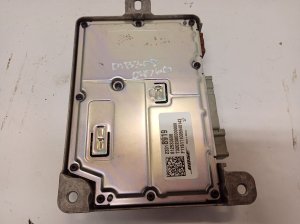
OEM Part Numbers: 13590745 22896786 22936351 22952326 23119572 13588229
Mounts in glove box. Single-disc CD/MP3 player. Requires RPO Code TG5. Integrated into Cadillac CUE system.
We Have This Part in Stock




The information in this article is provided for general reference and educational purposes only. Vehicle specifications, procedures, and part compatibility can vary by production date, trim level, and region. Always consult your vehicle's factory service manual and verify part numbers before purchasing or performing repairs. Safety-critical components such as airbags, seat belts, and braking systems should be installed by a qualified professional.
- Cadillac ATS:
- Cadillac XTS: