

2018-2019 Audi A5, S5, RS5 & SQ5 Infotainment Module: A Guide to Component Protection
This guide explains the common failures, part number variations, and critical programming requirements for the glove box-mounted CD player and MMI module in these Audi models.
- A replacement MMI module MUST be programmed by a dealer or specialist to remove 'Component Protection'; it will not work otherwise.
- Always match the OEM part number on your original unit exactly to ensure all features like navigation will work.
- Common failure symptoms include no audio, a black or rebooting screen, and unresponsive controls.
- The physical replacement is easy (requiring only radio keys), but the mandatory software programming is not a DIY job.
Understanding the CD Player and MMI Module

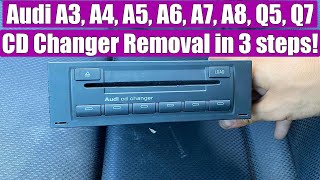
In the 2018-2019 Audi A5, 2019 Audi S5, 2019 Audi RS5, and 2018 Audi SQ5, the main infotainment unit is a sophisticated computer housed within the glove compartment. 🎬 Watch: Locate the glove box disc reader While it includes a slot for CDs, its primary role is to serve as the central processor for the entire MMI system. This module controls everything from audio and navigation to vehicle settings displayed on the main screen. Due to its integrated nature, replacing it is not a simple plug-and-play task.
The #1 Issue: Component Protection

The single most important factor to understand when replacing this module is Audi's anti-theft system, known as Component Protection. This is a software lock that pairs electronic modules to the vehicle's unique VIN. If you install a used module from another vehicle, Component Protection will activate, leading to significant functional limitations.
Warning: A replacement MMI module will NOT function correctly until Component Protection is removed. This process requires special diagnostic tools and an online connection to Audi's servers, meaning it must be performed by an Audi dealership or a qualified independent shop with the proper equipment (like ODIS). Most local mechanics and locksmiths cannot perform this service.
When Component Protection is active, you may experience symptoms like no audio from any source, the radio being muted, or messages on the MMI screen indicating the system is not fully functional.
Symptoms of a Failing MMI Module

Before the module fails completely, you might experience intermittent issues. Many problems can be software-related and sometimes a simple MMI reset can temporarily resolve them. 🎬 Watch: How to fix a black MMI screen first However, persistent problems often point to a hardware failure within the J794 module.
- No Audio: The most common symptom is a complete loss of sound from the radio, CD, Bluetooth, and navigation.
- MMI Screen is Black or Frozen: The screen may fail to turn on, freeze on the Audi logo, or go black intermittently.
- System Constantly Reboots: The MMI may get stuck in a reboot loop, where it turns on and off every few minutes.
- CD/DVD Player Malfunctions: The unit may refuse to accept or eject discs, or fail to read them.
- Unresponsive Controls: Buttons on the center console or steering wheel may stop responding.
- Connectivity Issues: Persistent problems with Bluetooth, Apple CarPlay, or Android Auto that are not resolved by resetting the connection.
Associated OBD-II Codes
A failing MMI module can trigger several fault codes. While a generic OBD-II scanner may not read all of them, a VAG-specific tool like VCDS or ODIS can provide more detail. Common codes include:
- U10CF00: Optical data bus for display in instrument cluster sporadic disruption.
- B13B901: Video wire for information electronics 1 Electrical error.
- P02095: Component Protection Active. This code will appear after a new or used module is installed but before it is programmed.
Buying a Used CD Player / MMI Module

Purchasing a used OEM module is a cost-effective alternative to a new unit from the dealer, but careful selection is crucial.
Pro Tip: Before buying a replacement, have the system professionally diagnosed. Sometimes, issues like a black screen or no audio can be caused by a simple blown fuse or a software glitch that can be fixed with an update, saving you the cost of a new module.
- Match the Part Number Exactly: This is the most critical step. There are several variations of this module depending on the vehicle's original options. The part number is printed on a sticker on the unit's case. The two most common part numbers for this vehicle group are:
- 8W5-035-890-B (and its variants): Typically for vehicles equipped with Navigation.
- 8W5-035-880-B (and its variants): Typically for vehicles with Digital Radio Reception (DAB), which is less common in North America.
- Physical Inspection: When you receive the part, check for any signs of physical damage, especially to the connectors. Ensure there is no evidence of water intrusion or corrosion on the casing or pins, as this is a common cause of electronic failure.
- Source Vehicle Information: While not always possible, knowing the history of the donor car can be helpful. A part from a low-mileage, non-collision vehicle is always preferable.
- Budget for Programming: Remember to factor in the cost of having Component Protection removed by a dealer or specialist. This can range from $150 to $400.
Replacement Overview
Physically swapping the MMI module is a relatively simple DIY task for those comfortable with basic tools.
- Open the glove box.
- Insert Radio Removal Keys: You will need a set of radio removal keys (two flat, metal keys). Insert one key into each of the two horizontal slots on the face of the unit until they click into place.
- Slide the Unit Out: Gently pull on the keys to slide the module out of its housing.
- Disconnect the Wiring: Carefully press the tabs on the large wiring harness at the back of the unit and pull to disconnect it. There may be other antenna connections as well.
- Install the New Unit: Connect the wiring to the replacement module, slide it back into the glove box until it clicks, and remove the keys.
Remember: After the physical installation, the vehicle must be taken to a dealer or specialist for Component Protection removal to restore full functionality.
Cost Comparison
The cost to resolve an MMI issue can vary dramatically based on the solution.
| Item/Service | Estimated Cost |
|---|---|
| New OEM MMI Module (Part Only) | $4,000 - $6,000 |
| Used OEM MMI Module (Part Only) | $250 - $600 |
| Dealer Labor (Installation) | $150 - $300 |
| Dealer/Specialist Labor (Component Protection Removal) | $150 - $400 |
Frequently Asked Questions
Can I just swap the MMI module with a used one and have it work?
No. Due to Audi's Component Protection anti-theft system, a used module will have limited functionality (like no audio) until it is programmed to your vehicle by a dealer or specialist with the proper online tools.
My screen is black but the radio still plays. Is the MMI module bad?
Not necessarily. This could be a software glitch, a problem with the screen itself, or a loose connection. A full system reset should be your first step. If the problem persists, a professional diagnosis is needed to pinpoint the faulty component. A black screen can also be a symptom of a failing MMI module.
Can my local mechanic remove the Component Protection?
It is highly unlikely. The process requires a specific diagnostic tool (ODIS) with a paid subscription and a live connection to Audi's servers in Germany to authorize the part to your car's VIN. Only dealers and some high-end European auto specialists have this capability.
What happens if I don't remove Component Protection?
The MMI system will be severely handicapped. The most common symptom is a complete lack of audio from all sources. You may also see warning messages on the screen and lose access to certain menus and features.
Is there a way to bypass Component Protection?
For modern Audis, there is no reliable or officially supported way to bypass Component Protection. Some third-party services claim to offer remote or mail-in solutions, but these can be risky and may not work. The safest and most reliable method is to have it done by an authorized facility.
Helpful Videos


Technical Specifications
OEM Part Numbers: 8W5-035-880-B 8W5-035-890-B 8W5035880B 8W5035890B 8W5035890BX 8W5035880C
The unit is technically known as the J794 Control Module for Information Electronics. It is located in the glove box and serves as the central computer for the MMI system.
We Have This Part in Stock



The information in this article is provided for general reference and educational purposes only. Vehicle specifications, procedures, and part compatibility can vary by production date, trim level, and region. Always consult your vehicle's factory service manual and verify part numbers before purchasing or performing repairs. Safety-critical components such as airbags, seat belts, and braking systems should be installed by a qualified professional.
- Audi A5:
- Audi S5:
- Audi RS5:
- Audi SQ5: