

2011-2017 Audi A6, A7, A8, S8 CD Changer: Solving Component Protection & MMI Faults
This guide explains common failures, diagnosis, and the critical Component Protection removal process for the CD/DVD changer in Audi A6, A7, A8, S8, and A8 Quattro models.
- Replacing this CD changer requires programming. A used unit will trigger "Component Protection," which must be removed by a dealer or specialist shop.
- A failed CD changer can cause the entire MMI screen to go black because it is part of a fiber optic loop. Use a MOST bypass loop to diagnose.
- A common failure mode is a constantly cycling mechanism that can drain the vehicle's battery, even when turned off.
- The physical replacement is very easy and only requires a set of radio removal keys, but you must budget for the subsequent Component Protection removal service.
Symptoms of a Failing CD Changer
A faulty CD changer in these Audi models can cause more than just problems playing music. Because it's a key component in the MMI's fiber optic loop, its failure can have system-wide effects. Watch for these specific symptoms.
- CDs Will Not Load, Play, or Eject: The most common symptom is a mechanical failure where the unit makes noises but fails to accept, read, or eject a disc.
- Constant Clicking or Grinding Noise: The changer mechanism may get stuck in a loop, constantly trying to change discs. This can happen even when the vehicle is turned off and can drain the battery.
- MMI System Black Screen: A complete electronic failure of the CD changer will break the MOST fiber optic loop. This prevents communication between all infotainment modules, often resulting in an MMI screen that stays black or only shows the Audi logo briefly before shutting down.
- "Component Protection Active" Message: After installing a replacement unit, this message may appear on the MMI screen, and audio will be muted or cut out every few seconds. This is not a failure symptom, but a security feature that must be addressed.
- Diagnostic Trouble Codes (DTCs): A scan with a VAG-compatible tool may reveal fault code 00468 (CD-ROM Drive -R92- Faulty) stored in the radio module (address 56).
Diagnosing the Failure: Is It Really the CD Changer?
If your entire MMI system is dead (black screen), the CD changer is a likely culprit, but so are the amplifier or the main MMI head unit. The most effective way to confirm the faulty module is by using a fiber optic bypass loop.
Pro Tip: A fiber optic bypass loop (often called a "MOST loop" or "lollipop connector") is an inexpensive diagnostic tool that allows you to temporarily remove a single module from the fiber optic ring. If you bypass the CD changer and the MMI system starts working again, you have found your problem.
- Purchase a female MOST fiber optic bypass loop.
- Access the CD changer in the glove box. You will need a set of radio removal keys to slide the unit out.
- Disconnect the main wiring harness at the back of the unit. You will see a plug with two orange fiber optic cables.
- Carefully unclip the fiber optic connector from the main plug.
- Plug this fiber optic connector into your bypass loop tool. This completes the circuit, bypassing the CD changer entirely.
- Turn on the ignition. If your MMI screen and other functions return, the CD changer is faulty and needs to be replaced.
The #1 Issue: Component Protection (CP)
You cannot simply swap a used CD changer into your vehicle. All modern Audi infotainment components are protected by an anti-theft system called Component Protection (CP). When you install a used part, the system detects a VIN mismatch and puts the component into a limited-function mode. For the CD changer, this typically means the audio will be muted.
Warning: Installing a used CD changer will trigger Component Protection. The part will not function correctly until this security feature is removed by an authorized party. This is not a DIY fix for most owners.
How to Remove Component Protection
You have two primary options for removing Component Protection after installing your replacement CD changer:
- Audi Dealership: A dealer can connect your vehicle to their online diagnostic system (ODIS/GeKo) and authorize the used part with Audi's central database. This is the official method but is often the most expensive.
- Independent Specialist: Many independent European auto repair shops have the same licensed tools and online subscriptions to perform CP removal. This is often a more affordable and quicker option. Some specialists even offer remote CP removal if your local mechanic has a compatible diagnostic interface.
A highly advanced (and high-risk) third option is to physically desolder the EEPROM memory chip from your original faulty unit and solder it onto the replacement unit. This transfers the original VIN data, bypassing CP entirely. This should only be attempted by electronics repair experts with micro-soldering experience.
Buying a Used CD Changer
Given the high cost of new OEM units, a quality used CD changer is the most practical solution for most owners. Here’s what to look for:
- Verify the Part Number: Match the part number on your original unit exactly. Common part numbers for this platform include 4H0035108C, 4H0035108E, and 4H0035746D. While other numbers may work, an exact match is the safest bet.
- Inspect the Connectors: Ensure the large electrical connector and the small fiber optic port on the back are clean and free of any damage or corrosion.
- Budget for Programming: Remember that the price of the used part is not your final cost. You MUST factor in the additional expense of having Component Protection removed, which can range from $150 to $300.
- Ask About Functionality: Buy from a reputable seller who has tested the unit's mechanical functions (loading and ejecting) before selling it.
Replacement Walkthrough
Replacing the CD changer is a straightforward job that most DIY mechanics can handle in under 30 minutes.
- Required Tools: You will need a set of Audi radio removal keys.
- Open the Glove Box: The CD changer is located inside the glove box.
- Insert Removal Keys: Insert two removal keys into the horizontal slots on the left and right sides of the changer's faceplate until they click into place.
- Slide the Unit Out: Pull on the keys to slide the CD changer out of its housing.
- Disconnect Wiring: Squeeze the tabs on the large electrical harness to release it. Carefully disconnect the fiber optic plug as well.
- Install the New Unit: Connect the wiring to the replacement unit, slide it back into the glove box until it clicks, and then remove the keys by pressing the release tabs on the side of the unit.
- Schedule CP Removal: The unit is now installed, but you will need to visit a dealer or specialist to have Component Protection removed to restore full functionality.
Known Issues, TSBs, and Recalls
There are no active safety recalls for this specific part on these vehicles.
- TSB 2021780 / 91 13 88: Audi issued an informational bulletin for a sporadic fault (DTC 00468) where the CD drive is temporarily disabled if a CD is inserted or removed incorrectly. The bulletin advises against replacing the unit, as the function is restored after cycling the ignition.
- 3G Network Sunset: A service campaign (91CD) exists for the MMI system related to the shutdown of the 3G cellular network. This affects Audi Connect services but is unrelated to the function of the CD changer itself.
| Item | Estimated Cost |
|---|---|
| New OEM CD Changer | $1,200 - $1,800+ |
| Used OEM CD Changer | $50 - $200 |
| Shop Labor (Replacement) | $50 - $100 |
| Shop Labor (Component Protection Removal) | $150 - $300 |
Frequently Asked Questions (FAQ)
What is "Component Protection" and can I remove it myself?
Component Protection is an anti-theft feature that links electronic modules to your car's VIN. When you install a used part, this protection activates, limiting its function. For most owners, it is not possible to remove it yourself. You will need to visit an Audi dealer or a qualified independent shop with specialized online tools to authorize the part for your vehicle.
Can I just unplug my broken CD changer?
No. The CD changer is part of a fiber optic loop (MOST). Unplugging it will break the loop and cause your entire MMI system (screen, radio, navigation) to stop working. If you want to permanently remove the changer, you must install a fiber optic bypass loop in its place to keep the system functional.
Will a faulty CD changer drain my car's battery?
Yes, it can. A common failure mode involves the internal mechanism getting stuck and constantly trying to cycle discs, even when the car is off. This parasitic draw can drain your battery overnight.
What tools do I need to replace the CD changer?
The only special tools required are a set of Audi radio removal keys. These are flat metal keys that insert into slots on the unit's faceplate to release the internal locking clips, allowing you to slide it out of the glove box.
Technical Specifications
OEM Part Numbers: 4H0035108C 4H0035108E 4H0035746D 8X0035110B
Fits vehicles with Audi MMI 3G or MMI 3G+ infotainment systems. Connects via a main power harness and a fiber optic MOST connector.
We Have This Part in Stock


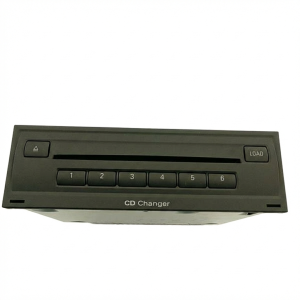
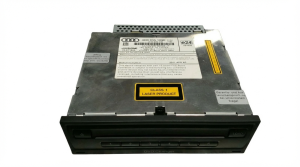
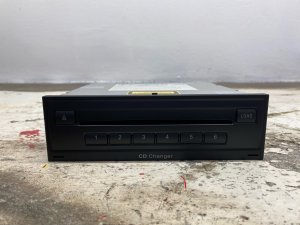

The information in this article is provided for general reference and educational purposes only. Vehicle specifications, procedures, and part compatibility can vary by production date, trim level, and region. Always consult your vehicle's factory service manual and verify part numbers before purchasing or performing repairs. Safety-critical components such as airbags, seat belts, and braking systems should be installed by a qualified professional.
- Audi A6:
- Audi A7:
- Audi A8:
- Audi S8:
- Audi A8 Quattro:
- 🛍️ Shop This Part
- Symptoms of a Failing CD Changer
- Diagnosing the Failure: Is It Really the CD Changer?
- The #1 Issue: Component Protection (CP)
- How to Remove Component Protection
- Buying a Used CD Changer
- Replacement Walkthrough
- Known Issues, TSBs, and Recalls
- Frequently Asked Questions (FAQ)
- 🎟️ Get 5% Off