

2011-2017 Audi A5, Q5, A6 & More CD Changer: A Guide to Component Protection
Replacing the 6-disc CD changer in your Audi involves more than just swapping the part; understanding Audi's 'Component Protection' system is critical to a successful repair.
- This CD changer is protected by Audi's 'Component Protection' (CP) anti-theft system.
- A used replacement unit MUST be programmed to your vehicle by an Audi dealer or a qualified independent shop with ODIS software.
- Failure to program a used unit will result in it not playing audio, even if it powers on.
- The physical replacement is very easy and only requires a set of radio removal keys.
Symptoms of a Failing CD Changer
When the glove box-mounted CD changer begins to fail in these Audi models, you'll likely notice several distinct symptoms. Because it's part of the integrated MMI system, a failure can sometimes cause confusing error messages.
- "Device Fault" or Similar MMI Error: The most common symptom is an error message on the MMI screen indicating a problem with the CD player.
- Failure to Load, Play, or Eject Discs: The unit may refuse to accept a CD, or it might accept it but fail to play it. You might hear mechanical whirring or clicking sounds as it tries and fails to operate. In other cases, it may not eject discs that are already inside.
- MMI Shows "CD Empty": Even with discs loaded, the MMI system may report that the changer is empty. This indicates a communication failure where the changer's mechanicals may work, but it cannot report its status to the MMI head unit.
- No Power or Blinking Lights: The lights on the front of the unit may not illuminate at all, or they may blink erratically, indicating an internal electronic or power-related fault.
- System Defaults to Another Source: When you select the CD changer as the audio source, the MMI might hesitate and then switch back to the radio or another media source.
Diagnosing the Issue
Before replacing the unit, a few simple checks can help confirm the CD changer is the culprit:
- Try Different CDs: Test with several known-good, commercially produced audio CDs to rule out a problem with a specific scratched or burned disc.
- Check Fuses: Locate and inspect the fuse for the CD changer or infotainment system. A blown fuse could cause a complete loss of power.
- Perform an MMI Reset: A soft reset of the MMI system can sometimes clear up software glitches. The procedure varies slightly by model but typically involves pressing a combination of the SETUP, central control knob, and upper-right soft key simultaneously.
- Visual Inspection: Check the electrical connector on the back of the unit for any signs of corrosion or loose pins.
Warning: This CD changer is part of a fiber optic loop (MOST bus). If you unplug the unit, you must install a fiber optic bypass loop connector (Audi part number 4E0 973 802) in its place. Failure to do so will break the communication ring and may cause other infotainment functions to stop working.
The #1 Issue: Component Protection
The single most important factor when replacing this CD changer is Audi's anti-theft system, known as Component Protection (CP). Many electronic modules in the vehicle, including this CD changer, are electronically 'locked' to the car they were originally installed in.
When you install a used CD changer from another vehicle, it will power on, and you may be able to load and eject discs. However, it will not play audio. The MMI will display a message like "Component protection active," and the unit will be non-functional until the protection is removed.
How is Component Protection Removed?
Removing Component Protection is not a DIY task. It requires special diagnostic tools (like ODIS) with an active online connection to Audi's factory servers in Germany. The process involves a technician logging into the system and having the server verify that the part is not from a stolen vehicle and then 'adapting' or 'marrying' the used part's serial number to your car's VIN.
- Audi Dealer: Any Audi dealership can perform this service.
- Independent Specialist: Many independent shops that specialize in German vehicles have the necessary tools and subscriptions (ODIS/GeKo) to perform Component Protection removal. This is often a more cost-effective option than a dealer.
- Remote Services: Some companies offer remote CP removal, but this requires you to have a specific diagnostic interface tool (like a VAS5054) and a stable internet connection for them to use.
Pro Tip: When calling shops for quotes, specifically ask, "Can you remove Component Protection on a used Audi MMI module?" and be prepared to provide your vehicle's VIN. The cost for this service typically ranges from one to two hours of labor.
Buying a Used CD Changer
Purchasing a used OEM CD changer is a great way to save a significant amount of money compared to a new unit from the dealer. However, you must factor in the additional cost of Component Protection removal.
- Verify the Part Number: Ensure the part number on the used unit matches your original one exactly. The primary OEM part number is 8X0035110B (sometimes written as 8X0 035 110 B). While other units may look identical, they might have different internal software and will not work.
- Physical Inspection: Check the used unit for any signs of physical damage, especially to the connectors on the back.
- Budget for Programming: Remember that the price of the used part is not the final cost. You MUST budget for a dealer or specialist to remove the Component Protection.
- Why Used OEM is Better: For this part, there are no new aftermarket alternatives. A used OEM unit, once properly programmed, is identical to a new one in function. It is designed to integrate perfectly with the MMI system.
Replacement Overview
Physically replacing the CD changer is a straightforward process that most DIYers can complete in under 30 minutes.
- Obtain Radio Removal Keys: You will need a set of standard Audi radio removal keys. These are inexpensive and widely available online.
- Insert the Keys: Insert two keys into the horizontal slots on the front of the CD changer until they click into place.
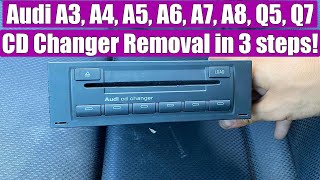
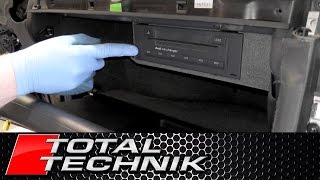
- Pull the Unit Out: The keys release the locking tabs, allowing you to pull the entire unit straight out of the glove box. 🎬 Watch: Step-by-step Audi glove box CD changer removal tutorial
- Disconnect the Harness: Squeeze the tabs on the large electrical connector at the back and pull to disconnect it.
- Install the New Unit: Connect the harness to the replacement unit, slide it back into the glove box until it clicks securely, and then remove the keys.
Known Issues, TSBs, and Recalls
Searches for recalls and Technical Service Bulletins (TSBs) on the NHTSA database did not reveal any specific actions for this CD changer part number across the listed vehicles. Most issues are related to individual component failure or the Component Protection system. There is a TSB (91-16-67) related to MMI software updates for various issues, but it does not specifically target CD changer failures.
Cost Comparison
| Part/Service | Estimated Cost |
|---|---|
| New OEM Unit (Dealer) | $790 - $1,140 |
| Used OEM Unit (Online) | $50 - $275 |
| Component Protection Removal (Labor) | $150 - $400 |
Frequently Asked Questions
Do I have to take my car to an Audi dealer to get a used CD changer to work?
Not necessarily. While a dealer can always perform the service, many independent shops that specialize in European cars have the required ODIS diagnostic tool and online subscription to remove Component Protection. Calling around to local specialists can often save you money.
Can I use VCDS (VAG-COM) to remove Component Protection?
No. Standard diagnostic tools like VCDS cannot remove Component Protection. This process requires a live, authenticated connection to Audi's servers, which is a feature of the official ODIS software used by dealers and licensed shops.
What happens if I just install the used CD changer without programming?
The unit will likely power on, and you may be able to load and eject discs. However, it will not play any audio, and the MMI screen will show a "Component Protection active" error message, rendering the unit useless until it is programmed.
Is this part the same for all the vehicles listed, like the A5, Q5, and A6?
Yes, the part itself (OEM # 8X0035110B) is shared among the 2015-2017 Audi A5, 2011-2017 Audi Q5, 2015-2017 Audi S5, 2012-2013 Audi A6, 2015 Audi RS5, 2015-2017 Audi SQ5, 2013 Audi S7, and 2012-2013 Audi A7 Quattro. The glove box mounting and replacement procedure are very similar across these models.
My car has a single CD player in the dash. Is this part compatible?
No. This guide is specifically for the 6-disc changer mounted in the glove box. The in-dash single CD/DVD player is a different component and is not interchangeable with this unit.
Helpful Videos
Technical Specifications
OEM Part Numbers: 8X0035110B 8X035110B 8X0035110
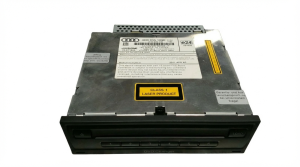
6-disc CD changer, glove box mounted, integrates with Audi MMI 3G/3G+ via MOST fiber optic bus.
We Have This Part in Stock



The information in this article is provided for general reference and educational purposes only. Vehicle specifications, procedures, and part compatibility can vary by production date, trim level, and region. Always consult your vehicle's factory service manual and verify part numbers before purchasing or performing repairs. Safety-critical components such as airbags, seat belts, and braking systems should be installed by a qualified professional.
- Audi A5:
- Audi Q5:
- Audi S5:
- Audi A6:
- Audi RS5:
- Audi SQ5:
- Audi S7:
- Audi A7 Quattro: