

Ford E-Series Van Body Control Module (2010-2019): Solving Electrical Gremlins and No-Start Issues
This guide covers the diagnosis, replacement, and critical programming requirements for the Body Control Module (BCM) in the 2010-2019 Ford E-350, 2018-2019 E-450, 2010-2014 E-150, and 2010-2014 E-250.
- A replacement BCM is NOT plug-and-play; it absolutely MUST be programmed to your van's VIN and keys by a dealer or qualified locksmith to avoid a no-start condition.
- Common symptoms of failure are bizarre electrical issues, a recurring dead battery, or a no-start situation with a flashing theft light.
- The BCM is located in the driver's footwell, integrated with the interior fuse panel, making physical replacement accessible for DIYers before professional programming.
- Buying a used OEM module and having it programmed, or using a mail-in cloning service, can save hundreds of dollars compared to a full dealer replacement.
Symptoms of a Failing Body Control Module

A failing BCM can cause a wide range of confusing and seemingly unrelated electrical problems. Because it controls so many different systems, symptoms can vary, but they almost always point to an electrical issue rather than a mechanical one.
- Erratic Electrical Functions: This is the most common sign. You may experience lights flickering, turning on or off by themselves, power door locks engaging or disengaging randomly, or windshield wipers activating unexpectedly.
- Parasitic Battery Drain: If your battery repeatedly dies overnight, the BCM may be failing to shut down a component, causing a continuous power draw known as a parasitic drain.
- Dashboard Warning Lights: A faulty BCM can cause multiple, often random, warning lights to illuminate on the instrument cluster, sometimes resembling a 'Christmas tree' effect.
- Complete Failure of Accessories: Certain features may stop working entirely, such as power windows, the radio, interior dome lights, or the horn.
- No-Start or Crank-No-Start Condition: Because the BCM is tied to the anti-theft system, a critical failure can prevent the van from recognizing your key, resulting in a no-start situation. The security light on the dash may flash or stay on. 🎬 Watch: Troubleshooting a no-start condition and flashing immobilizer light.
Common Diagnostic Trouble Codes (DTCs)
When the BCM fails, it often loses communication with other modules on the vehicle's network. The most common trouble code associated with this is:
- U0140 - Lost Communication With Body Control Module: This generic code is a strong indicator that the BCM is offline or has an internal fault. 🎬 See this guide on diagnosing and fixing U0140 communication codes. You may see this code logged in the Powertrain Control Module (PCM), ABS module, or other electronic units.
Diagnosing a U0140 code involves checking the BCM's power and ground connections, inspecting fuses, and examining the wiring harness for damage before condemning the module itself.
Known Issues, TSBs, and Recalls

While no large-scale recalls are specific to the BCM on these E-Series vans, several common failure points and Technical Service Bulletins (TSBs) on similar Ford vehicles are relevant.
- Water Intrusion: On many Ford trucks and vans, water leaks from a poorly sealed windshield or cowl area can drip directly onto the BCM/Smart Junction Box, causing corrosion and short circuits on the internal circuit board. If you are experiencing BCM issues, inspect the area around the module for signs of moisture or rust.
- Parasitic Drain: A known issue with Ford electronics is a parasitic battery draw that can sometimes be traced back to a module that fails to 'go to sleep'. While TSBs like 05-22-9 were issued for other models, the diagnostic principles apply to the E-Series. This often requires a technician to perform a parasitic draw test by measuring amperage at the battery while pulling fuses to isolate the faulty circuit.
- Programming Issues: Ford issued TSB SSM 47875 for some 2014-2019 vehicles regarding the inability to program a replacement BCM, which highlights the complexity of the programming process.
Critical Warning: Programming is NOT Optional
A replacement Body Control Module for a 2010-2019 Ford E-150, E-250, E-350, or E-450 is NOT a plug-and-play part. It must be professionally programmed to your van after installation. Failure to program the module will result in a no-start condition because the Passive Anti-Theft System (PATS) will not recognize your keys. This applies to both new and used replacement modules.
Programming and Anti-Theft Requirements

This is the single most important factor when replacing this part. The BCM stores vehicle-specific data, including the VIN and the security information for your ignition keys.
- Who Can Program It? Programming requires specialized software, either Ford's Integrated Diagnostic Software (IDS) or Ford Diagnosis & Repair System (FDRS). This can be done by a Ford dealership. Some well-equipped independent repair shops and certified automotive locksmiths who have a NASTF license can also perform the programming, including the necessary security 'parameter reset'.
- Can I Program It Myself? Advanced DIY tools like FORScan may be able to copy some configuration data, but they typically cannot complete the PATS key programming and security handshake required for the vehicle to start. Attempting this without the proper credentials and knowledge carries a high risk of 'bricking' the module and leaving the vehicle completely immobilized.
- What is Required? You will need to have at least two original, functioning keys for the technician to program them to the new BCM.
Buying a Used Body Control Module
Purchasing a used OEM Body Control Module is an excellent way to save a significant amount of money. Since these modules are complex electronic units, a recycled original Ford part is often more reliable than a new, unproven aftermarket part. Here’s what to look for:
- Match the Part Number: It is essential to match the Ford engineering or service part number exactly. While multiple part numbers may be compatible (e.g., BC2Z-15604-D supersedes AC2Z-15604-A), starting with an identical number is the safest bet. The part number is printed on a sticker on the module's case.
- Inspect for Physical Damage: Check the used module for any signs of water damage, such as corrosion on the pins or a discolored case. Look for broken connectors or cracks in the plastic housing.
- Factor in Programming Costs: Remember that even a perfect used BCM will not work until it is programmed. When comparing prices, always add the expected cost of programming by a dealer or locksmith to the price of the used part.
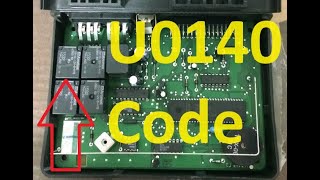
- Consider a Cloning Service: Some specialized automotive electronics companies offer a mail-in cloning service. You send them your original BCM and a compatible used replacement, and they transfer the programming and key data from your old module to the new one. The replacement then becomes a true plug-and-play part, with no dealer visit required. This can be a great option for DIY replacement. 🎬 Watch: How cloning services make BCM replacement plug-and-play.
Replacement Overview
Physically replacing the BCM is a straightforward job for a DIYer with basic tools. The main challenge is the programming that must follow.
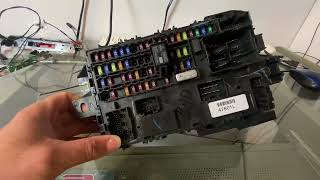
- Location: The Smart Junction Box (SJB) / Body Control Module is located in the driver's side footwell, to the left of the brake pedal. It is integrated with the interior fuse panel.
- Disconnect the Battery: Before starting, always disconnect the negative battery terminal to prevent electrical shorts.
- Remove Trim: You will likely need to remove the lower dash trim panel and kick panel to gain clear access to the module.
- Disconnect and Remove: Carefully unplug the multiple large electrical connectors from the module. They have locking tabs that must be released. Once all connectors are free, unbolt the module from its mounting bracket and remove it.
- Installation and Programming: Installation is the reverse of removal. Once the new module is installed and the battery is reconnected, the van will not start. It must be towed or transported to a dealer or qualified programmer to have the module programmed to the vehicle.
Cost Comparison
The cost of replacing the BCM can vary significantly based on the path you choose. Remember to factor in programming for all options except a pre-cloned module.
| Part Type | Estimated Part Cost | Notes |
|---|---|---|
| New OEM (Dealer) | $350 - $590 | Price varies by dealer. Part number BC2Z-15604-D has an MSRP of $588 but can be found cheaper online. |
| Used OEM | $75 - $200 | A cost-effective option, but quality and warranty vary. Must be programmed. |
| New Aftermarket | $250 - $400 | Availability for this specific application is limited. Quality can be inconsistent. |
| Shop Labor & Programming | $200 - $500+ | Includes ~1-2 hours for physical installation plus 1-2 hours for programming. Dealer programming rates can be high. |
Frequently Asked Questions (FAQ)
Can I drive my van with a bad BCM?
It is not recommended. While the engine may run, you risk unpredictable behavior from critical systems like headlights and wipers. Most importantly, if the BCM's anti-theft function fails, it could leave you stranded with a vehicle that will not start.
Will a BCM from the exact same year and model van work without programming?
No. The BCM is programmed to the specific VIN and security keys of the vehicle it came from. It must be wiped and reprogrammed to match your van's data, even if the part numbers are identical.
What is the difference between a BCM and an ECM/PCM?
The Body Control Module (BCM) manages body and cabin electronics like lights, windows, and locks. The Engine Control Module (ECM) or Powertrain Control Module (PCM) is the main computer that controls all engine and transmission functions, such as fuel injection, ignition timing, and shifting.
Why does the dealer need two keys to program a new BCM?
The programming process involves teaching the new BCM to recognize the unique transponder chips inside your keys as part of the PATS security system. The Ford programming procedure requires a minimum of two keys to build the security parameter file.
Helpful Videos
Technical Specifications
OEM Part Numbers: AC2T14C442AA AC2Z15604A AC2Z15604D BC2T14C442AB BC2T15604BB BC2Z15604A BC2Z15604D
Also known as the Smart Junction Box (SJB). Integrated with the interior fuse panel. Controls body electronics and the Passive Anti-Theft System (PATS).
We Have This Part in Stock



The information in this article is provided for general reference and educational purposes only. Vehicle specifications, procedures, and part compatibility can vary by production date, trim level, and region. Always consult your vehicle's factory service manual and verify part numbers before purchasing or performing repairs. Safety-critical components such as airbags, seat belts, and braking systems should be installed by a qualified professional.
- Ford E-350 Super Duty:
- Ford E-450 Super Duty:
- Ford E-150:
- Ford E-250:
- 🎬 Helpful Videos
- 🛍️ Shop This Part
- Symptoms of a Failing Body Control Module
- Common Diagnostic Trouble Codes (DTCs)
- Known Issues, TSBs, and Recalls
- Programming and Anti-Theft Requirements
- Buying a Used Body Control Module
- Replacement Overview
- Cost Comparison
- Frequently Asked Questions (FAQ)
- 🎟️ Get 5% Off