

2017-2023 Tesla Model 3 B-Pillar Camera: Failure, Calibration, and Replacement Guide
This guide covers the diagnosis, replacement, and mandatory calibration of the B-pillar appliqué, which houses the critical side camera for Autopilot.
- This part is critical for Autopilot; a failure will disable most driver-assist features.
- Camera calibration is mandatory after replacement. It is initiated via the touchscreen and completed by driving 20-100 miles.
- Condensation inside the lens is a very common known issue; if persistent, it requires replacement.
- Parts are NOT interchangeable between Chrome/Black trim years, HW3/HW4 vehicles, or with the 2024+ 'Highland' model. Always verify the part number.
Understanding the B-Pillar Appliqué vs. Interior Trim

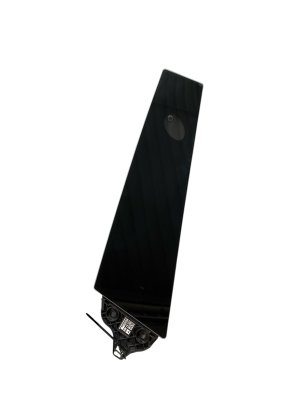
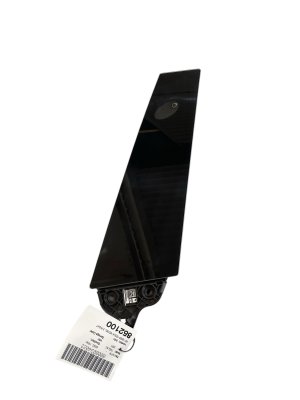
It is important to distinguish between the exterior B-pillar appliqué and the interior B-pillar trim. This guide focuses on the exterior part, which is a glossy black or chrome panel containing the side camera. The interior trim is a separate plastic piece that covers the seatbelt height adjuster. The interior trim is known for having clips that can break, causing it to become loose, but it is a different part and a much simpler fix.
Symptoms of a Failing B-Pillar Camera

Failure of the B-pillar appliqué assembly usually relates to the integrated camera or physical damage. Symptoms can range from minor annoyances to a complete loss of key driver-assist features.
- Error Messages on Touchscreen: The most common symptom is an alert on the center display. You may see messages like "Camera Blocked or Blinded," "Autopilot features currently unavailable," or a specific camera error indicating a fault.
- Moisture or Condensation: Fog, condensation, or water droplets visible inside the camera lens area is a widely reported issue. This moisture can obscure the camera's view and trigger error messages.
- Black or Flickering Camera Feed: When viewing the side camera feed (for example, when activating the turn signal), the image may be black, flickering, or show a frozen gray screen. This points to a failure of the camera sensor or its wiring.
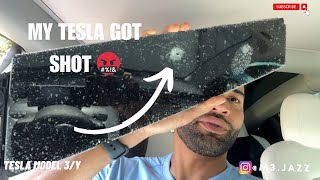
- Physical Damage: The panel is exposed to the elements and can be damaged by road debris, car washes, or side impacts. Look for cracks, deep scratches, or a shattered glass finish.
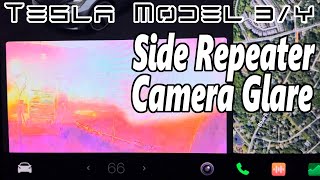
- Poor Night Performance: On earlier models, a common complaint was severe glare or a yellow tint that washed out the camera image at night when the turn signal was active. This was due to a design flaw allowing light to leak from the turn signal LED into the camera sensor. 🎬 See how turn signal glare affects the camera feed.
Known Issues, TSBs, and Recalls

Widespread Condensation Issue
The most prevalent known issue for the 2017-2023 Model 3 is moisture and condensation building up inside the B-pillar camera housing. Tesla has stated in some cases that this is a normal characteristic and can be cleared by preconditioning the cabin to warm the area. However, it can also be a sign of a failing seal. In response to this, Tesla issued a service bulletin (SB-20-12-001) for some earlier vehicles, instructing technicians to remove internal "gore patches" to improve airflow and reduce moisture buildup. If condensation is persistent and triggers frequent camera errors, replacement is often the only permanent solution.
Incompatibility Between Model Years
Not all B-pillar appliqués are the same. When purchasing a replacement, you must match the part to your vehicle's production date.
- Chrome vs. Black Trim: Early Model 3s (approx. 2017-2020) came with chrome trim. Later models (approx. 2021-2023) came with a factory black trim (often called a "chrome delete").
- Hardware 3 vs. Hardware 4: Starting in mid-2023, Tesla began equipping vehicles with Autopilot Hardware 4 (HW4), which uses different cameras. HW3 and HW4 cameras are not interchangeable.
- 'Highland' Refresh (2024+): The refreshed 2024+ Model 3, codenamed 'Highland', uses a completely redesigned glass B-pillar appliqué. These parts are NOT backward-compatible with 2017-2023 models.
Recalls
There have been no official recalls for the B-pillar side cameras. Recalls you may have seen for the Model 3, such as NHTSA campaign 21V00B000, pertain to the rearview camera wiring harness in the trunk, which can wear out from opening and closing the trunk lid. This is a separate issue from the side cameras.
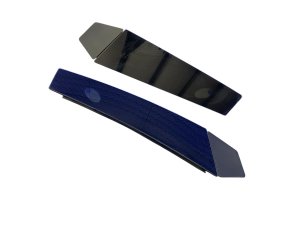
Warning: The B-pillar appliqué for the left (driver) and right (passenger) sides are different parts and are not interchangeable. They are often identified by color-coded stickers on new parts (yellow for LH, blue for RH).
Buying a Used B-Pillar Appliqué: What to Inspect

A used OEM appliqué is an excellent, cost-effective option, especially since aftermarket quality can be inconsistent. Pay close attention to the following before buying.
- Verify the Part Number: This is the most critical step. Match the part number to your vehicle's side (left/right) and production year range. The left (driver) side is typically a 1109253-xx-x number, while the right (passenger) side is 1109255-xx-x. Ensure you are getting the correct finish (chrome or black) and hardware version for your car.
- Inspect the Camera Lens: Look closely at the small camera lens. It should be perfectly clear. Reject any part with deep scratches, scuffs, or haziness on the lens itself, as this will permanently affect camera performance.
- Check the Housing: Inspect the glossy panel for major cracks or deep gouges. Minor surface scratches are cosmetic, but deep cracks can allow more moisture to enter.
- Examine Mounting Tabs: Turn the part over and check that all plastic mounting clips and tabs are intact. Broken tabs will result in a loose fit and potential rattling.
- Check the Electrical Connector: The connector pins should be straight and free of any green or white corrosion, which would indicate water damage.
Replacement and Calibration
Replacing the B-pillar appliqué is a very straightforward DIY task that can be done in under 30 minutes.
The basic steps involve using a plastic trim removal tool to carefully pry the old unit off the B-pillar, disconnecting a single electrical connector, and snapping the new unit in place. 🎬 Watch this step-by-step B-pillar replacement walkthrough. After the physical installation, a mandatory camera calibration must be performed.
Pro Tip: After replacement, you must clear the old calibration data from the car's computer. This is done from the driver's seat using the touchscreen.
To Calibrate the Camera:
- On the touchscreen, navigate to Controls > Service > Camera Calibration > Clear Calibration.
- The car will then need to self-calibrate. This is done by simply driving. Calibration typically completes after 20-25 miles of driving on roads with clear lane markings, but can take up to 100 miles in some conditions. 🎬 Watch this quick guide on how to recalibrate your cameras.
- During the calibration period, Autopilot and other related features will be unavailable, and a message will be displayed on the screen.
| Item | Estimated Cost |
|---|---|
| New OEM (from Tesla) | $130 - $200 |
| Used OEM | $80 - $140 |
| New Aftermarket | $40 - $100 |
| Shop Labor | $100 - $200 |
Prices are estimates and may vary based on location, supplier, and part condition. Labor costs are for installation only.
Frequently Asked Questions (FAQ)
Do I have to go to Tesla to have the camera calibrated?
No. Calibration is an automatic process that you initiate from the touchscreen and the car completes by itself as you drive. You do not need a service center visit for calibration after a simple replacement.
Why is there fog or condensation inside my camera? Is it broken?
Not necessarily. This is a very common issue, and Tesla has even called it a normal characteristic in some situations. It happens because the housings are not perfectly sealed by design. If it happens only in cold/wet weather and clears on its own, it may not be a failure. If it's constant and causes persistent errors, the unit's seal has likely failed and it should be replaced.
Will this part fit my 2024 'Highland' Model 3?
No. The 2017-2023 parts are completely incompatible with the 2024 and newer 'Highland' Model 3. The Highland version uses a different glass appliqué and a newer generation of camera hardware (HW4).
My interior B-pillar trim is loose. Is this the same part?
No. The interior trim that covers the seatbelt is a separate, flexible plastic part. It is notorious for having its clips break, causing it to pop off. That is a different part number and repair process. This guide is for the exterior glass/plastic panel that houses the camera.
Helpful Videos

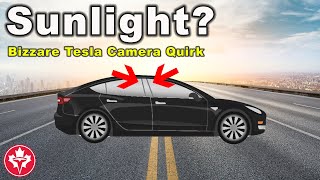
Technical Specifications
OEM Part Numbers: 1100437-00-C 1109253-00 1109253-00-J 1109253-90-F 1109255-00 1109255-00-J 1109255-90-F
Part is side-specific. Left Hand (Driver Side) is typically part number 1109253-XX-X. Right Hand (Passenger Side) is typically part number 1109255-XX-X.
We Have This Part in Stock

The information in this article is provided for general reference and educational purposes only. Vehicle specifications, procedures, and part compatibility can vary by production date, trim level, and region. Always consult your vehicle's factory service manual and verify part numbers before purchasing or performing repairs. Safety-critical components such as airbags, seat belts, and braking systems should be installed by a qualified professional.
- Tesla 3:
- 🎬 Helpful Videos
- 🛍️ Shop This Part
- Understanding the B-Pillar Appliqué vs. Interior Trim
- Symptoms of a Failing B-Pillar Camera
- Known Issues, TSBs, and Recalls
- Widespread Condensation Issue
- Incompatibility Between Model Years
- Recalls
- Buying a Used B-Pillar Appliqué: What to Inspect
- Replacement and Calibration
- Frequently Asked Questions (FAQ)
- 🎟️ Get 5% Off