

2020-2026 Tesla Auto Headlight & Sensor Issues: Model 3, Y, S, X & Cybertruck
This guide explains how to diagnose whether your Tesla's automatic headlight problem is a simple sensor fault or a more complex issue with the camera-based Autopilot system.
- Tesla uses two systems: a light sensor for basic on/off and the forward cameras for Auto High Beams. You must identify which system is failing.
- Part number 1920001-00-B is a GNSS (GPS) antenna that may be integrated with the rain/light sensor; its failure can cause navigation problems.
- Many issues, especially with Auto High Beams, are caused by a dirty windshield or software that needs updating, not a broken part.
- After replacing any component in the rearview mirror housing, you should run the headlight calibration routine from the vehicle's service menu.
Understanding Tesla's Automatic Headlight Systems

If you're experiencing issues with your automatic headlights on a 2024-2026 Tesla Cybertruck, 2024-2026 Tesla Model 3, 2021-2026 Tesla Model S, 2021-2026 Tesla Model X, or a 2020-2025 Tesla Model Y, it's important to understand that two different systems could be at fault. Problems are not always caused by a single failed part.
- Basic Auto Headlights (On/Off): This function is controlled by an ambient light sensor. This sensor is almost always packaged with the rain sensor in a single unit attached to the windshield. If your headlights fail to turn on in the dark or stay on during the day, this sensor module is the most likely culprit.
- Auto High-Beams & Adaptive Headlights: This smarter function, which automatically dips your high beams for other cars, is controlled by the main forward-facing cameras located in the same housing behind the rearview mirror. Issues with this system are very often related to software, camera cleanliness, or calibration rather than a distinct hardware failure.
The Role of Part Number 1920001-00-B
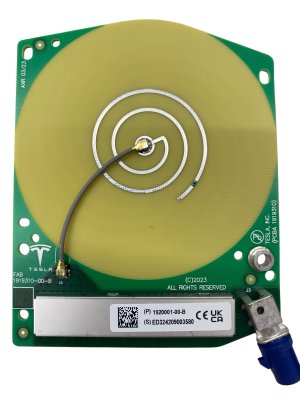
The specific part number 1920001-00-B is officially designated by Tesla as the "ASSEMBLY GNSS MILKWEED ANTENNA". Its primary job is to receive GPS signals for navigation. However, it is located in the upper windshield housing along with the cameras and other sensors. Some parts sellers list this as a combined GPS, rain, and light sensor module. Therefore, a failure in this single assembly could lead to issues with navigation, automatic wipers, or automatic headlights.
Known Issues, TSBs, and Recalls

While widespread recalls for this specific part are uncommon, several known issues and service bulletins affect the systems that control the headlights.
Vehicle-Specific Issues
- Model S & Model X (2021+): Tesla issued Service Bulletin SB-24-21-002 for some Model S and Model X vehicles that experienced poor GPS signal strength. The issue was sometimes caused by electromagnetic interference from aftermarket USB devices. The fix involves replacing the original GNSS antenna with an updated part (1920001-00-C) that has better shielding. If your navigation is failing, this part is the likely cause.
- Model X (2024): A small number of Model X vehicles manufactured between June and August 2024 were subject to recall 24V-904. The issue caused the low beams to flicker at certain temperatures due to a specific combination of software and headlamp hardware. Tesla addressed this with an over-the-air (OTA) software update.
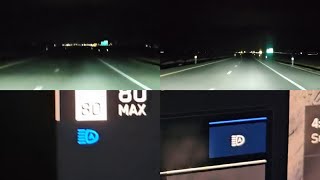
- Cybertruck, Model 3, Model Y: Most reported issues on forums for these models relate to the performance of Auto High Beams being overly sensitive or slow to react. Users note that the system can be confused by reflections from road signs or porch lights, causing the high beams to dip unnecessarily. This behavior is typically adjusted through Tesla's frequent software updates. 🎬 Watch a demonstration of Cybertruck auto high beam performance issues.
Pro Tip: Many automatic headlight and wiper issues are caused by a dirty windshield. Before assuming a part has failed, thoroughly clean the area on the outside and inside of the windshield where the camera and sensor housing is located. Even a small amount of dirt, haze, or residue can interfere with the cameras and sensors.
Symptoms of a Failing Automatic Headlight Sensor or System

Diagnosing the problem starts with observing the specific symptoms. The table below outlines common failures and their likely causes.
| Symptom | Likely Cause | Affected Vehicles |
|---|---|---|
| Headlights do not turn on automatically in the dark. | Failed ambient light sensor (part of the rain/light sensor module). | All Models |
| Headlights stay on even in bright daylight. | Failed ambient light sensor or obstruction over the sensor. | All Models |
| Auto High Beams do not activate or are slow to react. | Software issue, dirty camera lens, or needs calibration. Often changes with OTA updates. | All Models |
| "Adaptive Headlight Functionality Unavailable" message on screen. | System confidence is low due to weather (fog, rain), dirty windshield, or a software glitch. | All Models with Adaptive Headlights |
| Poor or no GPS signal; navigation shows incorrect location. | Failure of the GNSS Antenna (Part 1920001-00-B). | All Models |
Buying a Used Automatic Headlight Sensor
Purchasing a used OEM sensor assembly can be a cost-effective solution. Because these parts are complex electronics designed to integrate with Tesla's software, a used original part is often a more reliable choice than a new, unproven aftermarket version.
What to Check Before Buying
- Verify the Part Number: Tesla uses many part numbers and revisions. For basic auto headlights, you may need a rain/light sensor like 1108902-00-C (Model Y) or 1068171-00-A (Model S/X). For GPS issues, you need the GNSS antenna, 1920001-00-B or a later revision. Confirm the exact part number needed for your vehicle's VIN.
- Inspect the Lens: If the part has a visible lens for the rain or light sensor, ensure it is perfectly clear, without scratches, chips, or internal cloudiness.
- Check the Connectors: Look at the electrical connector pins. They should be straight, clean, and free of any corrosion or damage.
- Ask About the Donor Vehicle: Knowing the mileage of the vehicle the part came from can give you an idea of its remaining service life, though these sensors do not typically wear out with mileage.
Replacement and Calibration

Replacing the sensor assembly is generally feasible for a DIY mechanic with patience.
Location: The assembly is located on the windshield, inside the plastic housing behind the interior rearview mirror. Access usually involves carefully prying this plastic cover off. The sensor itself is often clipped or lightly adhered to a bracket on the windshield.
Calibration: This is the most critical step. While the basic on/off function may work immediately, Tesla's systems are highly integrated. After replacing the part or disturbing the cameras, you may need to perform a calibration.
- Headlight Calibration: On the vehicle's touchscreen, navigate to Controls > Service > Adjust Headlights. The vehicle will run a calibration routine. Some models may require you to drive a short distance to complete the process.
- Camera Calibration: If you receive any Autopilot or camera-related errors after the repair, a camera calibration may be necessary. This can also be initiated from the service menu. 🎬 See how easy it is to recalibrate your Autopilot cameras.
Warning: The area around the rearview mirror contains critical cameras for Autopilot and safety systems. Work carefully and avoid touching or moving the forward-facing cameras. Misalignment can cause significant issues with driver assistance features.
Cost of Replacing a Tesla Headlight Sensor
Costs can vary, but this provides a general estimate for the combined rain/light sensor module.
| Item | Estimated Cost (USD) |
|---|---|
| New OEM Part | $150 - $300 |
| New Aftermarket Part | $90 - $160 |
| Used OEM Part | $40 - $100 |
| Shop Labor | $150 - $250 |
| Total DIY (Used Part) | $40 - $100 |
| Total Shop Job (New Part) | $300 - $550 |
Note: Prices are estimates as of early 2026 and can vary by location and vehicle model.
Frequently Asked Questions (FAQ)
Why do my Auto High Beams turn off or dip for no reason?
This is a common complaint. The Tesla Vision system that controls high beams can be sensitive to reflections from wet roads, street signs, or even bright porch lights, mistaking them for oncoming headlights. The system's sensitivity is frequently adjusted via over-the-air software updates.
Can I fix my automatic headlights by cleaning something?
Yes, absolutely. Before attempting any repair, thoroughly clean the inside and outside of your windshield in front of the camera/sensor housing. Haze, dirt, or sticker residue can easily confuse the system and is a very common cause of erratic behavior.
Do I need to calibrate the sensor after replacing it?
It is highly recommended. After installing the new part, you should run the 'Adjust Headlights' routine found in the vehicle's service menu on the touchscreen. This ensures the entire system is working together correctly.
Is the automatic headlight sensor the same part as the rain sensor?
Yes, in most modern vehicles, including Teslas, the rain and light sensing functions are combined into a single module that attaches to the windshield.
My navigation isn't working but my headlights are fine. Could it be the same part?
Yes. The part number 1920001-00-B is a multi-function assembly that includes the GNSS (GPS) antenna. It is possible for one function (like GPS) to fail while another (like the light sensor) continues to work. If you have navigation problems, this part is the primary suspect.
Helpful Videos
Technical Specifications
OEM Part Numbers: 1920001-00-B 1920001-00-C 1108902-00-C 1068171-00-A
Typically a 3-pin connector. Combines rain, light, and sometimes condensation or humidity sensors. The 1920001-00-B assembly also includes the GNSS antenna.
We Have This Part in Stock

The information in this article is provided for general reference and educational purposes only. Vehicle specifications, procedures, and part compatibility can vary by production date, trim level, and region. Always consult your vehicle's factory service manual and verify part numbers before purchasing or performing repairs. Safety-critical components such as airbags, seat belts, and braking systems should be installed by a qualified professional.
- Tesla Cybertruck:
- Tesla Model 3:
- Tesla Model S:
- Tesla Model X:
- Tesla Model Y:
- 🎬 Helpful Videos
- 🛍️ Shop This Part
- Understanding Tesla's Automatic Headlight Systems
- The Role of Part Number 1920001-00-B
- Known Issues, TSBs, and Recalls
- Vehicle-Specific Issues
- Symptoms of a Failing Automatic Headlight Sensor or System
- Buying a Used Automatic Headlight Sensor
- What to Check Before Buying
- Replacement and Calibration
- Cost of Replacing a Tesla Headlight Sensor
- Frequently Asked Questions (FAQ)
- 🎟️ Get 5% Off