

VW's Black Screen Problem: A Guide to the 2019-2026 Taos, Tiguan, Atlas & Jetta Infotainment System
Diagnose and fix common radio failures, from frozen screens to faulty control modules, and understand the critical programming steps required for replacement.
- The system has two main parts: the display screen and a separate control module. Identify which part has failed before buying a replacement.
- A used control module WILL NOT work correctly until a VW dealer or specialist uses proprietary software to remove the 'Component Protection' anti-theft lock.
- The most common failures are black screens and system reboots, which often point to a faulty control module or a software glitch that can sometimes be fixed with a reset or update.
- A bubbling or 'melting' screen is a separate physical defect called delamination; in this case, you may only need to replace the screen, not the entire system.
Is It the Screen or the Control Module?

Before buying any parts, it's important to understand that the infotainment system in the 2022-2026 Volkswagen Taos, 2021-2024 Volkswagen Tiguan, 2019-2023 Volkswagen Arteon, 2021-2023 Volkswagen Atlas, 2022-2023 Volkswagen Atlas Cross Sport, and 2022-2024 Volkswagen Jetta is made of two separate, key components. Diagnosing the issue correctly can save you hundreds or even thousands of dollars.
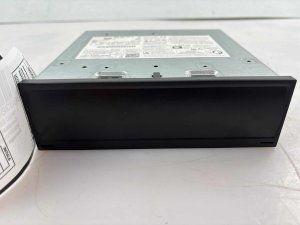
- The Display Unit: This is the 8-inch touchscreen in your dashboard. Failures here are often physical, such as a non-responsive touch interface, 'ghost touches,' or visible bubbling and delamination. Part numbers for the display often start with 5NN or 5G6.
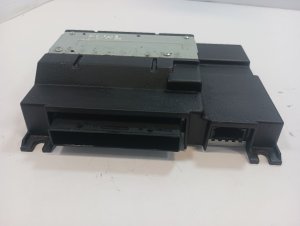
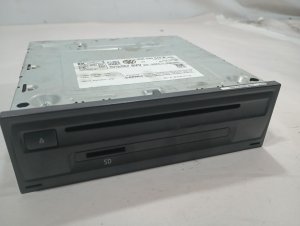
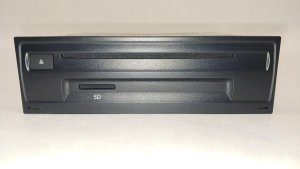
- The Control Module: Often found in the glovebox, this is the computer that runs the entire system. Failures here are typically electronic, causing issues like the system freezing, rebooting, a persistent black screen, or problems with Apple CarPlay/Android Auto. Part numbers for this module often start with 3G5 or 3G8.
Common Symptoms of a Failing Audio System

Owners of these vehicles report a range of issues, many of which are now well-documented in owner forums and even legal investigations.
Black or Blank Screen
The most frequent complaint is the infotainment screen going completely black and unresponsive. Sometimes it happens randomly and resolves itself after the car has been off for a while. In other cases, the screen remains black, even though you might still hear audio. This can be caused by a software glitch, an overheating control module, or a complete failure of the module itself.
System Freezing or Constantly Rebooting
The system may freeze on the VW logo or reboot every few minutes without warning. This makes using navigation or listening to media impossible. This symptom almost always points to a problem with the main control module in the glovebox, often related to software corruption or internal hardware failure.
Screen Delamination (Bubbling or "Melting" Look)
Many owners notice what looks like bubbles, peeling, or a 'melting' effect on the screen. This is a physical defect called delamination, where the adhesive bonding the touch layer to the LCD fails. It can lead to unresponsive areas on the screen or 'ghost touches' where the system acts like it's being pressed randomly. This is a failure of the display unit itself, not the control module.
🎬 See what screen delamination looks like and how to fix it.No Sound
The infotainment system may appear to work perfectly, but no sound comes from the speakers. This can be due to a software glitch, a failing internal amplifier within the control module, or a communication error. A system reset can sometimes resolve this temporarily.
Apple CarPlay / Android Auto Connectivity Issues
Users frequently report that wireless or wired Apple CarPlay and Android Auto will disconnect, fail to launch, or cause the screen to go black. While sometimes related to the phone or cable, persistent issues are often a sign of a software bug within the VW infotainment system.
Known Issues, Recalls, and Technical Service Bulletins (TSBs)

Volkswagen has acknowledged some of these problems through official channels.
- NHTSA Recall 91US / 24V480: This recall addresses an issue where the rearview camera image may be delayed or not appear at all, failing to comply with federal safety standards. It affects certain 2022-2024 Atlas, Atlas Cross Sport, and Tiguan models. The remedy is a software update that can often be performed over-the-air (OTA) without a dealer visit.
- NHTSA Recall 21V615: Some 2022 Taos vehicles were recalled because a manufacturing issue in the infotainment system's memory could cause the rearview camera to fail.
- Technical Service Bulletin (TSB) 91-23-03: This bulletin provides a procedure for dealers to update the MIB3 infotainment software to version 0841 or newer. This update is intended to resolve various glitches, including system freezes, reboots, and App-Connect malfunctions.
- Class Action Investigation: Due to the high volume of complaints about MIB3 system failures like black screens and glitches, a class action lawsuit investigation has been initiated for models including the 2022-2024 Tiguan and 2023-2025 Atlas.
Diagnosis and Troubleshooting
Step 1: Perform a Soft Reset
Before assuming the hardware is bad, try a soft reset. This simple procedure fixes many temporary software glitches. With the vehicle on, press and hold the infotainment system's power button for 10-15 seconds. The screen will turn off and then reboot, often displaying the VW logo. 🎬 Watch: How to perform a soft reset on your system. This is the first step for nearly any issue, from a black screen to CarPlay problems.
Step 2: Check for Software Updates
If resets don't provide a permanent fix, your system may need a software update. Check with a VW dealer to see if your vehicle is eligible for the update outlined in TSB 91-23-03 or if it's part of the 91US recall campaign.
Warning: This guide is for infotainment units equipped with factory navigation, typically found on SEL trim levels. Base models use a different system. Always verify your vehicle's options and match part numbers before purchasing a replacement.
Buying a Used Audio System: The Most Important Section
If you've determined you need a replacement part, buying a used OEM unit can save you a significant amount of money compared to a new one from the dealer. However, there are critical factors to consider.
Verifying Compatibility
You must match the part number exactly. Even a single letter difference can mean the unit is incompatible. Ensure the replacement unit is from a vehicle with the same options, specifically the 8-inch screen with factory navigation.
Physical Inspection
If buying a display unit, inspect the screen carefully in good light. Look for any signs of bubbling, peeling at the edges, or a watery appearance under the surface, which are all signs of delamination.
The Critical Warning: Component Protection
CRITICAL: Volkswagen uses an anti-theft system called Component Protection (CP). This system links the infotainment module to the vehicle's original VIN. If you install a used control module from another car, it will trigger Component Protection and will not be fully functional. Features like audio output will be disabled. You cannot fix this yourself.
Programming and Installation
Because of Component Protection, you cannot simply swap a used control module and expect it to work. After physical installation, the unit must be programmed to your vehicle's VIN.
- Who can program it? This procedure must be done by a Volkswagen dealership or a qualified independent specialist who has the official VW ODIS (Offboard Diagnostic Information System) software with an online connection to VW's servers.
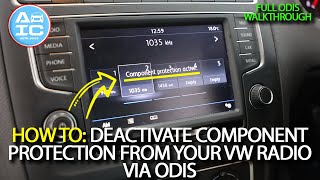
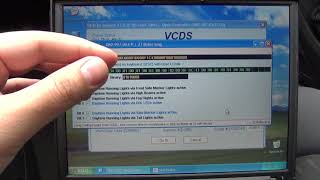
- Can a DIYer or regular mechanic do it? No. Standard OBD-II scan tools or tools like VCDS cannot remove Component Protection. A dealer visit is almost always required. 🎬 Watch: How a technician removes Component Protection using ODIS software.
- What about the screen? If you are only replacing the 8-inch display screen and not the control module in the glovebox, programming is typically not required.
Pro Tip: Before buying a used control module, call your local VW dealer and confirm they are willing to program a customer-supplied used part. Some dealers refuse this service and will only install and program brand new units that they sell.
Replacement Costs
The cost to fix a faulty infotainment system varies wildly depending on the failed part and the repair path you choose.
| Part / Service | Estimated Cost |
|---|---|
| New OEM Control Module (Part Only) | $850 - $1,100 |
| New OEM 8-inch Display (Part Only) | $130 - $210 |
| Used OEM Control Module | $150 - $400 |
| Used OEM 8-inch Display | $75 - $150 |
| Screen Delamination Repair Service | $200 - $400 |
| Dealer Labor (Diagnosis & Programming) | $200 - $500+ |
Note: Prices are estimates as of late 2025 and can vary by location and supplier. Dealer quotes to replace the entire system often range from $2,000 to $3,000.
Frequently Asked Questions (FAQ)
My screen is bubbling. Do I need to replace the whole radio system?
No. If your only issue is the physical screen bubbling or delaminating, you likely only need to replace the 8-inch display unit, not the expensive control module in the glovebox. Some specialty repair shops can also fix your existing screen by replacing the top touch layer (digitizer).
Can I just swap an infotainment module from another VW?
No, not without professional programming. Due to Volkswagen's Component Protection anti-theft system, a module from another vehicle will be locked and have limited functionality until it is adapted to your car by a dealer or specialist with ODIS diagnostic software.
What is Component Protection?
Component Protection is an anti-theft feature used by Volkswagen that links major electronic modules, like the infotainment system, to the car's unique Vehicle Identification Number (VIN). If the system detects a module that doesn't match the car's original configuration, it restricts its functionality as a theft deterrent.
Can my local mechanic program the replacement module?
Probably not. Programming requires a special diagnostic tool called ODIS that needs an active, licensed connection to Volkswagen's servers in Germany to remove Component Protection. Most general repair shops do not have this capability. You will likely need to go to a VW dealer or a European auto specialist.
Why does my screen go black but come back on after I restart the car?
This is a classic symptom of a software glitch or an overheating component in the control module. Performing a soft reset by holding the power button for 15 seconds often provides a temporary fix. If the problem is persistent, check with a dealer about software updates like TSB 91-23-03.
Helpful Videos


Technical Specifications
OEM Part Numbers: 3G5-035-842-G 3G5035842 3G5035842B 3G5035842D 3G5035842F 3G5035842G 3G5035842H 3G8035842 5G6-919-605-D 5NN-919-605-D 5NN919605
System: MIB2 or MIB3 Discover Media. Display: 8-inch capacitive touchscreen. Features: Factory navigation required for compatibility with listed part numbers.
We Have This Part in Stock



The information in this article is provided for general reference and educational purposes only. Vehicle specifications, procedures, and part compatibility can vary by production date, trim level, and region. Always consult your vehicle's factory service manual and verify part numbers before purchasing or performing repairs. Safety-critical components such as airbags, seat belts, and braking systems should be installed by a qualified professional.
- Volkswagen Taos:
- VOLKSWAGEN TIGUAN:
- Volkswagen Arteon:
- VOLKSWAGEN ATLAS:
- VOLKSWAGEN ATLAS CROSS SPORT:
- Volkswagen Jetta:
- 🎬 Helpful Videos
- 🛍️ Shop This Part
- Is It the Screen or the Control Module?
- Common Symptoms of a Failing Audio System
- Black or Blank Screen
- System Freezing or Constantly Rebooting
- Screen Delamination (Bubbling or "Melting" Look)
- No Sound
- Apple CarPlay / Android Auto Connectivity Issues
- Known Issues, Recalls, and Technical Service Bulletins (TSBs)
- Diagnosis and Troubleshooting
- Step 1: Perform a Soft Reset
- Step 2: Check for Software Updates
- Buying a Used Audio System: The Most Important Section
- Verifying Compatibility
- Physical Inspection
- The Critical Warning: Component Protection
- Programming and Installation
- Replacement Costs
- Frequently Asked Questions (FAQ)
- 🎟️ Get 5% Off