

VW Jetta, GTI, Golf & GLI Audio System: Unlocking 'SAFE' Mode on the RCD 310 Radio (2010-2014)
Your complete guide to diagnosing, replacing, and understanding the anti-theft code for the standard RCD 310 radio in your Volkswagen.
- A used RCD 310 radio is useless without its unique 4-digit anti-theft code; it will be locked in 'SAFE' mode.
- The RCD 310 does not have built-in Bluetooth. Music streaming issues are related to the separate module under the passenger seat.
- Replacement is an easy DIY job requiring only a T20 Torx driver and a trim tool, not special radio keys.
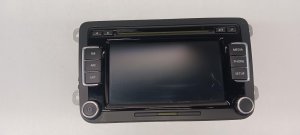
- This is a great opportunity to upgrade to a plug-and-play OEM touchscreen unit like the RCD 510 or RNS 315 for more features.
Vehicle Fitment and Part Identification

This guide applies to the standard RCD 310 audio system found in the following North American market vehicles:
- 2011-2013 VOLKSWAGEN JETTA (MK6)
- 2012-2014 VOLKSWAGEN JETTA GLI (MK6)
- 2010-2011 VOLKSWAGEN GTI (MK6)
- 2010-2011 VOLKSWAGEN GOLF (MK6)
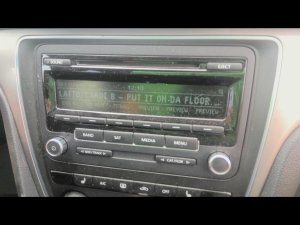
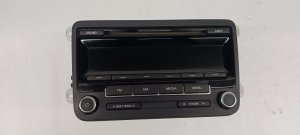
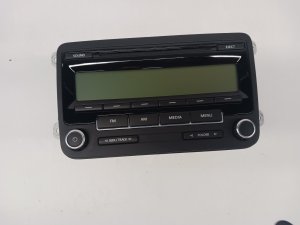
These models share the Volkswagen Group A5 (PQ35) platform, resulting in interchangeable parts like this radio. The unit is a Delphi-made RCD 310, identifiable by its monochrome screen and button layout (FM, AM, MEDIA, MENU).
Known OEM Part Numbers
Always verify the part number on your original unit before purchasing a replacement. While units with different suffix letters are often interchangeable revisions, an exact match is the safest way to guarantee full functionality.
- 1K0035164D
- 1K0035164F
- 1K0035164G
- 1K0035161D
- 28285097 (Delphi)
Common Failure Symptoms
When the RCD 310 radio begins to fail, you may experience one or more of the following issues:
- Completely Dead Unit: The radio will not power on, and the screen remains blank. This can be caused by a blown fuse (either in the car's fuse panel or on the back of the radio itself) or total internal failure.
- Power On, No Sound: The display lights up and you can change stations, but no audio comes from the speakers. This could be a fault within the head unit, a blown fuse for an external amplifier, or a wiring issue.
- Unresponsive Buttons: Buttons on the faceplate may become sticky, intermittent, or stop working entirely.
- CD Player Malfunction: The unit may refuse to accept, eject, or read CDs.
- Intermittent Static or Poor Reception: You may hear excessive static on FM/AM stations that is not present in other vehicles. Sometimes this can be caused by interference from phone chargers or dash cams plugged into the car's 12V power outlets.
- Software Glitches: The radio may behave erratically. A soft reboot can sometimes temporarily fix these issues. To do this, press and hold the power/volume knob for about 10 seconds until the unit shuts down and restarts.
Bluetooth Issues Are Usually Not the Radio: Problems with Bluetooth, such as being able to make calls but not stream music (A2DP), are almost always caused by an older external Bluetooth module under the passenger seat, not the RCD 310 head unit itself. Upgrading this module is required to enable music streaming.
Buying a Used RCD 310 Audio System


Purchasing a used OEM radio is a cost-effective solution, but there are critical factors to consider to avoid buying a useless part.
1. The Anti-Theft Security Code is MANDATORY
This is the most important rule. Every VW radio is protected by a 4-digit security code. If the radio is disconnected from power, it will enter "SAFE" mode upon reconnection and will be completely non-functional until the correct code is entered.
- Verify the Code: Do NOT purchase a used radio unless the seller can provide the 4-digit code. The code is often written on the radio's chassis.
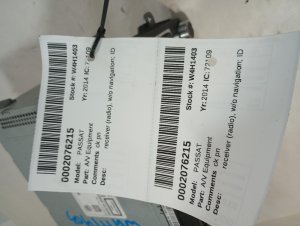
- Retrieving a Lost Code: If you have a radio without a code, it is possible to retrieve it. You will need the radio's 14-digit serial number, which is printed on a label on the metal housing and typically starts with "VWZ". A Volkswagen dealer can look up the code for a fee, or you can use various online services that provide the code instantly for a small price.
2. Part Number Compatibility
While many RCD 310 units look identical, they can have different internal programming. To ensure features like steering wheel controls, external amplifier communication, and parking sensor displays work correctly, it is best to match the part number (e.g., 1K0035164D) from your old unit to the replacement.
3. Consider an OEM Upgrade
Since you are already replacing the radio, this is a perfect opportunity to upgrade. The following OEM touchscreen units are typically plug-and-play replacements for the RCD 310 in these vehicles and offer significant feature improvements:
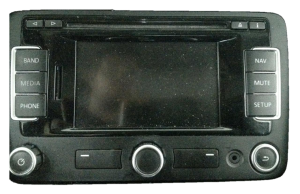
- RCD 510: Adds a large color touchscreen, an SD card slot, and an internal 6-disc CD changer. Still requires an external module for Bluetooth.
- RNS 315: Adds a smaller color touchscreen, navigation, and often has Bluetooth functionality built directly into the head unit, eliminating the need for the separate under-seat module.
Replacement and Installation
Replacing the RCD 310 is a straightforward DIY job that typically takes less than an hour.
Pro Tip: You do not need special DIN-style radio removal keys for these models. The radio is held in by four screws accessible after removing the surrounding trim.
Tools Needed:
- Plastic Trim Removal Tool
- T20 Torx Screwdriver
Step-by-Step Guide:
- Use a plastic pry tool to carefully unclip and remove the plastic trim panel that surrounds the radio and climate controls. Start from the bottom and work your way around.
- With the trim removed, you will see four T20 Torx screws securing the radio to the dashboard. Remove these four screws.
- Slide the radio straight out of the dash.
- Disconnect the main wiring harness. This large connector has a lever that you must flip up, which will push the connector out of the radio socket.
- Disconnect the antenna cable(s).
- Connect the wiring and antenna to the new radio and slide it into place.
- Secure the new radio with the four T20 Torx screws.
- Turn on the ignition. The radio will display "SAFE" or "1000".
- Enter the 4-digit security code using the radio preset buttons (button 1 for the first digit, 2 for the second, etc.).
- Once the code is entered, press the seek/scan button (often the right arrow or `>`) to confirm. The radio will unlock and function normally.
- Snap the dash trim back into place.
Recalls and Technical Service Bulletins (TSBs)
While there are no major recalls specifically for the RCD 310 radio unit itself, owners of the 2011 Jetta should be aware of NHTSA Campaign ID 11V196000. This recall addressed a wiring and fuse layout issue where a blown fuse could disable the horn and anti-theft system, and in some cases, cause the engine to stall or lights to fail. While not a direct radio fault, it highlights the sensitivity of the vehicle's electrical system.
Cost of Replacement
| Part Type | Estimated Cost |
|---|---|
| New OEM | $500 - $800+ (if available) |
| New Aftermarket (Upgrade Unit) | $250 - $500 |
| Used OEM | $50 - $150 |
| Remanufactured OEM | $175 - $250 |
| Shop Labor | $100 - $175 |
Frequently Asked Questions (FAQ)
Do I need to program the radio after installing it?
No, you do not need to perform any special programming or coding with diagnostic tools for a like-for-like replacement. You only need to enter the 4-digit anti-theft security code to unlock the unit.
What do I do if my radio says "SAFE" on the screen?
"SAFE" mode is the anti-theft system. It means the radio has lost power and needs its unique 4-digit security code to be reactivated. If you enter the wrong code twice, the radio may lock for up to an hour before you can try again.
Can I add Bluetooth music streaming to my RCD 310?
Not directly. The RCD 310 relies on an external Bluetooth module. If your car only supports hands-free calling, you must upgrade the module under the passenger seat to a newer version that supports A2DP (music streaming). Alternatively, upgrading the head unit to an RNS 315 or an aftermarket radio with built-in Bluetooth is a more modern solution.
Will a radio from a Passat or Tiguan work in my Jetta/GTI?
Physically, it might fit, as many VW models from this era used the same size radio. However, the internal software may be coded for different features (like different amplifier types or climate control displays). It is always safest to use a radio from the same model group (Jetta, Golf, GTI) to ensure 100% compatibility.
Technical Specifications
OEM Part Numbers: 1K0035164D 1K0035164F 1K0035164G 1K0035161D 1K0035164 28285097
Type: RCD 310 Audio System. Manufacturer: Delphi. Features: AM/FM Tuner, Single CD/MP3 Player, AUX input support. Display: Monochrome. Security: 4-Digit Anti-Theft Code.
We Have This Part in Stock

The information in this article is provided for general reference and educational purposes only. Vehicle specifications, procedures, and part compatibility can vary by production date, trim level, and region. Always consult your vehicle's factory service manual and verify part numbers before purchasing or performing repairs. Safety-critical components such as airbags, seat belts, and braking systems should be installed by a qualified professional.
- Volkswagen Jetta:
- VOLKSWAGEN JETTA:
- VOLKSWAGEN JETTA GLI:
- VOLKSWAGEN GTI:
- VOLKSWAGEN GOLF:
- 🛍️ Shop This Part
- Vehicle Fitment and Part Identification
- Known OEM Part Numbers
- Common Failure Symptoms
- Buying a Used RCD 310 Audio System
- 1. The Anti-Theft Security Code is MANDATORY
- 2. Part Number Compatibility
- 3. Consider an OEM Upgrade
- Replacement and Installation
- Tools Needed:
- Step-by-Step Guide:
- Recalls and Technical Service Bulletins (TSBs)
- Cost of Replacement
- Frequently Asked Questions (FAQ)
- 🎟️ Get 5% Off