

Tesla Model S & Model X Audio Amplifier Guide (2012-2026): Symptoms, Failures, and Replacement
Diagnose and understand the critical differences between the audio amplifiers in pre-2021 and 2021+ 'Plaid'/'Refreshed' Tesla Model S and Model X vehicles.
- The audio systems are completely different between pre-2021 and 2021+ Model S/X vehicles; parts are not interchangeable.
- A replacement amplifier is NOT plug-and-play. It requires software configuration with Tesla's diagnostic tools to function.
- Common failure symptoms include total audio loss, intermittent sound cutting out, popping noises, and the vehicle's microphone no longer working.
- Before replacing the amp for intermittent issues, check the amplifier's ground connection, as a poor ground can cause similar symptoms.
Vehicle and Audio System Variants: A Critical Distinction

Before diagnosing or replacing any audio component, you must identify your vehicle's generation. The audio systems in pre-2021 and post-2021 vehicles are entirely different, and the parts are not interchangeable.
Pre-2021 "Legacy" Model S (2012-2020) & Model X (2016-2020)
These earlier models were available with two main audio tiers:
- Standard Audio: A basic system with fewer speakers and a 200-watt amplifier.
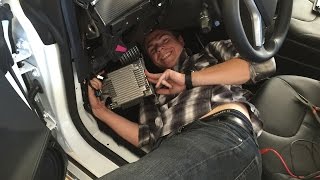
- Premium Audio (UHFS): Originally called Sound Studio or Ultra High Fidelity Sound (UHFS), this optional upgrade featured more speakers (up to 11), a subwoofer, and a more powerful 560-watt amplifier. The amplifier for the UHFS system is typically located in the driver's side footwell, near the steering column.
A common issue in these earlier vehicles is the failure of the Media Control Unit (MCU), which can cause the screen to go blank and lead to a loss of audio controls. This is a separate issue from a failed amplifier.
2021+ "Refreshed" (Palladium/Plaid) Model S & Model X
Starting in 2021, the refreshed Model S and Model X (often called 'Palladium' or known by their 'Plaid' performance trim) came standard with a new, highly advanced audio system.
- Premium Audio System: This system features 22 speakers, a subwoofer, and a powerful 960-watt amplifier. It also includes Active Road Noise Reduction technology. The primary amplifier for this system, such as part number 1490471-00-C, is located in the rear trunk area, typically on the right side behind the trim panels.
Warning: The vast majority of used amplifiers on the market, like part number 1490471-00-C, are for the 2021 and newer vehicles with the 22-speaker Premium Audio system. Do not purchase this part for an older vehicle, as it is not compatible.
Symptoms of a Failing Audio Amplifier

When the amplifier begins to fail, you may experience a range of issues. A simple infotainment reboot (holding both scroll wheels on the steering wheel) can sometimes fix temporary software glitches, but a failing amplifier will have persistent symptoms.
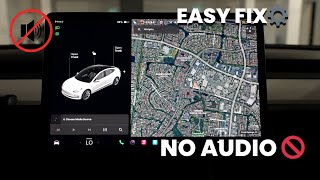
🎬 Watch: Troubleshooting steps for when your Tesla has no sound- Complete Loss of Sound: The most obvious symptom is when no audio comes from any speaker, even though the infotainment screen appears to be playing music.
- Intermittent Audio / Cutting Out: Sound may cut in and out, sometimes randomly or when hitting bumps. This often affects the rear speakers and subwoofer first.
- Popping, Crackling, or Distorted Sounds: Unpleasant noises from the speakers that are not part of the audio track can indicate failing amplifier components.
- Loss of Specific Speaker Channels: You might lose audio from a specific group of speakers, such as all door speakers or just the subwoofer, while others continue to work.
- Voice Commands Not Working: In many Tesla models, the microphone for voice commands is processed through the audio amplifier. If the amplifier fails, the microphone will stop working.
- Poor Ground Connection: Some owners have reported that intermittent audio cut-outs can be caused by a poor factory ground connection for the amplifier. Before replacing the unit, it may be worth inspecting the ground bolt and contact surfaces for corrosion or looseness. This requires disconnecting the 12V battery and accessing the amplifier. 🎬 See this guide on how to properly ground a car amplifier
Programming and Installation Requirements

Warning: Replacing a Tesla audio amplifier is NOT a plug-and-play procedure. The vehicle's software configuration is tied to the specific hardware installed.
A replacement amplifier, whether new or used, must be configured to the vehicle. Tesla's service manuals for older models explicitly state that a firmware update or reinstall is necessary after replacement. For newer 2021+ models, the integration is even deeper. The vehicle's central computer needs to recognize the serial number of the new amplifier and enable it in the car's configuration.
This process requires access to Tesla's proprietary diagnostic software, known as Toolbox. While some advanced independent repair shops may have this capability, most DIY mechanics and even many professional shops do not. In most cases, a visit to a Tesla Service Center will be required to make the replacement amplifier functional.
Buying a Used Tesla Audio Amplifier

Purchasing a used OEM amplifier can offer significant savings, but careful verification is essential to avoid buying an incompatible or faulty part.
- Verify the Part Number and Generation: This is the most critical step. Ensure the part number on the used amplifier exactly matches what is required for your vehicle's year and audio system type (Standard vs. Premium, Pre-2021 vs. 2021+). An amplifier from a 2015 Model S will not work in a 2022 Model S Plaid.
- Physical Inspection: When you receive the part, inspect the casing for any signs of physical damage, dents, or being tampered with. Most importantly, check the electrical connectors for any signs of corrosion, bent pins, or water damage. Water intrusion can destroy these modules.
- Buy From a Reputable Source: Purchase from an auto recycler or seller who offers a warranty and a return policy. This gives you protection in case the part is dead on arrival.
- Factor in Programming Costs: Remember that the price of the used part is not the final cost. You must account for the labor and software configuration costs from a Tesla Service Center or qualified independent shop to get the part working.
Known Issues, TSBs, and Recalls
There are no known recalls or Technical Service Bulletins (TSBs) that specifically target the main cabin audio amplifiers in the Model S or Model X.
- MCU Recall (Pre-2021 models): A widely known recall (NHTSA 21V-035) affected the Media Control Unit (MCU) in 2012-2018 Model S and 2016-2018 Model X vehicles due to flash memory wear. A failing MCU causes a loss of the center display, which includes audio controls, but this is not a failure of the amplifier itself.
- Boombox/PWS Recalls: Several software-based recalls were issued for the "Boombox" feature, which uses the external Pedestrian Warning System (PWS) speaker. These recalls do not affect the internal audio system or its amplifier.
Cost Comparison
Prices can vary based on location, supplier, and the specific part number required.
| Part Type | Estimated Cost | Notes |
|---|---|---|
| New OEM | $400 - $800+ | Must be purchased through Tesla Service. Price can be high and may require installation by Tesla. |
| New Aftermarket | $1,300 - $1,500+ | These are typically high-end upgrades, not direct OEM replacements, and require extensive custom installation. |
| Used OEM | $90 - $250 | A cost-effective option. Prices for the 2021+ amplifier (1490471-00-C) are commonly in this range. |
| Shop Labor | $150 - $400 | Includes physical replacement and the necessary software configuration. Tesla's flat rate time is under an hour, but diagnosis and programming add to the real-world cost. |
Frequently Asked Questions (FAQ)
Do I need to program a replacement Tesla audio amplifier?
Yes, absolutely. A replacement amplifier must be configured to your vehicle's VIN and software using Tesla's diagnostic tools. It is not a plug-and-play part, and the car will not recognize it until this step is performed.
Where is the amplifier located?
The location depends on the vehicle's year. In pre-2021 models with Premium Audio, it's often found in the driver's footwell area. In 2021+ refreshed Model S and Model X vehicles, the main amplifier is located in the rear trunk, behind the right-side trim panel.
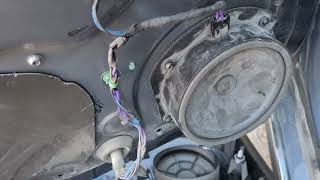
🎬 Watch: How to access the premium amplifier in a Model SCan I upgrade my standard audio system to the premium one?
This is a very complex and expensive conversion. It involves not only swapping the amplifier but also adding numerous speakers, running new wiring harnesses throughout the car, and performing significant software and vehicle configuration changes. It is generally not considered a practical or cost-effective upgrade.
My sound just stopped working. Is it always the amplifier?
Not always. First, try a soft reset of the infotainment system by holding down both scroll wheels on the steering wheel until the screen reboots. This can solve temporary software glitches. If that doesn't work, the issue could be the amplifier, a fuse, or wiring. On older cars, a failing MCU can also lead to a loss of audio control.
Helpful Videos

Technical Specifications
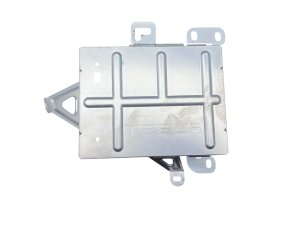
OEM Part Numbers: 1004833-03-A 1004833-10-A 1143716-00-C 1490471-00-C 149047100C 1622932-00-B 162293200A
System power varies by generation: 200W (Standard, pre-2021), 560W (Premium UHFS, pre-2021), 960W (Premium, 2021+). The 2021+ system features 22 speakers and active noise cancellation.
We Have This Part in Stock
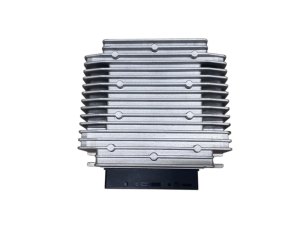
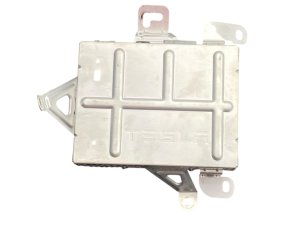
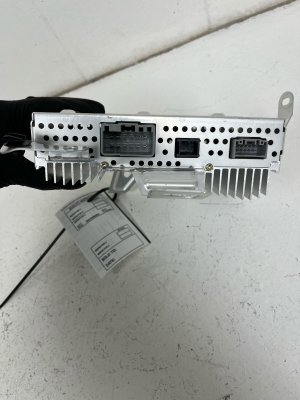
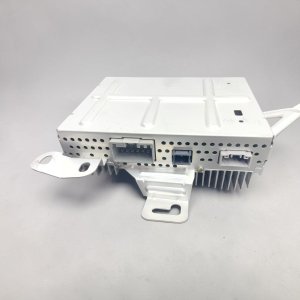


The information in this article is provided for general reference and educational purposes only. Vehicle specifications, procedures, and part compatibility can vary by production date, trim level, and region. Always consult your vehicle's factory service manual and verify part numbers before purchasing or performing repairs. Safety-critical components such as airbags, seat belts, and braking systems should be installed by a qualified professional.
- Tesla Model X:
- Tesla Model S:
- 🎬 Helpful Videos
- 🛍️ Shop This Part
- Vehicle and Audio System Variants: A Critical Distinction
- Pre-2021 "Legacy" Model S (2012-2020) & Model X (2016-2020)
- 2021+ "Refreshed" (Palladium/Plaid) Model S & Model X
- Symptoms of a Failing Audio Amplifier
- Programming and Installation Requirements
- Buying a Used Tesla Audio Amplifier
- Known Issues, TSBs, and Recalls
- Cost Comparison
- Frequently Asked Questions (FAQ)
- 🎟️ Get 5% Off