

Tesla Model 3 & Y Audio Failure: Diagnosing Amps, Tuners, and MCU Compatibility (2017-2025)
A detailed guide to identifying, diagnosing, and replacing the correct audio components for your 2017-2025 Tesla Model 3 or 2020-2023 Tesla Model Y.
- Before buying, you MUST identify your car's audio system (Premium vs. Standard) and its infotainment processor (MCU2 Intel Atom vs. MCU3 AMD Ryzen).
- Partial audio loss (rear speakers and sub out) combined with a dead microphone is the classic sign of a failed rear amplifier in Premium Audio models.
- Many audio problems are software glitches. Always perform both a soft reset (scroll wheels) and a deep reset ('Power Off' menu) before replacing parts.
- Replacement modules, especially the amplifier and MCU, will likely require software programming by Tesla or a specialized shop to function correctly.
Critical Compatibility: Don't Buy the Wrong Part!

Before purchasing any audio component for your Model 3 or Model Y, you must verify two key details about your vehicle. Ordering the wrong part will result in incompatibility. This is the most important step in the process.
Warning: The initial part numbers provided cover several different components, including the main infotainment computer (MCU), the radio tuner, and the audio amplifier. You must identify which specific part has failed in your vehicle before ordering a replacement.
1. Audio System Version: Premium vs. Standard/Partial Premium
Tesla equipped these vehicles with different audio systems depending on the trim level and model year. A part for a Premium system is not compatible with a Standard system, and vice-versa.
- Premium Audio: Found in Long Range and Performance trims, and standard on all newer models. These systems feature 13 to 17 speakers, including speakers on the A-pillars and rear parcel shelf, one or two amplifiers, and a subwoofer in the trunk. If your audio settings include a separate subwoofer control and "Immersive Sound" options, you likely have the Premium system.
- Standard or Partial Premium Audio: Found in earlier and base-level Rear-Wheel Drive (RWD) models. These systems have fewer speakers (typically 7 to 9), a single amplifier, and no factory subwoofer. The sound is noticeably less full, especially in the bass department and for rear passengers.
2. Infotainment Processor: MCU2 (Intel Atom) vs. MCU3 (AMD Ryzen)
This is the most critical compatibility check, especially if you are replacing the main infotainment computer. Tesla transitioned from an Intel Atom processor (MCU2) to a more powerful AMD Ryzen processor (MCU3) around early 2022.
To check your processor type: On your vehicle's main touchscreen, navigate to 'Controls' > 'Software' > 'Additional Vehicle Information'. The screen will display your processor type. It will clearly state either "Intel Atom" or "AMD Ryzen".
IMPORTANT: The known OEM part number 1566786-xx-x is for the Intel Atom (MCU2) computer. It is NOT compatible with vehicles originally equipped with the AMD Ryzen (MCU3) processor. You must verify your vehicle's processor before ordering.
Diagnosing Your Tesla's Audio Problems

Common Symptoms of Failure
Audio issues in a Tesla can range from simple software glitches to complete hardware failure.
- No sound at all: Turn signals, music, and alerts are all silent. This could be a software glitch, a blown fuse, or a failed primary amplifier.
- Partial sound loss: Audio only comes from the front dashboard speakers. The rear speakers, door speakers, and subwoofer are silent. This strongly points to a failure of the rear audio amplifier. 🎬 See how to troubleshoot rear speakers and amplifier balance issues.
- Microphone not working: Voice commands fail to register. On Premium audio systems, the cabin microphone is routed through the rear amplifier, so a failed amp will also disable the microphone.
- No FM or HD Radio: Streaming audio works, but the radio does not pick up any stations. This points to a failure of the dedicated radio tuner module.
- Crackling or distorted audio: This can be a sign of a failing speaker or amplifier.
DIY First Steps: Software Resets
Before assuming a hardware failure, always try a software reset. Many audio issues are temporary glitches that a reboot can fix.
- Soft Reset: Press and hold both scroll wheels on the steering wheel until the center screen turns black. The system will reboot. This fixes a wide range of minor issues. 🎬 Watch: A quick guide to resetting your Tesla's audio system.
- Deep Reset (Power Off): If a soft reset doesn't work, perform a full power off. Park the car, and on the touchscreen go to 'Controls' > 'Safety & Security' > 'Power Off'. Wait at least two to three minutes without touching anything in the car (including the brake pedal or door). Then, press the brake pedal to power the car back on. This is a deeper reboot that can resolve more persistent software problems.
Guide to Replaceable Audio Modules

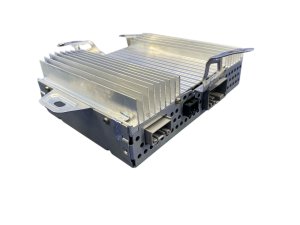
Audio Amplifier (Premium Audio)
- Part Numbers: 1079748-00-C, 1079748-00-D, 1079748-00-E, 1079748-00-F
- Function: Powers the door speakers, rear speakers, and subwoofer. It also processes the microphone input on premium systems.
- Location: In the trunk, typically on the right side behind a trim panel. 🎬 Watch this walkthrough for accessing and replacing the trunk amplifier.
- Common Failure Symptoms: Loss of audio from all speakers except the very front dash tweeters. Loss of bass and subwoofer output. Microphone for voice commands stops working. Water ingress in the trunk is a known cause of failure.
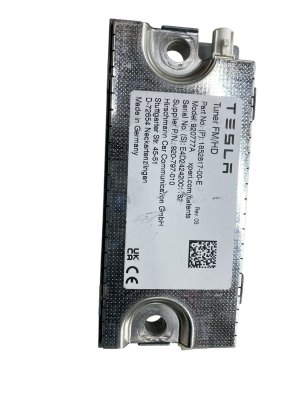
FM/HD Radio Tuner
- Part Numbers: 1079749-00-B, 1079749-00-C, 1079749-00-D, 1079749-00-E
- Function: Receives terrestrial radio signals for FM and HD Radio. It does not process AM radio, which is unavailable in these vehicles.
- Location: Varies, but often located in the passenger cabin area.
- Common Failure Symptoms: Inability to tune to any FM or HD Radio stations, while other audio sources like Bluetooth or Streaming work fine.
Buying a Used Tesla Audio Module
Purchasing a used OEM audio component can be a cost-effective repair, but careful verification is essential.
- Match Part Numbers Exactly: The most important rule. A part number that is off by even one letter or revision may not be compatible.
- Verify Compatibility: Double-check that the donor vehicle had the same audio system (Premium/Standard) and infotainment processor (MCU2/MCU3) as your car.
- Inspect for Damage: Look for any signs of physical damage, corrosion from water intrusion, or bent connector pins.
- Ask About Programming: Understand that the part may not work immediately upon installation. It might require a software "handshake" with the vehicle, which can require a trip to a service center.
Installation and Programming Requirements

Warning: Many Tesla electronic modules are tied to the vehicle's software configuration. While you may be able to physically swap a part like an amplifier or radio tuner, it may not function until it is configured to the car using Tesla's proprietary "Toolbox" diagnostic software.
Replacing the main MCU is a complex task that requires backing up the vehicle's profile and is not recommended for DIYers without significant experience. For simpler modules like the amplifier or tuner, some independent shops with access to Tesla's diagnostic tools may be able to perform the necessary programming. However, in many cases, a visit to a Tesla Service Center may be required to finalize the installation and ensure full functionality.
Cost of Replacement (2017-2025 Model 3 & 2020-2023 Model Y)
| Part | New OEM (Estimate) | Used OEM | Shop Labor |
|---|---|---|---|
| Audio Amplifier (Premium) | $400 - $600 | $100 - $250 | $150 - $300 |
| Radio Tuner Module | $150 - $250 | $40 - $100 | $100 - $200 |
| Infotainment Computer (MCU2) | $1500 - $2500 | $250 - $500 | $400 - $600 |
Recalls: The "Boombox" Pedestrian Warning System Issue

You may have heard of a recall related to the audio system (NHTSA Recall 22V-063). This recall was for the "Boombox" feature, which allowed custom sounds to be played through the car's external Pedestrian Warning System (PWS) speaker. The concern was that these custom sounds could obscure the legally required warning noise for pedestrians at low speeds. This issue was resolved via an over-the-air (OTA) software update that disabled the Boombox feature while the vehicle is in Drive, Neutral, or Reverse. This recall does not relate to the common failures of the internal cabin audio system.
Frequently Asked Questions (FAQ)
Does a replacement Tesla audio amplifier need to be programmed?
Often, yes. While it might be a simple plug-and-play swap in some cases, it is common for a replacement amplifier to require software configuration with Tesla's diagnostic tools to be recognized by the vehicle. You should be prepared for a potential visit to a service center.
Why did my microphone stop working when my speakers failed?
In vehicles with the Premium Audio system, the cabin microphone's signal is processed by the rear amplifier. If this amplifier fails, it will not only cut sound to the rear/door speakers and subwoofer but will also disable the microphone for voice commands.
How can I tell if I have the Premium or Standard audio system?
The easiest way is to check your audio settings. If you have an option to adjust the subwoofer level and enable "Immersive Sound," you have the Premium system. Visually, Premium systems also have speaker grilles in the A-pillars (near the side mirrors) and on the rear parcel shelf, which are absent in Standard systems.
Can I fix my audio by just rebooting the car?
Yes, frequently. Many instances of total audio loss are caused by software glitches. Always perform a soft reset (holding both steering wheel scroll wheels) and a deep reset (using the 'Power Off' button in the Safety menu) before assuming you have a hardware failure.
Helpful Videos

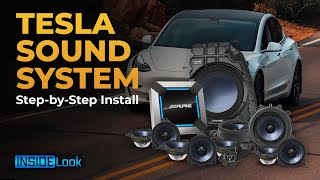
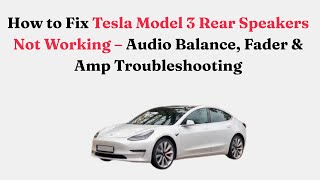
Technical Specifications
OEM Part Numbers: 1079749-00 1079749-00-B 1079749-00-C 1079749-00-D 1079749-00-E 1566786-00-B 1566786-00-C 1566786-00-E 1566786-S0-C 1566786-S0-E 1681271-00-D 1755000-00-B 1782702-00-F 1079748-00-C 1079748-00-D 1079748-00-E 1079748-00-F
System configurations vary widely. Premium systems feature 13-17 speakers, dual amplifiers, and a subwoofer with up to ~560W total power. Standard systems feature 7-9 speakers with a single amplifier and ~200-325W of power.
We Have This Part in Stock
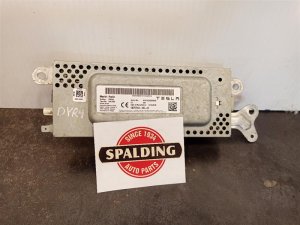
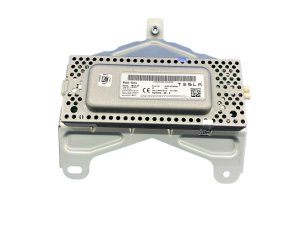

The information in this article is provided for general reference and educational purposes only. Vehicle specifications, procedures, and part compatibility can vary by production date, trim level, and region. Always consult your vehicle's factory service manual and verify part numbers before purchasing or performing repairs. Safety-critical components such as airbags, seat belts, and braking systems should be installed by a qualified professional.
- Tesla Model 3:
- TESLA MODEL Y:
- 🎬 Helpful Videos
- 🛍️ Shop This Part
- Critical Compatibility: Don't Buy the Wrong Part!
- 1. Audio System Version: Premium vs. Standard/Partial Premium
- 2. Infotainment Processor: MCU2 (Intel Atom) vs. MCU3 (AMD Ryzen)
- Diagnosing Your Tesla's Audio Problems
- Common Symptoms of Failure
- DIY First Steps: Software Resets
- Guide to Replaceable Audio Modules
- Audio Amplifier (Premium Audio)
- FM/HD Radio Tuner
- Buying a Used Tesla Audio Module
- Installation and Programming Requirements
- Cost of Replacement (2017-2025 Model 3 & 2020-2023 Model Y)
- Recalls: The "Boombox" Pedestrian Warning System Issue
- Frequently Asked Questions (FAQ)
- 🎟️ Get 5% Off