

2024-2025 Tesla Cybertruck Audio System: Failures, Resets, and Amplifier Replacement
This guide covers the common software glitches causing audio loss, the role of the external amplifier, and the critical programming required for replacement.
- The most common audio problem—loss of all speakers except the dash—is usually a software glitch fixed by a vehicle 'deep sleep' or software update, not a bad amplifier.
- A replacement audio amplifier is NOT plug-and-play. It MUST be programmed to the vehicle's VIN by Tesla or a specialist with the correct software.
- Due to the mandatory programming step, DIY replacement is not fully feasible. You can swap the part, but a shop visit is required to make it work.
- Before buying a used amplifier, exhaust all software-based troubleshooting steps, as the physical part may not be the cause of the problem.
System Overview and Specifications

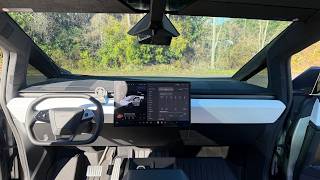
All 2024-2025 Tesla Cybertrucks are equipped with the same high-end audio system as standard equipment. There are no optional audio upgrades from the factory. The system is a core part of the vehicle's infotainment and is controlled exclusively through the large central touchscreen.
- Total Speakers: 15
- Subwoofers: 2 dedicated subwoofers
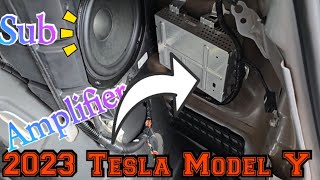
- Amplification: The system uses "distributed amplifiers," with a primary external amplifier located in the right-hand side of the trunk area behind the trim panels.
- Control Interface: 18.5-inch front center touchscreen and a 9.4-inch rear passenger touchscreen.
Symptoms of Failure

Audio system problems in the Cybertruck are becoming well-documented, with most issues pointing toward software glitches or failures in related control modules rather than the amplifier itself.
Most Common Symptom: Audio Cuts Out Except for Dash Speakers
The most widely reported issue is a sudden loss of audio from all speakers except for the three small speakers located on top of the dashboard. This results in a very tinny, treble-heavy sound with no bass, subwoofer output, or immersive surround effect. Fading the audio to the rear in the on-screen controls will result in complete silence. This problem often occurs randomly and has been reported by numerous owners on delivery or after a software update.
🎬 See this guide on fixing common Cybertruck delivery problemsCommon Fixes Reported by Owners:
- Vehicle "Sleep" Cycle: Many owners find the issue resolves itself after letting the truck go into a deep sleep. This requires parking the vehicle, turning off Sentry Mode, and staying away from it with your phone key for several hours to allow all modules to fully shut down and reboot on the next startup.
- Software Updates: In some cases, installing a new over-the-air (OTA) software update from Tesla has permanently fixed the problem.
- System Reboot: A simple two-scroll-wheel reboot of the main screen 🎬 Watch: How to fix common Tesla audio software issues does not always fix this issue, but it is the first step to try.
- Service Center Reset: Tesla Service Centers have reportedly performed a "mid-voltage disconnect" to perform a hard reset of the vehicle's controllers, which has resolved the issue for some owners.
Pro Tip: If you experience the "dash speakers only" issue, the root cause is very likely a software glitch or a fault in a related vehicle controller, not a failed amplifier. Before purchasing a replacement amplifier, try all software-based fixes, including letting the vehicle sleep overnight.
Other Reported Symptoms
- Static or Crackling Sounds: Some owners have noted a "staticky crackling tinfoil sound," particularly with music that has a lot of treble. This can indicate a failing speaker or a problem with the amplifier's output channels.
- No Bass / Weak Subwoofer: While sometimes related to the main software glitch, a specific failure of the subwoofers or the amplifier channels that power them can occur. One owner reported waiting for a replacement amplifier after the subwoofers were swapped without success.
- Reduced Bass in Cold Weather: The rubber and foam surrounds on speakers can stiffen in very cold temperatures, leading to a temporary reduction in bass response. This is a normal physical characteristic and usually resolves as the cabin warms up; it is not a sign of electronic failure.
Important: Some audio issues are not caused by the amplifier itself. Forum discussions show that Tesla Service has sometimes replaced other vehicle controllers, such as the "VCLEFT" or "VCREAR" modules, to fix audio problems. This highlights the complexity of the system and the need for proper diagnosis before replacing parts.
Known Issues, TSBs, and Recalls
As of early 2026, there are no official recalls or Technical Service Bulletins (TSBs) from the NHTSA or Tesla specifically for the audio amplifier or speakers in the 2024-2025 Cybertruck. The common audio loss issue is typically addressed by Tesla service centers under warranty, often through software updates or the replacement of related electronic modules.
CRITICAL: Programming and Installation
Replacing a major electronic module in any modern Tesla is not a simple plug-and-play task, and the audio amplifier is no exception.
- Programming Required: A replacement audio amplifier, whether new or used, must be programmed and configured to the vehicle. This process pairs the module to the car's specific VIN and configuration. This procedure requires access to Tesla's proprietary diagnostic and service software, known as Toolbox.
- Dealer or Specialist Required: Due to the software requirements, replacing the audio amplifier is not a feasible DIY job for most people. The final installation steps must be completed by Tesla Service or a qualified independent repair shop with the proper Tesla software subscription and tools.
- Anti-Theft Link: Like many other modules, the audio system components are linked to the vehicle's security system. An improperly configured part may not function at all.
Buying a Used Audio System
For buyers of recycled OEM parts, understanding the complexities of the Cybertruck's audio system is key to a successful repair.
- Diagnose First, Buy Second: Given that the most common audio failure is a software glitch, do not assume the amplifier is bad. A used amplifier will not fix a software bug. Exhaust all reset and reboot procedures first.
- The Programming Trap: The single most important factor is the need for programming. Factor in the cost and hassle of a visit to Tesla or a specialist shop to get the used part configured. A cheap used amplifier is not a bargain if you cannot get it to work in the vehicle.
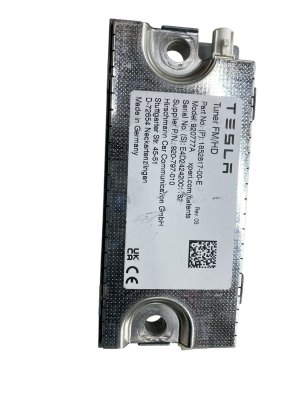
- Verify the Part Number: Ensure the part number on the used amplifier (e.g., 1852817-00-E) exactly matches the one you are replacing. Mismatched hardware may not be compatible or programmable.
- Physical Inspection: When buying a used amplifier, inspect it for signs of physical damage, especially to the connectors. Check for any evidence of water intrusion or corrosion, as the amplifier is located in the trunk area.
Cost Breakdown
Pricing for Cybertruck components can be difficult to obtain as they are primarily sourced through Tesla's service network. Aftermarket options are generally for upgrades, not direct OEM replacement.
| Part/Service | Estimated Cost | Notes |
|---|---|---|
| New OEM Amplifier | $500 - $900 | Must be purchased and installed through Tesla Service. Price is an estimate based on similar Tesla modules. |
| Used OEM Amplifier | $250 - $500 | Available from online salvage marketplaces. Price varies based on condition and availability. |
| New Aftermarket | N/A | Direct-replacement aftermarket amplifiers are not common. Upgrade kits 🎬 Watch: A walkthrough of a Cybertruck multi-speaker audio upgrade with new amps and speakers are available but cost thousands. |
| Shop Labor (Physical Install) | $100 - $200 | The physical swap is quick. Tesla's flat rate time is under an hour (0.24-0.36 hours). |
| Shop Labor (Programming) | $150 - $300 | This is a separate, required step. Cost varies by shop. |
Frequently Asked Questions (FAQ)

Does the 2024-2025 Cybertruck audio amplifier need to be programmed?
Yes, absolutely. A replacement amplifier must be electronically paired to the vehicle's VIN and configuration using Tesla's proprietary service software. This is not a plug-and-play part, and a dealer or qualified specialist visit is required to make it function.
Why did my Cybertruck's sound suddenly start coming from only the dashboard speakers?
This is the most common audio issue and is almost always a software glitch or a communication error between modules. Before seeking repairs, try letting the vehicle go into a deep sleep for several hours. This often resolves the problem by allowing the modules to fully reset.
Can I replace the Cybertruck audio amplifier myself?
While the physical replacement is straightforward for a DIY mechanic, the final programming step makes it unfeasible for most. You can perform the physical swap to save on labor, but you will still need to have the vehicle towed or driven to a facility with Tesla's diagnostic software to activate the part.
Can I upgrade the Cybertruck's stock audio system?
Yes. Several aftermarket audio companies offer full speaker and amplifier upgrade packages specifically for the Cybertruck. These systems use advanced digital signal processors (DSPs) to integrate with the factory touchscreen while providing higher-quality sound. These are complex installations best left to professional car audio shops.
Helpful Videos
Technical Specifications
OEM Part Numbers: 1852817-00-E 185281700E
System: 15 speakers, 2 subwoofers, distributed amplifiers. Amplifier Location: Right-hand side of trunk, behind trim panels.
We Have This Part in Stock

The information in this article is provided for general reference and educational purposes only. Vehicle specifications, procedures, and part compatibility can vary by production date, trim level, and region. Always consult your vehicle's factory service manual and verify part numbers before purchasing or performing repairs. Safety-critical components such as airbags, seat belts, and braking systems should be installed by a qualified professional.
- Tesla Cybertruck:
- 🎬 Helpful Videos
- 🛍️ Shop This Part
- System Overview and Specifications
- Symptoms of Failure
- Most Common Symptom: Audio Cuts Out Except for Dash Speakers
- Other Reported Symptoms
- Known Issues, TSBs, and Recalls
- CRITICAL: Programming and Installation
- Buying a Used Audio System
- Cost Breakdown
- Frequently Asked Questions (FAQ)
- 🎟️ Get 5% Off