

2019-2024 Subaru Ascent Audio System: Blank Screens, Reboots, and Replacement Guide
This guide covers the common infotainment system failures in the 2019-2024 Subaru Ascent, including the critical warranty extension and mandatory dealer programming required for replacement.
- A warranty extension covers many common failures on 2019-2022 Ascents for 8 years/150,000 miles. Check with a dealer before paying for a repair.
- ALL replacement head units (new or used) MUST be programmed by a Subaru dealer to the vehicle's VIN to function.
- Part numbers must be matched exactly. Harman Kardon, Navigation, and standard units are NOT interchangeable.
- Common failures include black screens, constant rebooting, and 'ghost touch' caused by screen delamination.
Key Symptoms of a Failing Ascent Audio System

The Subaru Starlink infotainment systems in 2019-2024 Ascents are known for a range of software and hardware-related problems. Many of these issues were cited in a class-action lawsuit covering 2019-2023 models. If your audio system is failing, you will likely experience one or more of the following symptoms:
- Black or Blank Screen: The display goes completely black and unresponsive, sometimes intermittently and sometimes permanently. This can happen after a failed software update.
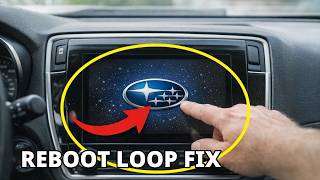
- Constant Rebooting: The system gets stuck in a loop where it continuously restarts, often showing the Starlink logo before shutting down and starting over.
- "Ghost Touch" or Phantom Inputs: The screen registers touches that you are not making, causing it to randomly change settings, switch menus, or make calls. This is often linked to screen delamination.
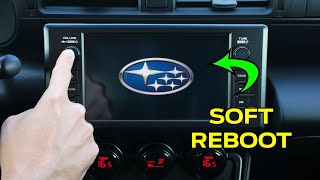
- Freezing and Unresponsiveness: The system freezes and stops responding to any touch inputs or physical button presses. 🎬 See how to quickly reboot your Subaru screen
- Screen Delamination: The layers of the touchscreen begin to separate, creating bubbles, an oily or hazy appearance, or peeling around the edges. 🎬 Watch: A temporary fix for screen delamination This is a physical defect that can cause ghost touches.
- Loss of Audio: Sound from all sources may cut out intermittently or stop working entirely.
- Connectivity Failures: The unit may fail to connect to or maintain a connection with devices via Bluetooth, Apple CarPlay, or Android Auto.
- Backup Camera Failure: The backup camera image may not appear when the vehicle is in reverse, or it may freeze.
Subaru's Infotainment Warranty Extension Program (USA)

In response to widespread issues, Subaru of America, Inc. announced a significant warranty extension for the infotainment head units in many vehicles, including the 2019-2022 Subaru Ascent. This is the most important factor to consider before paying for a repair.
- Extended Coverage: The warranty is extended from the original 3 years/36,000 miles to 8 years or 150,000 miles, whichever comes first.
- Qualifying Conditions: The extension covers failures resulting in a black/blank screen, loss of audio, repeated rebooting, or the inability to use the touchscreen, CarPlay/Android Auto, Navigation, or Bluetooth.
- Repair Procedure: Under the extension, a dealer will first attempt to fix the issue by reprogramming the unit with the latest software. If the unit already has the latest software or the problem persists, the dealer will perform a one-time replacement of the head unit.
- What's Not Covered: The extension does not cover physical damage (like a cracked screen from impact) or failures of other audio components like speakers or amplifiers.
Pro Tip: Before scheduling a repair, check your vehicle's eligibility for this warranty extension by contacting a Subaru dealer with your Vehicle Identification Number (VIN). If you have already paid for a repair that would have been covered, you may be eligible for reimbursement from Subaru.
Known Issues, TSBs, and Recalls

Subaru has released numerous Technical Service Bulletins (TSBs) to address the software glitches in these systems. Many problems can be resolved with a simple software update performed by the dealer.
- TSB 15-236-18R: This bulletin provides reprogramming files to optimize the Harman Gen 3.1 audio and navigation units found in the Ascent. Critically, it notes that if the screen goes blank during an update, the head unit must be replaced.
- TSB 15-240-19R: Pertains to the Harman Kardon audio amplifiers, addressing operational concerns.
- DTCs B2255 & B2256: TSBs exist that provide diagnostic procedures for when these specific Diagnostic Trouble Codes related to the infotainment system are detected.
Recall Notice: While there are no recalls for the audio system itself, 2019-2022 Ascent models were recalled for an improperly fastened ground bolt for the PTC heater, which could pose a fire risk (NHTSA ID: 22V907). This is unrelated to the infotainment system's performance issues but is an important safety check for your vehicle.
The #1 Rule: Programming is Mandatory
This is the most critical fact for anyone replacing an Ascent audio system. You cannot simply swap a used unit into your vehicle and expect it to work.
A replacement head unit—whether new or used—MUST be programmed to your vehicle's VIN by an authorized Subaru dealership. This process uses the proprietary Subaru Select Monitor (SSM) diagnostic tool to link the new radio to the car's other computers, including the anti-theft and telematics systems.
Failure to program the unit will result in limited or no functionality, anti-theft lockouts, and features like vehicle settings or the backup camera not working correctly. Most independent shops and locksmiths do not have the required software to perform this service. You must budget for a dealer visit when purchasing a replacement unit.
Buying a Used 2019-2024 Ascent Audio System

Given the high cost of a new unit, a used OEM audio system is a smart financial choice, especially if your vehicle is outside the warranty extension period. However, you must be extremely careful to ensure compatibility.
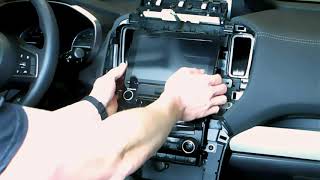
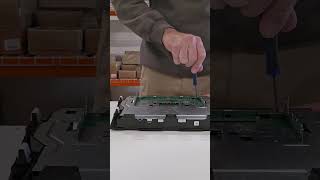
- Match Part Numbers Exactly: The single most important step is to remove your original unit 🎬 Watch: How to safely remove your Ascent radio and match the OEM part number on the sticker to the replacement unit. There are many variations, and they are not interchangeable. A unit for a base audio system will not work correctly in a car with the Harman Kardon amplifier.
- Verify Trim and Options: The audio systems are different for Base/Premium trims versus Limited/Touring trims. Key differences include:
- Harman Kardon (HK) vs. Standard Audio: The HK system, standard on Touring and optional on Limited, uses a powerful external amplifier and 14 speakers. The head units are not cross-compatible with the 6-speaker base system.
- Navigation vs. Non-Navigation: Units with factory navigation have different hardware and software. Attempting to "upgrade" to a navigation unit is not a simple plug-and-play swap and is not recommended.
- Screen Size: Early models offered 6.5-inch or 8-inch screens. Later models (2023+) feature a large 11.6-inch vertical screen. These are not interchangeable.
- Inspect for Delamination: Carefully inspect the screen of the used unit for any signs of bubbling, peeling, or an oily haze under the surface. Avoid any units showing these signs, as the touchscreen is likely to fail.
- Budget for Dealer Programming: Remember to factor in the cost of a visit to the Subaru dealer for programming. This can range from $150 to over $300, depending on the dealer's labor rates.
| Part/Service | Estimated Cost |
|---|---|
| New OEM Head Unit (8-inch w/ Nav) | $1,600 - $2,500 |
| Used OEM Head Unit | $350 - $800 |
| New Aftermarket Head Unit | $500 - $1,500+ (plus installation kits) |
| Dealer Labor (Programming/Installation) | $150 - $400 |
Frequently Asked Questions (FAQ)
Do I have to go to a Subaru dealer to get a replacement radio programmed?
Yes, in almost all cases. The head unit is tied to the vehicle's anti-theft and main communication systems. Only a Subaru dealer with the proprietary Subaru Select Monitor (SSM) software can correctly pair a new or used unit to your vehicle's VIN. An unprogrammed unit will not function correctly.
Can I upgrade my base radio to a Harman Kardon or Navigation unit?
This is not recommended. The Harman Kardon system uses a different wiring harness and an external amplifier that a base model vehicle lacks. Similarly, upgrading to a factory navigation unit requires additional hardware like a GPS antenna that is not present in non-nav models. These are not plug-and-play swaps.
My screen is bubbling and has "ghost touches." Is this covered by the warranty extension?
Yes, issues with the touchscreen, including those caused by delamination like ghost touches, are listed as qualifying conditions for repair or replacement under the 8-year/150,000-mile warranty extension. You should contact your dealer to have it inspected.
My screen is just frozen. What can I try before going to the dealer?
You can try a soft reset. Press and hold the power/volume knob for 10-15 seconds until the system reboots. This can sometimes clear a temporary software glitch. Also, ensure your phone and all apps are fully updated, as this can sometimes cause connectivity issues. If the problem persists, it likely needs a dealer visit for a software update or diagnosis.
Helpful Videos
Technical Specifications
OEM Part Numbers: 86201XC62A 86201XC66A 86201XC67A 86271-XC62A 86271XC62A 86271XC63A 86271XC63B 86271XC65A 86271XC65B 86271XC67A 86271XC67B 86271XC67D
System types include standard 6-speaker audio and an optional Harman Kardon 14-speaker, 792-watt system. Screen sizes include 6.5-inch, 8-inch, and 11.6-inch depending on year and trim. Systems are designated as Gen 3.1 or CP1.
We Have This Part in Stock



The information in this article is provided for general reference and educational purposes only. Vehicle specifications, procedures, and part compatibility can vary by production date, trim level, and region. Always consult your vehicle's factory service manual and verify part numbers before purchasing or performing repairs. Safety-critical components such as airbags, seat belts, and braking systems should be installed by a qualified professional.
- Subaru Ascent: