

2003-2010 Mazda6 Audio System: A Guide to Failures, Compatibility, and Replacement
This guide covers common radio problems, the critical differences between Bose and non-Bose systems, and how to choose the right used replacement for your first-generation Mazda6.
- The most critical factor when buying a replacement is matching the Bose or non-Bose system type; they are not interchangeable.
- Failure of the upper LCD information display and the internal 6-disc CD changer mechanism are the two most common problems.
- In cars with the Bose system, a loss of sound is often caused by the external amplifier under the passenger seat, not the radio head unit.
- Replacement OEM units do not require dealer programming or anti-theft codes, making used units a simple, plug-and-play repair option.
Key Variants and Compatibility Warnings

Before purchasing a replacement audio system for a 2003-2010 Mazda6, it's critical to identify which system your vehicle has. Mismatched parts will not work without significant and complex modifications.
- Bose vs. Non-Bose Systems: This is the most important distinction. The Bose system features a multi-channel amplifier located under the front passenger seat, powering low-impedance (2-ohm) speakers. The non-Bose system has a standard amplifier built into the head unit itself, which powers 4-ohm speakers. The head units and wiring harnesses are different and cannot be swapped directly. A Bose head unit will not power non-Bose speakers, and a non-Bose head unit is not designed to work with the external Bose amplifier. You can identify a Bose system by the 'Bose' logo on the head unit or door speaker grilles.
- CD Changer: Head units were available with either a single-disc CD player or an in-dash 6-disc CD changer. These are generally interchangeable as long as you match the Bose or non-Bose system type.
- Automatic Climate Control Integration: On models equipped with automatic climate control, the upper LCD information screen is shared between the audio system and the climate functions. Replacing the radio on these models can be more complex, and an incorrect or aftermarket unit may cause a loss of climate control display functions. Always verify part numbers to ensure compatibility.
Warning: Never install a Bose head unit in a non-Bose car, or vice-versa. The systems use different amplification and wiring methods. Attempting to mix components can result in no sound, damage to the head unit, or damage to the amplifier.
Common Failure Symptoms

The first-generation Mazda6 audio systems are known for several common issues, primarily related to age and the mechanical components of the CD changer.
1. Dim, Pixelated, or Completely Blank Display
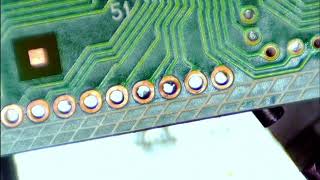
The upper LCD information screen is prone to failure. Segments of the display may disappear, making it impossible to read the clock, radio station, or temperature. In many cases, this is caused by cracked or failing solder joints on the display's circuit board due to years of thermal cycles and vibration. 🎬 Watch: A time-lapse of the LCD information center repair process. Sometimes, pressing on the dash above the screen or on the unit itself can temporarily restore the display, which points to a bad connection.
2. CD Changer Errors or Jammed Discs
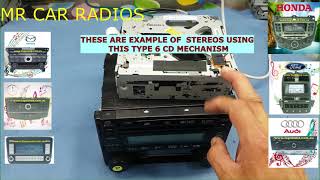
The 6-disc changer mechanism is a frequent point of failure. Owners often report a "CD-ERR" message on the display, or the unit making repeated mechanical noises as it tries, and fails, to load or eject a disc. This can be caused by worn internal gears, a faulty loading mechanism, or simply a disc becoming physically jammed. Disconnecting the vehicle's battery for a few minutes can sometimes reset the unit's logic, but often the mechanism requires physical repair or replacement.
🎬 See how to fix and repair a jammed 6-disc changer.3. No Sound or Intermittent Audio
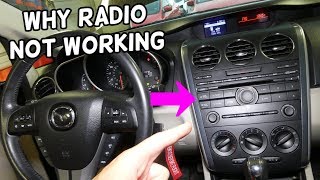
In Bose-equipped models, a complete or intermittent loss of sound from all speakers is often a sign of a failing external amplifier. The amplifier is located under the passenger's seat and can be susceptible to moisture or electronic failure. Sometimes, a loud static or "machine gun" noise will come through the speakers, which also points to an internal amplifier fault. 🎬 Watch: Troubleshooting a Mazda 6 radio with no sound. In non-Bose systems, a lack of audio is more likely due to a failure within the head unit itself.
4. Erratic Volume or Control Knob Function
The rotary knobs for volume and tuning can become worn over time. This may manifest as the volume jumping up and down unpredictably when you try to adjust it, or the knob not responding at all. This is due to wear on the internal rotary encoder contacts.
Diagnosing a Faulty Audio System


- Check the Fuses: Before assuming the unit has failed, always check the relevant fuses. On many Mazdas, the radio fuse may be labeled as "ROOM" or "AUDIO" in the fuse panel. A blown fuse is a simple fix and should be the first step in any diagnosis.
- Listen for Mechanical Noises: If you have a CD player issue, listen closely when you turn the car on or try to use the CD function. Whirring, clicking, or grinding sounds indicate a mechanical jam or failure inside the unit.
- Note Display Messages: Error messages like "CD-ERR" or "CHECK CD" are valuable clues that point specifically to a problem with the disc changer.
- Test All Sources: Check if the problem is universal. If the radio works but the CD player doesn't (or vice-versa), the fault is isolated to that specific function within the head unit. If no audio source produces sound, the issue is more likely with the amplification stage (either internal to the head unit or the external Bose amp).
Buying a Used 2003-2010 Mazda6 Audio System
Purchasing a used OEM radio is often the most cost-effective way to restore factory function. Given the high failure rate of certain components, here’s what to look for:
- Verify Compatibility First: This is the most critical step. Determine if your car has the Bose or non-Bose system. Get the part number from your original radio and match it to the replacement unit. Part numbers like GS4M669RXC are for specific configurations. Do not buy a unit without confirming it is for the correct sound system and climate control type.
- Inspect the LCD Display: If possible, ask the seller to power on the unit and provide a photo of the display. Ensure it is bright, clear, and has no missing pixels or segments. This is a primary failure point.
- Check the CD Changer: Ask if the CD changer has been tested. A seller specializing in auto parts should be able to confirm that the unit loads and ejects discs properly. Be wary of units sold "as-is" without this confirmation.
- Examine Connectors: Ensure the electrical connectors on the back of the radio are clean, straight, and free of corrosion or damage.
- Why Used OEM is a Good Choice: For this vehicle, a used OEM unit is often a better choice than a cheap, no-name aftermarket radio. A compatible OEM unit ensures plug-and-play installation, retention of steering wheel controls, and proper integration with the car's display and electronics without the need for expensive adapter harnesses and dash kits.
Pro Tip: When buying a used unit, prioritize one from a newer model year (e.g., 2008-2010) if possible, as it may have had less use and potentially incorporated minor revisions over the earlier production years.
Programming, Anti-Theft, and Installation
The audio systems in the 2003-2010 Mazda6 are generally straightforward to replace and do not require special programming or dealer intervention.
- No Programming Required: Replacement OEM head units are plug-and-play. They are not linked to the vehicle's VIN and do not need to be flashed or programmed by a dealer.
- No Anti-Theft Codes: Unlike some vehicles of the era, these radios do not typically feature an anti-theft code that needs to be entered after a power loss or replacement.
Known Issues, TSBs, and Recalls
While there have been no major safety recalls for the audio system itself, Mazda has issued Technical Service Bulletins (TSBs) related to audio issues on similar models, which may provide insight.
- No Recalls: There are no NHTSA safety recalls specifically for the audio head unit in the 2003-2010 Mazda6. Recalls for this model have focused on other issues like wiring for power steering or airbags in later generations.
- Related TSBs: TSBs for other Mazda models from the era mention issues like static from Bose speakers due to amplifier software, or rattling from door speakers due to corrosion. While not specific to the 2003-2010 Mazda6 head unit, they highlight common audio system problems in Mazda vehicles. A general TSB (09-030/15) covers service information for infotainment systems across many Mazda models, including the Mazda6, directing technicians on how to source exchange units.
Cost Comparison
| Part Type | Estimated Cost | Notes |
|---|---|---|
| New OEM | $880 - $1,900+ | Often discontinued or very limited availability. Price varies significantly based on the specific configuration (Bose, CD changer, etc.). |
| New Aftermarket | $150 - $500+ | Requires a dash kit (approx. $25-$50) and wiring harness adapters. May result in loss of steering wheel controls or display features without additional modules. |
| Used OEM | $50 - $150 | The most common and economical solution. Prices vary based on condition and seller. |
| Remanufactured | $200 - $400 | A good option where a failed unit is professionally repaired and tested. Often comes with a warranty. |
| Shop Labor | $100 - $200 | Replacement is typically straightforward, taking 1-1.5 hours of labor. |
Frequently Asked Questions (FAQ)
Do I need to program a replacement radio for my 2003-2010 Mazda6?
No. A replacement OEM radio from a compatible vehicle is plug-and-play and does not require any dealer programming or anti-theft code entry.
Can I install a Bose radio in my non-Bose car?
No, not without extensive and difficult modifications. The Bose system uses an external amplifier and different speakers and wiring. You must replace your radio with one designed for the system originally installed in your car.
Why is my radio display blank but the radio still plays music?
This is a very common failure of the separate LCD information screen. It is usually caused by cracked solder joints on the unit's circuit board. The display unit can often be replaced independently of the main radio/CD player chassis.
My 6-disc CD changer is making noises and won't eject. How can I fix it?
This indicates a mechanical failure inside the changer. Sometimes disconnecting the car battery for 10-15 minutes can reset the mechanism, but it's often a temporary fix, if it works at all. The most reliable solution is to replace the entire head unit with a functional used one, as repairing the complex changer mechanism is often not cost-effective.
Can I install a modern touchscreen radio in my first-gen Mazda6?
Yes, but it requires an aftermarket dash kit, a wiring harness adapter, and potentially a steering wheel control interface. Companies like Metra and Scosche make kits that allow for the installation of a standard single-DIN or double-DIN head unit. Be aware that this will change the interior's appearance and may affect the functionality of the upper information display, especially on models with automatic climate control.
Helpful Videos
Technical Specifications
OEM Part Numbers: GK2A66AS0 GK2A66DSX GK2A66DSXB02 GM0M66ARX GM0M66DSX GN3C66AS0 GS4M669RX GS4M669RXA GS4M669RXB GS4M669RXC
System variants include standard (non-Bose) and premium (Bose). The non-Bose system uses 4-ohm speakers, while the Bose system uses an external amplifier and 2-ohm speakers. Head units were available with a single-disc player or a 6-disc changer.
We Have This Part in Stock



The information in this article is provided for general reference and educational purposes only. Vehicle specifications, procedures, and part compatibility can vary by production date, trim level, and region. Always consult your vehicle's factory service manual and verify part numbers before purchasing or performing repairs. Safety-critical components such as airbags, seat belts, and braking systems should be installed by a qualified professional.
- Mazda Mazda6:
- 🎬 Helpful Videos
- 🛍️ Shop This Part
- Key Variants and Compatibility Warnings
- Common Failure Symptoms
- 1. Dim, Pixelated, or Completely Blank Display
- 2. CD Changer Errors or Jammed Discs
- 3. No Sound or Intermittent Audio
- 4. Erratic Volume or Control Knob Function
- Diagnosing a Faulty Audio System
- Buying a Used 2003-2010 Mazda6 Audio System
- Programming, Anti-Theft, and Installation
- Known Issues, TSBs, and Recalls
- Cost Comparison
- Frequently Asked Questions (FAQ)
- 🎟️ Get 5% Off