

2021-2025 Kia Seltos Audio System: Decoding Screens, Programming, and Common Failures
This guide covers the common failures, complex compatibility, and mandatory programming for the 8-inch and 10.25-inch Seltos audio systems.
- A used audio system MUST be programmed by a Kia dealer after installation to function.
- Part numbers must be matched exactly to the original unit; systems for different screen sizes or audio options (Bose vs. standard) are not interchangeable.
- Software issues are common; check for available Technical Service Bulletins (TSBs) for a software update before replacing the hardware.
- There are two main versions: an 8-inch screen (typically on lower trims) and a 10.25-inch screen with navigation (on higher trims). They are not easily swappable.
Key Variants and Compatibility (2021-2025)

Choosing the correct audio system for your Kia Seltos is critical, as the units are not interchangeable between all trims and model years. The primary differences are screen size, navigation capabilities, and compatibility with the Bose premium audio system. The 2024 model year introduced a significant interior facelift, further changing the available options.
2021-2023 Seltos (Pre-Facelift)
- 8-Inch Touchscreen (Non-Navigation): Found on lower trims like the LX and S, this unit is identified by part number 96160-Q5650DHV. A key feature of this smaller screen is that it supports wireless Apple CarPlay and Android Auto. It is designed for the standard 6-speaker audio system.
- 10.25-Inch Touchscreen (with Navigation): Standard on higher trims like the EX, Nightfall Edition, and SX, this larger screen includes factory navigation. Unlike the smaller screen, it typically requires a wired connection for Apple CarPlay and Android Auto. This unit is compatible with both the standard 6-speaker system and the available 8-speaker Bose premium audio system.
2024-2025 Seltos (Facelift)
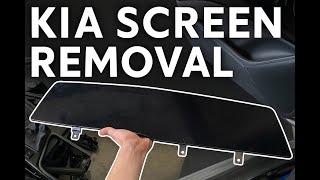
The 2024 facelift introduced a redesigned dashboard, including an available panoramic display that merges the digital instrument cluster and the main infotainment screen 🎬 See how to remove the panoramic cluster and radio screen behind a single piece of glass.
- 8-Inch Touchscreen: This screen is standard on the base LX trim and is paired with a 4.2-inch instrument display and a 6-speaker audio system.
- 10.25-Inch Touchscreen: Found on S, EX, X-Line, and SX trims, this screen includes built-in navigation.
- Bose Premium Audio System: The top-tier SX trim comes exclusively with an 8-speaker Bose premium audio system, which requires a compatible head unit (like part number 96560-Q5CB0FHV).
Warning: The audio systems are specific to the vehicle's trim level and options. An 8-inch screen cannot be directly swapped with a 10.25-inch screen without changing wiring harnesses, dash bezels, and other components. An upgrade is complex and not a simple plug-and-play procedure.
Common Symptoms of a Failing Audio System

When the Seltos audio system begins to fail, it can manifest in several ways, often related to software glitches or internal hardware issues.
- Black or Unresponsive Screen: The display may go completely black or freeze, becoming unresponsive to touch commands. Sometimes the audio may still play in the background.
- Random Rebooting: The system may restart on its own while driving. This can be intermittent and is often a sign of a software fault or failing internal component. 🎬 Watch: How to quickly restart your Seltos infotainment system
- Apple CarPlay / Android Auto Issues: Frequent disconnections, failure to connect, or lagging performance are common complaints. This can sometimes be caused by a faulty cable or phone software, but can also be a head unit problem.
- No Sound: The display may work perfectly, but there is no audio output from any source. This can point to a failure within the head unit or, in Bose-equipped models, an issue with the external amplifier.
- Bluetooth Connectivity Problems: The unit may fail to pair with a phone or repeatedly drop the connection.
OBD-II codes are not typically generated for audio system failures, as they are not considered part of the powertrain or emissions control systems.
Known Issues, TSBs, and Recalls

As of mid-2026, there are no active recalls from the National Highway Traffic Safety Administration (NHTSA) specifically for the audio and infotainment system in the 2021-2025 Kia Seltos. Numerous recalls exist for this vehicle, but they pertain to engine components, airbags, and other systems.
However, Kia has issued several Technical Service Bulletins (TSBs) to address software-related problems:
- TSB #TSB_ELE303_R1 (NHTSA ID: 10242982): This bulletin provides a software update for certain 2020-2024 models to fix a radio that is "non-responsive" or "inoperative."
- TSB #SA569: This service action updates the software on "Display Audio 2.0 (D2V)" and "5th Generation AVN Wide (AVN5W)" head units in 2022-2023 vehicles to resolve various Apple CarPlay and Android Auto connectivity concerns.
Pro Tip: Before replacing a faulty unit, check with a Kia dealer to see if a software update is available. Many issues like random rebooting or connectivity problems can be fixed by flashing the latest firmware, which is much cheaper than replacing the entire unit.
Buying a Used Kia Seltos Audio System: What to Know
Purchasing a used OEM audio system can be a cost-effective solution, but it requires careful attention to detail to ensure compatibility and functionality.
1. Match the Part Number Exactly
This is the most important rule. Due to the different screen sizes, navigation features, and standard vs. Bose audio systems, part numbers are not interchangeable. You must match the part number from your original unit to the replacement. Using a unit from a different trim level will likely result in lost features or complete incompatibility.
2. Dealer Programming is Required
A used Seltos audio system is not plug-and-play. These units are integrated into the vehicle's anti-theft and CAN bus systems. After installation, the unit must be programmed or "variant coded" by a Kia dealership using their proprietary Global Diagnostic System (GDS) software. This procedure syncs the radio to the vehicle's VIN and enables the correct features for your specific trim. Independent shops and locksmiths generally do not have the capability to perform this programming. Expect to pay a dealer for 1-2 hours of labor for this service.
3. Physical Inspection
When buying a used unit, inspect it carefully. Check the screen for deep scratches, delamination (bubbling), or cracks. Ensure all connector ports on the back are clean and free of bent or broken pins. Ask the seller about the mileage of the donor vehicle; a lower-mileage part is always preferable.
4. Aftermarket vs. Used OEM
While aftermarket head units from brands like Pioneer or Kenwood exist, they are not a simple replacement. Installation requires a specific dash kit, a wiring harness adapter, and an interface to retain factory features like steering wheel controls and the backup camera. For owners who want to maintain a factory look and full integration, a properly matched and programmed used OEM unit is often the better choice.
Cost Comparison
Prices for a replacement audio system can vary dramatically. A used OEM unit offers significant savings over a new part from the dealer.
| Part Type | Estimated Cost | Notes |
|---|---|---|
| New OEM (8-inch) | $2,100 - $3,200 | Part number 96160-Q5650DHV. |
| New OEM (10.25-inch) | $3,900 - $6,000 | Part number 96560-Q5CA0FHV. |
| Used OEM | $250 - $1,900 | Price depends heavily on screen size, condition, and seller. |
| New Aftermarket | $400 - $1,000+ | Does not include required installation kits, wiring harnesses, or interfaces. |
| Shop Labor (Installation) | $150 - $250 | For physical removal and replacement. |
| Shop Labor (Programming) | $150 - $350 | Dealer-only service to program a used unit to the vehicle. |
Replacement Overview

Replacing the head unit is a moderately difficult task that a skilled DIYer can perform. The main challenge is carefully removing the dash trim without causing damage.
- Disconnect the Battery: Always disconnect the negative battery terminal before working on any electronic components.
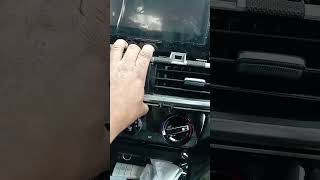
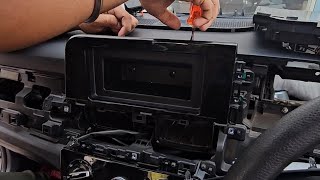
- Remove Dash Trim: The process involves prying off several trim pieces around the steering wheel, vents, and center console to gain access to the unit's mounting screws. Use plastic pry tools to avoid scratching the panels. 🎬 Watch: Step-by-step guide to opening the Seltos dashboard
- Unbolt the Head Unit: Once the trim is removed, the head unit is typically held in by a few screws. Remove them and carefully pull the unit out.
- Disconnect Wiring: Disconnect the main wiring harnesses and antenna cables from the back of the old unit.
- Install the New Unit: Connect the harnesses to the replacement unit and slide it into place. Reinstall the mounting screws and reassemble the dash trim in the reverse order of removal.
- Dealer Visit: Drive the vehicle to a Kia dealership for the required programming.
Frequently Asked Questions (FAQ)
Does a used Kia Seltos radio need to be programmed?
Yes, absolutely. A replacement audio system, whether new or used, must be programmed by a Kia dealer to function correctly and integrate with the vehicle's systems. It is not a plug-and-play part.
My screen is frozen or rebooting. What should I try first?
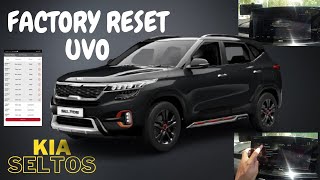
Before assuming the hardware has failed, try a soft reset. Locate the small, recessed pinhole button on the face of the radio unit (its exact location may vary by model). With the vehicle on, press and hold this button for a few seconds with a paperclip or pen until the system reboots. This can often resolve temporary software glitches.
Can I upgrade my 8-inch screen to the 10.25-inch screen?
This is not a simple swap. Upgrading requires the new head unit, a different dash bezel/trim, and likely different wiring harnesses. While technically possible for an expert, it is a complex and expensive project that is not recommended for most owners.
Why does my 8-inch screen have wireless CarPlay but the bigger 10.25-inch screen doesn't?
This is a quirk of how Kia configured these systems in the 2021-2023 models. The 10.25-inch units with built-in factory navigation were not equipped with the hardware for wireless phone projection, requiring a USB cable. The base 8-inch units, lacking factory navigation, were given the wireless capability.
Helpful Videos


Technical Specifications
OEM Part Numbers: 96160Q5650DHV 96560-Q5CA0FHV 96560Q5CA0FHV 96560Q5CB0FHV
Screen Sizes: 8-inch or 10.25-inch diagonal. Audio Systems: Standard 6-speaker or Premium 8-speaker Bose system.
We Have This Part in Stock



The information in this article is provided for general reference and educational purposes only. Vehicle specifications, procedures, and part compatibility can vary by production date, trim level, and region. Always consult your vehicle's factory service manual and verify part numbers before purchasing or performing repairs. Safety-critical components such as airbags, seat belts, and braking systems should be installed by a qualified professional.
- Kia Seltos:
- 🎬 Helpful Videos
- 🛍️ Shop This Part
- Key Variants and Compatibility (2021-2025)
- 2021-2023 Seltos (Pre-Facelift)
- 2024-2025 Seltos (Facelift)
- Common Symptoms of a Failing Audio System
- Known Issues, TSBs, and Recalls
- Buying a Used Kia Seltos Audio System: What to Know
- 1. Match the Part Number Exactly
- 2. Dealer Programming is Required
- 3. Physical Inspection
- 4. Aftermarket vs. Used OEM
- Cost Comparison
- Replacement Overview
- Frequently Asked Questions (FAQ)
- 🎟️ Get 5% Off