

2014-2018 Kia Cadenza Radio: Solving Black Screens, Reboots, and Replacement Issues
This guide covers the common failures, part number differences, and replacement secrets for the 2014-2018 Kia Cadenza audio and navigation systems.
- The 2014-2016 and 2017-2018 Cadenza use completely different, incompatible audio systems. You must buy a part from the correct generation.
- When buying a used unit, you must match the OEM part number exactly to ensure compatibility and plug-and-play installation.
- These systems generally do not require dealer programming or anti-theft codes, making a used OEM unit a straightforward and cost-effective repair.
- Common failures include a black screen, constant rebooting, and an unresponsive touchscreen, all of which point to an internal head unit failure.
A Critical Distinction: Two Generations of Cadenza (2014-2018)

Before diagnosing or buying a replacement audio system for a Kia Cadenza, you must identify your vehicle's generation. The 2014-2018 model years span two completely different designs with incompatible parts.
First Generation: 2014-2016 Kia Cadenza
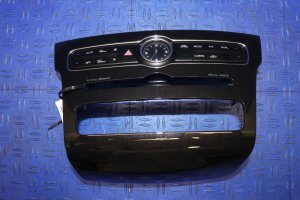
The first-generation Cadenza features a radio integrated into a sweeping dash console. These units are known for failures of the main board, leading to black screens or rebooting. Common part numbers for this generation include 96560-3R107 (often for 2014-2015 models) and 96560-3R105. When searching for a replacement, you must match your original part number exactly.
Second Generation: 2017-2018 Kia Cadenza
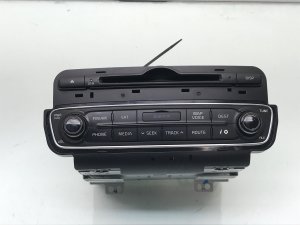
The Cadenza was fully redesigned for the 2017 model year, with a new 'tablet-style' screen that sits atop the dashboard. These systems are entirely different electronically and physically from the earlier models. Known part numbers include 96560-F6300 and 96560-F6301. A radio from a 2015 Cadenza will absolutely not fit or work in a 2017 Cadenza, and vice-versa.
Symptoms of a Failing Cadenza Audio System

Most audio system issues in the Cadenza point to an internal failure of the head unit itself, rather than external components like fuses or wiring. Here are the most common symptoms:
- Black or Blank Screen: This is the most frequent complaint. The screen goes completely black and becomes unresponsive. In some cases, audio might continue to play, or the backup camera may still display when in reverse, but the main interface is gone.
- Constant Rebooting: The system will try to start, show the Kia or UVO logo, and then shut down and restart in a continuous loop. This often happens a few moments after starting the car.
- Unresponsive Touchscreen: The display may look normal, but it does not respond to any touch commands, making it impossible to control navigation, audio, or other integrated functions.
- No Sound From Any Source: The head unit may appear to be working correctly, but there is no audio from the radio, CD player, or Bluetooth. Sometimes this is a software glitch that can be resolved with a 'hard reset'.
- Bluetooth Connectivity Fails: The unit may struggle to pair with a phone, or frequently disconnects during use.
Pro Tip: Before replacing the unit, try a hard reset. Disconnect the vehicle's negative battery terminal for 15 minutes, then reconnect it. This forces the entire system to reboot and can sometimes clear software glitches causing black screens or no audio. You can also try the pinhole reset button, which is often located near the volume knob or CD slot.
Known Issues, TSBs, and Recalls

While there are no safety recalls specifically for the audio system, Kia has issued several Technical Service Bulletins (TSBs) to address software bugs. These TSBs provide procedures for dealers to update the head unit's software.
- TSB ELE091 / ELE091R3: Provides a procedure for technicians to identify the head unit's software version, often as a preliminary step for a software update or exchange.
- TSB TSB-ELE117: Addresses an issue where Sirius Traffic data doesn't display on the navigation screen. This is fixed with a software update.
- TSB TSBELE088: Pertains to a software upgrade for the voice recognition system in some 2015 models.
If your radio is experiencing software-related issues like freezing or Bluetooth problems, it may be worth checking with a Kia dealer to see if a software update is available before replacing the entire unit.
Vehicle Safety Recall Notice: A recall (NHTSA ID 21V-137) was issued for a fire risk in some 2017-2021 Cadenza models. This issue is caused by a potential short circuit in the Hydraulic Electronic Control Unit (HECU) in the engine compartment and is not related to the audio system. You can check if your vehicle is affected by entering your VIN on the NHTSA website.
Buying a Used 2014-2018 Cadenza Audio System

Due to the extremely high cost of new OEM units, a used radio is the most practical and economical solution for most owners. Here is what to look for to ensure you get the right part.
- Match the Generation First: As stressed before, ensure the donor vehicle is the same generation as yours (2014-2016 or 2017-2018).
- Verify the Part Number: This is the most important step. Remove your old radio and find the manufacturer's label. The part number on the replacement unit MUST match your original number exactly. Do not trust a listing based on year alone.
- Check for Premium vs. Base Audio: Cadenzas were available with a standard audio system or an upgraded Infinity premium sound system, which includes an external amplifier. The head unit must be compatible with the system your car was built with. A radio from a car with the base system may not work correctly in a car with the Infinity amplifier, and vice-versa.
- Inspect the Connectors: Check photos of the rear of the unit to ensure the plugs and ports match your old radio perfectly. Any difference indicates an incompatibility.
- Why Used OEM is a Smart Choice: A used OEM radio is typically plug-and-play. It avoids the complex programming and anti-theft issues of other brands and retains all factory functionality like steering wheel controls, climate control integration, and backup camera without needing expensive adapters. Aftermarket solutions are often not feasible due to the deep integration of vehicle functions in the stock head unit.
Programming and Installation Notes
Warning: Before beginning any work, disconnect the negative battery terminal to prevent electrical shorts.
Replacing the Cadenza audio system is a manageable DIY job for those comfortable with basic tools. The process involves carefully prying off the surrounding dash trim panels to access the mounting screws for the radio. Plastic trim removal tools are highly recommended to avoid scratching the dashboard.
Does the radio need to be programmed?
No, in most cases. When replacing a failed unit with a used one that has the exact same part number, dealer programming is generally not required. These systems do not typically have the complex anti-theft codes that lock the radio to the original vehicle's VIN. While some generic parts sellers may warn that programming is needed, owner experiences suggest it is a simple plug-and-play swap. After installing the replacement unit, reconnect the battery. The system should power on and function normally.
Cost of Replacement (2014-2018 Cadenza)
The cost to replace a Cadenza audio system varies dramatically depending on the source of the part.
| Part Source | Estimated Cost | Notes |
|---|---|---|
| New OEM | $2,800 - $4,600+ | Extremely expensive and often unnecessary. Prices are from Kia dealer parts networks. |
| Used OEM | $150 - $500 | The most cost-effective solution. Prices vary by generation, condition, and seller. |
| New Aftermarket | $450 - $700+ | Not recommended. Generic units require complex wiring and loss of integrated features like climate control. Vehicle-specific Android units have mixed reviews. |
| Shop Labor | $150 - $300 | Expect 1-2 hours of labor at an independent repair shop. |
Frequently Asked Questions (FAQ)
Do I need an anti-theft code to install a used radio?
Generally, no. Unlike many other manufacturers, these Kia navigation units do not require a special anti-theft code when being transferred between vehicles, as long as the part numbers match. The system is plug-and-play.
Can I upgrade my non-navigation radio to a factory navigation unit?
This is not recommended. It is a very complex project that involves more than just swapping the head unit. You would likely need to change wiring harnesses, add a GPS antenna, and potentially replace the amplifier, making it impractical and costly.
My screen is black but the backup camera still works. Is the radio bad?
Yes, this still points to a failure inside the head unit. The backup camera video signal can sometimes pass through to the screen even when the main processing board for the infotainment system has failed. The head unit will need to be replaced.
Can I just replace the touchscreen or internal components?
While technically possible for a skilled electronics technician, it is not a common or easy repair. It is far more practical and reliable for most people to replace the entire sealed head unit with a functioning used part.
Technical Specifications
OEM Part Numbers: 96560-3R107 96560-3R105 96560-F6300 96560-F6301
System integration includes AM/FM/XM Radio, CD Player, Bluetooth, Navigation, and in some trims, climate control functions.
We Have This Part in Stock




The information in this article is provided for general reference and educational purposes only. Vehicle specifications, procedures, and part compatibility can vary by production date, trim level, and region. Always consult your vehicle's factory service manual and verify part numbers before purchasing or performing repairs. Safety-critical components such as airbags, seat belts, and braking systems should be installed by a qualified professional.
- Kia Cadenza:
- 🛍️ Shop This Part
- A Critical Distinction: Two Generations of Cadenza (2014-2018)
- First Generation: 2014-2016 Kia Cadenza
- Second Generation: 2017-2018 Kia Cadenza
- Symptoms of a Failing Cadenza Audio System
- Known Issues, TSBs, and Recalls
- Buying a Used 2014-2018 Cadenza Audio System
- Programming and Installation Notes
- Does the radio need to be programmed?
- Cost of Replacement (2014-2018 Cadenza)
- Frequently Asked Questions (FAQ)
- 🎟️ Get 5% Off