

2015-2020 Jeep Renegade Radio Problems: Delamination, Reboots, and Replacement Guide
This guide covers the common Uconnect screen failures, software glitches, and the critical programming steps required when replacing the audio system in your 2015-2020 Jeep Renegade.
- Replacing the radio requires a 'Proxy Alignment' procedure. Without it, your odometer will flash and features will not work.
- Touchscreen delamination ('bubbling') and 'ghost touch' are the most common failures on 7-inch and 8.4-inch screens. You can replace just the screen/digitizer instead of the whole radio.
- Radio systems are not interchangeable. You must replace your radio with one that has the exact same screen size and features (Nav, SiriusXM) as the original.
- Software glitches causing reboots or no sound can sometimes be fixed with a dealer-installed software update, as noted in official TSBs.
Audio System Variants for the 2015-2020 Jeep Renegade

The Jeep Renegade from this generation was equipped with several different audio systems. Identifying the correct system in your vehicle is the most important step for diagnosis or replacement.
| System | Screen Size | Key Features | Common Trims |
|---|---|---|---|
| Base Audio | 3.0-inch Non-Touch Display | AM/FM Radio, Bluetooth, USB/AUX inputs. No touchscreen functionality. | Sport |
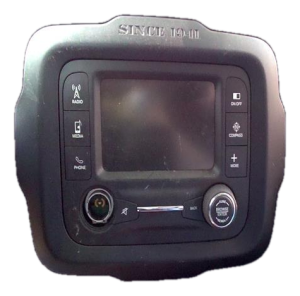
| Uconnect 3 with 5.0 Display | 5.0-inch Touchscreen | AM/FM, Bluetooth, SiriusXM Satellite Radio (optional), Voice Command. This unit has a physical volume knob on the radio face. | Latitude, Sport (optional) |
| Uconnect 4 with 7.0 Display | 7.0-inch Touchscreen | Includes all 5.0 features plus Apple CarPlay and Android Auto. | Latitude, Altitude, Limited (standard on later years) |
| Uconnect 4C NAV with 8.4 Display | 8.4-inch Touchscreen | Includes all 7.0 features plus built-in Navigation. | Limited, Trailhawk, High Altitude (optional or standard) |
Warning: The systems are not easily interchangeable. Upgrading from a 5.0-inch to an 8.4-inch system, for example, requires not only the new screen but often a new climate control panel (as the volume knob moves), a new USB media hub, and mandatory dealer programming.
Common Symptoms of a Failing Audio System

Failures in the Renegade's Uconnect systems are common and can range from minor annoyances to making the system completely unusable.
1. Touchscreen Delamination and "Ghost Touch"
This is the most widespread issue, affecting the 7.0-inch and 8.4-inch touchscreens. Over time, heat and sun exposure cause the adhesive holding the screen layers together to fail. This leads to:
- Bubbling or Peeling: Visible air pockets or a peeling look, often starting at the corners of the screen.
- Ghost Touch (Phantom Touch): The screen registers touches you aren't making. This can cause random station changes, settings adjustments, or phone calls, making the system dangerously distracting.
- Unresponsive Screen: Portions of the screen, or the entire screen, may stop responding to touch.
2. Software and Electrical Glitches
These issues can affect any of the Uconnect systems and are often intermittent.
- Constant Rebooting: The radio gets stuck in a boot loop, showing the Jeep logo, shutting off, and repeating.
- Freezing or Lagging: The system becomes slow or completely unresponsive, sometimes fixing itself after the vehicle is shut off for an extended period.
- Black or Partially Black Screen: The display goes dark, but the audio and touch functions may still work underneath.
- No Sound: The radio appears to be on and functioning, but no audio comes from any source. This can be an internal failure of the radio's amplifier chip or a communication issue with an external amplifier.
- Bluetooth/USB Connectivity Problems: The system fails to pair with phones or recognize devices plugged into the USB port.
Known Issues, Recalls, and Technical Service Bulletins (TSBs)

Several official communications have been released regarding the Renegade's audio systems.
- Safety Recall W35 / NHTSA 20V-191: Affects some 2019-2020 Renegades with the 8.4-inch radio. The rearview camera image could remain on the screen after shifting out of reverse, causing a distraction. The fix is a software update performed by a dealer or over-the-air.
- Safety Recall R45 / NHTSA 15V-461: For 2015 models, this recall addressed a software vulnerability that could allow unauthorized remote access to vehicle systems. The remedy was a software update provided on a USB drive or installed by a dealer.
- TSB 08-067-20: Released for 2020 models experiencing a "no audio from any media source" condition. This bulletin involves a radio software update.
- Customer Satisfaction Notification W11: For some 2020 models where connected services (like the mobile app and SOS feature) were inoperative. This was also resolved with a software update.
- Stellantis Star Case S2108000130: While not a formal recall or TSB, this is an internal document for dealers acknowledging the screen delamination and ghost touch issues on Uconnect screens. It advises dealers to inspect for the issue and typically replace the entire radio unit.
Buying a Used Audio System for Your Renegade

Purchasing a used OEM radio can be a cost-effective solution, but compatibility is critical. Here’s what to look for:
1. Match the System Exactly
The number one rule is to buy a radio that is identical to your original unit. A 3.0 base radio cannot be replaced with a 5.0 Uconnect, and a 5.0 cannot be easily swapped for an 8.4. Match the screen size and features (Satellite Radio, Navigation) of your original unit. Check the part number on your old radio and try to match it or find a verified superseded part number.
2. Physical Inspection is Crucial
- Check for Delamination: For touchscreen units, carefully inspect the screen surface and edges for any signs of bubbling, peeling, or separation. Tilt it in the light to see it clearly. Avoid any unit showing even early signs of this, as it will only get worse.
- Inspect Knobs and Buttons: Ensure all physical knobs and buttons are present and feel solid. The original buyer warnings noted that units can be missing knobs.
- Examine Connectors: Look at the rear connectors to ensure no pins are bent or broken and the plastic housings aren't cracked.
3. Understand Part Number Supersessions
Mopar frequently updates part numbers. A newer part number may replace an older one. For example, for the 8.4-inch screen, part number 68440837AE replaces older versions like 68440837AA, 68440837AB, and 68440837AC. Similarly, 6RQ12LXHAA for the 5.0-inch screen replaces several earlier numbers. Buying the latest part number in a supersession chain can sometimes provide you with a unit that has updated hardware or software.
4. Be Prepared for Programming
A used radio will not be plug-and-play. It MUST be programmed to your vehicle's VIN to work correctly. Without this step, you will almost certainly have a flashing odometer and may have missing features.
Programming and Activation: The Proxy Alignment

Critical Information: After installing a replacement radio, a procedure called a Proxy Alignment must be performed. This process uses a diagnostic tool to introduce the new radio's unique electronic signature to the vehicle's Body Control Module (BCM). It synchronizes all the computer modules on the car's network.
What happens if you skip the Proxy Alignment?
- The odometer on your instrument cluster will flash continuously.
- Features like steering wheel controls, the backup camera, or vehicle settings may not work.
- You may get communication-related Diagnostic Trouble Codes (DTCs), typically starting with a "U" (e.g., U0140: Lost Communication with Body Control Module).
How to Get a Proxy Alignment Done
- Jeep Dealership: A dealer can perform a proxy alignment using their proprietary wiTECH diagnostic tool. This is the most straightforward but often most expensive option.
- Independent Repair Shop: Some independent shops that specialize in Chrysler/Jeep/Dodge vehicles may have the necessary tools and subscriptions to perform the procedure.
- DIY with AlfaOBD: For advanced DIYers, software like AlfaOBD paired with a quality OBD2 interface (like OBDLink MX+) and the correct adapter cables can perform a proxy alignment. This requires a good understanding of the process, as incorrect configuration can cause further issues.
Cost Comparison for Jeep Renegade Audio System Replacement
| Item | Estimated Cost |
|---|---|
| New OEM Radio (8.4-inch) | $1,850 - $2,250 (Part only) |
| Used OEM Radio (All sizes) | $150 - $450 (Part only, depending on size and condition) |
| New Aftermarket Head Unit | $350 - $600 (Often includes Apple CarPlay/Android Auto) |
| Shop Labor (Replacement & Proxy Alignment) | $150 - $300 |
Frequently Asked Questions (FAQ)
Why is my odometer blinking after replacing the radio?
Your odometer is blinking because the vehicle has detected a mismatch in the configuration of its electronic modules. The new radio has not been properly introduced to the car's network. You must have a Proxy Alignment procedure performed to stop the blinking and ensure full functionality.
Can I just replace the touchscreen instead of the whole radio for the "ghost touch" issue?
Yes. For the common delamination and ghost touch issues, the problem is with the screen's digitizer layer, not the radio itself. You can purchase just the replacement touchscreen and digitizer assembly from aftermarket suppliers for a fraction of the cost of a full radio unit. This is a more involved repair that requires carefully disassembling the radio, but it is a very common and cost-effective fix.
Can I upgrade my 5.0-inch radio to the 8.4-inch Uconnect with navigation?
This is a very complex and expensive upgrade. It is not a direct swap. In addition to the 8.4-inch radio unit, you will likely need a new climate control panel (because the volume knob is located there on 8.4-inch systems), a new USB media hub that supports Apple CarPlay/Android Auto, and potentially other wiring. After installation, a proxy alignment is mandatory. For most owners, installing a high-quality aftermarket head unit is a more reliable and cost-effective way to get features like a large screen and navigation.
Do I need an anti-theft code for a replacement radio?
While some older Chrysler radios used a 4-digit anti-theft code, the Uconnect systems in the 2015-2020 Renegade are primarily secured by being electronically tied to the vehicle's VIN through the proxy alignment process. A used radio will not ask for a simple code; it will simply fail to integrate with the car until the proxy alignment is completed.
Technical Specifications
OEM Part Numbers: 07355981610 5VV55DX9AA 5VV59DX9AA 68440837AA 68440837AB 68440837AC 68440837AE 6EM43LXHAA 6HY55LXHAA 6NC38LXHAA 6RQ12LXHAA 6RU88LXHAA
Varies by trim. Systems include 3.0-inch display, 5.0-inch Uconnect 3, 7.0-inch Uconnect 4, and 8.4-inch Uconnect 4C NAV. All systems are integrated into the vehicle's CAN bus network.
We Have This Part in Stock



The information in this article is provided for general reference and educational purposes only. Vehicle specifications, procedures, and part compatibility can vary by production date, trim level, and region. Always consult your vehicle's factory service manual and verify part numbers before purchasing or performing repairs. Safety-critical components such as airbags, seat belts, and braking systems should be installed by a qualified professional.
- Jeep Renegade:
- 🛍️ Shop This Part
- Audio System Variants for the 2015-2020 Jeep Renegade
- Common Symptoms of a Failing Audio System
- 1. Touchscreen Delamination and "Ghost Touch"
- 2. Software and Electrical Glitches
- Known Issues, Recalls, and Technical Service Bulletins (TSBs)
- Buying a Used Audio System for Your Renegade
- 1. Match the System Exactly
- 2. Physical Inspection is Crucial
- 3. Understand Part Number Supersessions
- 4. Be Prepared for Programming
- Programming and Activation: The Proxy Alignment
- How to Get a Proxy Alignment Done
- Cost Comparison for Jeep Renegade Audio System Replacement
- Frequently Asked Questions (FAQ)
- 🎟️ Get 5% Off