

Genesis G80 Audio Failure (2018-2025): No Sound, Reboots, and Amplifier Replacement
Diagnosing audio system problems in the 2018-2025 Genesis G80 and Electrified G80, from a simple fuse to a dealer-programmed amplifier.
- There is a critical split between 2018-2020 models (plug-and-play replacements) and 2021-2025 models (dealer programming required).
- The most common failure is 'no sound' with a working screen, which points to a failed external amplifier in the trunk.
- You MUST identify your system (Standard or Lexicon) and match the OEM part number exactly when buying a used component.
- For 2021+ models, screen reboots are a known recall issue fixed by a software update; always try a system reset before replacing parts.
Key Differences: 2018-2020 vs. 2021-2025 Models

Before diagnosing any audio issue, it's critical to know which generation of Genesis G80 you have, as the repair process is completely different.
- 2018-2020 Genesis G80 (DH Platform): These models are a continuation of the earlier Hyundai Genesis platform. The most common hardware failure is the external amplifier. The good news is that if you replace a failed amplifier or radio with a used unit that has the exact same part number, it is a plug-and-play installation. No dealer programming is required.
- 2021-2025 Genesis G80 & 2023-2025 Electrified G80 (RG3 Platform): These are completely redesigned vehicles with more complex, software-driven electronics. While many issues can be software glitches, hardware replacement is more involved. A replacement amplifier, new or used, absolutely requires programming by a Genesis dealer to function. It must be configured to your vehicle's VIN and specific options.
Audio System Variants: Standard vs. Premium Lexicon

Both generations of the G80 were available with two main audio systems. Their components are not interchangeable. Installing a part from the wrong system will not work.
- Standard Audio: The base system, which does not have any special branding on the speakers.
- Lexicon Premium Audio: The upgraded system, featuring a more powerful multi-channel amplifier, additional speakers (17 speakers on 2018-2020 models, up to 21 on newer models), and advanced digital signal processing (DSP).
Pro Tip: The easiest way to identify your system is to check the speaker grilles on the doors or the center speaker on the dashboard. If your car has the premium system, they will have the "Lexicon" brand name clearly visible. If there is no branding, you have the standard audio system.
Symptoms of a Failing Audio System

Audio problems can manifest in several ways. Pinpointing the symptom is the first step to identifying the failed component.
1. No Sound From Any Speaker
This is the most common and definitive symptom of a failed external amplifier, especially on 2018-2020 models. The infotainment screen will turn on and function normally—you can change stations, see the navigation map, and access settings—but there is a complete lack of audio. This includes no sound from the radio, media, Bluetooth, or even system chimes. The failure can be intermittent at first before becoming permanent.
2. Screen Randomly Reboots or Goes Blank
If your main infotainment display frequently reboots, freezes, or goes black while driving, the issue is likely software-related within the head unit (AVN). This is a known problem on 2021 and newer models, and has been the subject of a safety recall. It is often triggered by a software bug related to the HD Radio function.
3. Buzzing, Rattling, or Distorted Sound from One Speaker
If the audio problem is isolated to a single speaker location (e.g., only the driver's door), the issue is a failed speaker, not the amplifier or head unit. The speaker cone may be torn or the internal voice coil damaged. You can confirm this by using the 'Balance' and 'Fader' controls in the audio settings to isolate the sound to the problematic speaker.
4. Communication Network Fault Codes (e.g., U0073)
In some cases, a failing audio module can disrupt the vehicle's entire communication network (CAN bus). This can cause a U-code like U0073 (Control Module Communication Bus 'A' Off) and trigger a cascade of warning lights on the instrument cluster for unrelated systems like ABS or traction control. While a weak battery is a common cause for this code on the G80, a shorted amplifier or head unit can also be the culprit.
Known Issues, TSBs, and Recalls

NHTSA Recall 26V019000: Instrument Panel Display Failure
This major safety recall affects certain 2025-2026 G80 and Electrified G80 models, as well as some 2023-2024 models under a similar recall (25V105000). A software error in the Audio-Video Navigation (AVN) system can cause the instrument panel and center display to intermittently reboot. This can hide critical safety information like the speedometer, increasing the risk of a crash.
- Cause: A software logic issue involving HD radio memory storage.
- Temporary Fix: Genesis advises owners to disable the HD radio feature until the permanent remedy is applied.
- Solution: A software update, which can be performed over-the-air (OTA) by the vehicle itself or by a Genesis dealer.
System Resets for Software Glitches
Before assuming a hardware failure, always perform a system reset, as it can resolve many common software glitches.
- For 2021+ Models (RG3): Press and hold the [MAP] and [SETUP] buttons simultaneously for about 5-10 seconds until the system reboots.
- For 2018-2020 Models (DH): For Lexicon systems with intermittent sound quality issues, a hidden engineering menu can be used to reset the amplifier. Go to Setup > System Info, then press and hold the center of the screen. When prompted, enter the code 5173, select 'MOST reset', and confirm. A simpler method is to disconnect the negative battery terminal for 15 minutes.
Buying a Used Genesis G80 Audio System
Purchasing a used OEM amplifier or head unit is the most cost-effective repair, as aftermarket integration is nearly impossible. However, compatibility is everything.
Warning: Upgrading from the standard audio system to the premium Lexicon system by swapping used parts is not a feasible project. The wiring harnesses, software, and number of speaker connections are different.
- Identify Your Generation: First, determine if you have a 2018-2020 (DH) or 2021-2025 (RG3) model. Parts are not interchangeable between them.
- Identify Your Audio System: Second, confirm if you have the Standard or Lexicon system by checking for branding on the speaker grilles.
- Match the Part Number EXACTLY: This is the most critical step. Remove your original amplifier or head unit and find the OEM part number printed on the label. The replacement part MUST have the exact same number to ensure it will communicate with your vehicle's other modules.
- Budget for Programming (2021+ Models): If you have a 2021 or newer G80, you MUST factor in the cost of a visit to the Genesis dealer for programming after the part is installed. The car will not recognize the new component until this is done.
Replacement & Programming Information

The primary audio components are the head unit in the dash and the amplifier in the trunk.
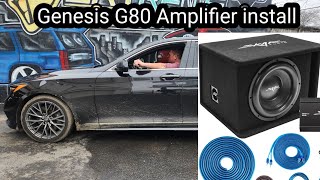
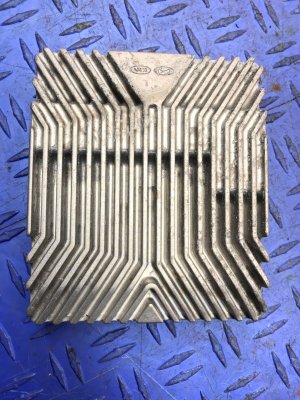
- Amplifier Location: In both generations, the external amplifier is located in the trunk, typically on the driver's side behind the trunk liner. Replacement requires removing the trunk floor and side trim panels to access the mounting bracket. 🎬 Watch how to easily remove trunk panel clips.
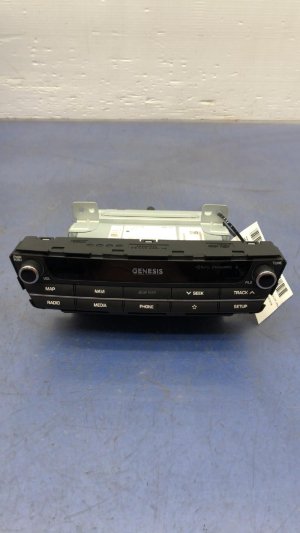
- Head Unit Location: The head unit is located in the center of the dashboard. Replacement is more involved, requiring careful removal of the surrounding dash trim and console panels to access its mounting screws.
- Programming (2021+ Models): A replacement amplifier or head unit must be programmed by a Genesis dealer or a qualified independent shop with Genesis-specific diagnostic tools. This process configures the module to your car's unique Vehicle Identification Number (VIN) and enables all the features specific to your trim level. An independent locksmith or general repair shop typically cannot perform this service.
Special Considerations for the Electrified G80
The Electrified G80 shares its audio architecture with the gasoline model but has one unique quirk. The car is equipped with Road-Active Noise Cancellation (R-ANC), which uses microphones in the cabin to generate counter-frequencies and cancel out road noise. If you are adding or modifying subwoofers, this system can cause interference, creating a loud humming or feedback through the subs. In some cases, one of the R-ANC microphones may need to be disabled to resolve the issue.
Cost of Replacement
| Component | New OEM | Used OEM | Shop Labor |
|---|---|---|---|
| Amplifier (Standard Audio) | $600 - $900 | $150 - $400 | $150 - $250 |
| Amplifier (Lexicon) | $1,300 - $1,900 | $250 - $600 | $150 - $250 |
| Head Unit / Radio Receiver | $1,500 - $3,000+ | $200 - $700 | $250 - $400 |
| Dealer Programming (2021+ models) | N/A | $150 - $300 | |
Verified OEM Part Numbers
This is not a complete list. Always match the part number from your specific vehicle.
| Part Number | Description | System | Years |
|---|---|---|---|
| 96370-B1100 | Amplifier | Lexicon | 2015-2017 |
| 96370-B1600 | Amplifier | Lexicon | 2018-2020 |
| 96560-B1EA04X | Radio Receiver / Head Unit | Standard | 2018-2020 |
| 96370-T1000 | Amplifier | Standard | 2021-2024 |
| 96370-T1500 | Amplifier | Premium (Lexicon) | 2021-2024 |
| 96110-T1000 / UV2 | Dash Control Switch | All | 2021-2024 |
| 96540-T1000 / VCS | Console Control Switch | All | 2021-2024 |
Frequently Asked Questions (FAQ)
My screen works but I have no sound. What's the problem?
This is the classic symptom of a failed external amplifier. The head unit is functioning, but the amplifier that powers the speakers is not. This is the most common hardware failure on 2018-2020 models.
Do I need a code to unlock a used radio for my G80?
For the 2018-2020 models, there is generally no anti-theft radio code required if you are swapping a unit with a matching part number. For 2021+ models, the issue isn't a simple code but a mandatory programming process that pairs the new module to the car's VIN.
Can an independent mechanic program a new amplifier for my 2022 G80?
It is unlikely. This procedure typically requires proprietary Genesis diagnostic software (GDS) that only authorized dealers have. You should plan for a dealer visit for this service.
Why did my audio stop working after the battery was replaced?
A sudden voltage change can sometimes cause a software glitch in the audio system. Before assuming a part has failed, perform a full system reset by disconnecting the negative battery terminal for 15 minutes. This allows all modules to reboot and can often restore normal function.
Helpful Videos


Technical Specifications
OEM Part Numbers: 96370-B1100 96370-B1600 96560-B1EA04X 96560-B1670-4X 96370-T1000 96370-T1500 96110-T1000 96110-T1000UV2 96540-T1000 96540-T1000VCS
System architecture consists of a central AVN (Audio-Video Navigation) head unit and a separate external amplifier. Two primary audio tiers: Standard and Lexicon premium sound. 2021+ models utilize a software-heavy architecture requiring VIN-specific programming for major components.
We Have This Part in Stock



The information in this article is provided for general reference and educational purposes only. Vehicle specifications, procedures, and part compatibility can vary by production date, trim level, and region. Always consult your vehicle's factory service manual and verify part numbers before purchasing or performing repairs. Safety-critical components such as airbags, seat belts, and braking systems should be installed by a qualified professional.
- Genesis G80:
- Genesis Electrified G80:
- 🎬 Helpful Videos
- 🛍️ Shop This Part
- Key Differences: 2018-2020 vs. 2021-2025 Models
- Audio System Variants: Standard vs. Premium Lexicon
- Symptoms of a Failing Audio System
- 1. No Sound From Any Speaker
- 2. Screen Randomly Reboots or Goes Blank
- 3. Buzzing, Rattling, or Distorted Sound from One Speaker
- 4. Communication Network Fault Codes (e.g., U0073)
- Known Issues, TSBs, and Recalls
- NHTSA Recall 26V019000: Instrument Panel Display Failure
- System Resets for Software Glitches
- Buying a Used Genesis G80 Audio System
- Replacement & Programming Information
- Special Considerations for the Electrified G80
- Cost of Replacement
- Verified OEM Part Numbers
- 🎟️ Get 5% Off