

2019-2023 Genesis G70 Audio System & Infotainment Issues Explained
This guide covers common failures like blank screens and no sound, and explains the differences between the base and Lexicon premium audio systems.
- The most common issues are blank screens and no sound, which can often be fixed with a simple pinhole reset.
- There are two distinct systems: a standard version and a premium 15-speaker Lexicon version. Parts are NOT interchangeable.
- When buying a used unit, you MUST match the OEM part number exactly to ensure compatibility.
- Be prepared for the possibility that a replacement head unit or amplifier may require programming by a dealership to work correctly with your vehicle.
Symptoms of Audio System Failure

Problems with the Genesis G70 audio system can range from minor glitches to complete failure. Here are the most common symptoms owners report.
1. Blank or Black Infotainment Screen
One of the most frequent complaints is the main display screen going black, sometimes intermittently. The screen might be backlit but show no image, or it may fail to turn on at all when the car is started. In some cases, the backup camera may still function even when the rest of the infotainment system is blank. Often, the system will randomly reboot and start working again after a few minutes of driving.
2. No Sound from Speakers
You might find that the infotainment screen appears to be working correctly—you can see the radio station or media player interface—but there is no audio output from any speaker. This issue can affect all audio sources, including the radio, Bluetooth, and Apple CarPlay/Android Auto. Sometimes, system sounds like turn signal clicks and parking sensor alerts will also be absent. This often points to a problem with the external amplifier, a blown fuse, or a loose connection.
3. System Freezing, Lagging, or Randomly Rebooting
The infotainment system may become unresponsive to touch, freeze on a particular screen, or spontaneously restart while driving. This can also manifest as glitchy behavior with connected devices, such as Apple CarPlay or Android Auto frequently disconnecting and reconnecting. These software-related issues can sometimes be resolved with a system reset or a software update from the dealership.
4. Distorted or Poor-Quality Audio
If you hear buzzing, rattling, or distorted sound, it could indicate a failing speaker. Some owners of the premium Lexicon system have also reported a lack of bass or a "flat" sound profile, which can sometimes be improved by adjusting EQ settings or ensuring the "Active Sound Design" feature is enabled, as this can apparently affect subwoofer activation.
5. Delaminating Touchscreen
On earlier models within this year range, the protective outer layer of the touchscreen can begin to bubble or peel away from the glass. This is known as delamination. While the screen may still function, it looks unsightly and can interfere with touch inputs over time.
Pro Tip: Before assuming a major component has failed, try a simple system reset. On the G70, there is a small pinhole reset button, often located next to the volume knob. 🎬 Watch: How to reboot your Genesis infotainment screen Gently pressing this button with a paperclip for a few seconds can force the system to reboot, which often clears up software glitches causing blank screens or unresponsiveness. Some owners have also had success by disconnecting the vehicle's battery for 10-15 minutes to perform a hard reset.
Known Issues, TSBs, and Recalls

While there are no widespread audio-specific recalls for the 2019-2023 G70, some related service bulletins exist. TSB 25-01-024G addresses issues where Genesis Connected Car Services may have interruptions, with the prescribed fix being a reset of the Audio Visual Navigation (AVN) unit. This indicates that Genesis is aware of connectivity and software glitches that can be resolved with a simple reboot procedure. It's worth noting that some newer Genesis models (outside this year range) were recalled for a software issue that could cause the instrument panel and infotainment screen to go blank, highlighting the integrated nature of these systems.
System Variants: Base vs. Lexicon Premium Audio

The 2019-2023 Genesis G70 was available with two main audio systems:
- Standard Audio System: The base system is a capable setup, but it lacks the external amplifier and additional speakers of the premium version.
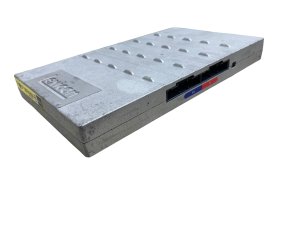
- Lexicon Premium Audio System: This is a 15-speaker system powered by a dedicated external amplifier, typically located in the driver's side of the trunk. 🎬 See this easy Genesis amplifier replacement walkthrough It was standard on higher trims (like the 3.3T) and available as part of option packages on others. This system is designed for higher fidelity and uses digital signals between the head unit and the amplifier.
Warning: The components for the base and Lexicon systems are not interchangeable. The head units, amplifiers, and wiring are different. If you are replacing a component, you must use a part from a vehicle with the same type of audio system.
Buying a Used Audio System

Purchasing a used OEM audio component can be a cost-effective solution, but it requires careful attention to detail to ensure compatibility and functionality.
1. Match Part Numbers Exactly
This is the most critical step. Genesis used several different part numbers for head units and amplifiers, even within the same year and trim level, depending on options like navigation and the premium sound system. The only way to guarantee compatibility is to match the part number on your original unit with the part number on the replacement. Do not rely on year and model alone.
2. Verify the Audio System Type
Ensure the donor vehicle had the same audio system as yours—either the standard system or the Lexicon premium system. An amplifier from a Lexicon-equipped car will not work in a car with the base system, and vice-versa.
3. Inspect the Screen for Delamination
If buying a head unit, carefully inspect the photos of the screen. Look for any signs of bubbling, peeling, or a spiderweb-like pattern under the surface, which indicates delamination. Ask the seller for clear pictures of the screen while it is turned off.
4. Programming and Anti-Theft Considerations
While there is no definitive evidence of a hard-coded anti-theft system that requires dealer intervention for this specific model, it is a common practice in modern vehicles. The audio system communicates with other vehicle modules over a network (CAN bus). It is possible that a replacement head unit or amplifier may need to be programmed or configured by a Genesis dealership or a specialized independent shop to function correctly with your vehicle's specific VIN and options. Be prepared for this possibility and factor in the potential cost.
5. Why Used OEM is Often Better
For a highly integrated system like the one in the G70, a used OEM component is almost always a better choice than a cheap aftermarket alternative. An OEM part is designed to communicate seamlessly with the vehicle's other electronic systems, retaining all factory functions like steering wheel controls and vehicle settings menus. Aftermarket head units often require complex wiring adapters and may not support all factory features.
Cost Comparison
Replacing an audio system component can be expensive, especially at the dealership. Here’s a general breakdown of what to expect. Prices can vary based on the specific part number and market conditions.
| Component | New OEM (Dealer) | New Aftermarket | Used OEM (Recycled) |
|---|---|---|---|
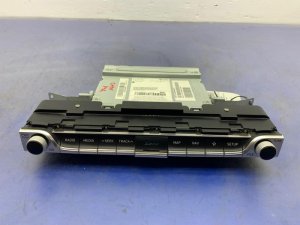
| Head Unit / Display | $1,900 - $3,000+ | Not Widely Available | 🎬 Watch: How to remove a Genesis stereo unit$250 - $600 |
| Lexicon Amplifier | $900 - $1,300+ | Not Available | $130 - $350 |
| Shop Labor | $200 - $400 (for replacement) | ||
Frequently Asked Questions (FAQ)
Does a replacement Genesis G70 radio need to be programmed?
It is highly likely. Modern infotainment systems are integrated with the vehicle's computer network. While some basic functions might work, full compatibility and functionality often require programming the replacement unit to your vehicle's VIN. It is best to assume a dealership visit will be necessary and consult with the seller or a qualified technician beforehand.
Can I upgrade my base audio system to the Lexicon system?
This is not a simple plug-and-play upgrade. It would require replacing the head unit, adding the external amplifier, changing numerous speakers, and extensive wiring modifications. It is generally considered not to be a cost-effective or practical conversion.
My screen is blank. How do I perform a reset?
First, locate the small pinhole reset button, usually next to one of the control knobs. With the car on, use a paperclip or pen tip to press and hold the button for about 5-10 seconds until the screen goes blank and the system reboots. If that doesn't work, you can try disconnecting the negative terminal of the car battery for 15 minutes, then reconnecting it.
Why is there no sound from my speakers even though the radio looks like it's on?
This is a classic symptom of a failed external amplifier, especially in cars with the Lexicon premium system. The head unit may be working perfectly, but if the amplifier isn't powering on or has an internal fault, no sound will reach the speakers. Check the fuses related to the audio system first, then suspect the amplifier.
Helpful Videos

Technical Specifications
OEM Part Numbers: 96160G9140VCA 96370-G9200 96370-G9250 96370G9200 96370G9250 96554-G9501 96560-G9MA0 96560-G9MA0VCA 96560G9500 96560G9500VCA 96560G9501VCA 96560G9502 96560G9503VCA 96560G9MA0VCA 96560G9MD0VCA 96370-G9700 96525-G9AA0
Systems available as standard audio or a premium 15-speaker Lexicon system with an external amplifier. Head units available with and without factory navigation. Screen size is typically 8-inch for 2019-2021 models and 10.25-inch for 2022-2023 models.
We Have This Part in Stock



The information in this article is provided for general reference and educational purposes only. Vehicle specifications, procedures, and part compatibility can vary by production date, trim level, and region. Always consult your vehicle's factory service manual and verify part numbers before purchasing or performing repairs. Safety-critical components such as airbags, seat belts, and braking systems should be installed by a qualified professional.
- Genesis G70:
- 🎬 Helpful Videos
- 🛍️ Shop This Part
- Symptoms of Audio System Failure
- 1. Blank or Black Infotainment Screen
- 2. No Sound from Speakers
- 3. System Freezing, Lagging, or Randomly Rebooting
- 4. Distorted or Poor-Quality Audio
- 5. Delaminating Touchscreen
- Known Issues, TSBs, and Recalls
- System Variants: Base vs. Lexicon Premium Audio
- Buying a Used Audio System
- 1. Match Part Numbers Exactly
- 2. Verify the Audio System Type
- 3. Inspect the Screen for Delamination
- 4. Programming and Anti-Theft Considerations
- 5. Why Used OEM is Often Better
- Cost Comparison
- Frequently Asked Questions (FAQ)
- 🎟️ Get 5% Off