

2010-2014 Ford Flex Audio System: Solving SYNC Glitches and Radio Failures
This guide covers the common failures of the 2010-2014 Ford Flex audio system, including total silence, SYNC issues, and the critical steps for choosing a compatible used replacement.
- The most common failure is a complete loss of sound while the radio display still appears to work, often caused by a faulty Audio Control Module (ACM).
- Compatibility is critical. You must replace your unit with one that has the exact same part number and matches your vehicle's options (Navigation, Sony sound, etc.).
- For a direct, part-number-matched replacement, programming is typically not required.
- Before replacing the unit, try a soft reset (holding Power + Right-Seek) or disconnect the battery for 15 minutes to rule out a simple software glitch.
Symptoms of a Failing Audio System

A failing audio system in the Ford Flex can manifest in several ways, often pointing to an internal failure of the Audio Control Module (ACM). Here are the most common symptoms reported by owners.
1. Complete Loss of Sound
The most frequent complaint is a total lack of audio from all speakers. The head unit may power on, display radio stations or media information, and appear to function normally, but no sound is produced. This can happen intermittently at first and then become permanent. The issue often lies with a faulty internal component in the ACM or, in vehicles with the premium Sony system, a failed amplifier.
2. Loud Popping or Static Noises
A sudden, loud pop or crackle from the speakers, especially when turning the vehicle on or off, can indicate a problem within the ACM. This may be followed by a complete loss of audio. This symptom is often caused by failing electronic components inside the radio unit itself.
3. Blank or Unresponsive Screen
The display screen may go black, freeze, or become unresponsive to touch. Sometimes the screen will show the Ford or SYNC logo and then shut down. This can be a software glitch that a system reset might fix, but it can also indicate a failure of the display module (FDIM) or the SYNC module (APIM).
4. Flashing Clock
A constantly blinking or flashing clock on the display that cannot be set is a classic sign of an ACM failure. This indicates that the module is not retaining its memory or has an internal power regulation fault.
5. Bluetooth and SYNC Malfunctions
Difficulty connecting a phone via Bluetooth, frequent disconnections, or the system being unable to find a media source are common SYNC-related issues. While sometimes solvable with a software update or a system reset, these problems can also be tied to a failing ACM or APIM module.
Known Issues, TSBs, and Recalls

While there have been no major safety recalls for the audio system in the 2010-2014 Ford Flex, Ford has issued several Technical Service Bulletins (TSBs) related to audio and SYNC problems.
- TSB 13-1-13: For some 2013 Flex models, this TSB addresses static, popping, or distorted sound from the speakers, specifically on FM radio. The prescribed fix is to reprogram the Audio Control Module (ACM) with updated calibration.
- SSM 47080: This bulletin notes that as of January 2018, the Spotify app was no longer supported via AppLink on SYNC systems, which could cause functionality issues for users attempting to use it.
Many owner complaints center on the general unreliability of the SYNC system, with issues ranging from failed software updates to complete module failure.
System Variations and Compatibility
Ford offered several different audio system configurations for the 2010-2014 Flex. It is absolutely critical to match the replacement part to the vehicle's original options.
- Standard System: Base models came with a standard AM/FM radio, single-disc CD player, and a 6-speaker audio system without a large touchscreen.
- 6-Disc CD Changer: An option for non-navigation models was an in-dash 6-disc CD changer. These units are not compatible with navigation-equipped vehicles.
- Voice-Activated Navigation: These systems feature a larger touchscreen display and are designed to work with a specific ACM. A radio from a non-navigation vehicle will not work properly.
- Premium Sony Audio: The high-end Sony system includes an external amplifier and a different ACM. It is not interchangeable with the standard audio systems.
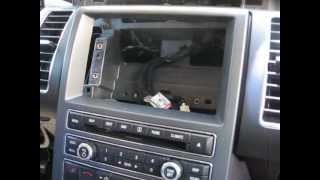
Warning: The climate controls are often integrated with the audio system's control panel (FCIM). Replacing the radio often involves disassembling this entire center stack. 🎬 See this walkthrough for removing the navigation and display unit A failure in this control panel can also mimic radio problems, causing both audio and HVAC controls to become inoperative.
Programming and Installation

For a direct like-for-like replacement, programming is typically not required. The units are generally plug-and-play as long as the part number from the replacement unit matches the original. There is no anti-theft code that needs to be entered after installation.
However, if you are changing system types (e.g., trying to upgrade to navigation) or if the replacement module is from a vehicle with different options, programming will be necessary. This involves updating the module's "As-Built" data to match your vehicle's specific configuration. This typically requires a trip to a Ford dealership or a well-equipped independent shop with access to Ford's diagnostic software (IDS).
Pro Tip: Before assuming the radio is dead, try a soft reset. Press and hold the Power button and the Right-Seek button simultaneously 🎬 Watch: How to perform a SYNC system soft reset for about 5-10 seconds until the screen resets. If that doesn't work, disconnecting the vehicle's battery for about 10-15 minutes can also resolve temporary software glitches.
Buying a Used Audio System
Purchasing a used OEM audio unit is the most cost-effective way to restore your Flex's sound system. Aftermarket replacements are complex and expensive due to the integrated climate controls. Here’s what to look for:
- Verify the Part Number: This is the most important step. Before removing your old unit, try to find the part number. If not, you must match the exact features of your system (Navigation vs. Non-Nav, Sony vs. Standard, Single CD vs. 6-Disc). Sellers of used parts should be able to provide the part number from the unit they are selling.
- Inspect the Screen (If Applicable): For navigation units, check photos for any signs of delamination or damage to the touchscreen.
- Check for All Components: Some listings may be for just the ACM (the CD player box), while others include the screen (FDIM) or the front control panel (FCIM). Ensure you are buying the specific component you need.
- Choose a Reputable Seller: Buy from a seller that offers a warranty and has good reviews. This protects you if you receive a defective part.
Replacement Cost Comparison
The cost to replace the audio system can vary significantly based on the type of unit and whether you do the work yourself.
| Part/Service | Estimated Cost |
|---|---|
| New OEM (Dealer) | $800 - $1500+ |
| New Aftermarket (Kit + Head Unit) | $600 - $1200+ |
| Used OEM | $65 - $250 |
| Remanufactured/Repaired OEM | $185 - $400 |
| Shop Labor | $150 - $300 |
Frequently Asked Questions (FAQ)
Does a replacement radio for a 2010-2014 Ford Flex need to be programmed?
If you are replacing your original radio with a used unit that has the exact same part number and came from a vehicle with identical options, programming is generally not required. However, if the part numbers differ or the unit is from a vehicle with different features (like Sony sound or navigation), it will likely need to be programmed by a dealer or a specialized technician to function correctly.
Why is my radio screen on but there's no sound?
This is the most common failure symptom and usually points to an internal fault within the Audio Control Module (ACM), which is the main radio/CD player unit. It can also be caused by a failure of the external amplifier in models equipped with the premium Sony sound system.
Can I upgrade my standard radio to the factory navigation system?
While physically possible, it is a complex and expensive process. It requires not only the navigation screen and ACM, but also potentially a new wiring harness, GPS antenna, and programming to make all the features work correctly. It is generally not considered a cost-effective upgrade.
How do I remove the radio to find the part number? 🎬 Watch: Step-by-step guide to removing the radio and ACM
Removing the radio requires carefully prying off several trim pieces around the center console and shifter area to access the 7mm screws that hold the main unit and display in place. The process involves removing the trim around the cup holders, the side panels of the center stack, and the trim above the screen. The part number is printed on a sticker on the metal housing of the ACM (the CD player unit).
Helpful Videos
Technical Specifications
OEM Part Numbers: AA8T19C156AA AA8T19C156AB AA8T19C156AC AA8Z-18K931-AB AA8Z18K931AA BA8T-19C116-AA BA8T19C107AA BA8T19C116AB BA8Z10D885A BA8Z10D885B BA8Z18C869AA DA8T19C107BA DA8T19C107BB DA8T19C107BC
System configurations include standard 6-speaker audio, premium Sony audio with external amplifier, single-disc CD, 6-disc CD, and optional voice-activated navigation.
We Have This Part in Stock






The information in this article is provided for general reference and educational purposes only. Vehicle specifications, procedures, and part compatibility can vary by production date, trim level, and region. Always consult your vehicle's factory service manual and verify part numbers before purchasing or performing repairs. Safety-critical components such as airbags, seat belts, and braking systems should be installed by a qualified professional.
- Ford Flex:
- 🎬 Helpful Videos
- 🛍️ Shop This Part
- Symptoms of a Failing Audio System
- 1. Complete Loss of Sound
- 2. Loud Popping or Static Noises
- 3. Blank or Unresponsive Screen
- 4. Flashing Clock
- 5. Bluetooth and SYNC Malfunctions
- Known Issues, TSBs, and Recalls
- System Variations and Compatibility
- Programming and Installation
- Buying a Used Audio System
- Replacement Cost Comparison
- Frequently Asked Questions (FAQ)
- 🎟️ Get 5% Off