

GM HMI Module Failure (2014-2025): Black Screens, Resets, and Programming Fixes for Corvette, Silverado, Tahoe & More
This guide explains common failures of the infotainment brain in many GM vehicles, why it happens, and the critical programming steps required for replacement.
- A replacement HMI module, whether new or used, is NOT plug-and-play and MUST be programmed to your vehicle's VIN to disable the anti-theft lock.
- A black screen or constant reboots point to a failed HMI module, while 'ghost touches' or screen bubbling indicate a separate failure of the touchscreen (digitizer).
- For used parts buyers, mail-in programming services are the most cost-effective way to unlock and configure a replacement module for your specific vehicle.
- Compatibility is critical. You must match the RPO codes (IO5/IO6), hardware version (2.0/2.5), and features (Bose audio) of the replacement module to your vehicle's original build.
Is it the HMI Module or the Touchscreen?

Before replacing parts, it's crucial to distinguish between a failed HMI module and a failed touchscreen (also called the digitizer). They have very different symptoms.
- Symptoms of a bad HMI Module: The screen is completely black but you might hear audio, the system constantly reboots, it's frozen on the logo, or you see a message like "Waiting for Update Media." This indicates a problem with the system's computer.
- Symptoms of a bad Touchscreen/Digitizer: The display looks normal, but the screen has "ghost touches" (making selections on its own), is unresponsive in certain areas, or has visible bubbling and delamination. This is a physical failure of the screen layer, especially common on Cadillac CUE systems.
This guide focuses on the HMI module, which is the cause of the black screen and rebooting issues.
Common Symptoms of HMI Module Failure

A failing HMI module can be frustrating because it often starts as an intermittent problem. You might notice one of these issues after the vehicle has been sitting, after a battery replacement, or after a jump-start, which can corrupt the module's software.
- Black or Blank Screen: This is the most common symptom. The screen is completely dark, but you may still be able to hear the radio and change stations using the steering wheel controls.
- Constant Reboots: The system gets stuck in a loop, showing the Chevrolet, Buick, GMC, or Cadillac logo over and over but never fully starting up.
- Frozen or Unresponsive System: The display is stuck on a single screen (like the home menu or navigation map) and does not respond to touch or button presses.
- "Waiting for Update Media" Message: If this message appears and does not go away, it is a guaranteed sign of internal HMI module failure.
- Loss of Features: Bluetooth may refuse to connect, Apple CarPlay or Android Auto may not launch, or the navigation system fails to load.
- Diagnostic Trouble Code U0184: A scan tool may show code U0184, which means "Lost Communication With Radio." This indicates that other computers in the vehicle can no longer get a signal from the HMI module.
Pro Tip: Before condemning the HMI module, check the simple things first. Ensure the vehicle's battery is fully charged and the terminals are clean. For trucks and SUVs like the Silverado, Sierra, Tahoe, and Suburban, check for Technical Service Bulletin (TSB) 18-NA-161, which points to a poor battery ground cable on the frame that can cause identical black screen issues. Also, try a hard reset by disconnecting the negative battery terminal for 15 minutes to clear any temporary software glitches.
CRITICAL: Programming and Anti-Theft Requirements

Warning: You cannot simply swap an HMI module from one vehicle to another. It is not a plug-and-play part. These modules contain anti-theft software that locks the unit to the VIN of the original vehicle.
If you install a used or new, unprogrammed module, the screen will display a "Theft Lock" message and will be completely non-functional. You have three main options to handle this:
- GM Dealership: A dealer can install and program a brand-new module purchased from them using the factory Service Programming System (SPS). This is the most expensive route, and they will almost never program a used part that you bring to them.
- Mail-In Programming Service: This is the best option for those buying a used module. Companies like MVI (Mobile Video Integration) and White Automotive & Media Services (WAMS) allow you to mail in your replacement (used) module. They will unlock it, clear the old VIN, and program it with your vehicle's VIN and specific options (like Bose audio or navigation). When you get it back, it becomes a plug-and-play installation.
- Pre-Programmed Replacement: The same specialist companies can also sell you a brand-new OEM module that is pre-programmed to your VIN before they ship it. This is simpler than a mail-in service but more expensive than buying a used module and having it programmed.
Buying a Used HMI Module: A Buyer's Guide
Purchasing a used OEM HMI module is an excellent way to save hundreds of dollars, but you must be careful to get the right part and have a plan for programming. A correctly programmed used OEM unit is often a more reliable choice than a cheap aftermarket Android-style radio, which can have integration problems.
- Verify Your RPO Codes: This is the most important step. Look for the silver sticker in your glove box and find your radio's RPO code. You need to match IO5 (8-inch screen without navigation) or IO6 (8-inch screen with navigation). Also, note other codes like UQA (Bose premium audio) or U2M (HD Radio), as the module's programming depends on these features.
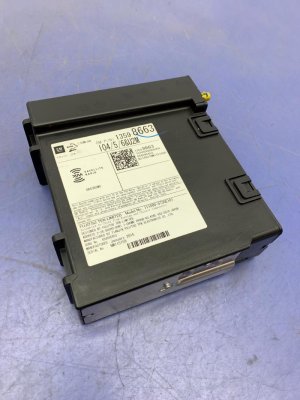
- Match the Hardware Version: There was a key hardware change around 2016. Earlier vehicles (2014-2015) used an "HMI 2.0" module. Later vehicles (2016+) used an "HMI 2.5" module, which is what enabled Apple CarPlay and Android Auto. You cannot put a 2.5 module in a 2.0 vehicle and expect it to work without also replacing the separate radio tuner module 🎬 See how to upgrade from HMI 2.0 to 2.5 for CarPlay. and the center console USB port hub. For a direct replacement, match the version. The version is printed in large letters on the module's label.
- Match the Part Number: The safest bet is to find the exact GM part number on your original module and buy a used one with the same number. While some numbers supersede others, an exact match removes any doubt.
- Factor in Programming Costs: Remember that the price of the used module is not the final cost. Budget an additional $200-$250 for a mail-in programming service to make the part work in your car.
Known Issues, TSBs, and Recalls
While no universal recall exists for HMI failure, GM has issued numerous Technical Service Bulletins (TSBs) related to software problems. Many issues like screen resets, volume control problems, and Bluetooth glitches can be fixed with a simple software update at the dealership.
- TSB 17-NA-025: Addresses a wide range of issues on 2016-2017 vehicles, including repeated resets, inoperative volume controls, and a "Waiting for Update Media" message. The fix is a software update via USB.
- Customer Satisfaction Program 17318: For some 2017 Silverado HD and Sierra HD trucks where the screen resets after shifting out of reverse. The fix is a radio reprogramming at the dealer.
- TSB PIC6055C (Cadillac): Specifically addresses the bubbling, cracking, or delaminating CUE screen on 2013-2017 Cadillac models, including the ATS. The official repair is to replace the Integrated Center Stack (the screen assembly), confirming this is a screen hardware issue, not an HMI module problem.
- TSB 17-NA-177 (Silverado): For 2017 Silverados with distorted audio during Bluetooth calls. The fix is to reprogram the radio module.
Vehicle-Specific Replacement Information

The HMI module is separate from the in-dash screen. Its location varies by vehicle platform.
- Chevrolet Corvette (C7): The HMI module is located in the driver's footwell, up against the A-pillar above the kick panel. 🎬 Watch this video for a step-by-step Corvette HMI module installation. Access is tight but does not require removing the entire dashboard.
- Chevy Silverado / GMC Sierra & Tahoe / Suburban / Yukon: The HMI module is located behind the glove box. On most models, you only need to remove the lower glove box assembly to gain access to the module mounted behind the upper glove box area.
- Buick LaCrosse / Cadillac ATS: The HMI module is generally located behind the glove box assembly, similar to the trucks and SUVs.
Cost of Replacing an HMI Module
| Item | Estimated Cost | Notes |
|---|---|---|
| New OEM (Dealer Installed) | $1,200 - $2,000+ | Includes new module, labor, and programming. The most expensive but most direct option. |
| New OEM Module (Part Only) | $450 - $700 | Price for a new, unprogrammed module from a GM parts dealer. Still requires programming. |
| Used OEM Module (Part Only) | $150 - $400 | Widely available online. Price depends on condition, part number, and whether it includes navigation (IO6). |
| Mail-In Programming Service | $200 - $250 | Required to make a used module work in your vehicle. |
| Shop Labor for Installation | $120 - $250 | Installation takes about 1-1.5 hours. Labor rates vary from $120-$180/hour. |
Frequently Asked Questions (FAQ)
Can I install a used HMI module myself?
Yes, the physical installation is straightforward for a DIYer. It typically involves removing the glove box or a kick panel, unplugging several connectors, and swapping the module. However, the vehicle will not work correctly until the module is programmed to your VIN. You must plan for mail-in programming or a visit to a specialist.
Can I upgrade my non-navigation (IO5) to navigation (IO6) by swapping the HMI?
Yes, this is a popular upgrade. You can replace your IO5 HMI module with a properly programmed IO6 module. You will also need to add a GPS antenna, which is an inexpensive part that can be mounted under the dashboard.
Will a new HMI module fix my 'ghost touch' problem?
No. Ghost touches, phantom inputs, and screen bubbling are caused by a failure of the touchscreen digitizer, which is part of the screen assembly. Replacing the HMI module will not fix a faulty touchscreen.
My screen went black after changing the car battery. Is the HMI fried?
It's very possible. The HMI module's software can be corrupted by the voltage spike or drop that occurs during a battery replacement or jump-start. Before replacing it, try a hard reset by disconnecting the battery for 15 minutes. If that doesn't work, the module likely needs to be repaired or replaced.
Helpful Videos
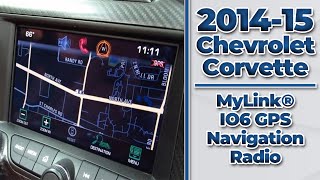
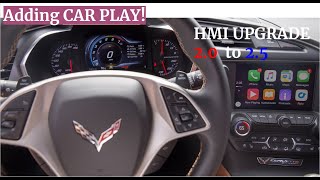
Technical Specifications
OEM Part Numbers: 84777196 84820638 84824884 84859879 84884291 84910574 84922769 84935306 84940424 84962943 13506373 22826761 23218534 23218535 23402905 23427520 84331776
System Type: Human Machine Interface (HMI) Module. RPO Codes: IO5 (8-inch Display), IO6 (8-inch Display with Navigation). Hardware Versions: HMI 2.0 (approx. 2014-2015), HMI 2.5 (approx. 2016+ with Apple CarPlay/Android Auto). Associated Modules: Radio Tuner Module, Display Screen, Amplifier.
We Have This Part in Stock


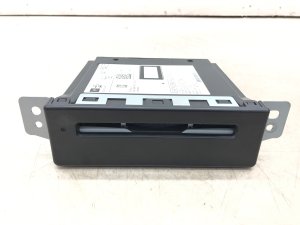


The information in this article is provided for general reference and educational purposes only. Vehicle specifications, procedures, and part compatibility can vary by production date, trim level, and region. Always consult your vehicle's factory service manual and verify part numbers before purchasing or performing repairs. Safety-critical components such as airbags, seat belts, and braking systems should be installed by a qualified professional.
- Chevrolet Corvette:
- Buick LaCrosse:
- Cadillac ATS:
- Chevrolet Silverado 1500:
- Chevrolet Silverado 2500 HD:
- Chevrolet Suburban:
- Chevrolet Tahoe:
- GMC Sierra 1500:
- GMC Sierra 2500 HD:
- GMC Sierra 3500 HD:
- GMC Yukon:
- GMC Yukon XL:
- Buick Encore:
- Buick Regal:
- Chevrolet Colorado:
- Chevrolet Silverado 3500 HD:
- GMC Canyon:
- Buick Enclave:
- Cadillac Escalade:
- Cadillac Escalade ESV:
- Cadillac XT5:
- Chevrolet Impala:
- Chevrolet Suburban 3500 HD:
- GMC Acadia:
- Buick Envision:
- Cadillac CT4:
- Cadillac CTS:
- Cadillac SRX:
- Cadillac XTS:
- Chevrolet Camaro:
- Chevrolet Cruze:
- Chevrolet Equinox:
- Chevrolet Malibu:
- Chevrolet Volt:
- GMC Sierra Denali 1500:
- GMC Sierra Denali 2500 HD:
- GMC Sierra Denali 3500 HD:
- Cadillac CT5:
- Cadillac CT6:
- Cadillac ELR:
- Chevrolet Traverse:
- GMC Silverado 3500 HD:
- 🎬 Helpful Videos
- 🛍️ Shop This Part
- Is it the HMI Module or the Touchscreen?
- Common Symptoms of HMI Module Failure
- CRITICAL: Programming and Anti-Theft Requirements
- Buying a Used HMI Module: A Buyer's Guide
- Known Issues, TSBs, and Recalls
- Vehicle-Specific Replacement Information
- Cost of Replacing an HMI Module
- Frequently Asked Questions (FAQ)
- 🎟️ Get 5% Off